Skip links
FREE

Real-Time Analytics
Dashboard

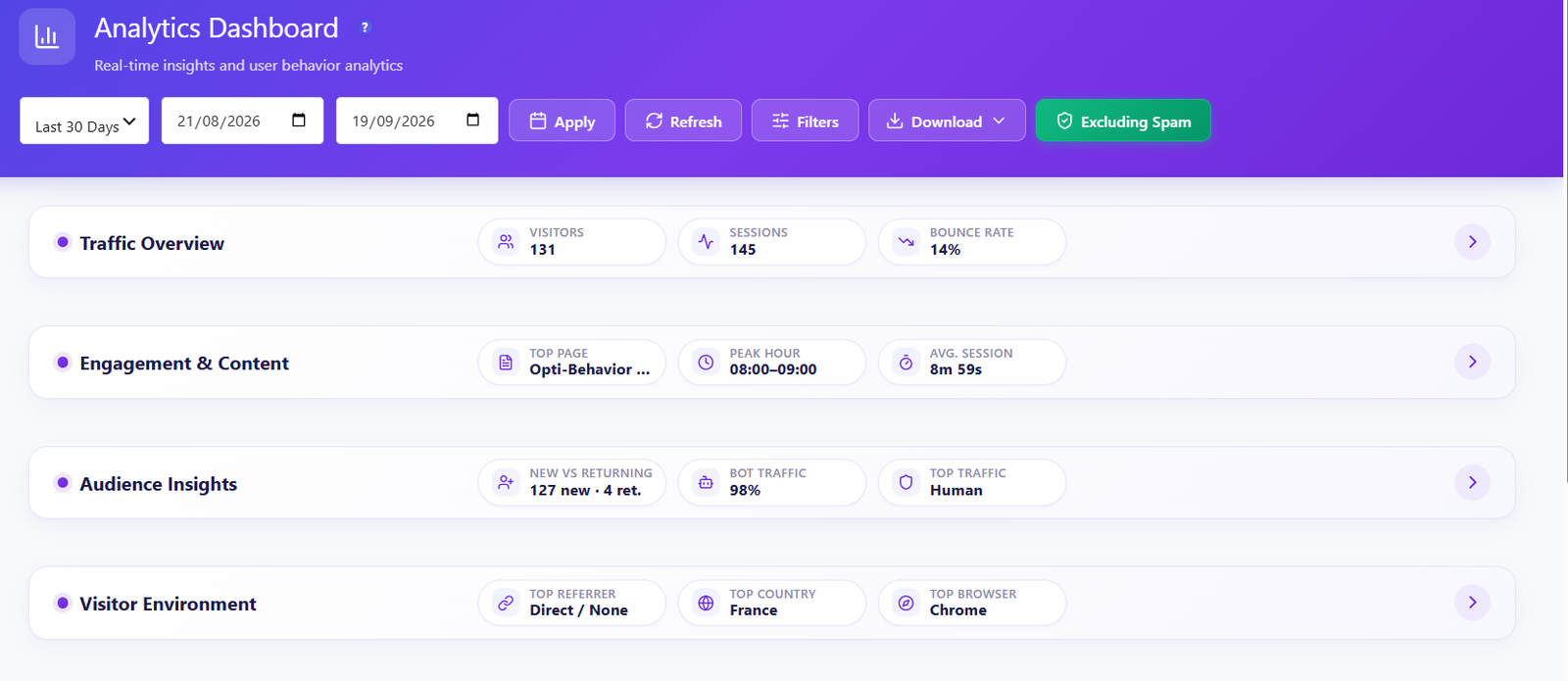
Monitor your entire website in real-time. 6 live KPIs, visitor feed with interactive world map, traffic charts, engagement metrics, referrer tracking, bot detection and more — all updating live on YOUR server.

6
Live KPIs
Visitors, sessions, bounce rate, scroll depth & more
16+
Widgets
Real-time map, heatmap, referrers, bot detection & more
Sessions
Unlimited visitors, pageviews & sessions tracked
$0
Monthly Cost
Free forever — no subscription, no hidden fees
Opti-Behavior real-time analytics dashboard overview
100% Self-Hosted
GDPR Compliant
Real-Time Updates
Unlimited Tracking

Everything You Need to Know About Your Traffic

The dashboard packs 16 widgets into a single, fast-loading page — including a unique Visitor Activity Heatmap showing hour-by-day engagement patterns. Every metric updates in real-time with zero external API calls and zero third-party dependencies.

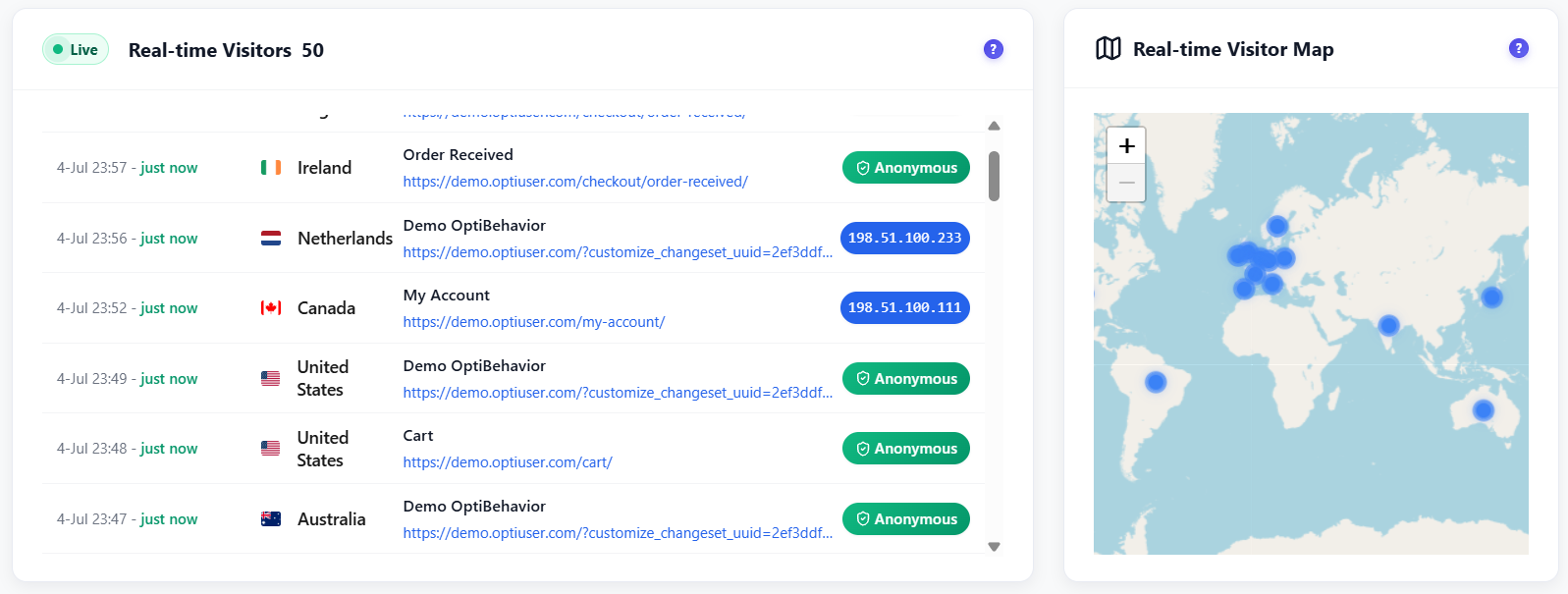
Live visitors and interactive world map

Live Visitors & World Map

See who is on your site right now. The interactive Leaflet world map shows visitor locations updating in real-time with country flags and session details.

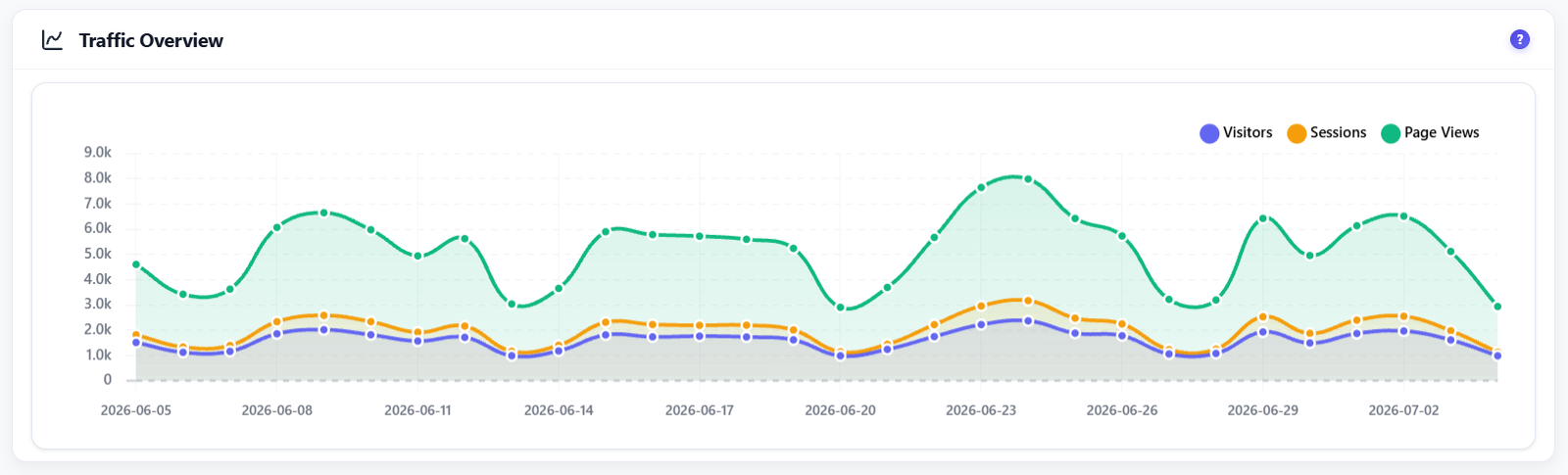
Traffic overview with charts and trends

Traffic Overview Charts

Visualize visitors, sessions and pageviews over time with interactive charts. Flexible date range selector with presets for today, last 7 days, 30 days or custom range.

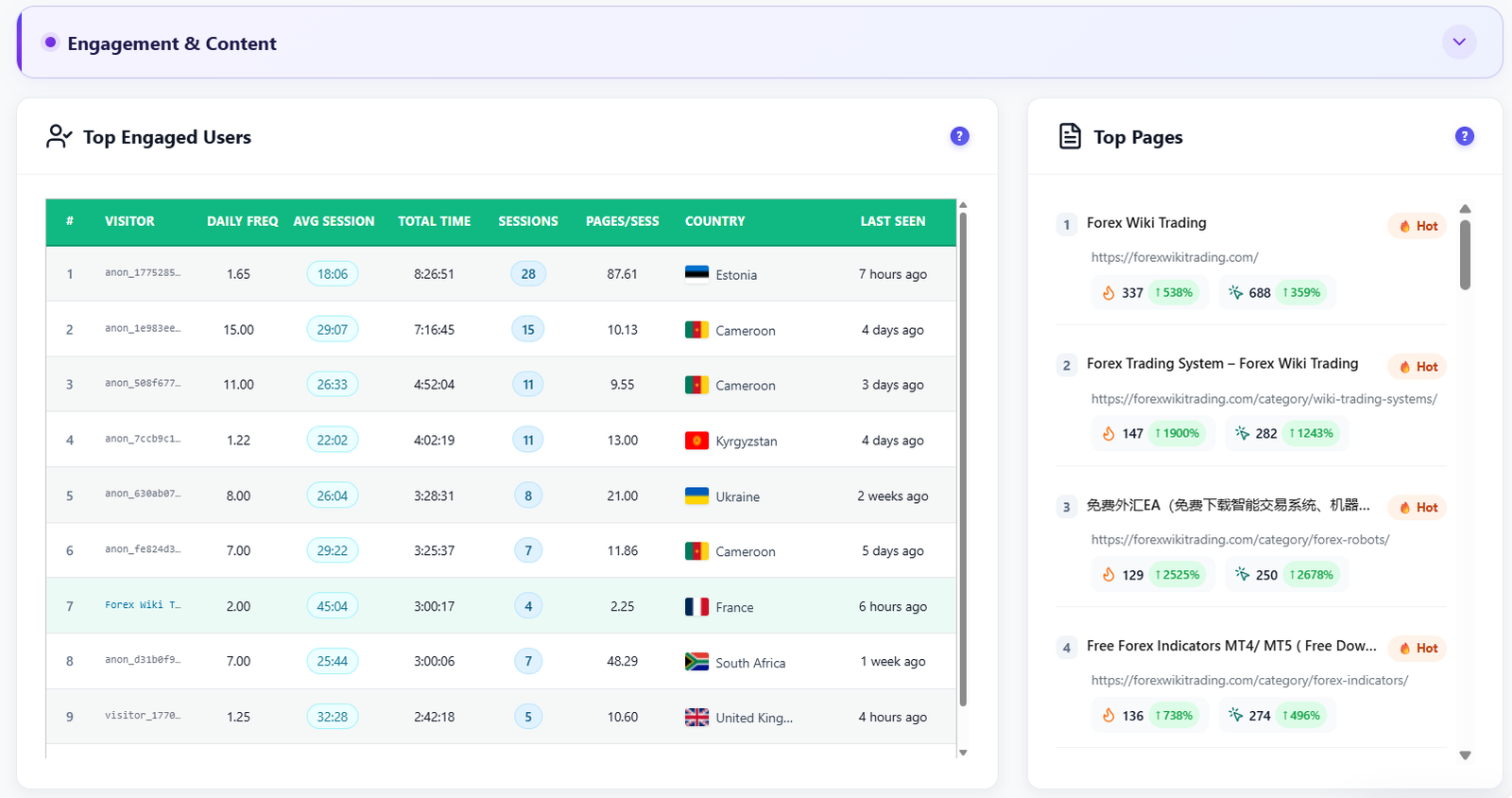
Top engaged users and top pages

Top Engaged Users & Pages

Identify your most engaged visitors ranked by session time, pages viewed and scroll depth. See which pages get the most traffic and highest engagement scores.

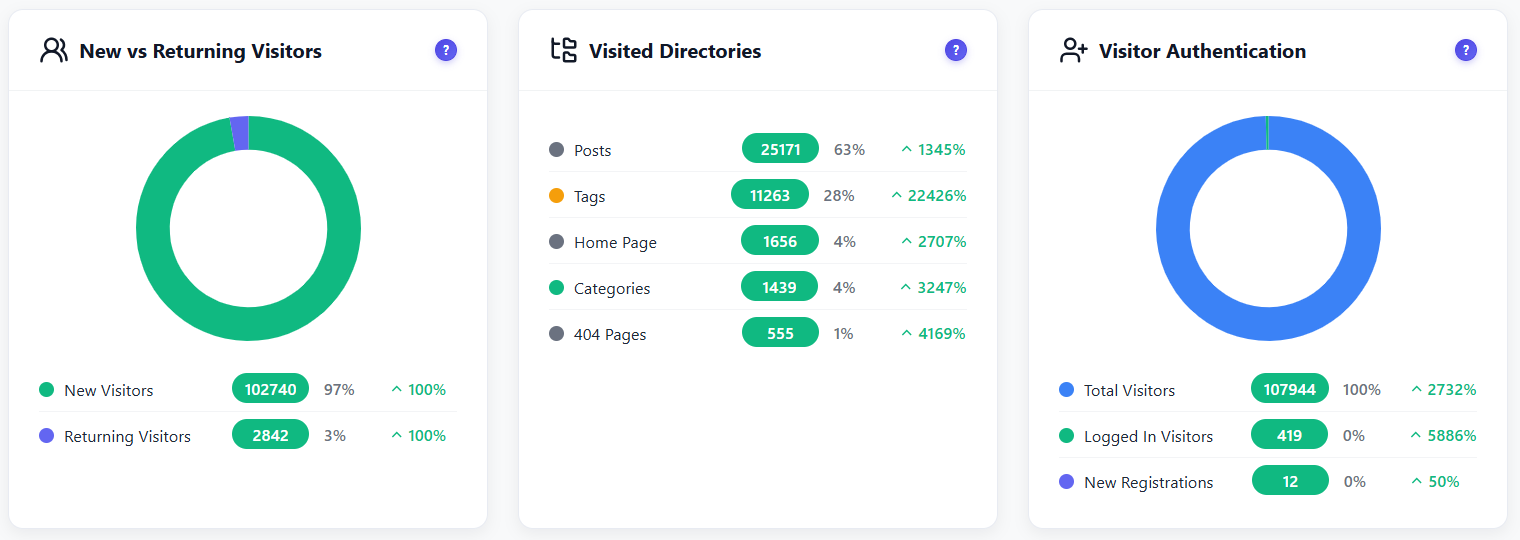
New vs returning visitors analysis

New vs Returning Visitors

Understand your audience loyalty. Donut chart breakdown of first-time versus returning visitors with visited directories analysis and authentication status tracking.

Country analytics with geographic breakdown

Country & Geographic Analytics

Full geographic breakdown by country with flag icons, visitor counts and percentage share. Period-over-period comparison shows whether each country’s traffic is growing or declining. Instantly understand where in the world your audience comes from.

Referrer tracking and traffic sources

UTM & Campaign Tracking

Measure the ROI of every marketing campaign. Full UTM parameter support (source, medium, campaign, term, content) lets you track newsletter clicks, ad campaigns and social posts with precision. Outbound click monitoring shows where visitors go after leaving your site.

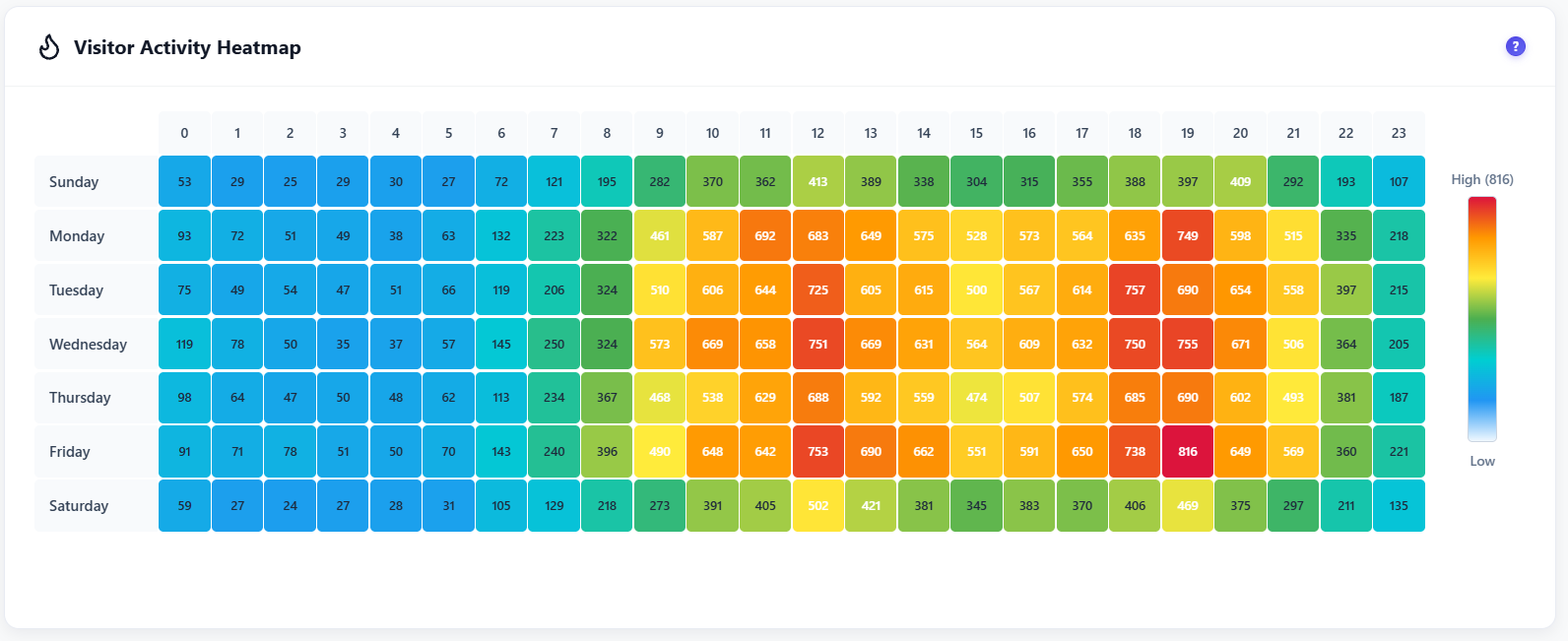
Visitor Activity Heatmap showing hour-of-day by day-of-week engagement grid

Visitor Activity Heatmap

A unique hour-of-day × day-of-week engagement grid that reveals exactly when your audience is most active. Instantly identify peak traffic windows to time content publishing, promotions and maintenance windows for maximum impact.

New vs returning visitors, visited directories and visitor authentication status

Visited Directories & Screen Resolutions

See which sections of your website visitors browse most with the Visited Directories treemap — instantly spot your highest-traffic content areas. Paired with full Screen Resolution analytics (donut chart + legend table) to ensure your design targets the right viewport sizes.

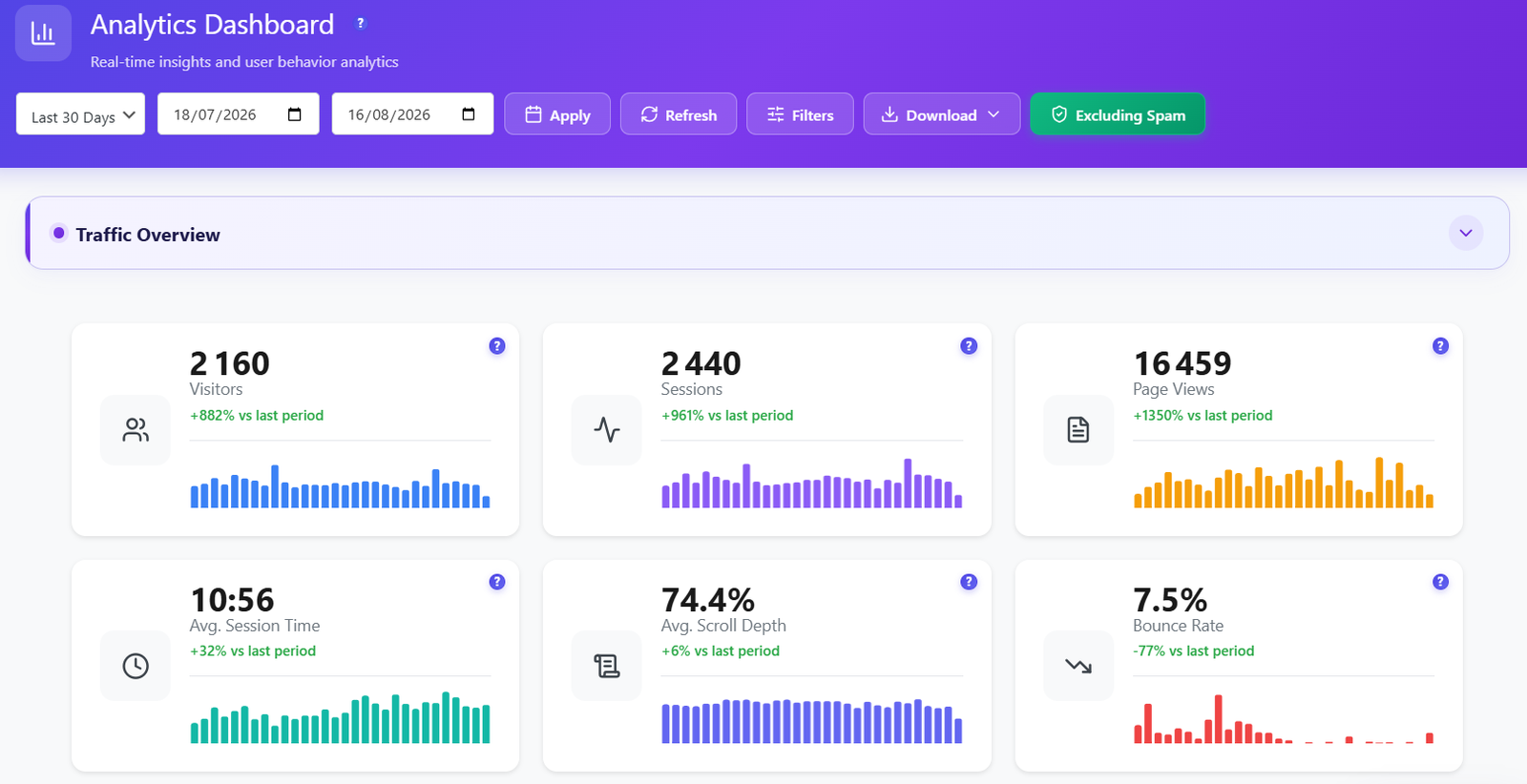
6 live KPI stat cards with sparkline bar chart history

6 Live KPI Stat Cards

At-a-glance performance at the top of every dashboard view. Six real-time KPI cards cover Visitors, Sessions, Page Views, Avg Session Time, Avg Scroll Depth and Bounce Rate — each with a period-over-period percentage change indicator and a mini sparkline bar chart showing daily trends for the selected date range.

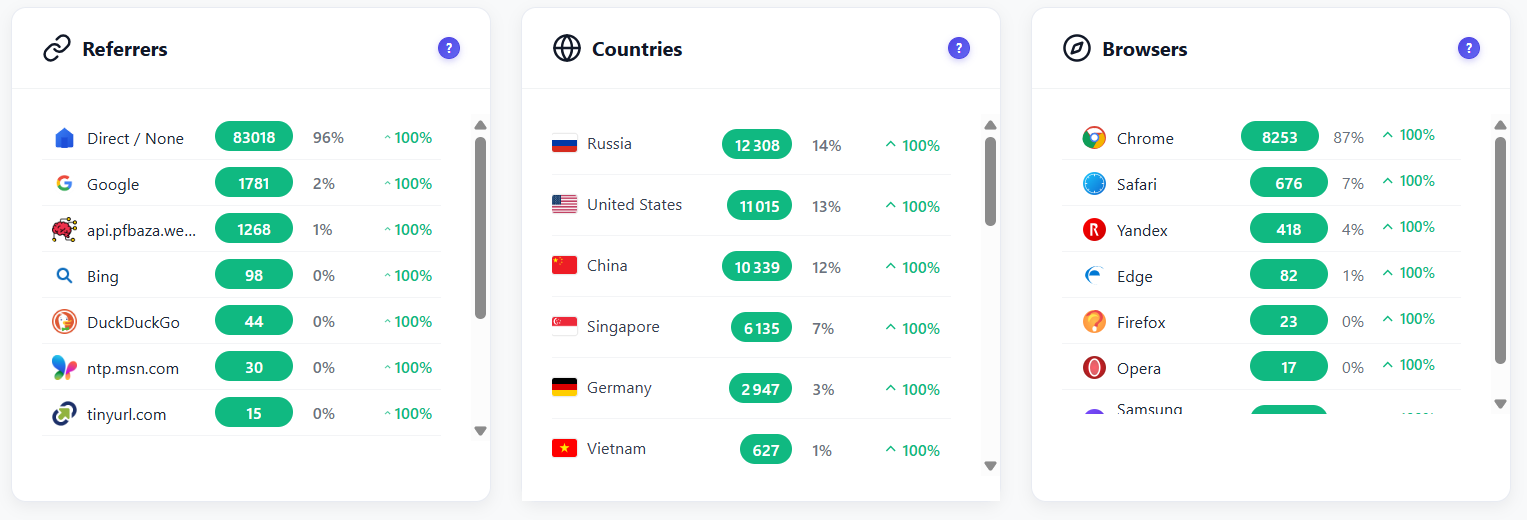
Referrer sources with favicons, country flags and browser brand icons

Referrers, Countries & Browsers

Rich visual widgets display your top traffic sources with recognizable favicon icons (Google, Bing, DuckDuckGo and more), country breakdown with flags and visitor counts, and browser usage with brand icons and percentage share. Period-over-period change indicators make it easy to spot trends at a glance.

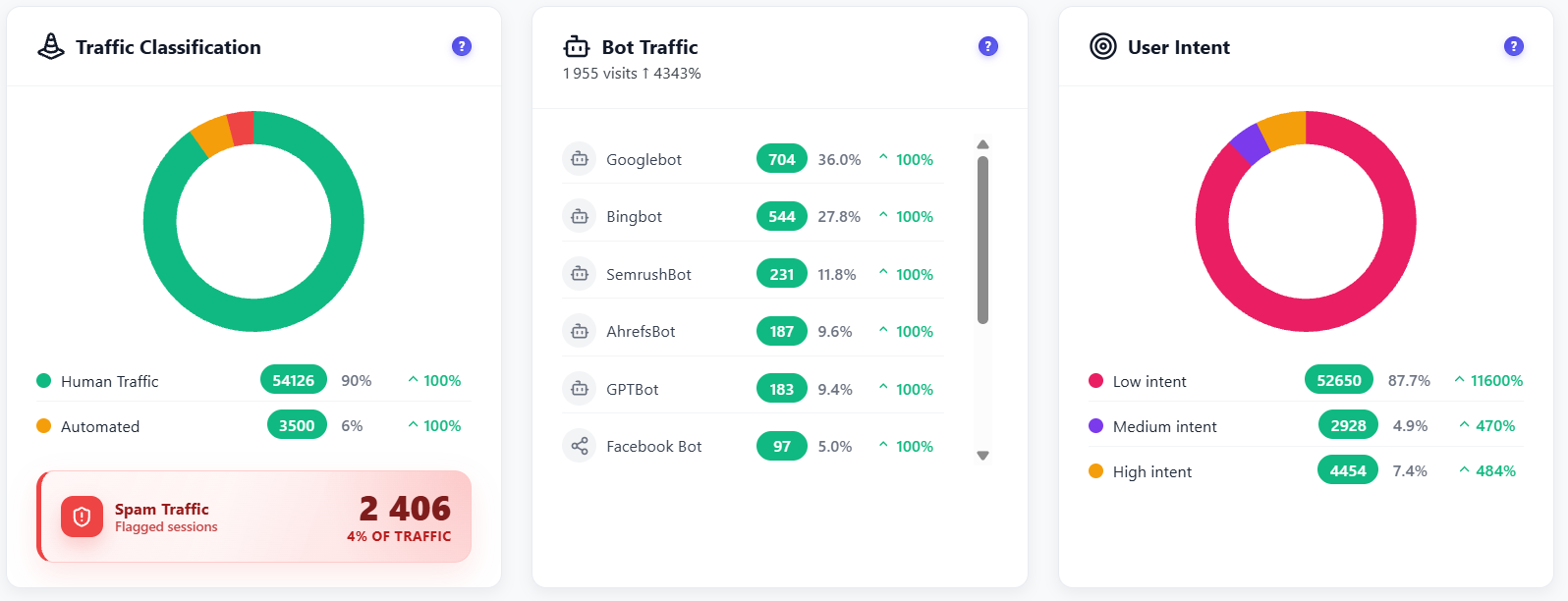
Traffic classification donut, bot traffic breakdown and user intent scoring

Traffic Quality & Bot Detection

A three-panel quality dashboard keeps your analytics clean. The Traffic Classification donut separates Human, Automated and Spam traffic. The Bot Traffic widget lists individual crawlers (Bingbot, YandexBot, Ahrefsbot, Googlebot, etc.) by hit count. User Intent scoring then ranks real human sessions as Low, Medium or High engagement so you can focus on what matters.

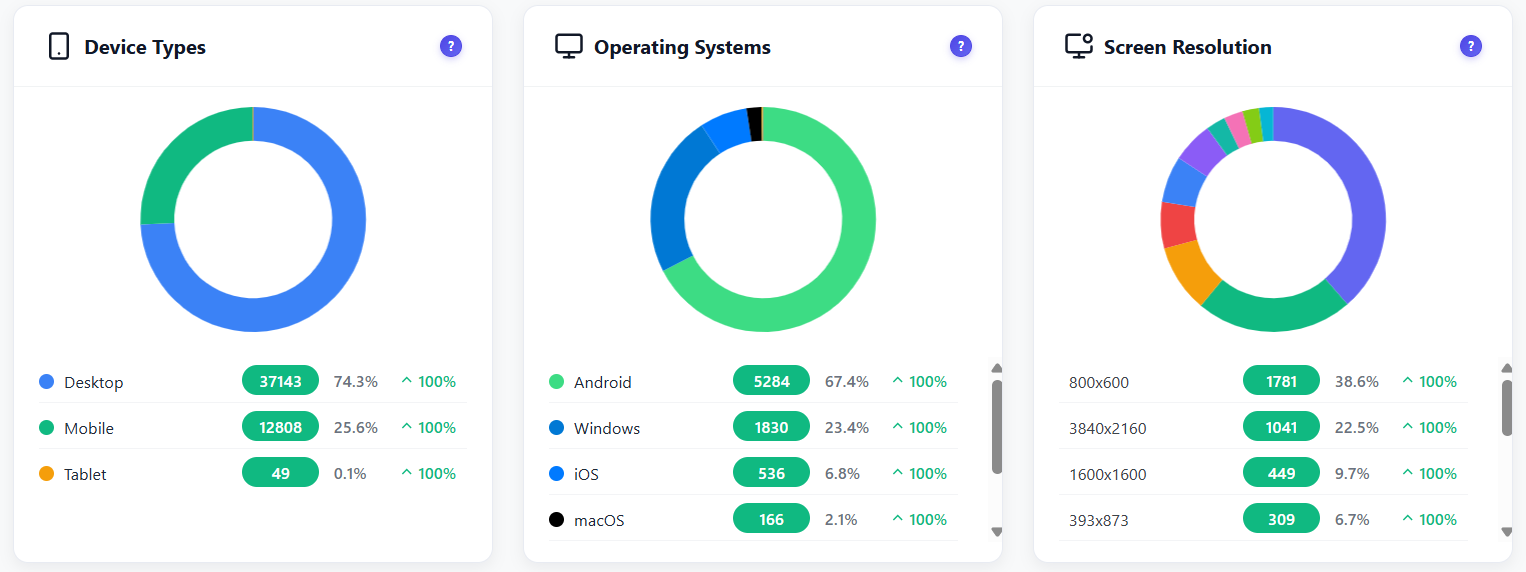
Device types donut, operating systems breakdown and screen resolution analytics

Device Types, OS & Screen Resolution

Three audience-profiling widgets in one section. The Device Types donut shows the Desktop / Mobile / Tablet split with visitor counts and percentages. Operating Systems breaks down Android, Windows, iOS, macOS and others. Screen Resolution analytics reveal the most common viewport sizes your visitors actually use — essential for responsive design decisions.

Automated email reports with scheduled delivery and report history
FREE

Automated Email Reports

Stay on top of your analytics without logging in. Opti-Behavior sends beautiful, data-rich reports straight to your inbox on a schedule you control — no third-party email service required.

  • Daily, weekly or monthly report schedules
  • Key KPIs: visitors, sessions, pageviews, bounce rate
  • Top pages and top referrers included
  • Sent directly via WordPress mail — no external service
  • Multiple recipient addresses supported
  • One-click enable / disable per report frequency

How It Works

1

Install & Activate

Install Opti-Behavior from WordPress.org or upload the plugin. Activate it and tracking starts automatically — no configuration needed.

2

Lightweight Tracking Script Loads

A ~15KB async script loads on your pages without affecting performance. It captures page views, clicks, scroll depth, session timing and referrer data.

3

Data Stays on YOUR Server

All analytics data is stored in your WordPress database. Zero external API calls, zero data sharing, zero cookies. You are the sole data controller.

4

Real-Time Dashboard Updates

Open the Dashboard page and see all 16+ widgets load in parallel with live data. Use date range selectors and filters to slice your analytics any way you want.

Who Uses the Analytics Dashboard?

E-Commerce Owners

Track product page views, monitor checkout traffic, identify top-performing products and understand where buyers come from — all without sharing data with third parties.

Bloggers & Content Creators

See which posts get the most engagement, monitor scroll depth to know if readers finish articles, track referrers from social media and newsletters.

Agencies & Freelancers

Manage analytics for multiple client sites from a single dashboard per site. Generate automated email reports and share insights without giving clients access to third-party tools.

Dashboard Comparison

Feature Opti-Behavior Hotjar MS Clarity Matomo
Real-Time Dashboard✓ Free
Live Visitor Map✓ FreePaid
Bot Detection✓ Free
Referrer Tracking✓ Free
User Intent Scoring✓ Free
Email Reports✓ Free
Self-Hosted Data✓ Free
Session LimitsUnlimited35/dayUnlimitedUnlimited
Price$0$213+/mo$0*€26+/mo

* Microsoft Clarity is free but Microsoft uses your visitors' data for advertising purposes.

Dashboard FAQ

Does the dashboard update in real-time?
Yes. The dashboard uses AJAX polling to refresh all 16+ widgets with live data. You see active visitors, new sessions, pageviews, and all KPI metrics updating automatically without reloading the page.
Will the dashboard slow down my WordPress admin?
No. The dashboard loads widgets in parallel using lightweight REST API calls to your own server. There are no external API calls, no heavy JavaScript frameworks, and no impact on your frontend page speed. The admin page loads in under 2 seconds even with thousands of tracked sessions.
How does bot detection work?
Opti-Behavior uses 15+ server-side detection patterns to identify bots, crawlers, and spam traffic. It checks user agents against known bot signatures (Googlebot, Bingbot, SEO tools, etc.) and classifies traffic as Human, Automated, or Spam. You can exclude bot traffic from your analytics with one click.
Can I export dashboard data?
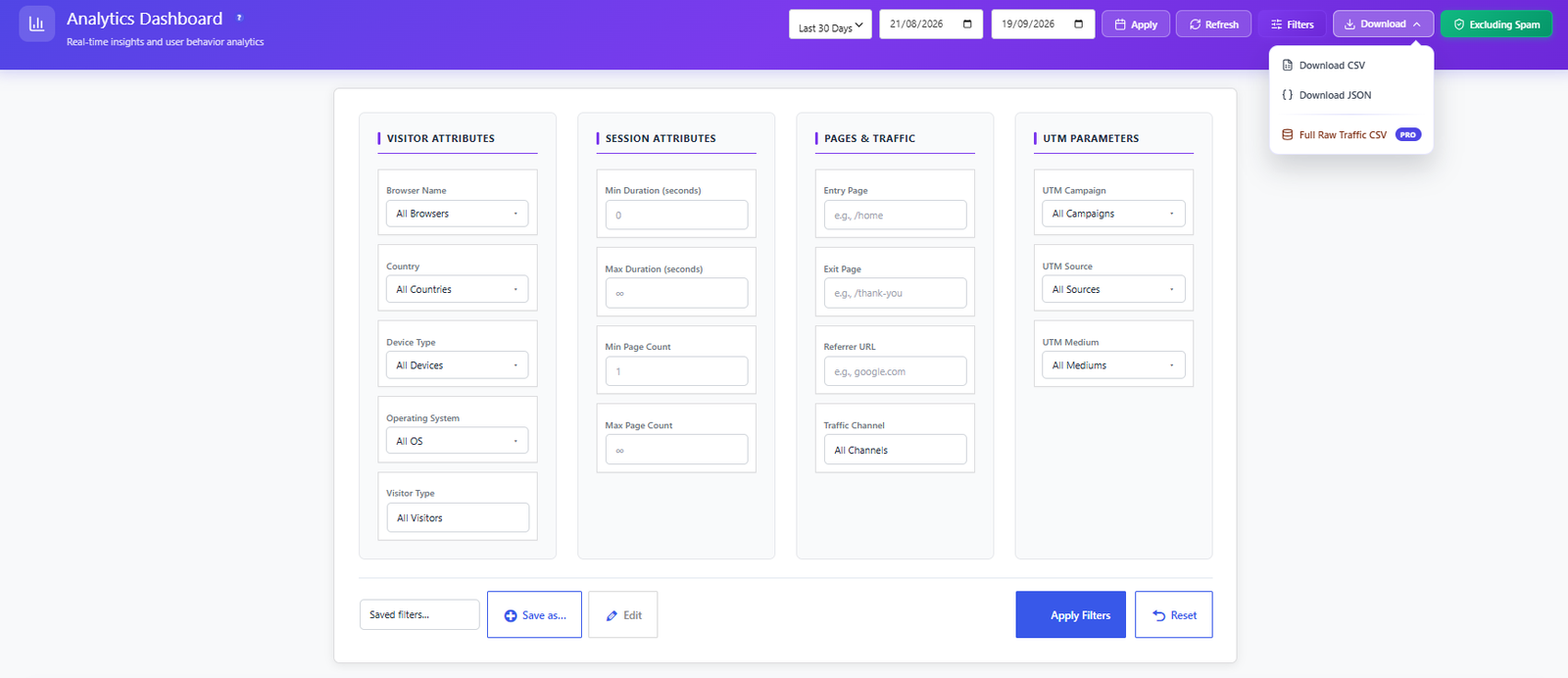
Yes. You can export analytics data to CSV files for further analysis. You can also set up automated email reports (daily, weekly, or monthly) that deliver key metrics directly to your inbox.
Does it track logged-in WordPress users?
Yes. The dashboard distinguishes between logged-in and anonymous visitors. You can see authentication status in the visitor feed and filter analytics by user type. Admin users can be excluded from tracking via Settings.
What is the Visitor Activity Heatmap?
The Visitor Activity Heatmap is a unique hour-of-day × day-of-week engagement grid that visualizes when your audience is most active. Each cell represents a specific hour on a specific day of the week, color-coded by traffic intensity. It helps you identify peak traffic windows so you can time blog posts, promotions and maintenance windows for maximum reach.
Can I see which website sections visitors browse most?
Yes. The Visited Directories widget shows a treemap and table breakdown of the URL path segments visitors access most — for example /blog/, /shop/, /contact/. This lets you instantly identify your highest-traffic content areas and understand how visitors navigate through your site structure.
How does the real-time visitor map work?
The real-time visitor map uses the open-source Leaflet.js library to render an interactive world map directly in your browser. Each active visitor is plotted as a marker showing their country flag, city (when available), current page, session duration and device type. The map updates automatically as new visitors arrive and existing sessions end — with zero external API calls. All geolocation data is derived server-side from anonymized IP data stored in your database.
What screen resolutions does Opti-Behavior track?
Opti-Behavior captures the actual browser viewport dimensions for every session. The Screen Resolution widget displays a donut chart of the most common resolutions alongside a detailed legend table showing resolution, visitor count and percentage share. This helps you prioritize responsive design breakpoints and ensure your layouts look great for the viewports your real visitors actually use.

Start Tracking in 2 Minutes

Install Opti-Behavior for free and see your first analytics data within minutes. No signup, no API keys, no monthly fees.

Explore
Drag