Skip links
FREE

Conversion
Funnels

Build unlimited conversion funnels to track user flow through your site. Visual step-by-step dropout analysis shows exactly where visitors abandon your conversion path — so you can fix leaks and increase revenue.

Unlimited Funnels
No limits — track every conversion path on your site
10
Steps per Funnel
Up to 10 URL steps with drag-and-drop reorder
7
URL Match Types
Any Page, Exact, Contains, Starts With, Ends With, Regex, Pageview
Auto-Discovery
One-click funnel creation from top User Journey paths
Opti-Behavior conversion funnel builder with visual step analysis
100% Self-Hosted
GDPR Compliant
Real-Time Updates
Unlimited Tracking

Build, Track & Optimize Conversion Paths

Create funnels from any sequence of pages on your site. Instantly see where users drop off and which steps need optimization.

Visual funnel builder with step-by-step configuration

Visual Funnel Builder

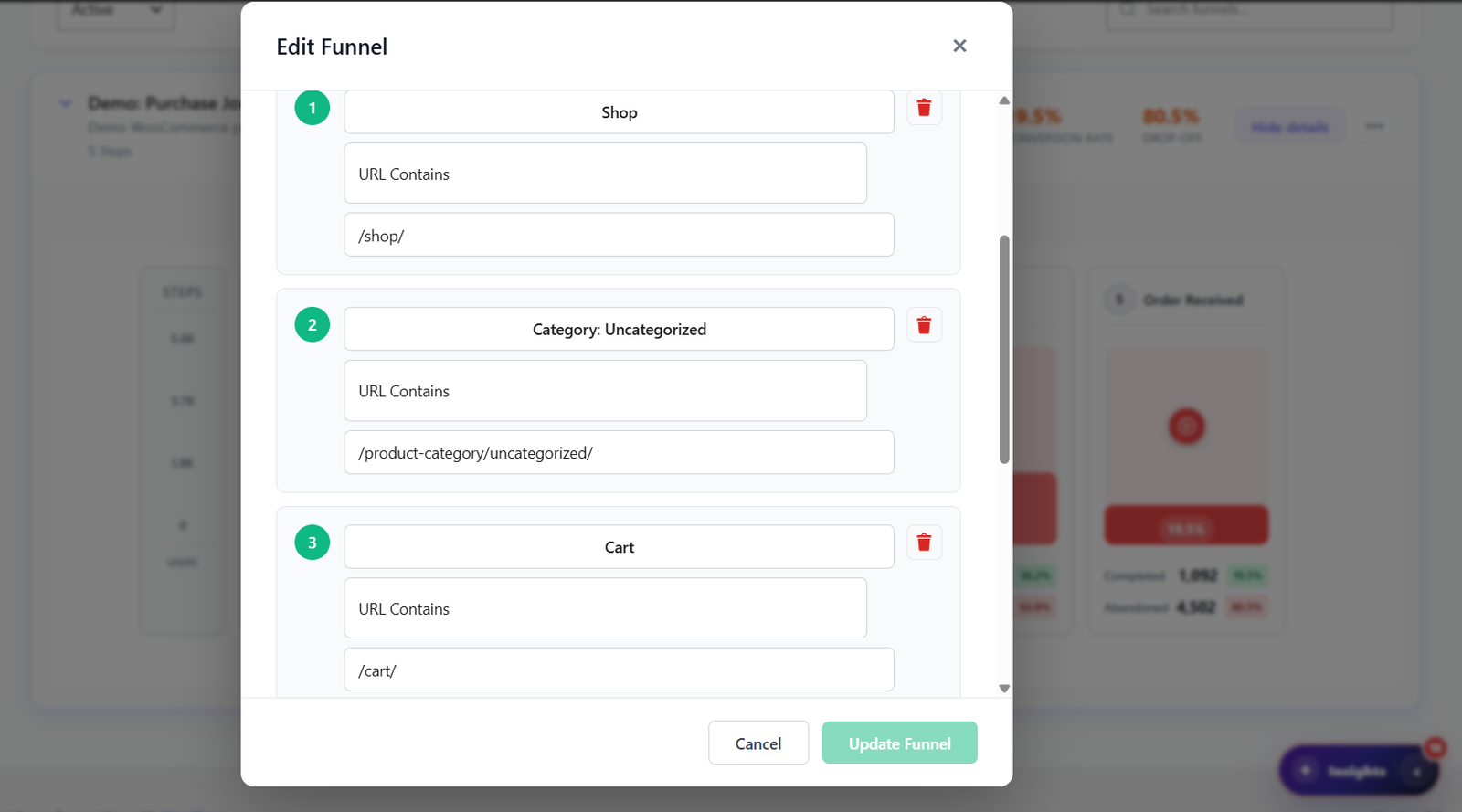
Create funnels by defining up to 10 URL-based steps in the built-in modal builder. Each step requires a name, a URL pattern, and a match type. Choose from 7 match strategies per step — Exact URL, Contains, Starts With, Ends With, Regex, Any Page, or Any Page View. Steps can be drag-and-drop reordered at any time without losing historical tracking data. Add an optional description to each funnel for team documentation.

Funnel list with management controls

Funnel Management

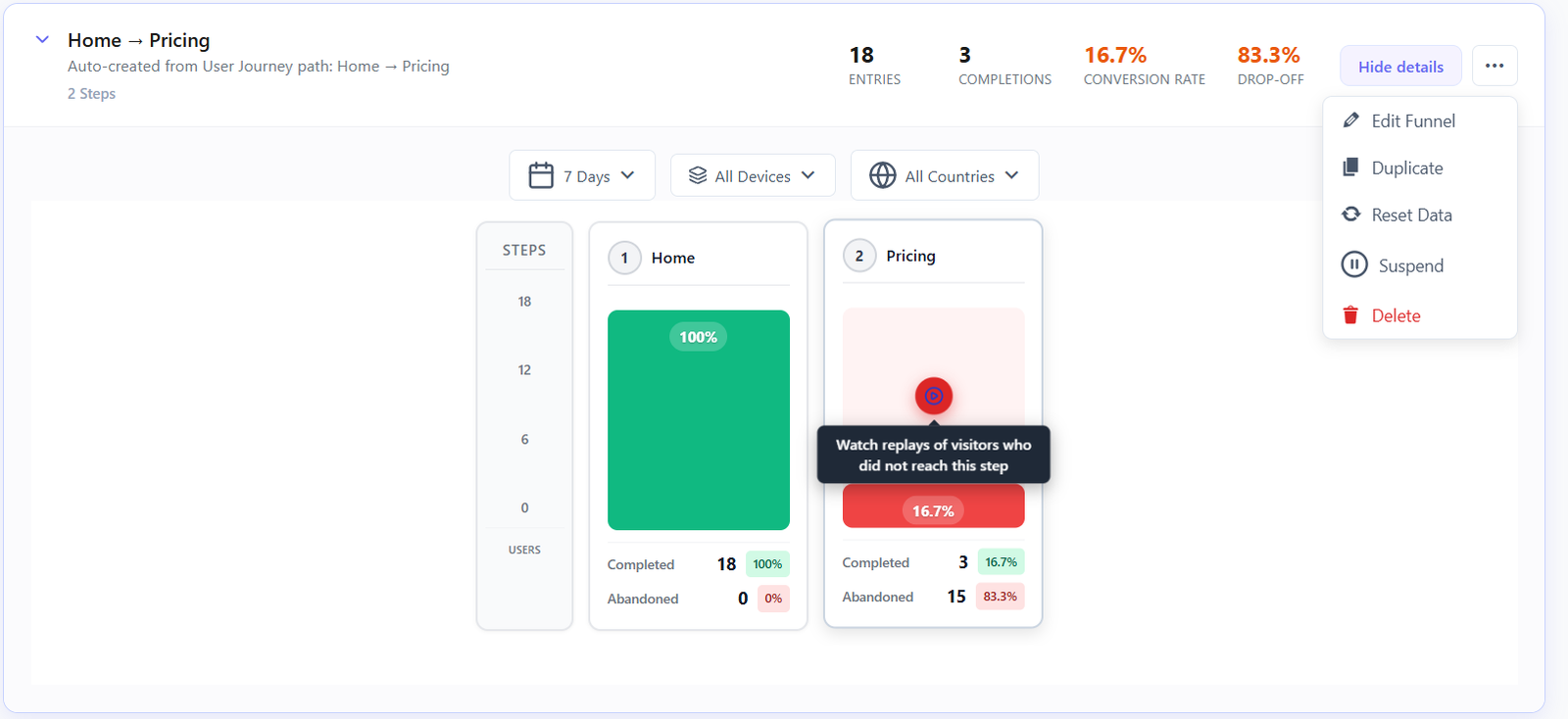
Manage all your funnels from a paginated central list. Each funnel card shows 4 real-time metric badges — sessions, unique visitors, pageviews, and completions — so you assess performance at a glance without opening the full analysis view. Enable or disable individual funnels instantly. Use the ellipsis menu for quick edit, delete, or duplicate actions. The paginated layout keeps the dashboard fast even with dozens of active funnels running simultaneously.

Top paths analysis with auto-funnel creation

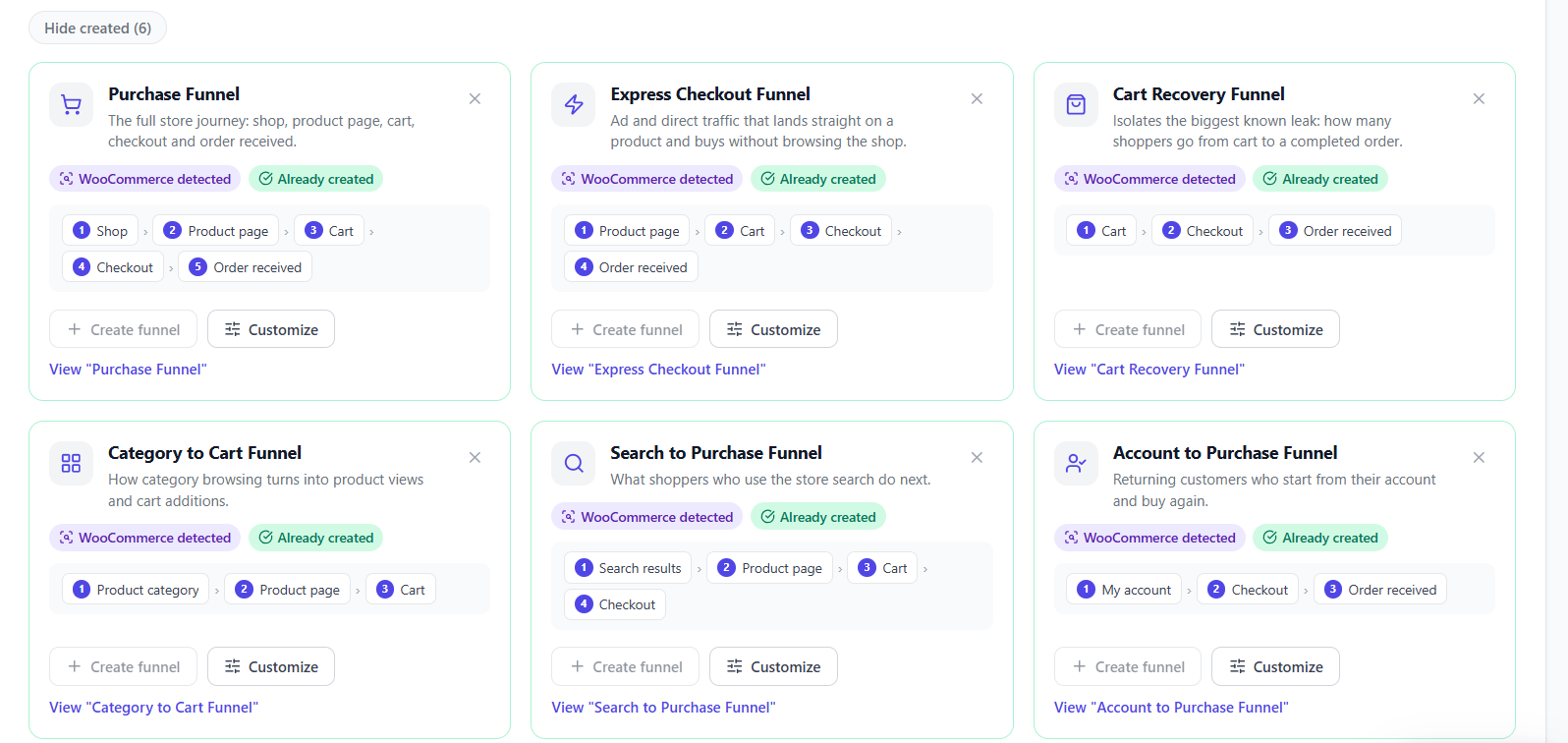
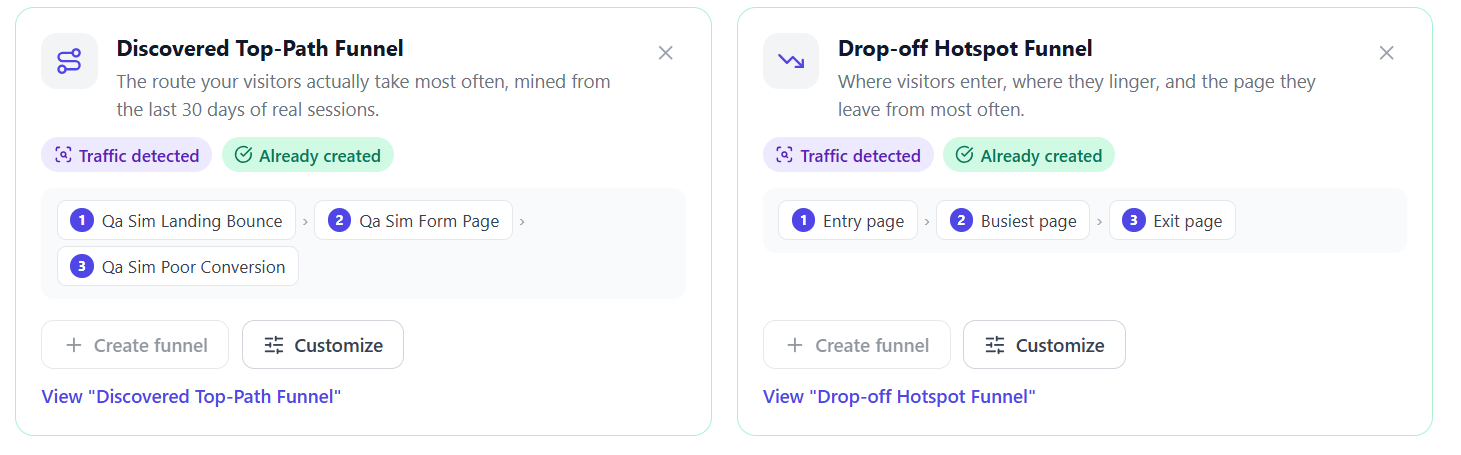
Auto-Discovery from Top Paths

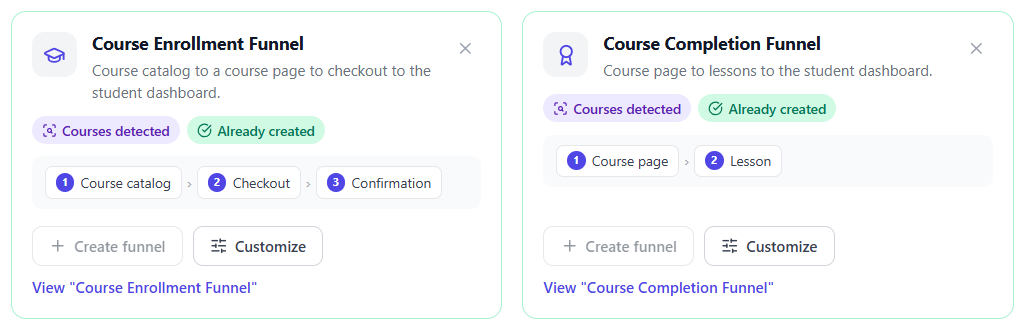
Not sure where to start? The User Journeys feature (included in free) automatically discovers the most-traveled paths across your site ranked by session volume. Any top path can be converted into a tracked funnel with one click from the User Journeys page. This grounds your first funnels in real visitor behavior rather than guesswork — you immediately start tracking the conversion paths that actually matter to your users.

URL match type selection in funnel step builder

7 URL Match Types

Each funnel step supports 7 flexible URL matching strategies sourced directly from the funnel builder: Any Page (matches every pageview — ideal for broad entry steps), Exact URL (precise full-path match), URL Contains (substring match anywhere in the URL — e.g. /product/ catches all product pages), Starts With (URL prefix match), Ends With (URL suffix match — catches query-free thank-you pages), Regex (full regular expression for complex multi-pattern rules), and Any Page View (fires on any page load). Mix match types freely across steps in the same funnel.

Funnel analysis filters for time period, device and country

3-Dimension Filtering

Every funnel analysis is filterable across 3 dimensions simultaneously — all updating the dropout chart instantly without a page reload. Time Period: choose 7 days, 30 days, 90 days, or a fully custom date range to compare before/after optimization periods. Device: isolate desktop, mobile, or tablet to spot device-specific dropout patterns (mobile users often abandon at different steps). Country: drill into any geographic market to understand regional conversion differences and tailor your funnel strategy accordingly.

Funnel card metric badges showing sessions, visitors, pageviews and completions

4 Metric Badges at a Glance

Each funnel card header displays 4 color-coded metric badges for instant health monitoring. A blue badge shows total sessions that entered the funnel. A purple badge shows unique visitor count. A teal badge shows total pageviews recorded across all steps. A green badge shows how many sessions completed the entire funnel. These badges update live as new sessions are tracked, giving you a real-time performance pulse from the main management dashboard without opening individual funnel analysis views.

Visual step-by-step dropout chart with entry and exit counts

Visual Dropout Chart

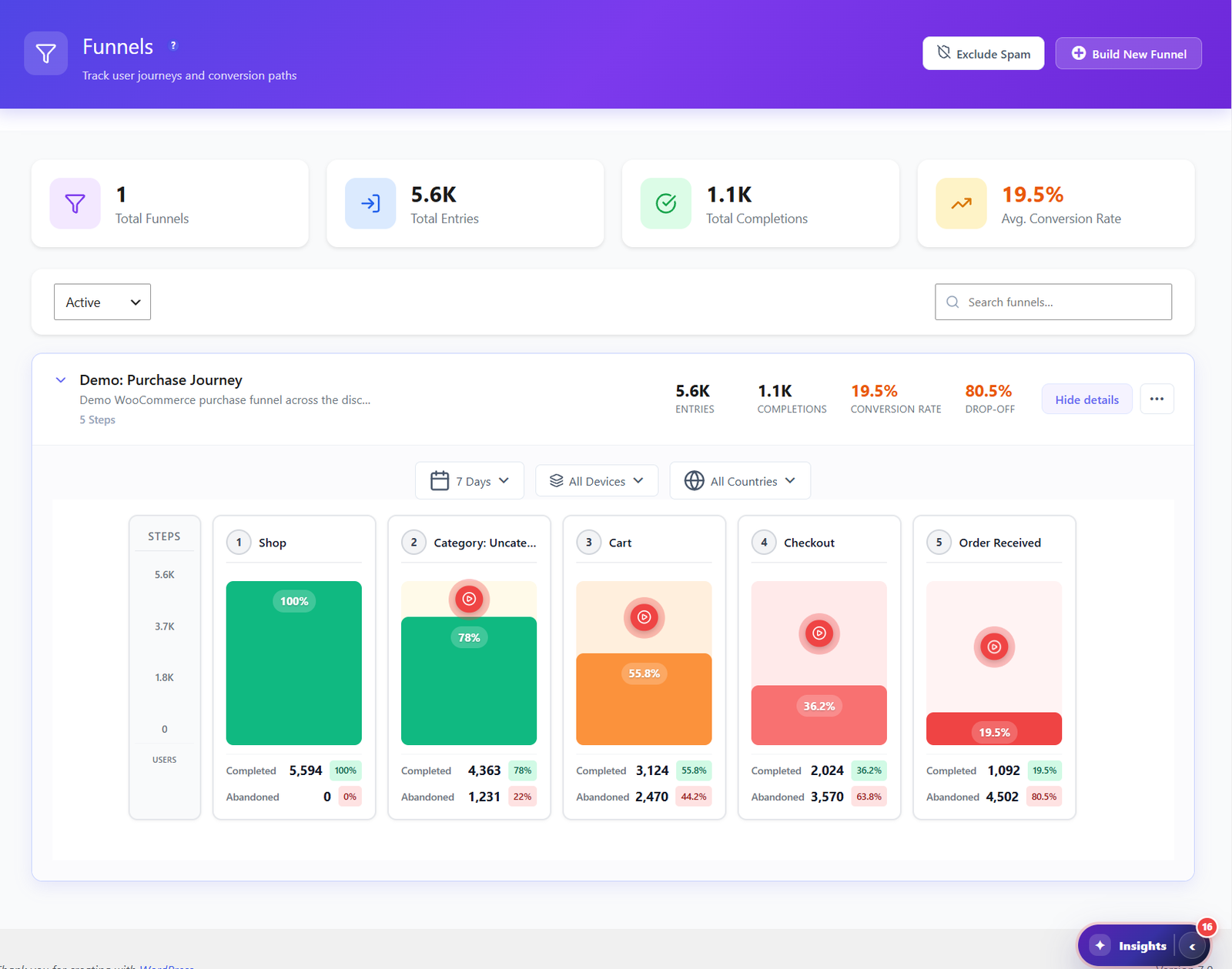
The funnel detail view renders a visual step progression chart where each bar height is proportional to the percentage of users who reached that step. Below each bar the entry count, exit count, and dropout percentage are shown side by side — making it immediately obvious which step loses the most visitors. The chart responds to all 3 analysis filters in real-time, so you can compare whether mobile users abandon at a different step than desktop users, or verify that a recent page change has improved a specific step’s conversion rate.

FREE

Dropout Analysis

The real power of funnels is seeing where users leave. Each step shows entry count, exit count, and dropout percentage — so you know exactly which page needs work. Combined with 3 analysis filters (time period, device, country), you can pinpoint exactly which audience segment abandons at which step and measure the impact of every optimization you make.

  • Step-by-step conversion rate tracking with proportional visual bars
  • Dropout percentage per step — instantly pinpoint your biggest leak
  • Total funnel completion rate across all sessions
  • Time period filter: 7 days, 30 days, 90 days, or custom date range
  • Device filter: compare desktop vs. mobile vs. tablet dropout rates
  • Country filter: isolate specific geographic markets
  • 4 real-time metric badges (sessions, visitors, pageviews, completions) per funnel
  • Paginated funnel list for managing unlimited active funnels

How It Works

1

Define Your Funnel Steps

Create a new funnel and add up to 10 steps using the built-in modal builder. Each step needs a name and a URL pattern. Choose from 7 match types — Exact URL, Contains, Starts With, Ends With, Regex, Any Page, or Any Page View — to precisely define what counts as completing each step. Drag steps to reorder them at any time without losing historical data.

2

Tracking Starts Automatically

Once saved, the funnel immediately starts collecting data. Every visitor session is matched against your funnel steps in sequence to calculate progression and dropout rates. Tracking is entirely server-side on your own WordPress installation — no external scripts, no third-party services, no data leaving your server.

3

Analyze Dropout Points

Open any funnel to see the visual dropout chart — each step bar height shows what percentage of users reached it. Below each bar see the raw entry count, exit count, and dropout percentage. Apply the 3 analysis filters (time period, device, country) to drill into specific audience segments. Read the 4 header metric badges for a performance summary at a glance.

4

Optimize & Repeat

Fix the pages with the highest dropout rates, then use the custom date range filter to compare before and after your changes. Use the device filter to confirm both mobile and desktop users are converting. Repeat the cycle for every funnel to continuously raise your overall site conversion rate.

Who Uses Conversion Funnels?

E-Commerce Stores

Track the path from product page to cart to checkout to purchase. Find where shoppers abandon their carts and optimize each step to increase sales.

Lead Generation Sites

Monitor the journey from landing page to form submission. Identify which pages lose the most leads and test improvements to boost conversion rates.

Membership & SaaS Sites

Track signup flows from pricing page to registration to onboarding. Understand where potential members drop off and streamline the enrollment process.

Funnel Tracking Comparison

Feature Opti-Behavior Hotjar MS Clarity Matomo
Conversion Funnels✓ Free✓ Paid✓ Paid
Unlimited Funnels✓ Free
Dropout Analysis✓ Free
Auto-Discovery✓ Free
10 Steps per Funnel✓ Free
7 URL Match Types✓ Freelimitedlimited
Self-Hosted Data✓ Free
Price$0$213+/moN/A€26+/mo

Funnels FAQ

How many funnels can I create?
Unlimited. There are no restrictions on the number of funnels you can create in the free version. Build as many conversion funnels as you need to track different user flows across your site.
Can I create funnels from User Journey paths?
Yes. If you have the Pro version with User Journey Analytics, you can discover popular paths users take and convert them into funnels with one click. This lets you track conversion rates on paths your visitors are already taking.
How does funnel step matching work?
Each funnel step matches against a URL pattern. You define the steps in order (e.g., Homepage → Product Page → Cart → Checkout → Thank You), and Opti-Behavior tracks how many visitors complete each step and where they drop off.
Can I reorder funnel steps after creating them?
Yes. The funnel builder includes drag-and-drop step ordering. You can rearrange steps, add new ones, or remove existing steps at any time without losing historical data for the remaining steps.
Can I filter funnel data by device or country?
Yes. Funnel analysis supports filters for device type, country, and time period. This helps you compare conversion rates between mobile and desktop users, or between different geographic markets.
What URL match types are available for funnel steps?
Each funnel step supports 7 URL match types: Any Page (matches every pageview — great for broad entry steps), Exact URL (precise full-path match), URL Contains (substring match — e.g. /product/ catches all product pages), Starts With (URL prefix match), Ends With (URL suffix match), Regex (full regular expression for complex patterns), and Any Page View (fires on any page load regardless of URL). You can use different match types for different steps within the same funnel.
What do the 4 metric badges in the funnel card show?
Each funnel card header shows 4 color-coded badges updated in real-time: a blue badge for total sessions that entered the funnel, a purple badge for unique visitor count, a teal badge for total pageviews recorded across all funnel steps, and a green badge for sessions that completed the entire funnel. These let you monitor every funnel’s health from the management dashboard without opening the full analysis view.
How does the visual dropout chart work?
The dropout chart renders each funnel step as a proportional bar — taller bars mean more users reached that step. Below each bar you see the raw entry count, exit count, and dropout percentage. The chart updates instantly when you change the Time Period, Device, or Country filters, so you can compare whether mobile users drop off at a different step than desktop users, or measure whether a recent page change improved a step’s conversion rate.
Can I track multiple funnels simultaneously?
Yes, and there is no limit on how many can run at once. All active funnels collect data in parallel — every visitor session is matched against every active funnel simultaneously with zero performance impact. You can run separate funnels for your checkout flow, lead generation form, newsletter signup, and onboarding sequence all at the same time. Enable or disable individual funnels at any time from the management dashboard.

Stop Guessing, Start Optimizing

Install Opti-Behavior for free and build your first conversion funnel in minutes. See exactly where visitors drop off and start improving your conversion rates today.

Explore
Drag