Smart Insights
Behavioral Recommendations
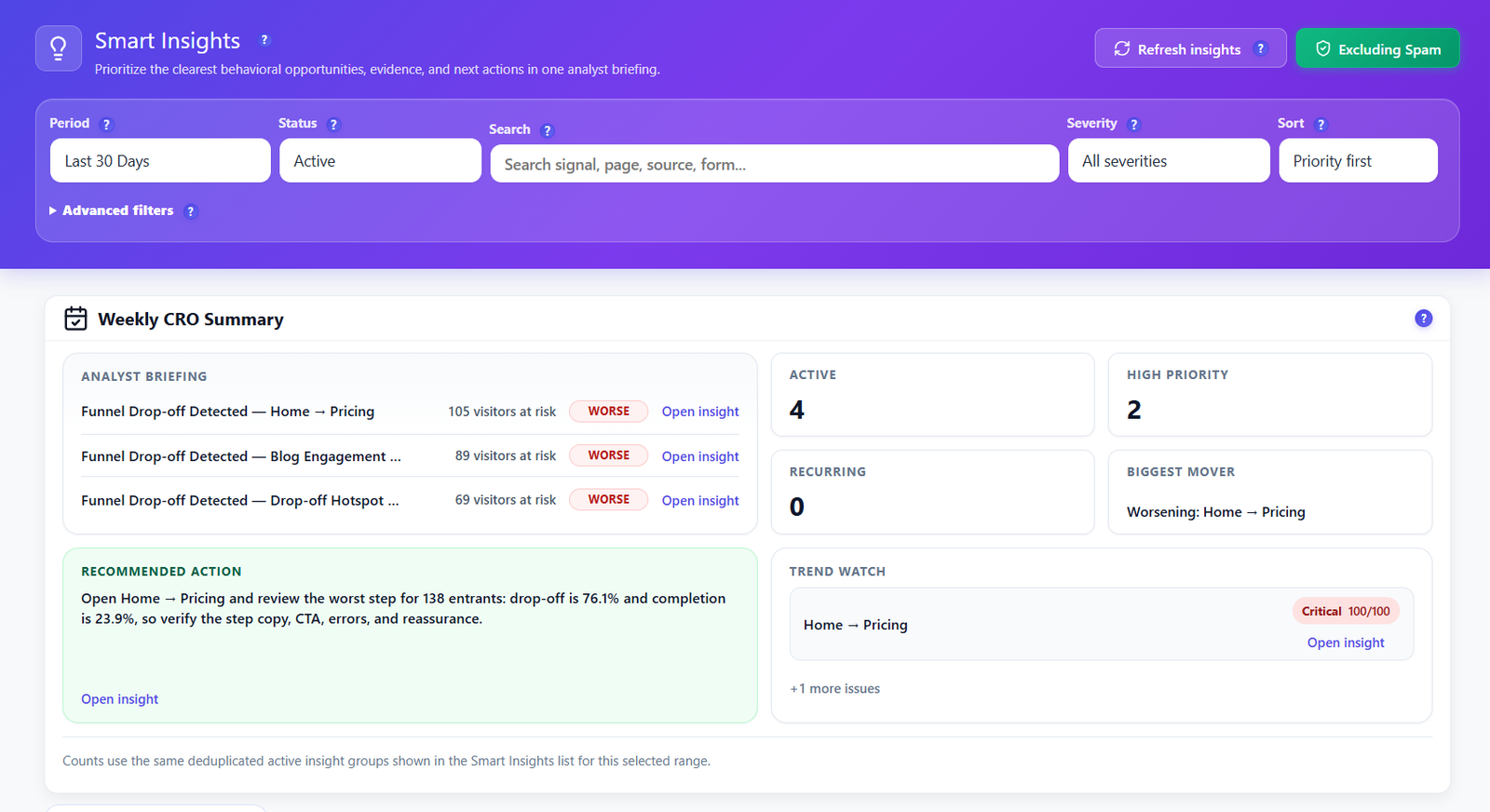
Turn self-hosted behavior data into prioritized CRO opportunities inside WordPress. Smart Insights reviews engagement, friction, funnels, forms, errors, recordings and experiments, then shows evidence-backed next actions without exporting visitor data to a third-party analytics platform.
Your Weekly CRO Briefing, Built From Real Visitor Behavior
Smart Insights converts the raw events already captured by Opti-Behavior into a readable analyst-style workspace. Free sites get page-level recommendations such as exit-rate spikes, scroll-depth gaps, bounce warnings and traffic anomalies. Pro adds richer evidence from recordings, user journeys, forms, errors, funnels and A/B testing destinations.
Weekly CRO Summary
See active opportunities, high-priority issues, recurring patterns, trend watch and one recommended action for the week. The briefing gives teams a starting point before they open individual reports.
Filters That Find the Next Fix
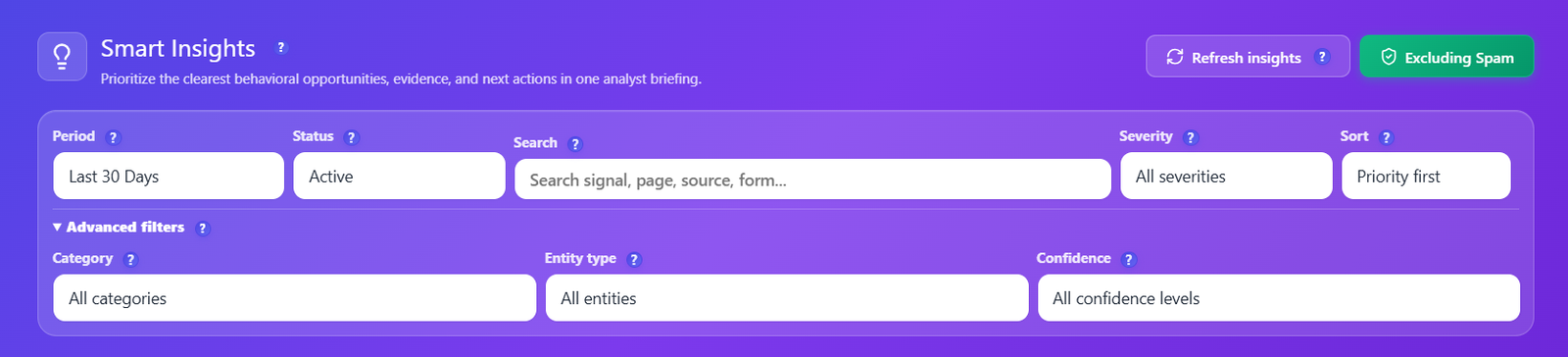
Filter by period, status, search term, severity, sort order, category, entity type and confidence. Focus on unresolved high-impact opportunities, recurring issues or a specific page before assigning work.
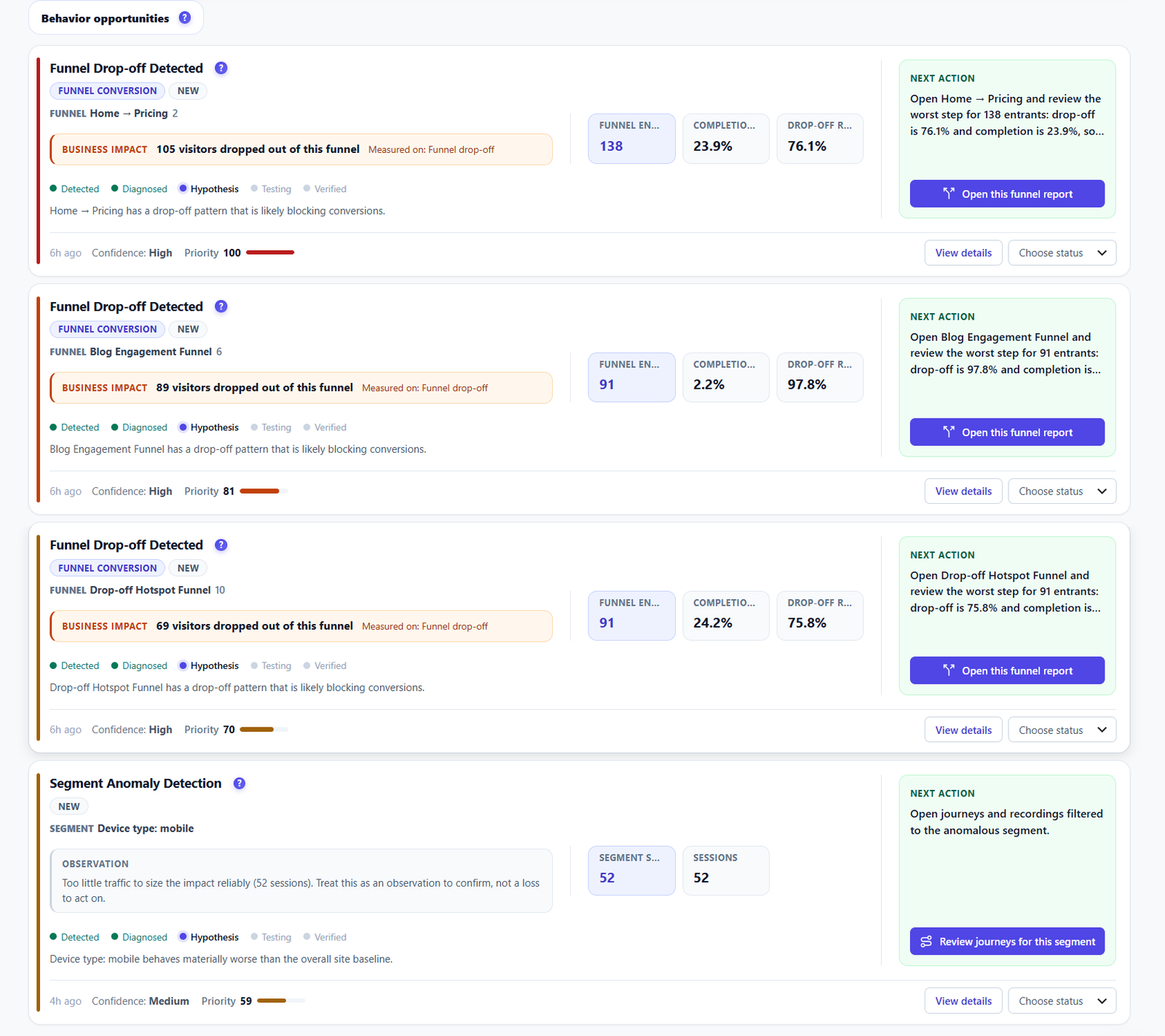
Evidence-Backed Behavior Cards
Each card includes category, status, recurrence, diagnosis, evidence KPI cards, confidence, priority bar, next action and destination links so you can move from insight to the right report quickly.
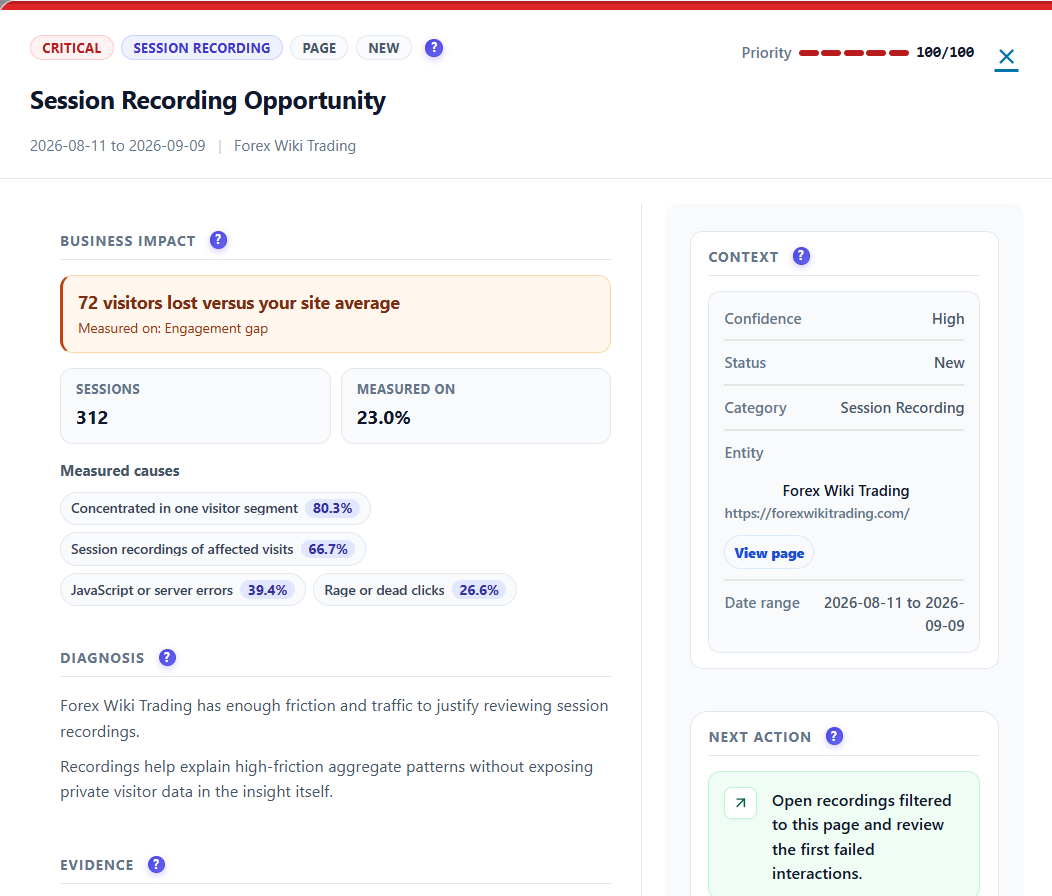
Detail Modal With Context
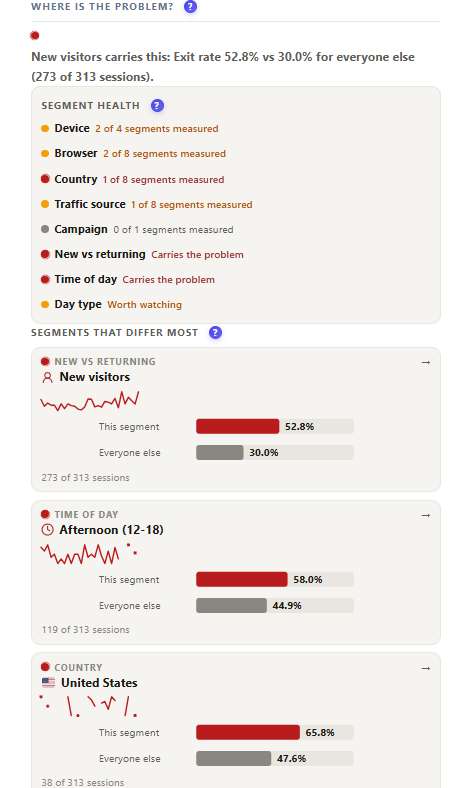
Open a recommendation to review diagnosis, evidence, trend comparison, segment breakdown, likely causes, recommended actions, status update controls and a primary destination CTA.
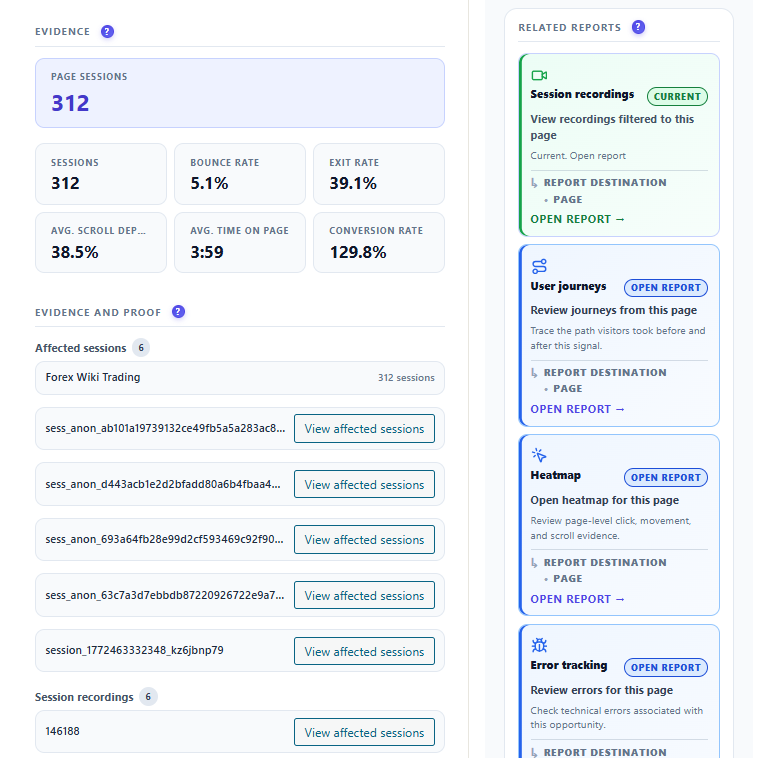
Related Reports & Destinations
Pro-enriched insights can point directly to relevant reports such as session recordings, form analytics, journeys, funnels, errors, heatmaps and A/B tests. Free insights keep you anchored to core page and engagement reports.
Notification Launcher
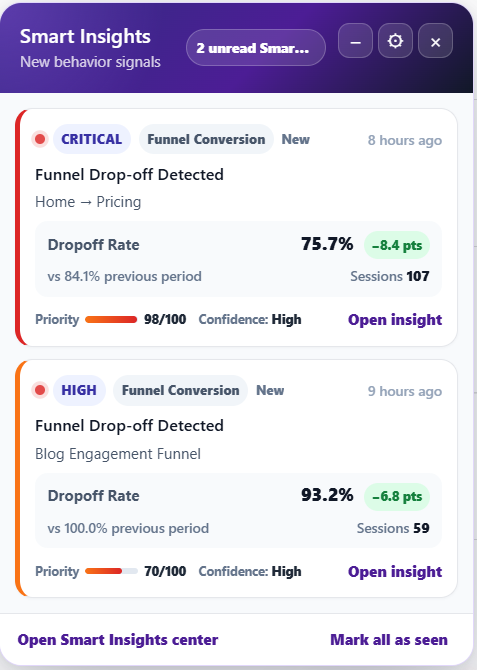
A compact launcher surfaces unread high-priority opportunities without forcing you to stay on the Smart Insights page. Open the panel, review compact insight cards and jump back into the full center.
Filter, Sort and Track Recommendation Status
Smart Insights is designed for repeat review, not one-off screenshots. Narrow the opportunity list, update status as work moves forward and keep recurring issues visible until they are resolved.
- Period, status, severity, keyword and sort controls
- Advanced category, entity type and confidence filters
- Status workflow for open, reviewed and resolved opportunities
- Priority and confidence indicators for triage meetings
- Recurring-pattern visibility for issues that keep returning
- Manual refresh when you want a new recommendation pass
From Diagnosis to Destination
When Pro modules are active, Smart Insights can enrich recommendations with deeper evidence and destination links. Teams can move from a mobile friction warning to recordings, from form abandonment to field analytics, or from checkout dropoff to funnel detail.
- Diagnosis, trend comparison and segment context
- Recommended actions and likely causes
- Related reports for recordings, forms, journeys, funnels and errors
- Primary destination CTA for the most useful next report
- Locked previews when Pro-only evidence is not active yet
Notifications, Scheduling and Personal Controls
Keep Smart Insights working in the background. Configure automatic generation, choose a processing profile, review scheduler status and control the global notification behavior from the same WordPress admin surface.
- Automatic insight generation and manual refresh workflow
- Processing profile controls for site-size needs
- Scheduler status and next-run visibility
- Global notification launcher behavior
- Personal launcher recovery controls if the panel is hidden
- Pro preview areas that explain advanced evidence sources
How Smart Insights Works
Collect Self-Hosted Signals
Opti-Behavior captures page engagement, traffic, device behavior, heatmap and conversion signals on your WordPress site.
Generate Recommendations
Smart Insights scores behavior patterns, groups recurring issues and creates readable recommendations with evidence and next actions.
Review the Briefing
Use the weekly summary, filters, status workflow and detail modal to pick the highest-impact opportunities for your team.
Open the Right Report
Follow destination links into heatmaps, funnels, recordings, forms, errors, journeys or A/B testing when those modules are available.
Free Core + Pro Evidence
| Capability | Free | Pro |
|---|---|---|
| Smart Insights center and weekly summary | ✓ | ✓ |
| Page-level engagement and traffic recommendations | ✓ | ✓ |
| Filters, status workflow and confidence indicators | ✓ | ✓ |
| Notification launcher and settings controls | ✓ | ✓ |
| Recordings, journey, form and error evidence | Preview | ✓ |
| Funnel, checkout and campaign mismatch signals | Basic page context | ✓ Advanced |
| Destination links to Pro reports | Core reports | ✓ Advanced reports |
Let Your Behavior Data Tell You What to Fix Next
Install Opti-Behavior for free to start receiving self-hosted Smart Insights, then add Pro when you want richer evidence from recordings, journeys, forms, errors, funnels and advanced experiments.