Skip links
iconOpti-Behavior
made by OptiUser

User journeys for wp mark whiteWordPress · woo markWooCommerce PRO

See the route
every visitor takes,
and where it ends.

An interactive flow diagram of how visitors move through your site, step by step — top paths, entry and exit pages, flagged unexpected exits, and one click to turn any path into a funnel. Built from your own session data, stored on your own WordPress server.

User journeys is a Pro module · 6 Months Free · No credit card

Admin in 6 languages · Multisite ready

← Back to overview

28%

of sessions drop off after the first two steps. The grey bands show exactly where.

Do this

Follow the widest band to the page where visitors leave.

25%

of sessions follow one route: Home, Shop, Cart, Checkout.

Do this

Click Funnel on a route to track its drop-off.

18.5%

exit rate on checkout, over twice the site average. Flagged Unexpected.

Fix

Look at the page before it: that is where the exit begins.

4

page groups fold hundreds of URLs into four readable nodes.

Do this

Click Auto-detect and review the groups it proposes.

Slice every journey by
  • Device
  • Browser
  • OS
  • Country
  • Visitor type
  • Referrer
  • UTM campaign
  • Date range
Example data
wp mark white
5.0 Rated on WordPress.org
1,700+ active installsSites running Opti-Behavior today
woo mark
Built for WooCommerceCheckout, cart and product-page funnels
Self-hosted: recordings and analytics are stored on your own server.Native WordPress · no cookies required
Cache plugin compatible
wp rocketWP Rocketlitespeed cacheLiteSpeed Cachew3 total cacheW3 Total Cachewp super cacheWP Super CacheautoptimizeAutoptimizesg optimizerSG OptimizerperfmattersPerfmatterswp optimizeWP-Optimizejetpack boostJetpack BoostbreezeBreezewp fastest cacheWP Fastest CachehummingbirdHummingbirdnitropackNitroPackflyingpressFlyingPresscache enablerCache Enablerswift performanceSwift Performanceasset cleanupAsset CleanUp
Works with all themes & page builders
elementorElementordiviDivibeaver builderBeaver BuilderwpbakeryWPBakerygutenbergGutenbergOxygenbrizyBrizybreakdanceBreakdancesiteoriginSiteOriginastraAstrageneratepressGeneratePresskadenceKadencethemifyThemifymotopressMotoPresslive composerLive ComposeroceanwpOceanWPblocksyBlocksyneveNeve
4
Journey Views
Flow, top paths, entry & exit, page groups
✓
Sankey Flow
Every route through your site, step by step
✓
One-Click Funnels
Turn any top path into a funnel, with history
6+
Audience Filters
Device, browser, OS, country, visitor, referrer & more

Pageviews tell you where they were. Journeys tell you where they went.

A page list cannot show routes. A journey map shows the path from the first page to the last one, and the exact step where people leave.

The problem

You know the pages, not the routes

Analytics lists what was viewed, not how visitors moved from one page to the next.

With Opti-BehaviorAn interactive Sankey flow shows every route step by step, with the drop-off as its own band.

The problem

You guess what visitors do next

Sales pages are designed around an imagined path, not the real one.

With Opti-BehaviorTop Paths ranks the real routes by sessions, with session depth and duration charts beside them.

The problem

Exit rates look normal until one is not

Every page has visitors leaving. The page that loses far more than its share hides in the average.

With Opti-BehaviorExit pages whose rate is more than double the site average are flagged Unexpected, with the previous page.

The problem

Hundreds of URLs make the map unreadable

A store with thousands of product pages turns any flow into spaghetti.

With Opti-BehaviorPage groups fold similar URLs into one node, auto-detected, and small nodes collapse into “Other”.

From the big picture to the page that loses them

It reads the session data you already collect, so there is nothing more to install or track — and it all stays on your server.

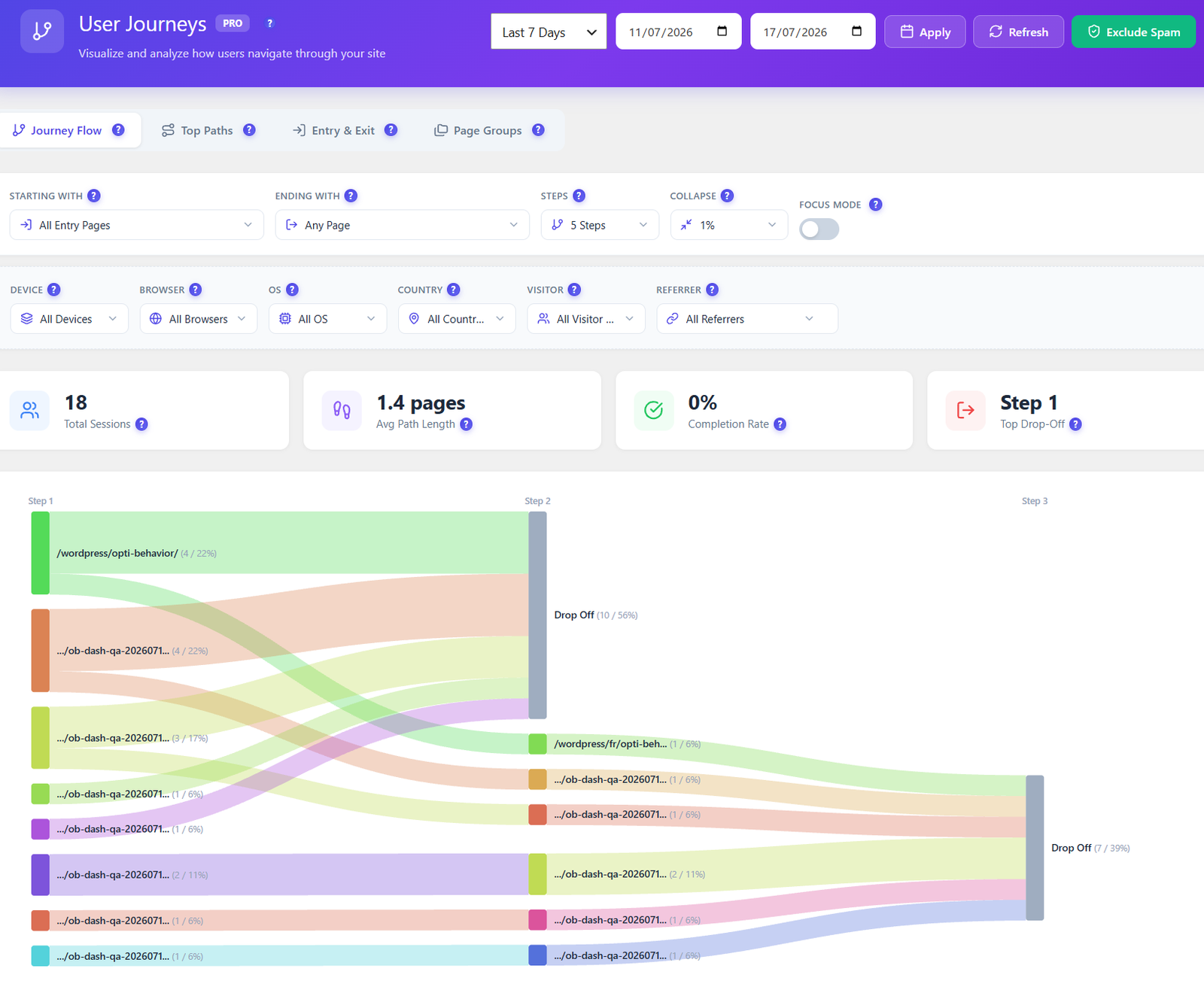
Opti-Behavior User Journeys Journey Flow tab with starting page, ending page, steps, collapse and focus mode controls, KPI cards and a Sankey diagram of visitor routes ending in Drop Off nodes

Journey flow PRO

See every route through your site.

The Journey Flow is an interactive Sankey diagram: the width of each band is the number of sessions, and every step shows where visitors go next — or where they drop off. Choose where journeys start and end, how many steps to show, and how small a node can be before it collapses.

  • Starting with, Ending with, Steps and Collapse controls, plus a Focus mode switch
  • Total sessions, average path length, completion rate and top drop-off on top
  • Drop Off nodes at each step, so the leak is a visible band

Fix itSet Ending with to your thank-you page and see who never gets there.
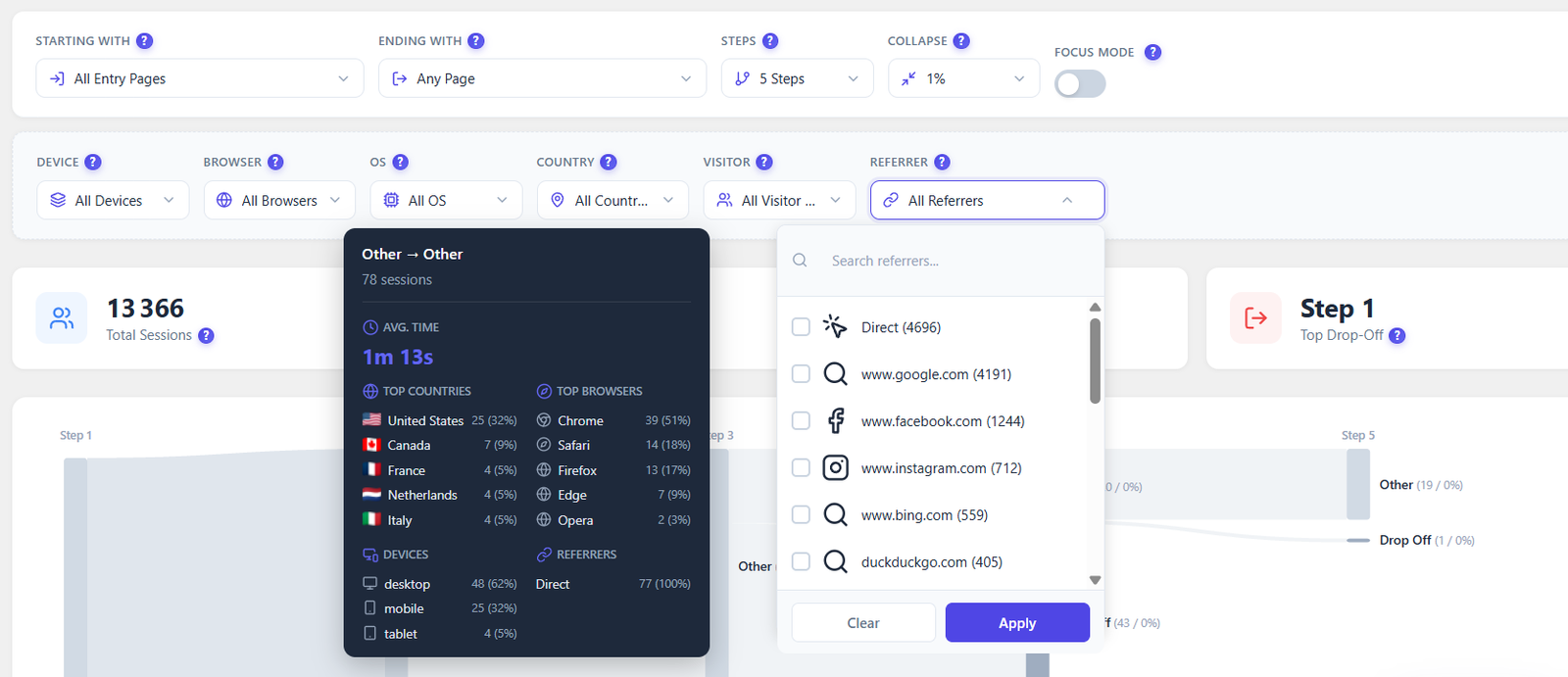
Opti-Behavior journey flow tooltip showing average time, top countries, top browsers, devices and referrers for one flow, next to a searchable referrer filter with visit counts

Flow details PRO

Hover a flow to meet the visitors in it.

Every band opens a card: how many sessions, the average time spent, and the top countries, browsers, devices and referrers of the people who took that route. A searchable referrer filter lists Direct, Google, Facebook and more, each with its visit count.

  • Average time and session count for the flow
  • Top countries, browsers, devices and referrers of that flow
  • Referrer filter with search and visit counts

Fix itOne route mostly mobile? Check whether that page works on a phone.

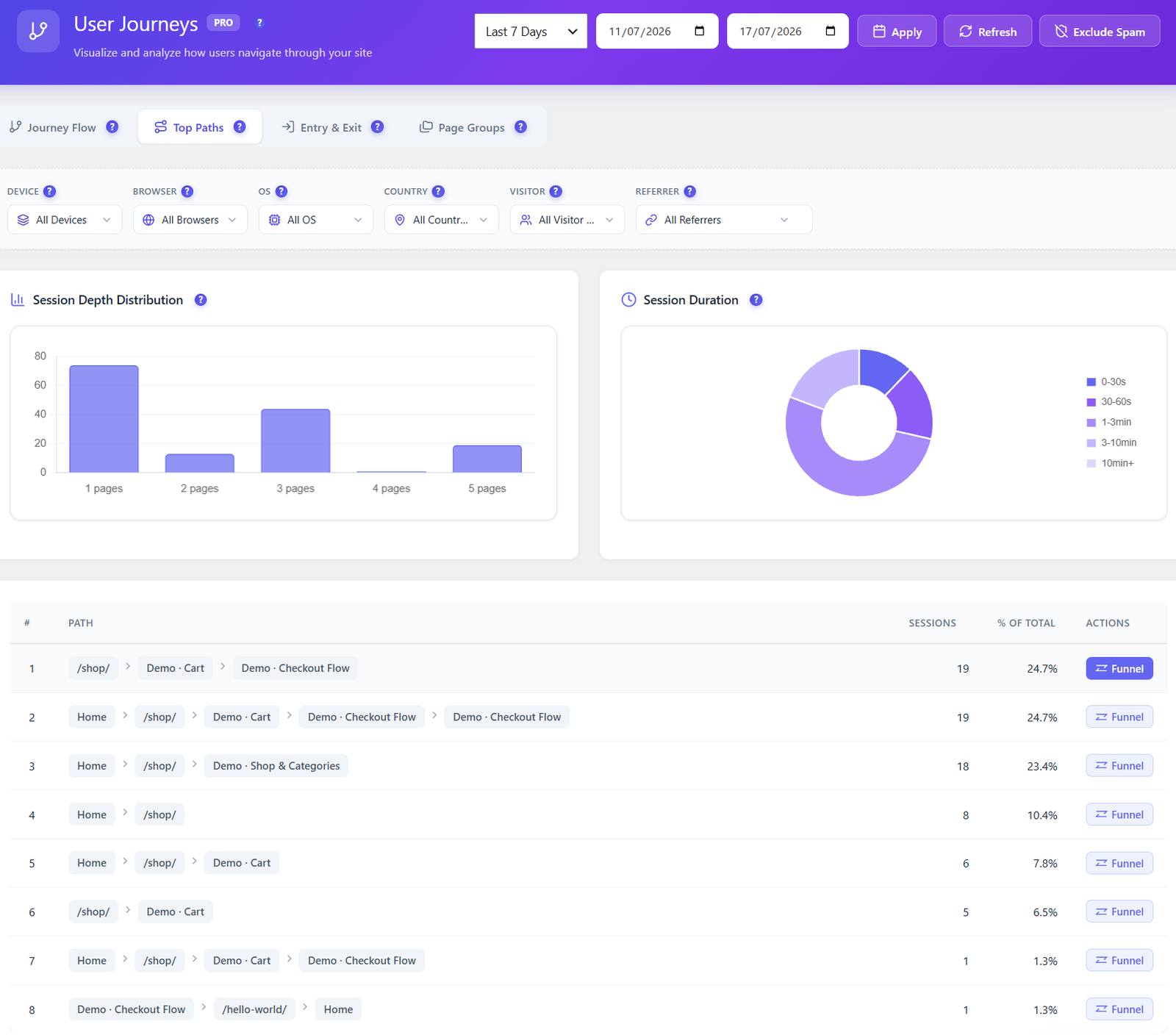
Opti-Behavior Top Paths tab with a session depth distribution chart, a session duration donut and a ranked table of paths with sessions, share of total and a Funnel button

Top paths PRO

The routes that really happen, ranked.

Top Paths lists the most-travelled routes with their sessions and share of total. Two charts sit above: how many pages a session lasts, and how long sessions run. Next to every route, a Funnel button turns it into a tracked funnel.

  • Routes ranked by sessions and % of total
  • Session depth distribution: 1 page, 2 pages, 3 pages and more
  • Session duration split from 0–30 s to 10 min and beyond

Fix itA top route ends before your goal page? Click Funnel and measure that gap.

Path to funnel PRO

Turn any path into a funnel, with its history.

A route you spot in Top Paths becomes a tracked funnel in one click, and Pro fills it with your stored session history straight away. You measure the drop-off of a path that already exists in your data, without waiting weeks for numbers.

  • One click from a route to a funnel
  • Stored sessions replayed into it, whole visits only
  • The funnel then follows the path in Funnels, with all its filters

Fix itConvert your top three routes and compare their drop-off side by side.

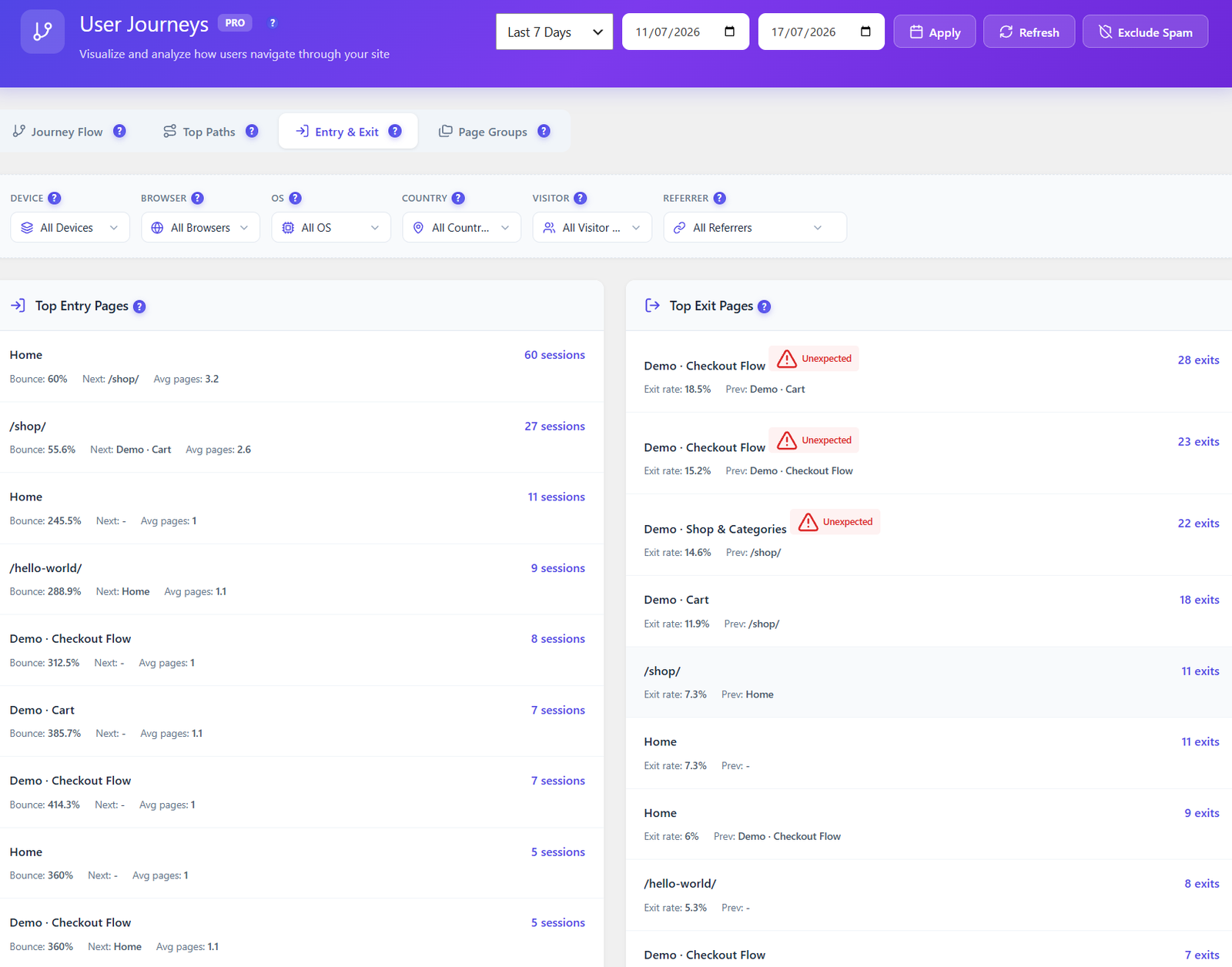
Opti-Behavior Entry and Exit tab with top entry pages showing sessions, bounce, next page and average pages, and top exit pages showing exits, exit rate, previous page and an Unexpected flag

Entry & exit PRO

Where they arrive, where they leave.

Top entry pages show sessions, bounce, the page people go to next and how many pages a visit lasts. Top exit pages show exits, exit rate and the page visitors came from — and an exit page whose rate is more than double the site average is flagged Unexpected.

  • Entry pages: sessions, bounce, next page, average pages
  • Exit pages: exits, exit rate and the previous page
  • Unexpected flag when the exit rate is over twice the site average

Fix itAn Unexpected exit on checkout? Open the page before it first.

Exit rule PRO

Exits that look normal, until they are not.

Every page loses some visitors. What matters is the page that loses far more than the rest. Opti-Behavior compares each exit page with the site average and flags the ones above double, so you do not have to scan a table for the odd one out.

  • Each exit page compared with the site average
  • Unexpected flag on pages above double that average
  • The previous page shown next to it, to locate the cause

Fix itWatch recordings of visitors who left from the flagged page.

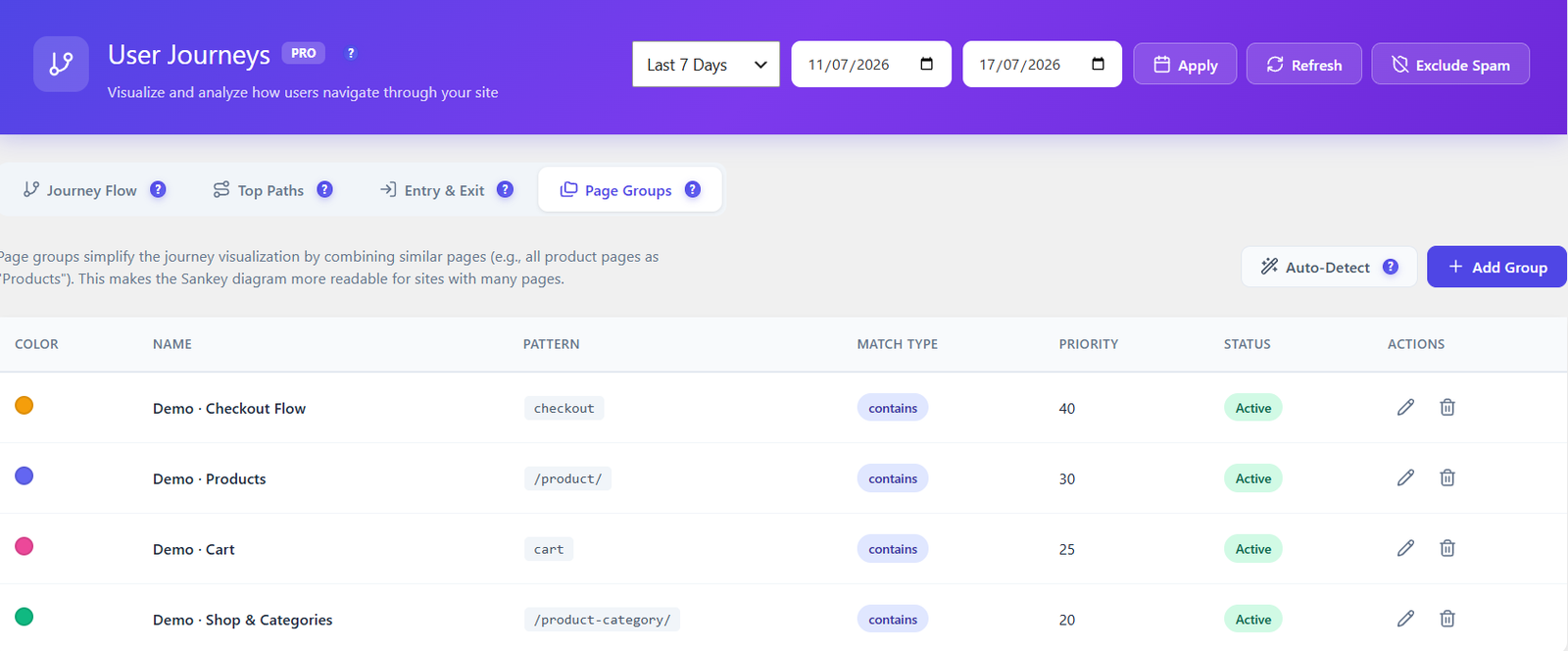
Opti-Behavior Page Groups tab listing named groups with a colour, a URL pattern, a match type, a priority and an Active status, with Auto-Detect and Add Group buttons

Page groups PRO

Fold hundreds of URLs into a readable map.

Page groups combine similar pages into one node, so all product pages read as “Products” in the flow. Each group has a colour, a URL pattern, a match type and a priority, and Auto-Detect proposes groups from your own site structure.

  • Name, colour, URL pattern, match type and priority for each group
  • Auto-Detect suggests groups from your site, Add Group creates your own
  • Active or paused per group, edit or delete any time

Fix itStore with thousands of products? One /product/ group and the flow becomes readable.

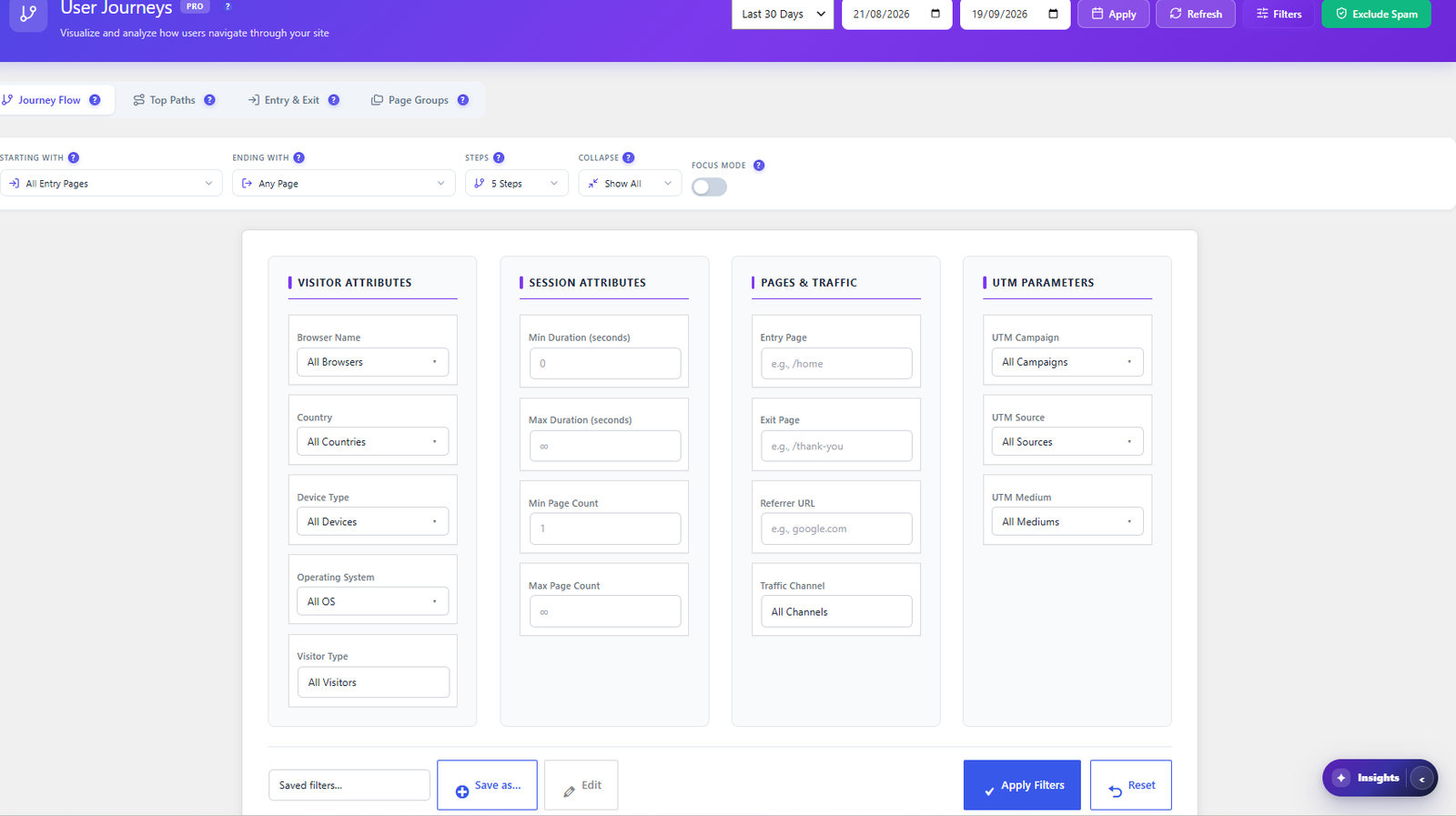
Opti-Behavior User Journeys advanced filter panel with visitor attributes, session attributes, pages and traffic, and UTM parameters, plus saved filters

Filters PRO

Compare journeys by audience.

Six quick filters sit above every view: device, browser, OS, country, visitor type and referrer. The Filters panel goes further, with session duration and page count, entry and exit page, referrer URL, traffic channel and UTM parameters — and saved filters you can reuse. Exclude Spam removes bot sessions.

  • Visitor: browser, country, device type, operating system, visitor type
  • Session: minimum and maximum duration and page count
  • Pages & traffic: entry page, exit page, referrer URL, traffic channel
  • UTM: campaign, source and medium
  • Saved filters and date range presets

Fix itCompare paid-campaign visitors with organic ones on the same flow.

Watch user journeys in action

A short tour of the journey screens inside a real WordPress admin.

How It Works

1

Nothing extra to install

User journeys read the page-by-page session data Opti-Behavior already collects, so there is no extra tracker to add and no extra load on your visitors.

2

Open the flow and set your question

Pick where journeys start, where they should end, how many steps to show and the audience filters. The Sankey redraws around your question.

3

Read the routes, entries and exits

Hover a band for who took it, check the top paths, and look for pages flagged Unexpected. Group similar URLs so the map stays readable.

4

Turn a path into a funnel and fix the leak

Click Funnel on a route, read its drop-off with history already filled in, and watch replays of the visitors who left.

Who Uses User Journeys?

Store Owners

See how shoppers move from categories to cart to checkout, and where they leave.

Marketers

Compare the routes of visitors from paid campaigns, search and social on the same map.

Content Teams

Find which articles lead to the pages that matter, and which ones are dead ends.

How Opti-Behavior user journeys compare

Few tools show routes rather than page lists. What decides it is flow depth, unexpected-exit detection and where the data lives.

Opti-Behavior vs
Opti-BehaviorHotjar · ContentsquareMicrosoft ClarityMatomo
Data stays on your server✓✗✗ Microsoft servers*✓
Native WordPress · no external account✓✗✗Partial · Matomo for WordPress
Interactive Sankey flow of routes✓ Pro✗✗Paid · premium feature
Top paths ranked by sessions✓ Pro✗✗✓
Entry & exit pages with bounce✓ Pro✗✗✓
Unexpected-exit detection✓ Pro✗✗✗
Page groups with auto-detect✓ Pro✗✗✓
One-click funnel from a path, with history✓ Pro✗✗✗
What the price covers✓ All 9 analytics modulesHeatmaps + replay · surveys from $99/mo extraHeatmaps + recordingsAnalytics + paid premium plugins
Price€0 – €89/yrwhole plugin, all 9 analytics modules$0 – from $49/mo$0*Free self-hosted · premium from €26/mo

* Clarity is free; Microsoft acts as an independent data controller and may use behavioral data for advertising, and collection is limited in the EU without consent. Hotjar merged into Contentsquare in July 2025: its column shows the Contentsquare Free and Growth plans. Matomo offers user flows in a paid premium feature. Competitor plans change often — updated from each vendor’s pricing page and documentation.

User journeys FAQ

What is a user journey?
The ordered list of pages one visitor sees in a session. User Journeys aggregates them across all sessions into flows, so you see the routes visitors take between pages, not just how many views each page got.
Do I need to add tracking for it?
No. It reads the page-by-page session data Opti-Behavior already collects, so there is no additional tracker and no extra load on your pages.
How does the Sankey diagram work?
The width of each band is the number of sessions. You choose where journeys start and end, how many steps to show, and how small a node can be before it collapses into Other. Focus mode lets you explore step by step. Hover a band to see its average time and top countries, browsers, devices and referrers.
What are Top Paths?
A ranking of the most-travelled routes with their sessions and share of the total, plus charts for session depth and session duration. Each route has a Funnel button.
What does the Unexpected flag mean?
An exit page is flagged Unexpected when its exit rate is more than double the average exit rate of the site. The previous page is shown next to it, so you can locate the cause.
What are page groups?
Rules that combine similar URLs into one node, for example every /product/ page as Products. Each group has a colour, a URL pattern, a match type and a priority, and Auto-Detect can propose groups from your site.
Can I turn a path into a funnel?
Yes. Click Funnel on any top path. In Pro the new funnel is filled with your stored session history straight away, using whole sessions only, so the numbers are real immediately.
Which filters are available?
Device, browser, OS, country, visitor type and referrer above every view, plus a Filters panel with session duration and page count, entry and exit page, referrer URL, traffic channel and UTM parameters. You can save filters and exclude spam sessions.
How is bounce calculated on the entry pages?
A bounce is a session that entered on that page and viewed no other page. The entry list also shows the most common next page and the average pages per visit.
Where is the data stored?
On your own WordPress server, in your own database. No external service is involved and nothing is shared with a third party, so you stay the sole data controller.

See the Routes Behind Your Numbers

Get Opti-Behavior Pro and see how visitors really move through your site, from first page to last. All data stays on your server — no third parties, no monthly fees.

No credit card · Cancel anytime

Explore
Drag