
Every day, millions of website visitors click “Reject All” on cookie consent banners. In 2026, cookie refusal rates hover between 35–45% across Europe — and they’re rising. Safari and Firefox have blocked third-party cookies for years. And while Chrome reversed its own deprecation plan in July 2024, it replaced it with a user-choice model that produces a similar outcome — a shrinking, consented pool of trackable users.
The result? If you’re still relying on cookie-based analytics, you’re flying blind on nearly half your audience. But there’s a better way: WordPress visitor tracking without cookies.
In this guide, you’ll learn what cookieless tracking is, why GDPR makes it not just optional but essential, and how Opti-Behavior gives you complete visitor analytics — zero cookies required.
Contents
See it running on a live site
A real WordPress dashboard with real traffic. No signup, no credit card, no email.
Open the live demo →Why Cookies Are Becoming a Liability
Traditional analytics tools — Google Analytics, Hotjar, Mixpanel — were built on cookies. A small file gets stored in the visitor’s browser, assigned a unique ID, and used to track that person across pages, sessions, and even websites.
That model is collapsing under three simultaneous pressures:
1. Browser-Level Blocking
- Safari (ITP): Intelligent Tracking Prevention has blocked third-party cookies since 2017 and limits first-party cookie lifetimes to 7 days (1 day for script-set cookies).
- Firefox (ETP): Enhanced Tracking Protection blocks known trackers by default in all browsing modes.
- Chrome: Google abandoned forced deprecation in July 2024 in favour of a user-choice prompt. Third-party cookies still exist, but Privacy Sandbox APIs continue to roll out alongside them and a growing share of users opt into restriction.
2. GDPR and Global Privacy Laws
Under GDPR (and its equivalents — CCPA, LGPD, PDPA), storing a tracking cookie requires explicit, informed, freely-given consent. This triggered the era of cookie consent banners. But consent banners create real problems:
- They damage UX and first impressions
- They can be rejected, leaving you with no data on those visitors
- Implementing them incorrectly still exposes you to fines (up to €20 million or 4% of global turnover)
- Even with consent, the data is incomplete — people forget they consented, switch devices, or use private browsing
3. The Consent Banner Rejection Problem
Studies from CookieYes and Cookiebot consistently show that 35–45% of European visitors reject all cookies. That means your analytics are structurally missing a huge — and potentially unrepresentative — segment of your audience.
The fix isn’t a better consent banner. The fix is no cookie tracking at all.
What Is Cookieless Tracking?
Cookieless tracking (also called no cookie analytics) refers to visitor measurement techniques that don’t rely on placing a persistent identifier in the user’s browser storage. Instead of assigning a unique cookie ID and reading it back on every visit, cookieless systems reconstruct visitor identity from server-side signals and session context.

The most privacy-respecting approach — the one used by Opti-Behavior — is session-based tracking:
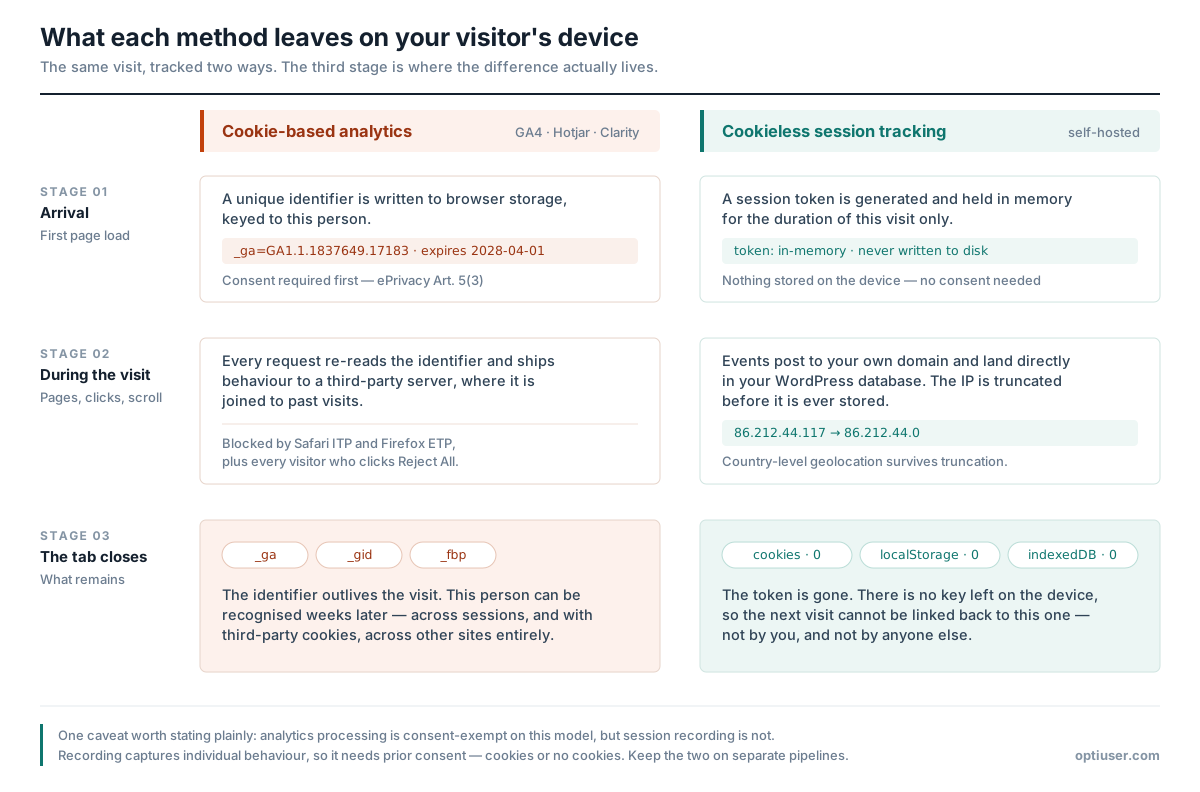
- A temporary session identifier is created when the visitor arrives
- It persists only in memory (or a short-lived session variable) for the duration of the visit
- When the visitor leaves or the browser closes, the session ID is gone — nothing is stored
- No cross-session profiling is possible, and no cross-site tracking occurs
This is fundamentally different from fingerprinting (which reconstructs identity from browser attributes and is actually more privacy-invasive than cookies, and likely illegal under GDPR).
Why Cookieless Analytics Is GDPR Compliant by Default
GDPR requires consent for activities that involve storing or accessing information on a user’s device (ePrivacy Directive, Article 5(3)). When you don’t store anything on the device at all, this requirement doesn’t apply in the same way.
With cookieless, session-based analytics:
- No personal data is stored on the visitor’s device
- No cross-session profiling — visitors cannot be identified across multiple visits
- No third-party data sharing — data stays on your server
- IP anonymization ensures no personally identifiable information is logged
This places cookieless analytics in the same category as basic web server logs — legitimate interest processing that doesn’t require a consent banner under most interpretations of GDPR. (Always verify with your legal counsel for your specific jurisdiction.)
The practical result: you measure every visitor who loads your pages, not just the 55–70% who click “Accept.”
What You Can Track Without Cookies
A common misconception is that cookieless analytics means sacrificing data. Not true. With a well-architected GDPR compliant analytics WordPress solution, you can track everything that matters:
Visitor & Session Metrics
- Unique visitors (estimated via session deduplication)
- Sessions — start time, duration, pages visited
- Bounce rate — single-page sessions
- Entry and exit pages
- Referrer source — organic, direct, social, referral
- Device type, browser, OS (from User-Agent, no fingerprinting)
- Country and region (from anonymized IP geolocation)
Engagement Metrics
- Scroll depth — how far visitors scroll on each page
- Click heatmaps — where visitors click, aggregated across sessions
- Outbound link clicks
- Page views per session
- Average time on page
Conversion Metrics
- Funnel step completion — track multi-step flows (checkout, signup, onboarding)
- Dropout rates — identify where visitors abandon your funnel
- Goal completions — page visits, button clicks, form submissions
What you genuinely can’t do with cookieless analytics (and shouldn’t do under GDPR anyway): cross-site retargeting, cross-device identity graphs, and long-term individual user profiling. Those are exactly the activities regulators target — and most site owners don’t need them.
How Opti-Behavior Tracks Visitors Without Any Cookies
Opti-Behavior was designed from day one as a cookie-free, privacy-first WordPress analytics plugin. Here’s exactly how its cookieless tracking engine works:
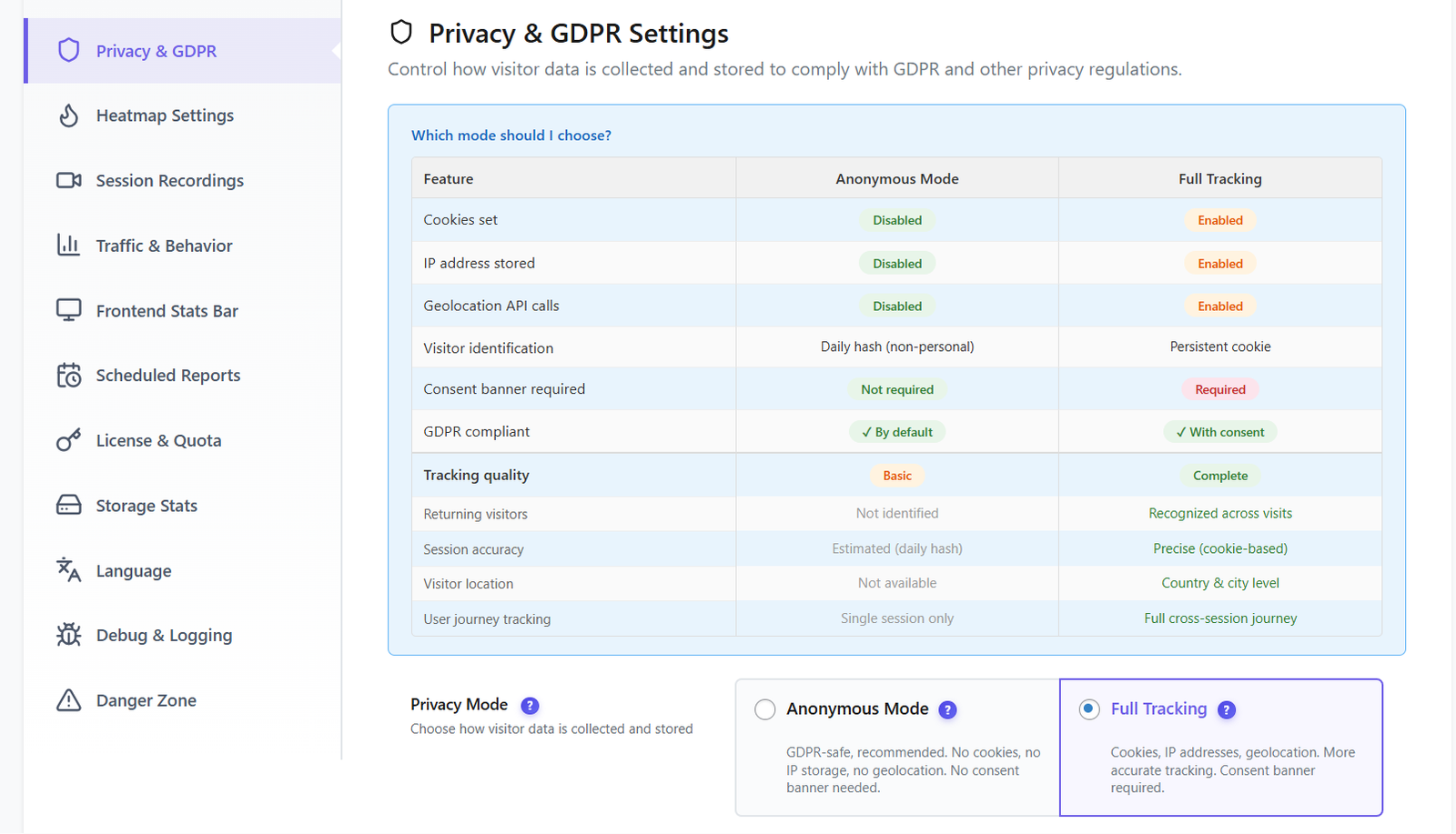
Session-Based Identification
When a visitor arrives on your site, Opti-Behavior generates a temporary session token. This token lives only for the duration of the browser session. It is:
- Not stored in a cookie — not accessible after the browser is closed
- Not stored in localStorage or IndexedDB — no persistent browser storage at all
- Not transmitted to third parties — stays exclusively on your server
Hybrid Storage Engine
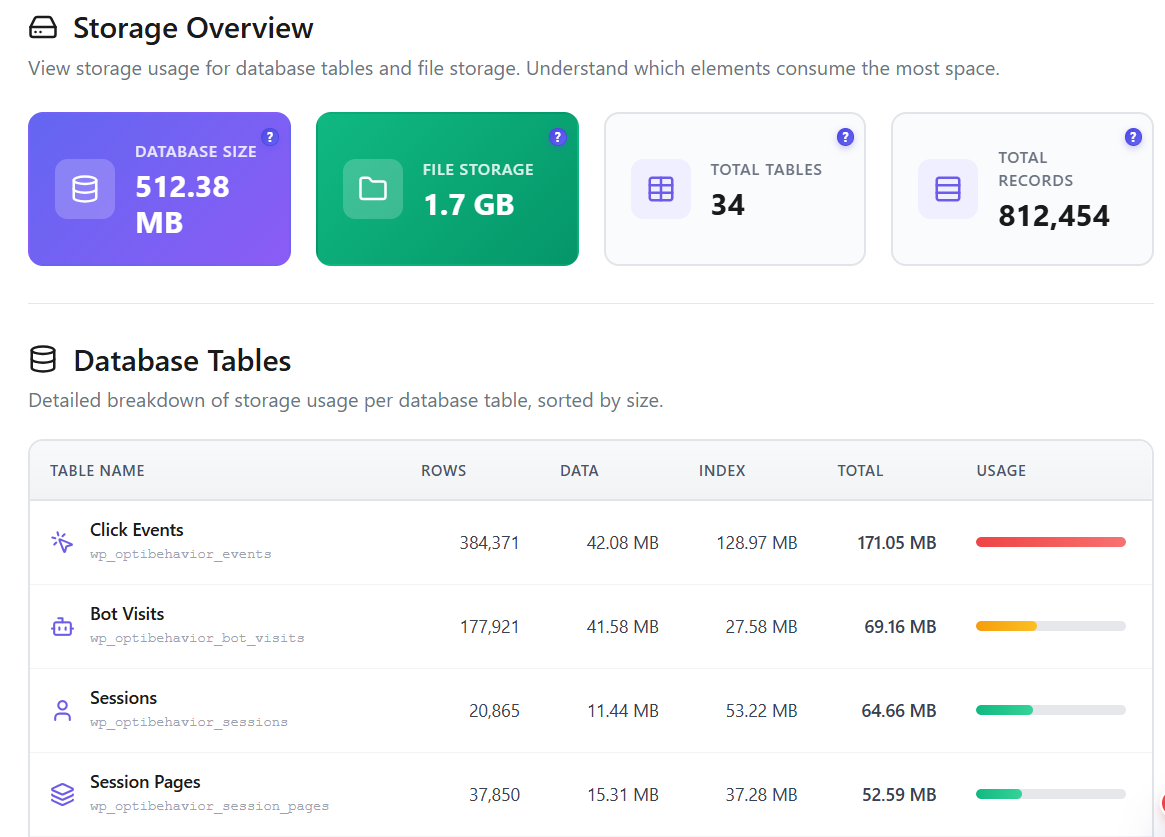
Opti-Behavior’s Hybrid Storage Engine writes all analytics data directly to your WordPress database. There is no external analytics server, no data pipeline to a cloud provider, no SaaS dashboard that stores your users’ behavior. Your visitors’ behavioural data never leaves your server. The one exception is optional country-level geolocation, which uses a third-party IP lookup — disable it in one click, or swap in a local MaxMind GeoLite2 database.
IP Anonymization Built In
Even IP addresses — which can constitute personal data under GDPR — are anonymized by default. The last octet of IPv4 addresses (and the last 80 bits of IPv6) are zeroed out before storage. You get geolocation data (country, region) without storing a personally identifiable IP.
Async Tracking Script (~15KB)
The tracking script is lightweight (~15KB) and loads asynchronously — meaning it never blocks page rendering. No performance penalty, no impact on Core Web Vitals, and far less likely to be blocked than third-party analytics, since it calls your own domain.
Bot Detection & Filtering
Search engine crawlers, known bots, and automated tools are detected and filtered automatically, keeping your analytics data clean without manual configuration.
Cookieless Tracking: Opti-Behavior vs Cookie-Dependent Alternatives
| Feature | Opti-Behavior | Google Analytics (GA4) | Hotjar | Microsoft Clarity |
|---|---|---|---|---|
| Cookie-free tracking | ✅ Native | ❌ Cookie-based | ❌ Cookie-based | ❌ Cookie-based |
| GDPR consent banner needed | ✅ No | ❌ Yes | ❌ Yes | ❌ Yes |
| Data stored on your server | ✅ Yes | ❌ Google servers | ❌ Hotjar servers | ❌ Microsoft servers |
| IP anonymization | ✅ Built-in | ⚠️ Optional | ⚠️ Partial | ⚠️ Partial |
| No consent gap | ✅ Yes | ❌ No (consent gap) | ❌ No | ❌ No |
| Free tier | ✅ Full free | ✅ Free | ✅ Free tier (limited) | ✅ Free |
See it running on a live site
A real WordPress dashboard with real traffic. No signup, no credit card, no email.
Open the live demo →The Self-Hosted Privacy Multiplier
When people discuss WordPress privacy analytics, they often stop at “no cookies.” But there’s a second, equally important dimension: where does the data go?
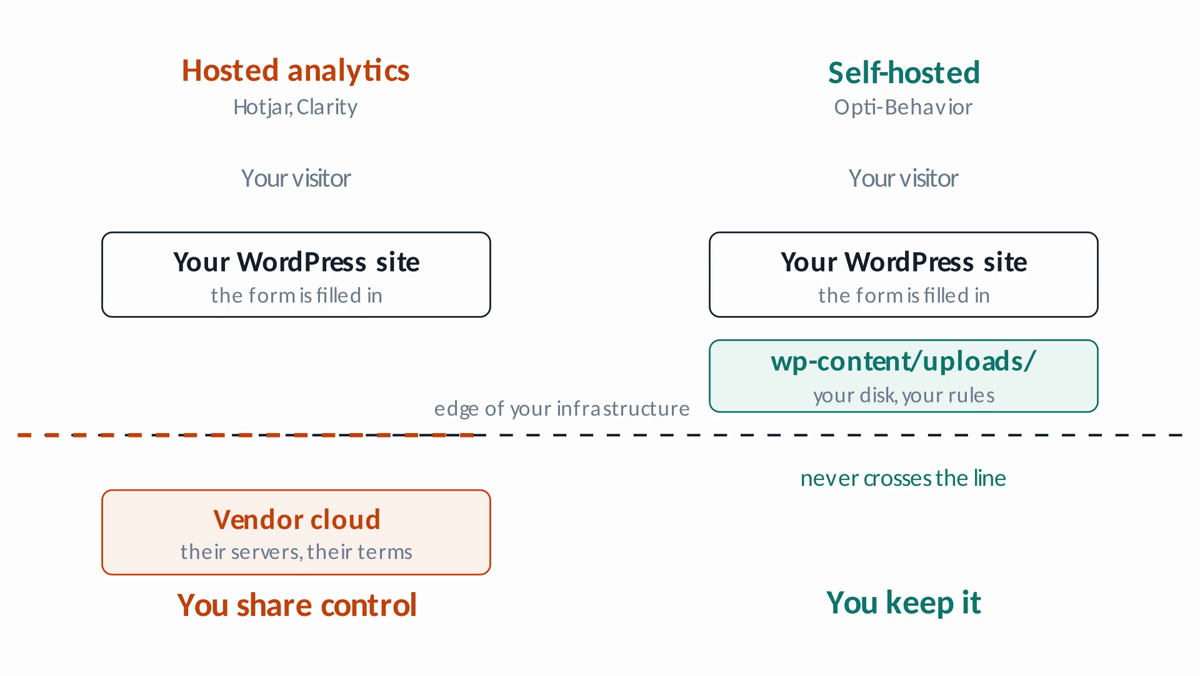
Even a cookie-free analytics tool can be a privacy problem if it sends behavioral data to an external server controlled by a third party. Microsoft Clarity, for example, doesn’t use persistent cross-site cookies — but it does send a detailed session replay stream to Microsoft’s servers, where it can be processed for AI training and other purposes.
Opti-Behavior eliminates this risk entirely with its self-hosted architecture:
- All data is stored in your WordPress database
- No data is transmitted to Opti-Behavior’s servers or any third party
- You own 100% of your analytics data at all times
- You can export all data to CSV at any time
- You can delete all tracking data at any time from the plugin settings
This self-hosted model means Opti-Behavior isn’t just cookieless — it’s fully private. Your visitor data never leaves your infrastructure.
What Opti-Behavior Measures (Free vs Pro)
A concern with cookieless analytics is “will I still get the insights I need?” With Opti-Behavior, the answer is yes — and then some.
Free Features (Cookieless, Always)
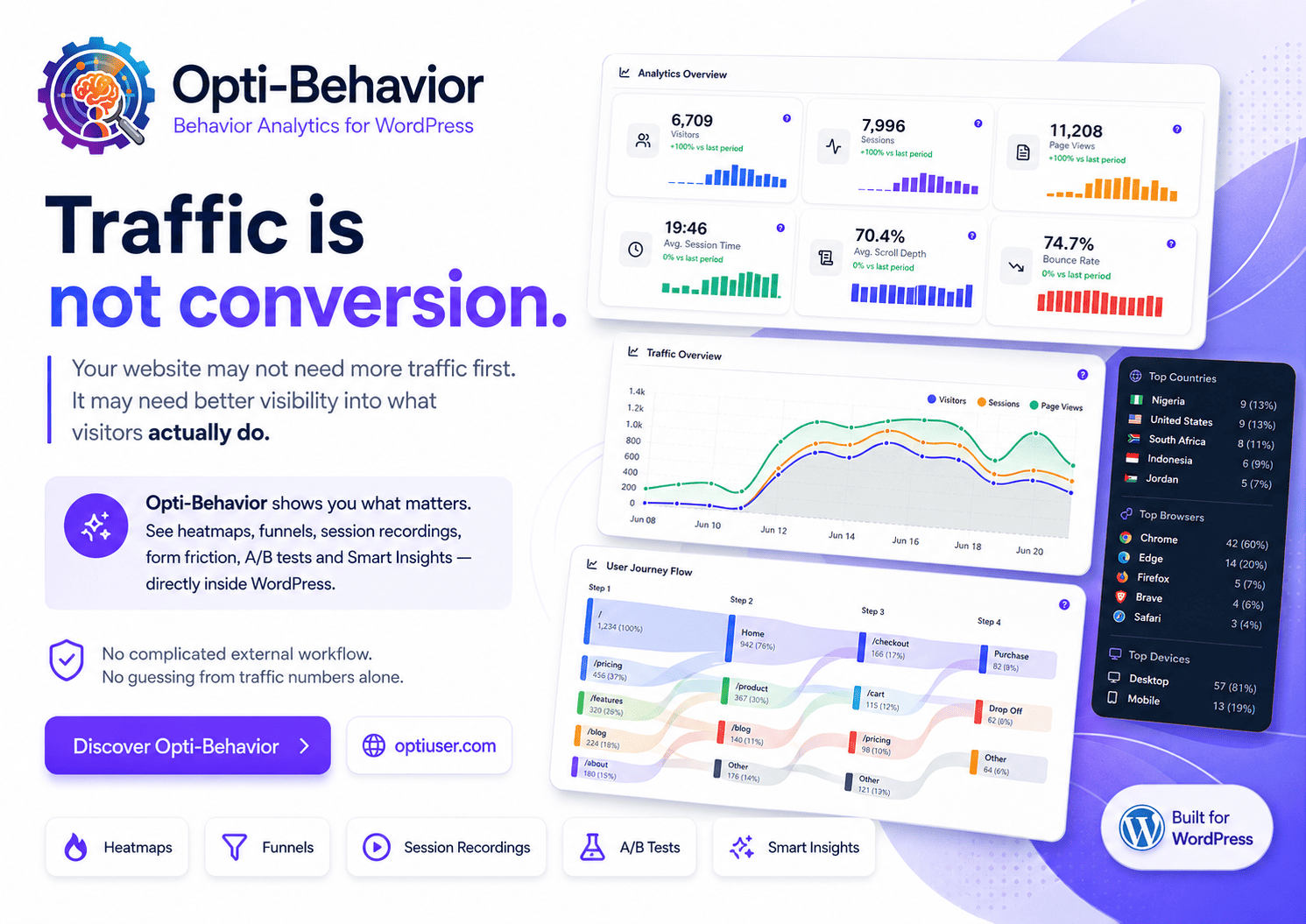
- Real-time analytics dashboard — visitors, sessions, page views, avg session time, scroll depth, bounce rate
- Visual click heatmaps — desktop and mobile, with scroll tracking
- Conversion funnels — multi-step, with device/country filtering and dropout visualization
- Session & visitor tracking — duration, pages, entry/exit, referrer, outbound clicks
- Bot detection & filtering
- Scheduled email reports (daily/weekly/monthly)
- AI-powered insights and user intent rules
- CSV data export
- Multilingual admin (EN, FR, DE, ES, PT, IT)
Pro Features (180-Day Free Trial, No Credit Card)
- Session recordings — unlimited, encrypted, with rage click and dead click detection
- Error tracking — JS errors, network errors, Core Web Vitals (LCP, FID, CLS, INP, FCP)
- Friction detection — rage clicks, dead clicks, friction heatmap overlay
- Broken link detection
- User journey analytics (Sankey diagram)
- Form analytics — field-level time, errors, refills, abandonment tracking
- Advanced heatmap filtering — country, browser, device, date range
All of this — on a zero-cookie foundation.
How to Set Up Cookieless Tracking on WordPress in 5 Minutes
Getting started with no cookie analytics on WordPress takes less than 5 minutes:
- Install Opti-Behavior: Go to WordPress Dashboard → Plugins → Add New. Search for “Opti Behavior” and click Install Now, then Activate.
- Navigate to the Analytics dashboard: Under your WordPress menu, find the Opti-Behavior section. The analytics dashboard activates immediately upon plugin activation — no API keys, no external accounts, no configuration required.
- Verify cookieless mode is active: Open your browser’s DevTools → Application tab → Cookies. You’ll see zero analytics cookies set by Opti-Behavior.
Live audit of the page you’re reading
- Remove your consent banner (optional but recommended): If you were previously running cookie-based analytics, and Opti-Behavior is now your only analytics tool, you may be able to remove or simplify your consent banner. Always confirm with your legal team based on what other tools you run.
- Watch real-time data populate: Visit a few pages on your site. Return to the Opti-Behavior dashboard and watch sessions, page views, and click data appear in real time.
Common Questions About Cookieless WordPress Analytics
Is cookieless tracking less accurate than cookie-based tracking?
In terms of coverage, cookieless tracking is actually more accurate — it measures visitors that cookie-based systems miss due to consent refusal or browser blocking. The trade-off is that distinguishing returning visitors from new visitors is harder without persistent IDs. For most site owners — who care about traffic trends, conversion rates, and UX behavior rather than individual user profiling — cookieless is superior.
Do I still need a cookie consent banner if I use Opti-Behavior?
For analytics only — pageviews, sessions, aggregated heatmaps — nothing is stored on the visitor’s device, so no banner is required for that processing. Session recording is different: it captures individual behaviour and requires prior consent under ePrivacy Article 5(3), cookies or not. Opti-Behavior keeps these on separate pipelines, so you can run analytics banner-free and gate recording behind consent. Audit every other plugin and script on your site before removing a banner entirely, and confirm with your legal counsel.
Does Opti-Behavior use browser fingerprinting?
No. Browser fingerprinting (combining screen resolution, fonts, plugins, and other attributes to create a unique ID) is explicitly not used by Opti-Behavior. Fingerprinting is potentially more privacy-invasive than cookies and is considered personal data processing under GDPR. Opti-Behavior uses only session-based tracking with server-side signals.
Will cookieless analytics work with WooCommerce and e-commerce funnels?
Yes. Opti-Behavior’s conversion funnel tracking works across any multi-step flow — including WooCommerce checkout — without cookies. You define funnel steps by URL pattern, and Opti-Behavior tracks session-level progression through the funnel.
Cookieless Tracking Is Not the Future — It’s the Present
The window to “wait and see” on cookieless analytics has closed. Between GDPR enforcement escalating, browser restrictions tightening, and consent refusal rates climbing, cookie-based analytics is delivering increasingly misleading data. Site owners relying on it are making decisions based on a distorted picture of reality.
Cookieless, self-hosted analytics isn’t a compliance workaround — it’s simply better data. When you measure all your visitors instead of 55–70% of them, you make better decisions. And when that data stays on your server, you own it completely.
Opti-Behavior is the only WordPress analytics plugin that delivers session recordings, heatmaps and funnels on a self-hosted, cookie-free foundation. And it’s free to start.
Start Tracking Every Visitor — No Cookies, No Consent Banner Required
Install Opti-Behavior free and get complete WordPress analytics that respects your visitors and complies with GDPR — out of the box, in under 5 minutes.
See it running on a live site
A real WordPress dashboard with real traffic. No signup, no credit card, no email.
Open the live demo →