
You’ve checked your analytics. Bounce rate: 68 %. Average session duration: 42 seconds. Conversions: flat. The numbers tell you something is wrong — but they won’t tell you what. That’s the gap a WordPress session recording plugin fills. It lets you watch exactly what real visitors do on your site: every mouse move, scroll, click, and rage-click — played back like a video.
Short answer: A WordPress session recording plugin replays real visits (clicks, scrolls, form use) so you can see why visitors leave. In Opti-Behavior, session recording is a Pro feature and the recordings are stored on your own WordPress server, not in a third-party cloud. The 5 setup steps are below.
This guide explains what session recording is, why it matters, what the cloud tools get wrong, and how Opti-Behavior Pro delivers unlimited, encrypted, self-hosted recordings that keep your visitors’ data off third-party servers.
What Is a WordPress Session Recording Plugin?
A session recording plugin — also called a session replay or visitor recording plugin — captures every interaction a visitor has with your site during a single browsing session. The recording engine serialises the live DOM state and all user events (cursor position, clicks, scrolls, key input, form interactions) into a compact stream that can be replayed later at any speed.
Unlike screenshots or heatmaps — which show you aggregate patterns — session recordings show you individual journeys. You can watch the exact moment a visitor tried to click a button that wasn’t clickable, got confused by a dropdown, or abandoned a checkout because a shipping cost appeared too late.
Session Recording vs Heatmaps: What’s the Difference?
- Heatmaps aggregate thousands of sessions into one visual layer — great for spotting patterns at scale.
- Session recordings let you watch individual sessions — great for understanding the why behind a pattern.
- Used together, they form a complete picture: heatmaps reveal the problem area, recordings reveal the root cause.
Why Session Recordings Are Essential for WordPress Sites
Every WordPress site — from a simple blog to a WooCommerce store — has conversion bottlenecks that standard analytics cannot surface. Here are the most impactful use cases for record user sessions WordPress tools:
1. UX Debugging Without Guesswork
Traditional UX research requires recruiting test participants, scheduling sessions, and moderating tests. Session recordings let you run continuous, passive usability testing on 100 % of real visitors. When a page redesign tanks conversions, you can watch 10 recordings and identify the problem in minutes — not weeks.
2. Conversion Optimisation
CRO teams use session replay WordPress tools to identify friction points in checkout flows, lead forms, and landing pages. Common discoveries:
- Visitors repeatedly clicking non-clickable images (expecting them to be links)
- Users scrolling past your CTA because it looks like a banner ad
- Mobile visitors unable to tap small buttons
- Confusing navigation menus causing rage-clicks
- Form fields that trigger validation errors on blur, frustrating users mid-flow
3. Bug Detection and Reproduction
When a user reports “the checkout button doesn’t work on my phone,” your developer needs to reproduce the bug. Session recordings give you the exact device, browser, viewport, and sequence of interactions — turning a vague bug report into a precise reproduction case. Pair this with JavaScript error tracking and you can see not just what the user did, but what error fired at the moment things broke.
4. Onboarding and Feature Adoption
For SaaS, membership sites, or learning management systems built on WordPress, session recordings reveal whether new users actually discover and use key features — or get lost before they ever get there.
5. Support Deflection
Support teams can watch recordings of sessions that ended in a support ticket submission. In most cases the recording reveals a UI problem that, once fixed, eliminates a whole class of tickets.
The Problem With Cloud-Based Session Recording Tools
The dominant visitor recording plugin and session replay market is dominated by cloud services — Hotjar, FullStory, and Microsoft Clarity. Each has serious drawbacks for WordPress site owners:
Hotjar: 35-Session Daily Cap on the Free Plan
Hotjar’s free plan caps recordings at just 35 sessions per day. For a site receiving 1,000 daily visitors, that’s a 3.5 % sample rate. You’ll miss the outlier sessions that contain the most valuable insights — the user who spent 12 minutes and still didn’t convert. Unlocking meaningful recording volume costs $32–$213+ per month depending on your traffic tier.
FullStory: Enterprise Pricing, Privacy Concerns
FullStory is powerful but priced for enterprise budgets. More importantly, all session data — including keystrokes and form interactions — is transmitted to and stored on FullStory’s servers. For sites handling GDPR-regulated data, this requires a DPA, cookie consent banners, and careful masking configuration. A single misconfiguration can result in sensitive data leaking to a US-based third party.
Microsoft Clarity: Free But Not Private
Microsoft Clarity is free and widely used, but its terms of service explicitly state that Microsoft may use your site’s data to improve its own products and services. Every session your visitors have is transmitted to Microsoft’s Azure infrastructure. For GDPR-regulated sites, this is a significant compliance risk — and your visitors’ behavioral data becomes Microsoft’s asset, not yours.
The Common Thread: Your Data Leaves Your Server
All cloud recording tools share one fundamental characteristic: visitor session data is sent to and stored on a third-party server. This creates:
- GDPR consent requirements (recordings can capture personal data)
- Data residency issues (servers may be outside the EU)
- Third-party data sharing risks
- Vendor lock-in (your historical recording data is stuck in their platform)
- Page load overhead from loading third-party scripts
Opti-Behavior Pro: Unlimited Self-Hosted Session Recordings for WordPress
Opti-Behavior Pro solves every one of these problems. It is a 100 % self-hosted WordPress session recording plugin: recordings are captured in the visitor’s browser, encrypted in transit, and stored directly in your WordPress database — never on any third-party server. You own the data, full stop.
Unlimited Recordings, No Daily Cap
There is no session cap. Opti-Behavior Pro records every single visitor session — or you can configure a sampling rate to manage storage. Whether your site has 100 or 100,000 daily visitors, the recording engine never throttles. Every session is available for replay.
Encrypted Storage
Session recordings are encrypted at rest in your WordPress database. Even if someone gained access to your database backup, the raw recording data would be unreadable without the decryption key. This is a security standard that most cloud tools don’t even offer for recordings stored on their own servers.
Rage Click and Dead Click Detection
Opti-Behavior Pro automatically detects and flags two critical friction signals in every recording:
- Rage clicks: A visitor clicks the same element 3+ times in rapid succession — a strong signal of frustration, usually triggered by an element that looks interactive but isn’t responding.
- Dead clicks: A visitor clicks on an area of the page where there is no interactive element — usually caused by poor visual design where static content looks clickable.
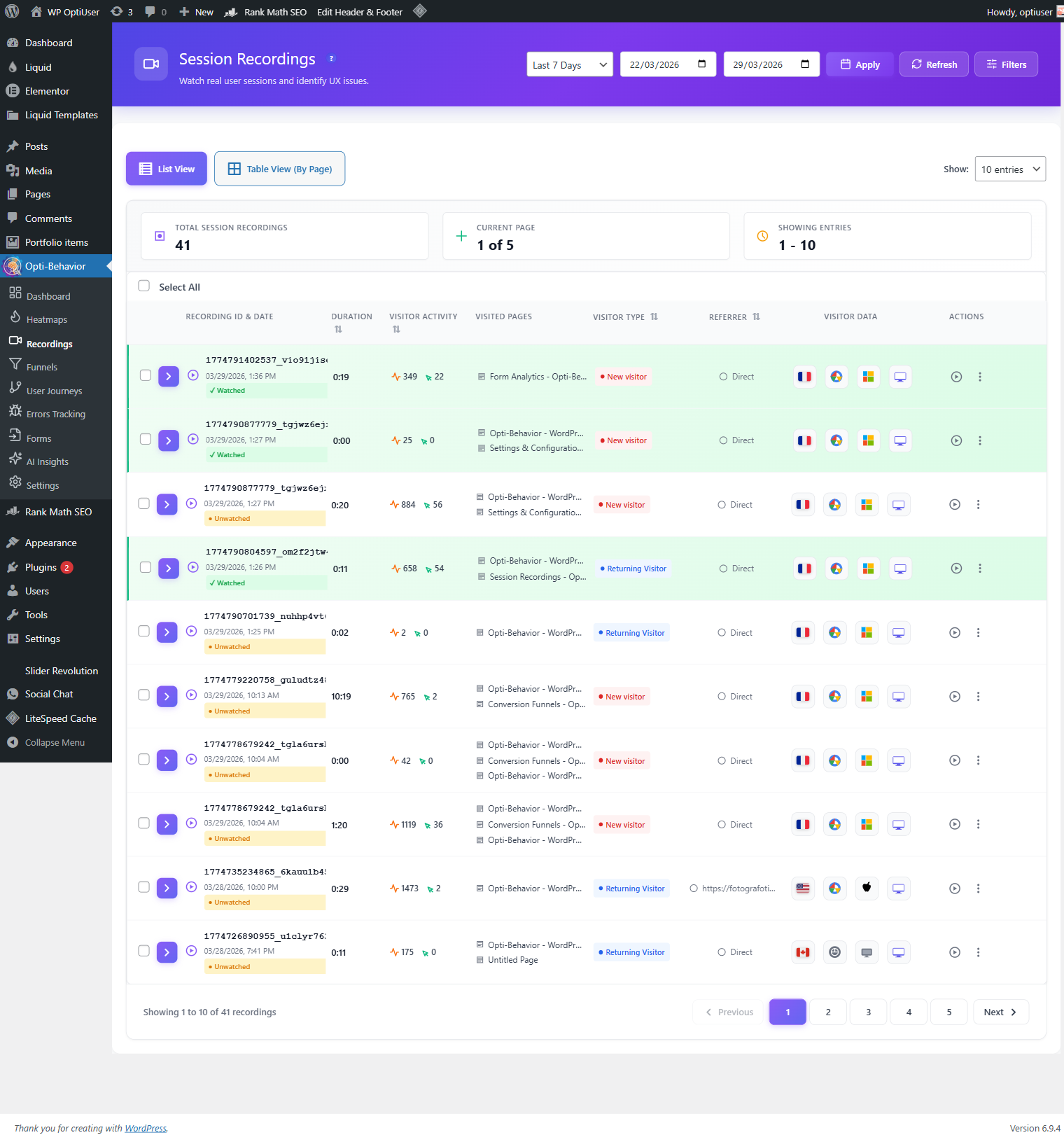
Flagged sessions are surfaced in the dashboard so you can immediately watch the most problematic recordings without manually reviewing hours of footage.
Skip Idle Mode
Real sessions contain dead time — a visitor stepped away from their desk, was interrupted by a phone call, or left a tab open in the background. Opti-Behavior Pro’s skip idle feature automatically compresses periods of inactivity during replay, so a 15-minute session with 8 minutes of idle time plays back in 7 minutes of actual interaction. You get the full signal without the noise.
Playback Controls
The recording player includes:
- Variable speed playback (0.5×, 1×, 1.5×, 2×, 3×)
- Timeline scrubbing to jump to any point in the session
- Event markers on the timeline (clicks, scrolls, rage clicks)
- Device and browser metadata (OS, viewport size, browser version)
- Session metadata (entry page, referrer, session duration, pages visited)
The Technical Architecture: How rrweb Powers Opti-Behavior Recordings
Opti-Behavior Pro’s recording engine is built on rrweb — the open-source DOM serialisation and replay library that also powers Sentry’s session replay and PostHog’s recording feature. rrweb (short for “record and replay the web”) works by:
- Full snapshot: When a session starts, rrweb takes a serialised snapshot of the complete DOM tree.
- Incremental mutations: Rather than re-snapshotting on every change, rrweb captures only DOM mutations (MutationObserver), pointer events, scroll events, and input events as lightweight delta objects.
- Batched transmission: Events are batched and sent asynchronously to your WordPress server at configurable intervals — minimising any impact on page performance.
- Faithful replay: The replay engine reconstructs the exact DOM state at any point in time by replaying the initial snapshot plus all subsequent mutations — producing a pixel-perfect recreation of what the visitor saw.
Because rrweb captures the DOM rather than a video stream, the recordings are extremely compact — a typical 5-minute session compresses to 50–200 KB, compared to the megabytes a screen video would require. This makes self-hosting recordings at scale genuinely practical on standard WordPress hosting.
Privacy and GDPR Compliance
Session recordings raise legitimate privacy questions because they can capture sensitive user interactions. Opti-Behavior Pro addresses this at multiple levels:
- No third-party data transfer: All recording data stays on your server — never transmitted to Opti-Behavior or any third party.
- Input masking: Password fields are automatically masked. You can configure additional CSS selectors to mask sensitive form fields.
- IP anonymisation: Visitor IP addresses are anonymised before storage — the same approach used by the free version for heatmap and analytics data.
- No cookies: The recording engine — like the rest of Opti-Behavior — uses no cookies for session identification.
- Data retention controls: Set automatic expiry for recording data so your database doesn’t grow indefinitely.
Since data never leaves your server, no outside analytics vendor receives your session recording data.
How to Get Started with Session Recording on WordPress
Getting rrweb WordPress-powered session recording running takes less than 10 minutes:
- Install the free plugin: Search for “Opti-Behavior” in your WordPress plugin directory, or download it from wordpress.org/plugins/opti-behavior/. Install and activate.
- Activate the Pro licence: Session recording is a Pro feature. Navigate to Opti-Behavior → Settings → Licence and enter your licence key. You can start a 6-month free trial with no credit card required.
- Enable recordings: Go to Opti-Behavior → Settings → Recordings and toggle recording on. Configure sampling rate if desired (default: 100 %).
- Watch your first recordings: Navigate to Opti-Behavior → Recordings. Within minutes of enabling, real visitor sessions will appear in the list — sorted by recency, filterable by device, rage clicks, and session duration.
- Filter for friction: Use the “Rage Clicks” filter to surface the sessions where visitors showed the most frustration. These are typically the highest-value recordings to review first.
Opti-Behavior Free vs Pro: What Do You Get?
Opti-Behavior’s free plugin — available on WordPress.org — already includes a real-time analytics dashboard, click heatmaps, conversion funnels, bot filtering, and scheduled email reports. The Pro upgrade unlocks the full behavioural intelligence layer:
- Unlimited session recordings with rage/dead click detection and skip-idle playback
- JavaScript error tracking and network error monitoring
- Core Web Vitals monitoring (LCP, CLS, INP, FID, FCP) — per session
- Friction detection heatmap overlay combining rage and dead clicks visually
- User journey analytics (Sankey diagram of navigation flows)
- Form analytics (field-level time, error rate, refill rate, abandonment)
- Advanced heatmap filtering by country, browser, device, and date range
- Broken link detection
- Priority support
Final Thoughts: Stop Guessing, Start Watching
Every website has invisible problems — navigation confusion, broken flows, frustrating interactions — that never appear in aggregate analytics. The only way to find them is to watch real people use your site. A WordPress session recording plugin makes that possible at scale, automatically, without recruiting test participants or running expensive UX research.
The difference with Opti-Behavior Pro is that you get unlimited recordings, stored entirely on your own server, with no data sent to third parties — and a 6-month free trial that requires no credit card. There’s no reason to cap your insight at 35 sessions a day or hand your visitors’ behavioral data to Microsoft.
Stop guessing why visitors leave. Start watching what they actually do.
Session recording without sending data to the US
Many session recording tools send every visit to a cloud in another country, often the United States. For European sites, that raises questions: who else can use the data, and on what legal basis is it transferred?
With a self-hosted plugin, those questions mostly disappear, because the recordings never leave your server. Here is how Opti-Behavior Pro handles recordings:
| Protection | How it works |
|---|---|
| Storage | Recording files are stored on your own WordPress server |
| Masked inputs | Everything typed in fields is replaced by stars (on by default), password fields always |
| Encryption | Recordings are stored encrypted, and replaying them needs an active Pro licence |
| Consent | In Full Tracking, recording starts only after the visitor accepts |
| Retention | Files expire after 90 days by default |
| Access | Only users who can manage Opti-Behavior can watch them |
What a masked recording looks like: fields show stars instead of text. You still see which field was focused, how long the visitor stayed and whether an error appeared. That is enough to fix a form, without reading any personal data.
Good practices: keep "mask all inputs" on, mention recordings in your privacy policy, shorten retention if you do not need 90 days, and add the cookie preferences shortcode so visitors can withdraw consent. If a visitor withdraws, recording stops and identifiers are removed.