Skip links
iconOpti-Behavior
made by OptiUser

Reports for WordPress FREE PRO

A website analytics report that says what to fix first

One page with the costliest problems of your site, ready to print or send.

A website analytics report usually lists visits and bounce rates, and leaves you to guess the rest. Opti-Behavior reads your shop counters, funnels, heatmaps, recordings, forms and errors inside WordPress. Smart Insights ranks what costs the most, and the report tells you what to fix first, page by page.

Short site report and scheduled e-mail free on WordPress.org · Full site report and Page X-Ray report in Pro

← Back to overview

3

most costly issues of the period, next to the key figures. Free short site report.

Do this

Open Issues: they are ranked by what they cost.

1

problem to fix first: nobody clicks the goal of the cart page.

Do this

Start with #1, then the next one.

3

actions, each with a button that opens the right report.

Do this

Save the page report as a PDF with your browser’s print.

Built from your modules
  • Smart Insights
  • Heatmaps
  • Funnels
  • Forms
  • Errors
  • Shop
  • Recordings · Pro
Example data
wp mark white
5.0 Rated on WordPress.org
1,700+ active installsSites running Opti-Behavior today
Built from your own dataProblems found, then what to fix
Self-hosted: recordings and analytics are stored on your own server.Native WordPress · no cookies required
3
Costliest problems
In the short site report, with the traffic · Free
1
Card per page
In the full site report · Pro
3
E-mail rhythms
Daily, weekly or monthly · Free
PDF
By your browser’s print
Print it, or save it to send or keep

A report you can act on, or send to your client.

Charts pile up, but a site owner or a client needs a short list of problems and next steps.

The problem

Too much data, no priorities

Ten dashboards and no clear answer to “what do I fix this week?”

With Opti-BehaviorThe report Summary (Free) puts traffic first, then the three most costly problems found on the site.

The problem

Dashboards nobody opens

If you have to log in to see the numbers, you stop looking after a week.

With Opti-BehaviorA scheduled e-mail sends the key figures daily, weekly or monthly, with no login needed.

The problem

Proving the work to a client

Clients ask “what changed?” and screenshots of charts do not answer that.

With Opti-BehaviorA printable site report (Free, PDF from the browser) covers traffic, shop, clicks and journeys, plus A/B tests when you have data.

The problem

One page needs a closer look

A key landing page underperforms, and a site-wide summary is too broad to explain why.

With Opti-BehaviorA Page X-Ray report (Pro) zooms in on one page: what blocks visitors there and what to change.

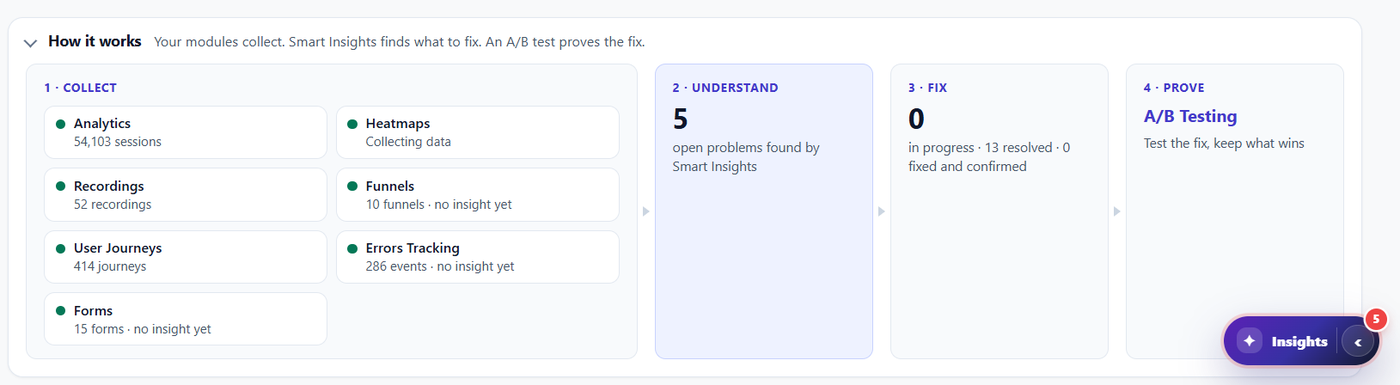
How it works: collect, understand, fix, prove
Free: modules collect, Smart Insights analyses, the report says what to fix. Example data.

Reports FREE PRO

A clear report: the problems found on your site, and what to do

Heatmaps, recordings, funnels, forms and errors each tell one part. The report puts them together: what is wrong, where, what it costs, and what to do first.

  • Site report: short (Free), full (Pro)
  • One-page report: Page X-Ray (Pro)
  • Print or save as PDF from your browser

Check this

Could you list today, in order, the 3 problems that cost your site the most? If not, that is what the report is for.
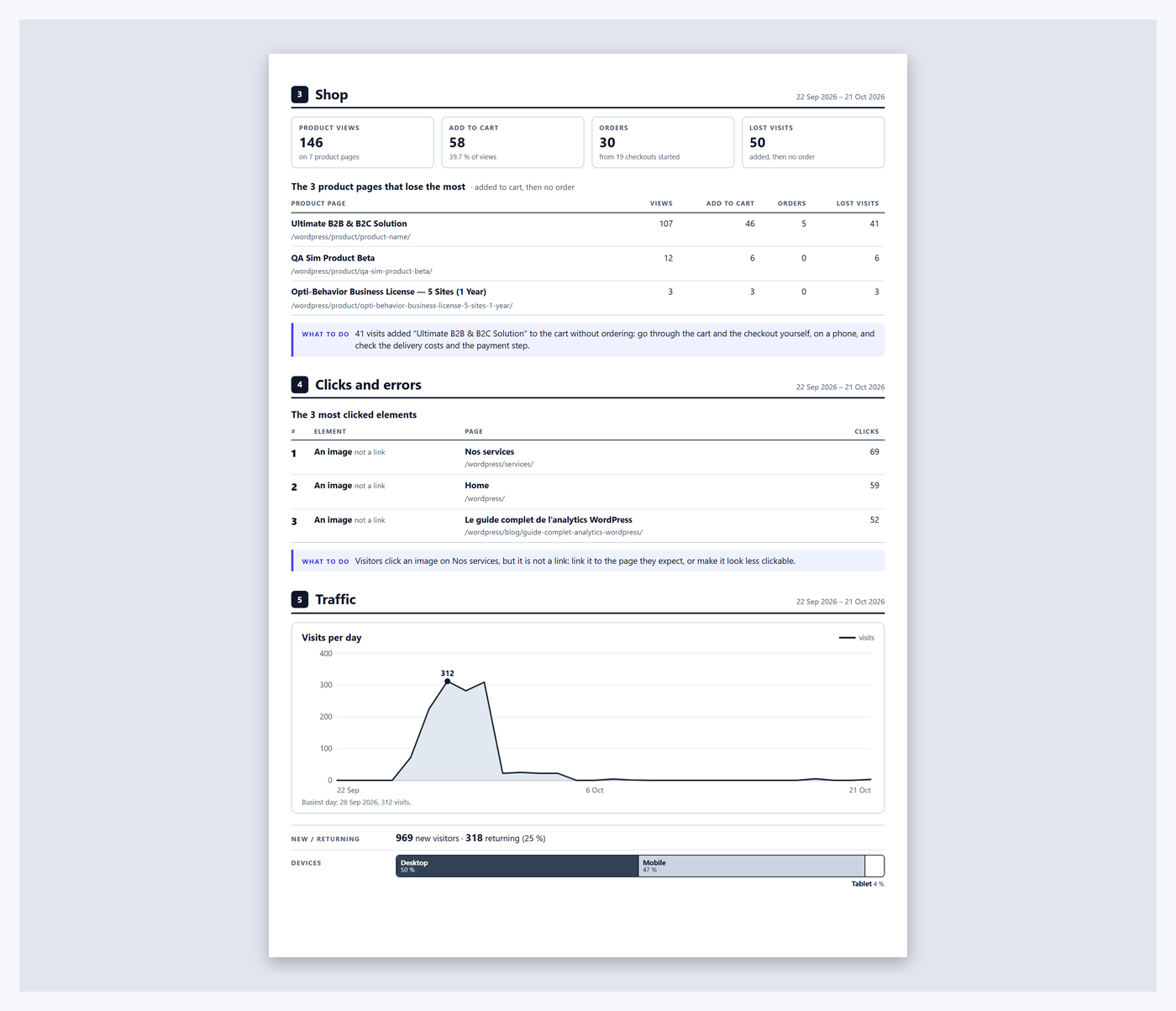
Short site report, page 2: the report sections that have data on the site
Free: Summary + every section that has data. Example data.

Site report · short FREE

The short site report, free

The Free report gives the Summary and every section that has data on your site. No empty pages.

  • Summary first
  • Only sections with data
  • Free

Check this

Read the Summary only. Do you know what to fix this week?

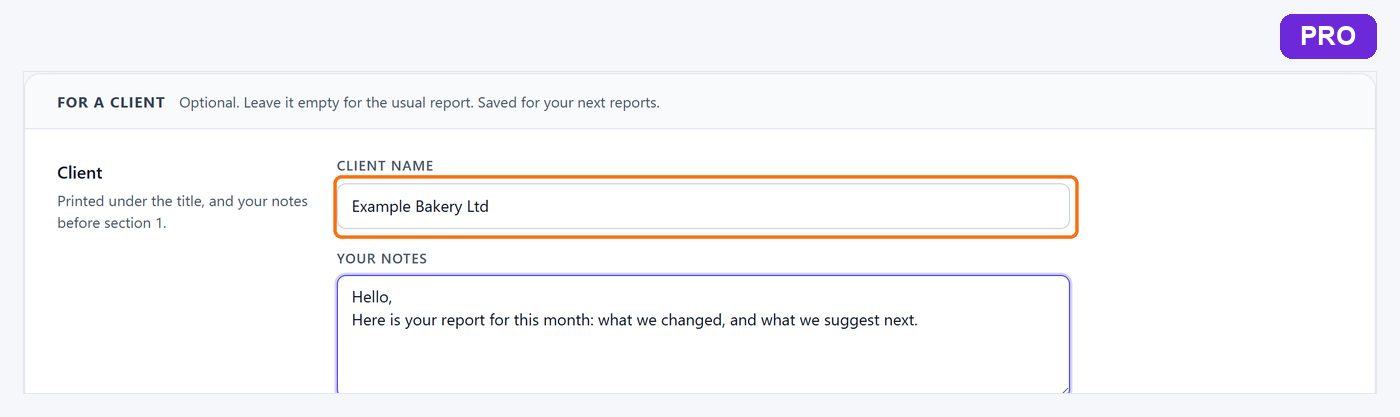
Full site report, Pro: the client name under the report titlePRO
Pro: your client’s name under the title of the full site report. Example data.

Site report · full PRO

The full site report, with your client’s name

The full version adds the name of the client on the report.

  • Client name on the report (Pro)

Check this

Who reads your report? If it is a client, check that their name is on it before you send it.

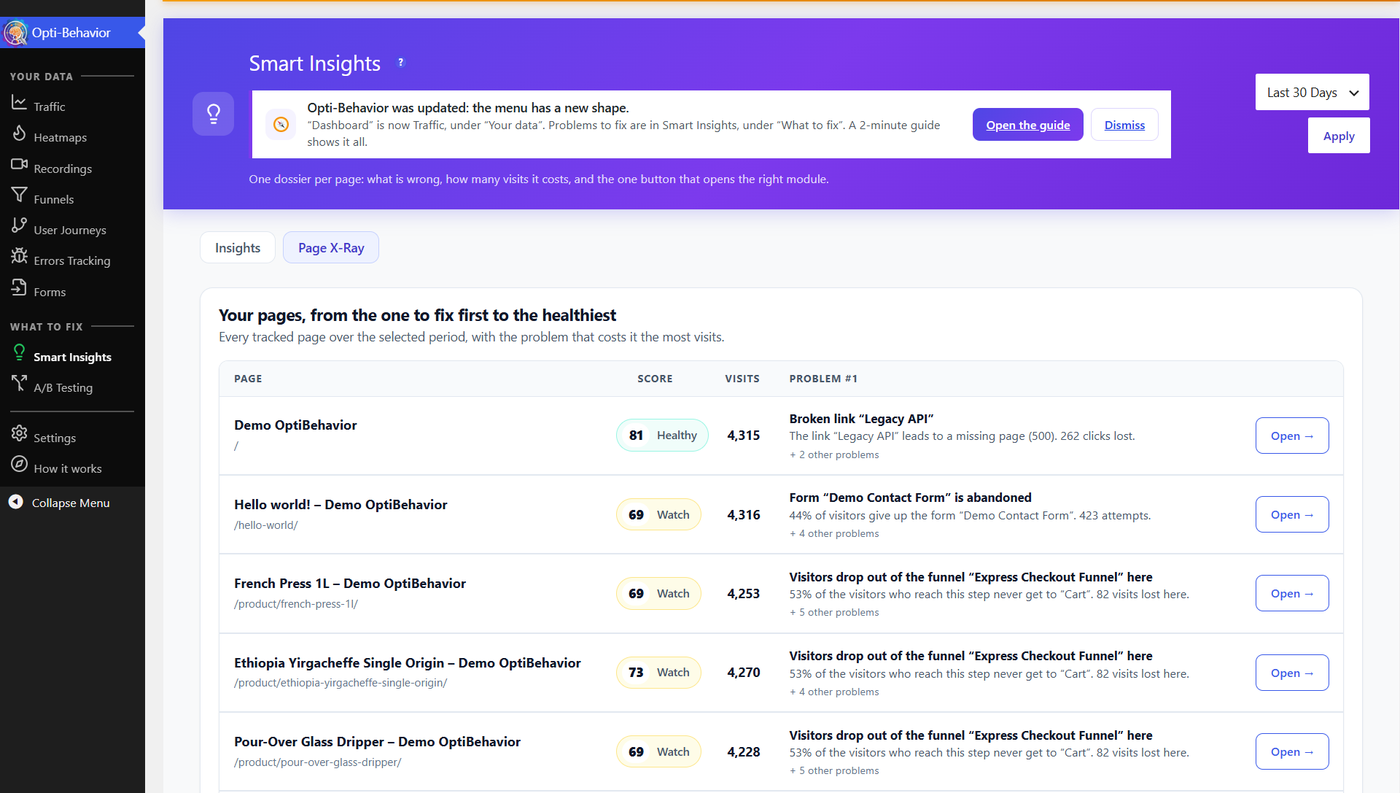
Page X-Ray: pages ranked from the one to fix first to the healthiestPRO
Pro: pages ranked from the one to fix first. Demo store data.

Page X-Ray PRO

One page, one score, one list of fixes

Page X-Ray gives each page a health score and ranks your pages from the one to fix first.

  • Health score per page
  • Ranked list

Check this

Your page with the most visits: is it also your healthiest? Often it is not.

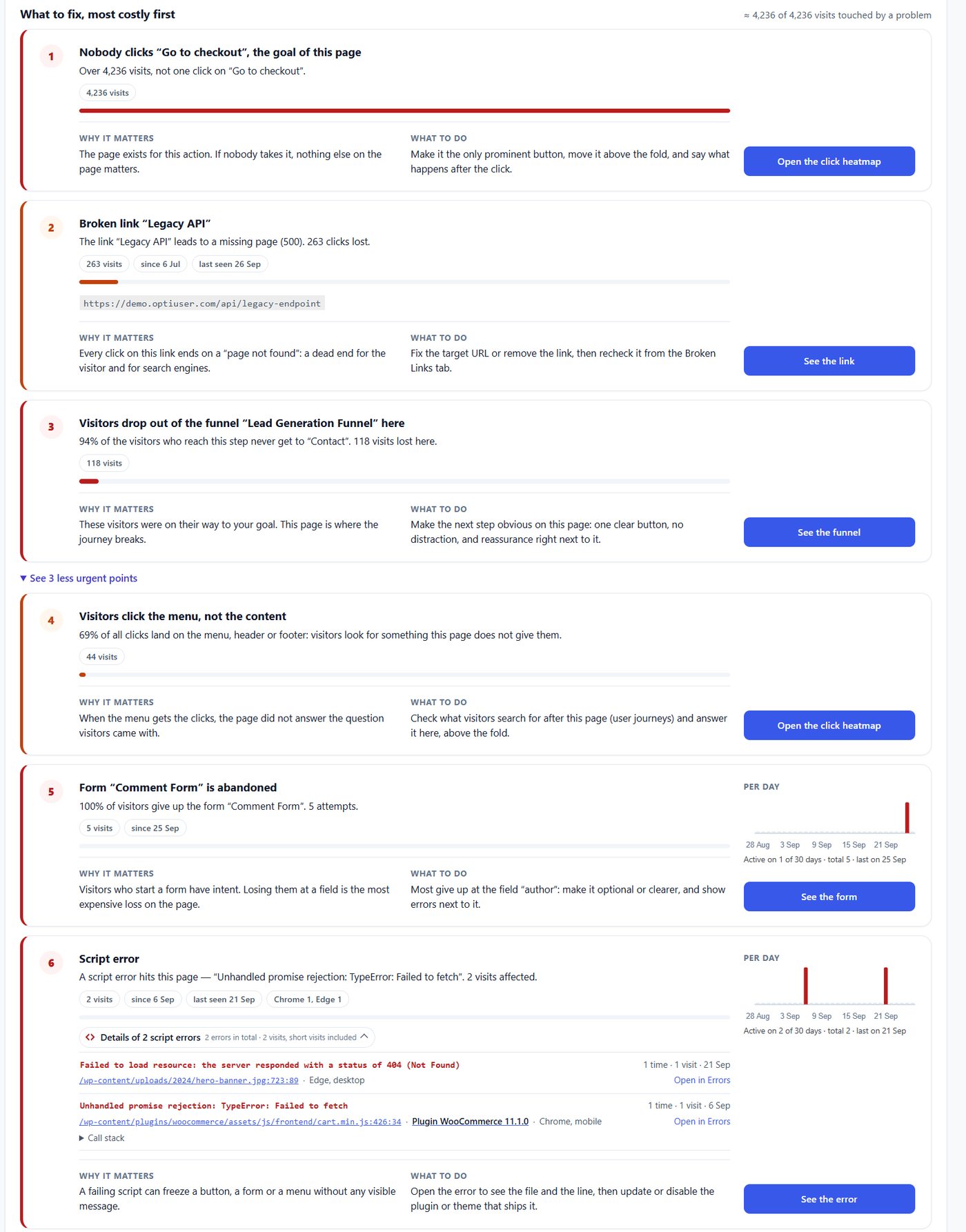
What to fix, most costly first: problems with why it matters and what to doPRO
Pro: each problem, why it matters, what to do. Demo store data.

What to fix PRO

Most costly problem first

A goal button never clicked, a broken link, a funnel step that loses people, an abandoned form, a script error. Each one comes with why it matters and what to do.

Check this

Open your main button’s page on a phone. Is the button visible without scrolling?

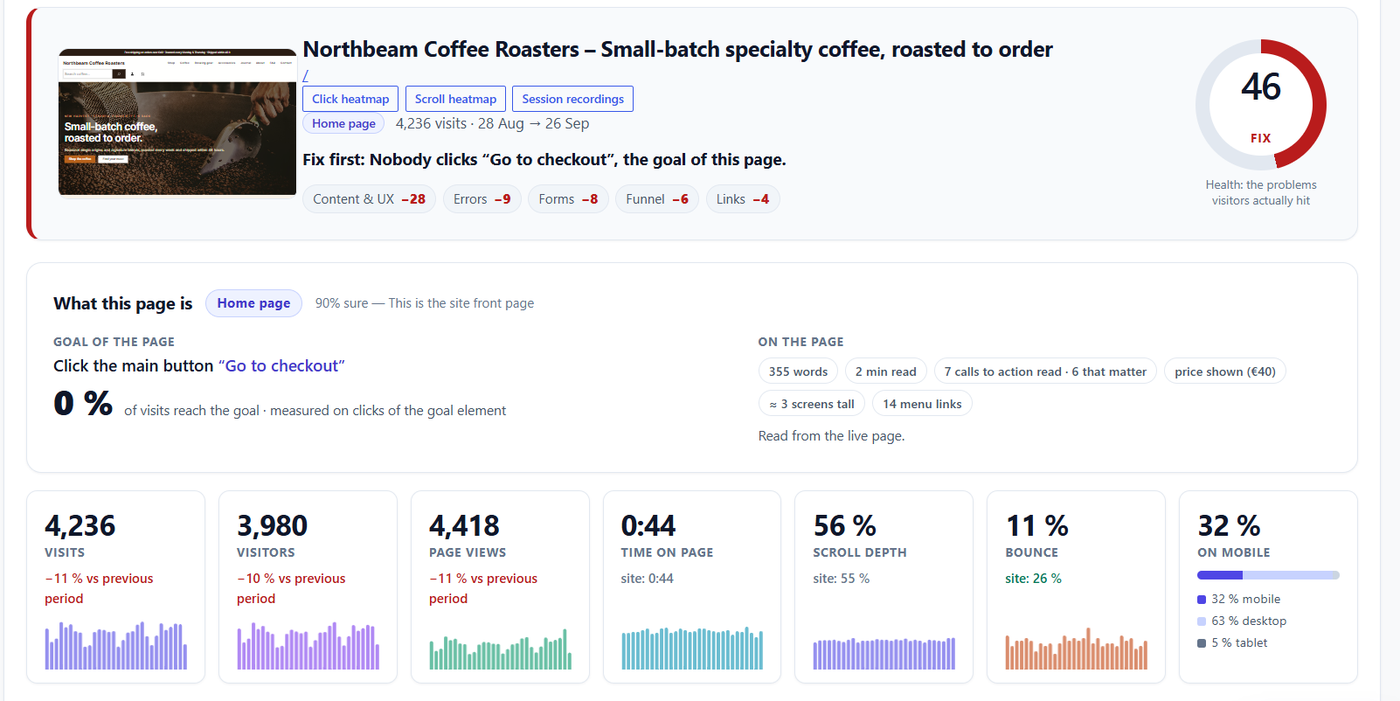
Page X-Ray header: health score, page goal and share of visitors reaching itPRO
Pro: the page’s goal and the share of visitors who reach it. Demo store data.

Page dossier PRO

What the page is for, and how many reach its goal

The report says what the page is (type and goal) and how many visitors reach that goal, with the penalties that lower its score.

  • Page type and goal
  • Share reaching the goal
  • Score penalties by area

Check this

Write the one goal of your homepage in 5 words. If you cannot, your visitors cannot either.

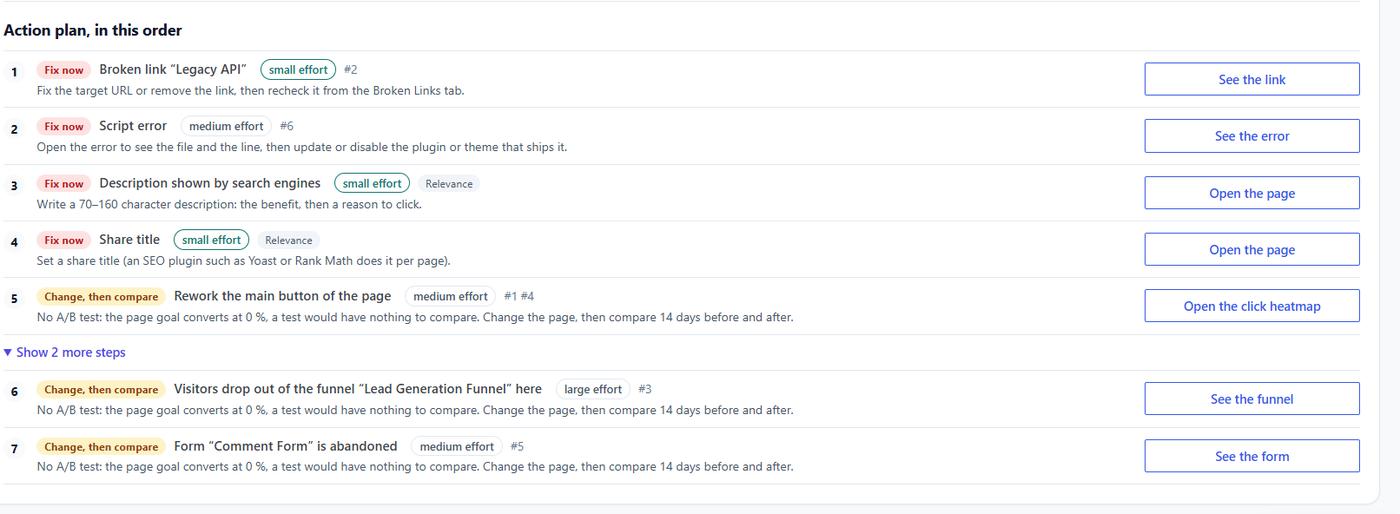
Action plan: steps tagged Fix now or Change then compare, with effortPRO
Pro: steps in order, with effort and the problem each one fixes. Demo store data.

Action plan PRO

The fixes, in order

The action plan turns the problems into steps: fix now, or change then compare. Each step shows the effort and the problem it answers.

Check this

Pick the first step with the lowest effort. Do it today.

PDF FREE PRO

Print it, save it as PDF, send it

Reports open in your browser. To get a PDF, use the browser’s print and save as PDF. No file is generated on your server. The one-page report as PDF is Pro.

Check this

Print the short report. Is it readable by someone who never opened WordPress?

Privacy FREE PRO

Built on your site’s own data

The report is built inside your WordPress, from the data your own site collected. Self-hosted: recordings and analytics are stored on your own WordPress site (database and uploads folder), not on our servers.

Free and Pro

FeatureFREEPRO
Short site report (Summary + sections with data)YesYes
Print / save as PDF from your browserYesYes
Full site report with the client nameNoYes
Page X-Ray on every pageNoYes
One-page report as PDFNoYes

Prices: see the pricing page.

FAQ

Is the report a PDF file?
It opens in your browser; use print → Save as PDF.
Can I put my client’s name on it?
Yes, in the full report (Pro).
Is the short report really free?
Yes, in the Free plugin from wordpress.org.
Does the country lookup call an external service?
No. Since version 1.10.1, the country comes from a local DB-IP Lite database shipped with the plugin, or from Cloudflare headers when present: the visitor’s IP address is not sent by the plugin to any geolocation service. Versions up to 1.10.0 could send it to ip-api.com / ipwho.is: update to 1.10.1. IP Geolocation by DB-IP (db-ip.com), CC BY 4.0.

Install the Free plugin and print your first site report today.

Explore
Drag