Skip links
iconOpti-Behavior
made by OptiUser

Shop for woo markWooCommerce FREE PRO

WooCommerce analytics that tell you which product page loses sales

See where buyers stop on each product, and what to fix first.

WooCommerce analytics usually shows what sold. Opti-Behavior counts product page views, adds to cart, paid orders and lost visits for each product, inside your WordPress admin, so you know which product page to work on first.

Shop screen, lost visits and shop funnels free on WordPress.org · Lost sales and payment errors in Pro

← Back to overview

218

visitors saw the product and did not add it to the cart: the biggest drop of this page.

Fix first

Make “Add to cart” the clear next step on this product page.

44%

add-to-cart rate of Canvas tote: the lowest of the 3 products, even with fewer visits.

Do this

Compare its page with Ceramic mug (61%): photos, price, options.

11

orders with a failed payment not paid later, by error type and payment method. Pro.

Do this

Start with the error code that comes back most, then test that payment method yourself.

377

lost visits on 3 products in 30 days, worst first.

Fix first

Fix the first product, then read the same list next month.

Counted for every product
  • Product views
  • Adds to cart
  • Paid orders
  • Lost visits
  • Add-to-cart rate
  • Lost sales · Pro
Example data
wp mark white
5.0 Rated on WordPress.org
1,700+ active installsSites running Opti-Behavior today
woo mark
Built for WooCommerceProduct, cart and checkout steps
Self-hosted: recordings and analytics are stored on your own server.Native WordPress · no cookies required
5
Counters per product
Views, adds to cart, paid orders, lost visits, add-to-cart rate · Free
3
Ready-made shop funnels
Purchase, Express Checkout, Cart Recovery · Free
3
Report rhythms
Shop numbers by e-mail, daily, weekly or monthly
95%
Confidence range
Estimated lost sales shown low–high, never one exact figure · Pro

Orders say what sold. The Shop screen says where sales were lost.

WooCommerce counts orders. It rarely shows the product pages, carts and payments that never became one.

The problem

Product pages with views, not carts

A product can be one of your most viewed pages and still be rarely added to the cart.

With Opti-BehaviorThe Shop screen (Free) lists product pages by lost visits: views without an add to cart, most first.

The problem

The gap between cart and order

Visitors add to cart, start the checkout, and the order never comes. Order totals hide where they stopped.

With Opti-BehaviorProduct views, adds to cart and paid orders are counted side by side, product by product (Free).

The problem

Payments that fail in silence

A gateway refuses a card and the buyer leaves. Unless someone complains, you never hear about it.

With Opti-BehaviorPayment errors (Pro) are grouped by gateway and error code.

The problem

No idea which leak costs most

Every product leaks a little, so you cannot tell where to look first.

With Opti-BehaviorEstimated losses per product (Pro) are shown as a range in your currency, so the biggest leak comes first.

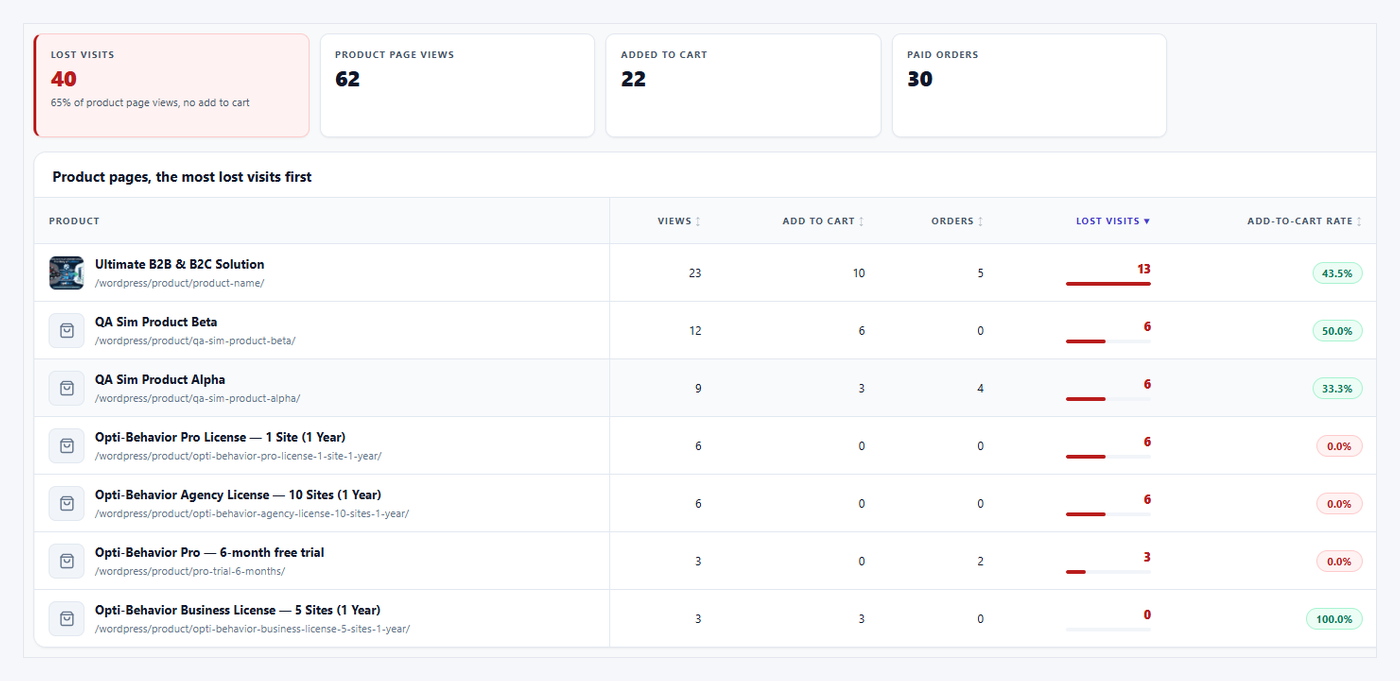
Opti-Behavior Shop screen: product views, add to cart, paid orders and lost visits per product
Free: the Shop screen, one line per product, from view to paid order. Demo store data.

WooCommerce · Shop FREE PRO

See where your shop loses sales, product by product

Your analytics says people come. WooCommerce says few buy. The Shop module shows what happens in between, for every product: how many people viewed it, added it to the cart and paid, and how many visits left without buying.

It runs inside your WordPress. Shop data is stored in your WordPress database and is not sent to our servers.

  • Product views, add to cart, paid orders and lost visits per product (Free)
  • Estimated lost sales in € per product, shown as a range (Pro)
  • Payment errors by payment method and error code (Pro)

Check this

In WooCommerce, open your best-selling product. Compare its orders this month with its views. If you do not know its views, you do not know its loss.
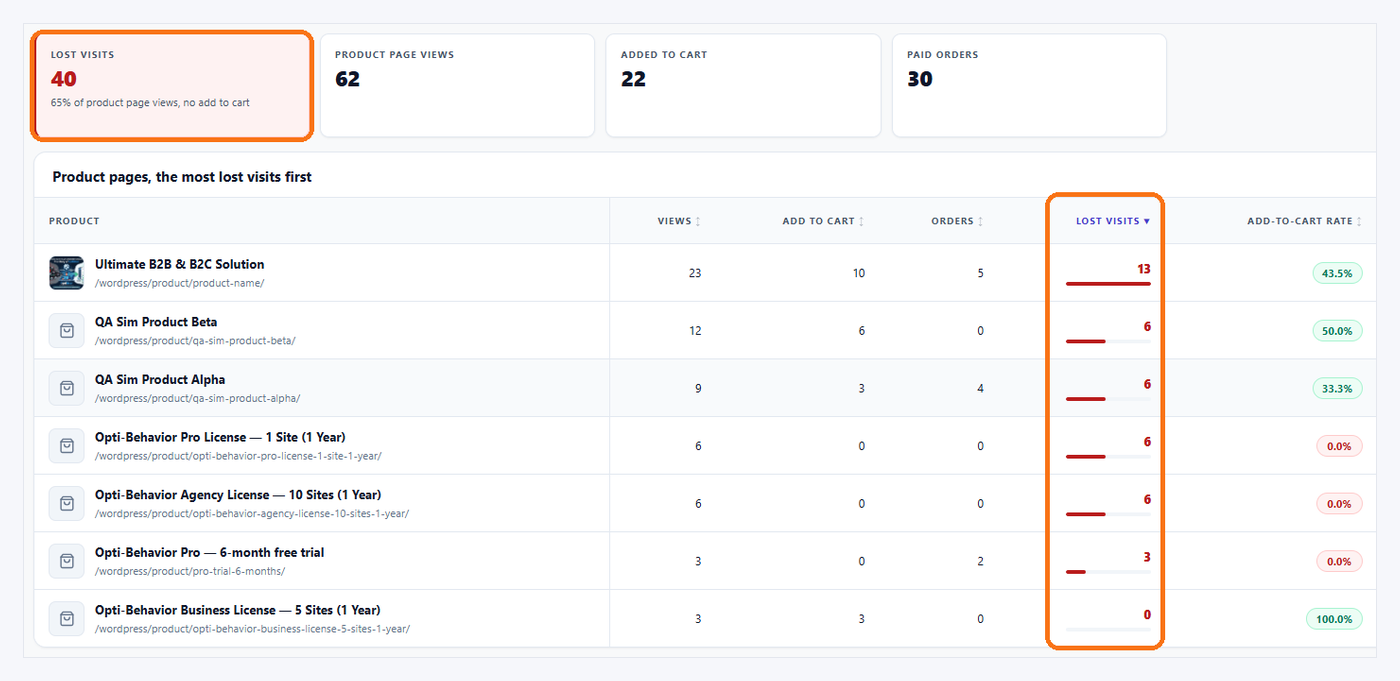
Shop counters with lost visits highlighted for one product
Free: lost visits per product, worst first. Demo store data.

Lost visits FREE

The products people look at, then leave

A product page with many views and few orders is the first page to fix. Not the homepage, not the blog.

Opti-Behavior ranks products by lost visits, so the page that costs you most comes first.

  • Counters per product, every day
  • Sorted by lost visits
  • Free

Example optiuser.com, our own shop. Smart Insights, last 30 days, read on October 8, 2026

  • Cart14
  • Checkout5
  • Order0

Check this

Take your product with the most views. Is the price, the delivery cost and the “Add to cart” button visible without scrolling on a phone?

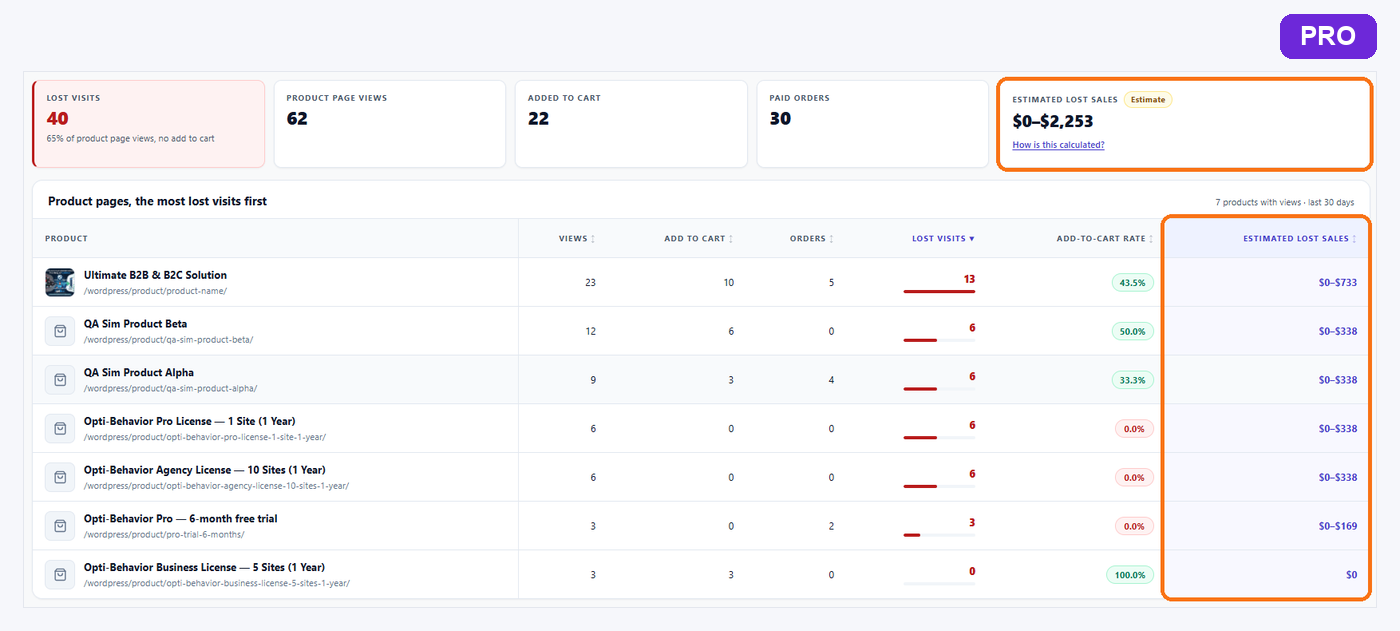
Estimated lost sales range in euros per product, ProPRO
Pro: a range in € per product, not an exact figure. Demo store data.

Lost sales PRO

What a leaking product page costs you, in euros

“300 visits” does not tell you whether to fix a page today. A euro amount does.

Opti-Behavior Pro turns lost visits into an estimated range of lost sales, from your own WooCommerce orders. It is an estimate: we show a range, never a single number presented as exact.

  • Range in € per product
  • Built from your shop’s own orders
  • Helps you choose which page to fix first

Check this

Multiply the lost visits of your top product by its usual conversion rate and price. That is the order of size of what the page leaves on the table.

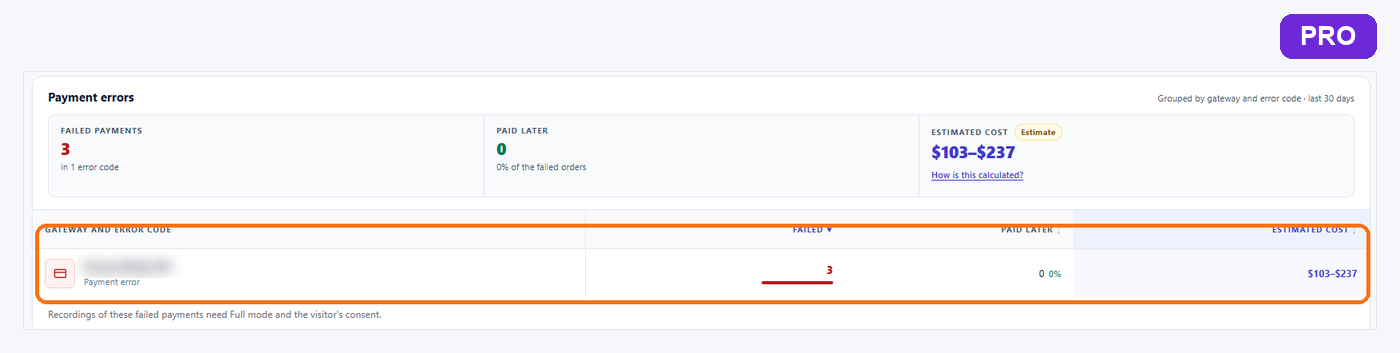
Payment errors grouped by payment method and error code, ProPRO
Pro: failed payments grouped by method and error code. Demo store data.

Payment errors PRO

Checkout that fails, by payment method

A buyer who reaches the payment step and gets an error is the most expensive visitor you lose. Many shops never see it: some failures leave an order marked “Failed” or “Pending payment”, others happen before any order is created.

Opti-Behavior Pro groups payment errors by payment method and by error code, so you can tell a card problem from a gateway setting.

  • By payment method
  • By error code
  • Shown next to the other Shop figures

Check this

Go to WooCommerce → Orders and filter by “Failed”, then by “Pending payment”. How many in 30 days? Each one is a buyer who wanted to pay, and some failures are not even in that list.

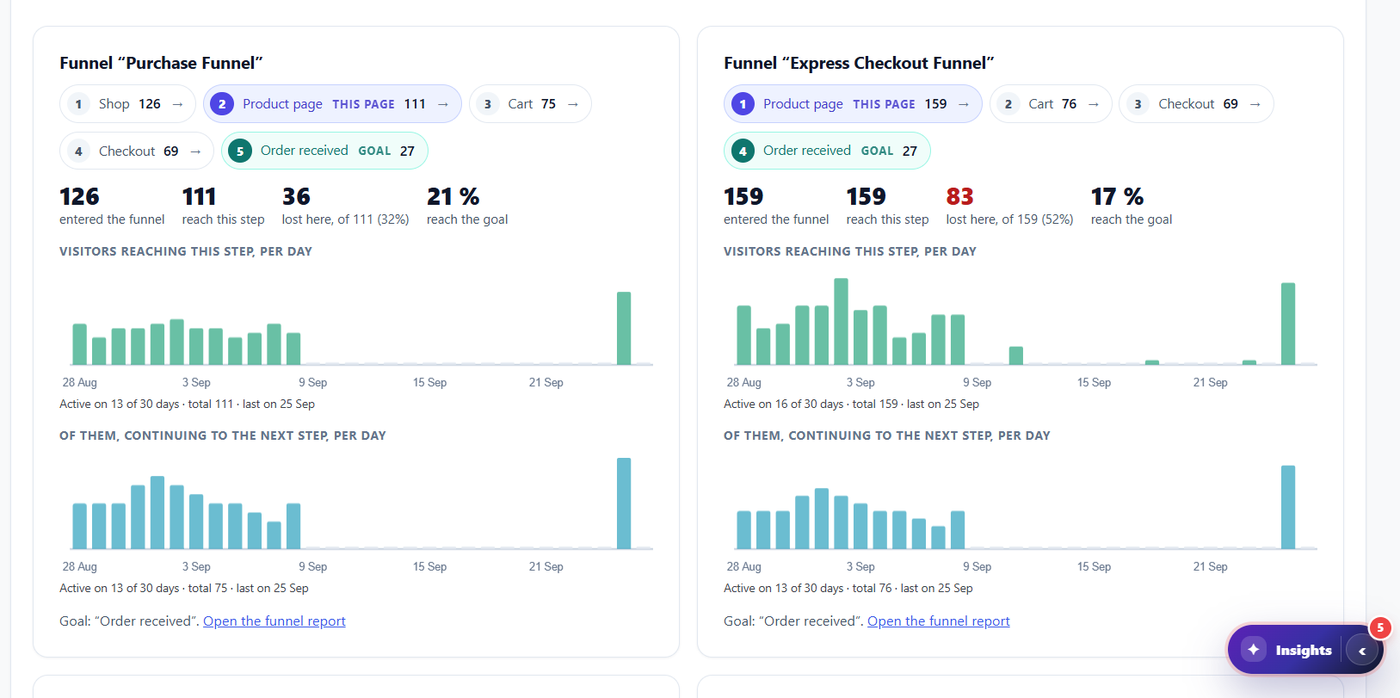
Purchase funnel and express checkout funnel of a product pagePRO
Pro: funnel steps of a product page in Page X-Ray, with the step where people leave. Funnels themselves are Free. Demo store data.

Funnel FREE

From product page to paid order, step by step

Funnels show at which step buyers stop: product, cart, checkout, order. Funnels and Smart Insights are Free.

  • Steps with entered / reached / lost
  • The weakest step comes first
  • A drop-off becomes a Smart Insights card with what to check

Check this

Add a product to your cart on a phone and reach the payment step. Count the screens and the fields.

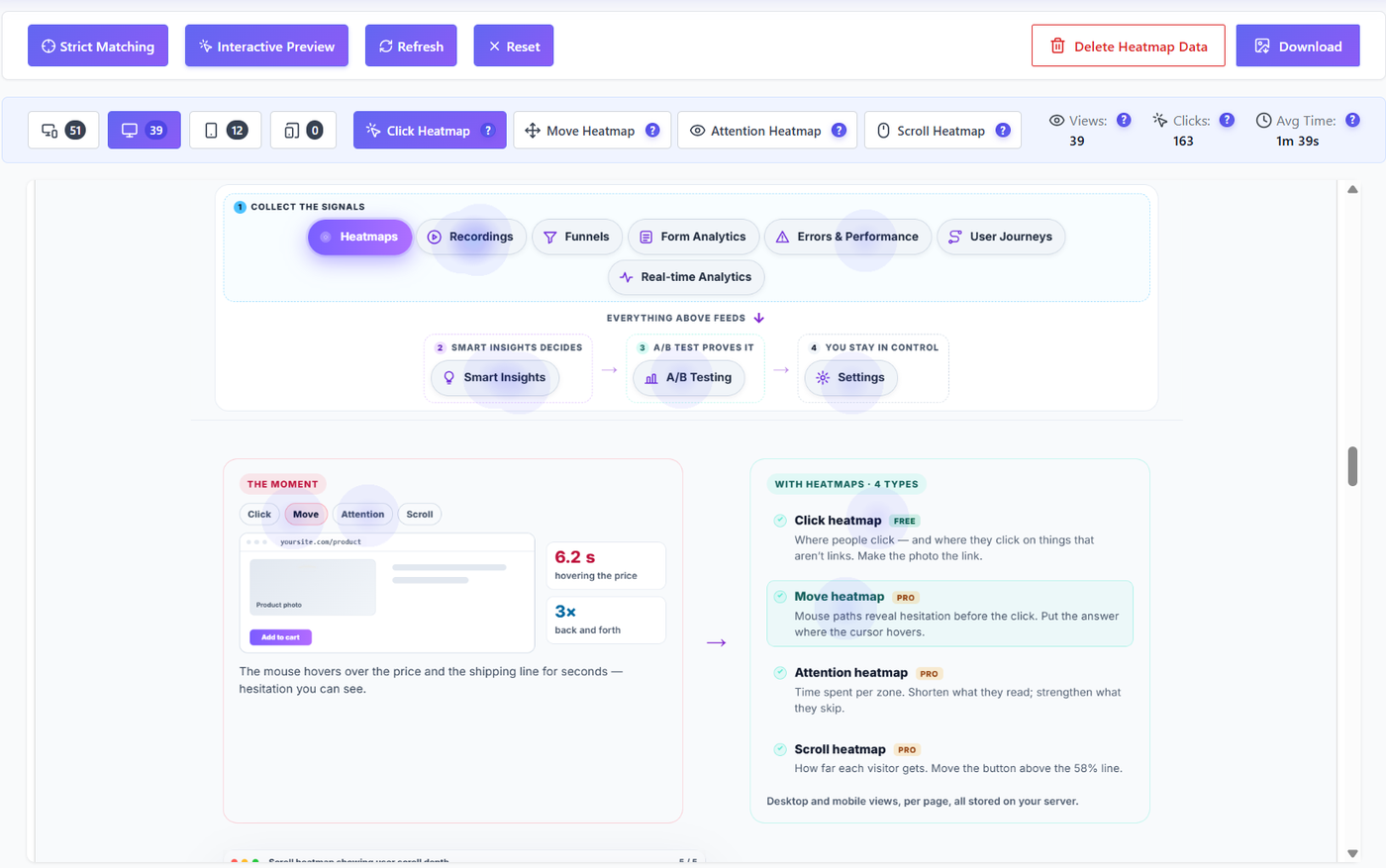
Click heatmap over a page
Free: click heatmap. Move, scroll and attention: Pro. Example data.

Heatmaps FREE PRO

Where people click on a product page

The click heatmap works on any page, product pages included. It shows the photo zoom nobody uses, or the size chart everybody clicks.

  • Click heatmap (Free)
  • Scroll, move and attention heatmaps (Pro)

Check this

On your product page, is the most clicked element the “Add to cart” button? If not, what is it?

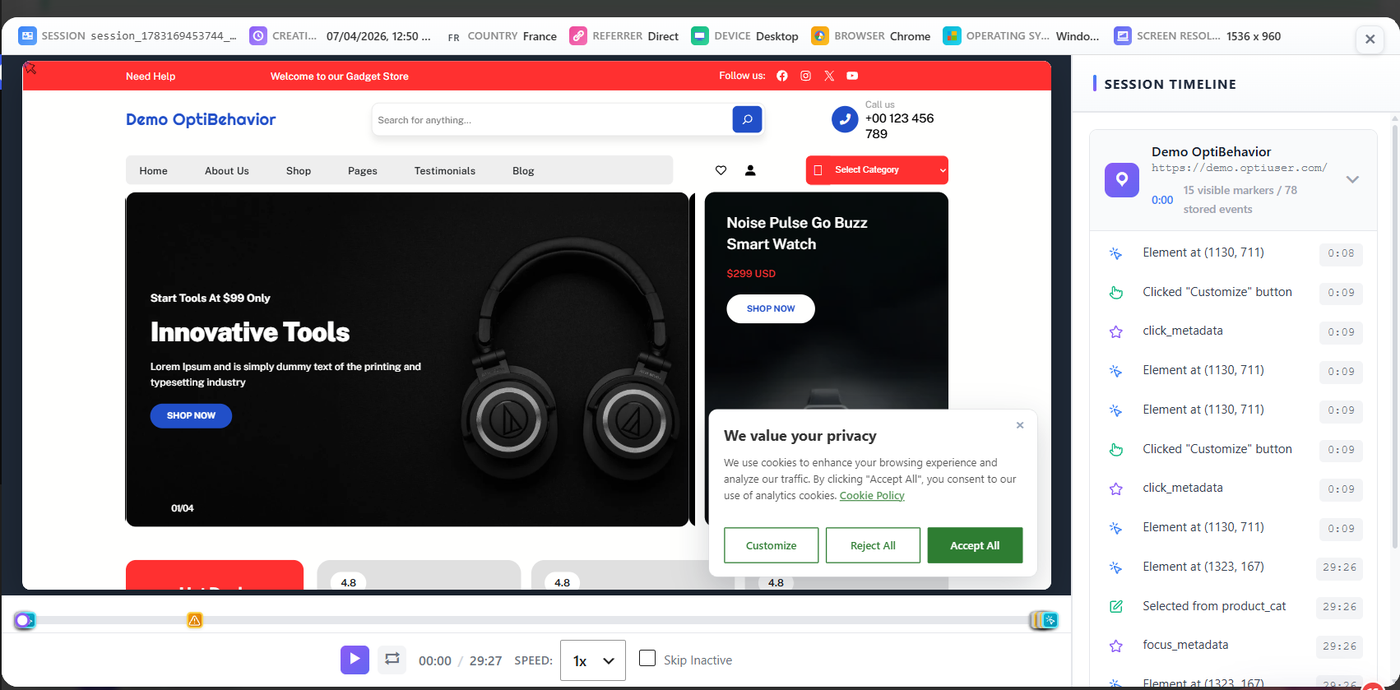
Session replay of a visit on a demo shop with the session timelinePRO
Pro: a session replay with its timeline, in Full Tracking mode with consent. Demo store data.

Recordings PRO

Watch the session behind a lost sale

A figure says where. A replay says why. Opti-Behavior Pro records sessions, and shop events are included in the recordings. Sessions are recorded only in Full Tracking mode, after the visitor has given consent.

  • Shop events included in recordings (Pro, Full Tracking mode with consent)
  • Skip inactive parts
  • Open the replay from a Smart Insights card

Check this

Watch one session that reached the cart and did not buy. Write down the last thing the person did.

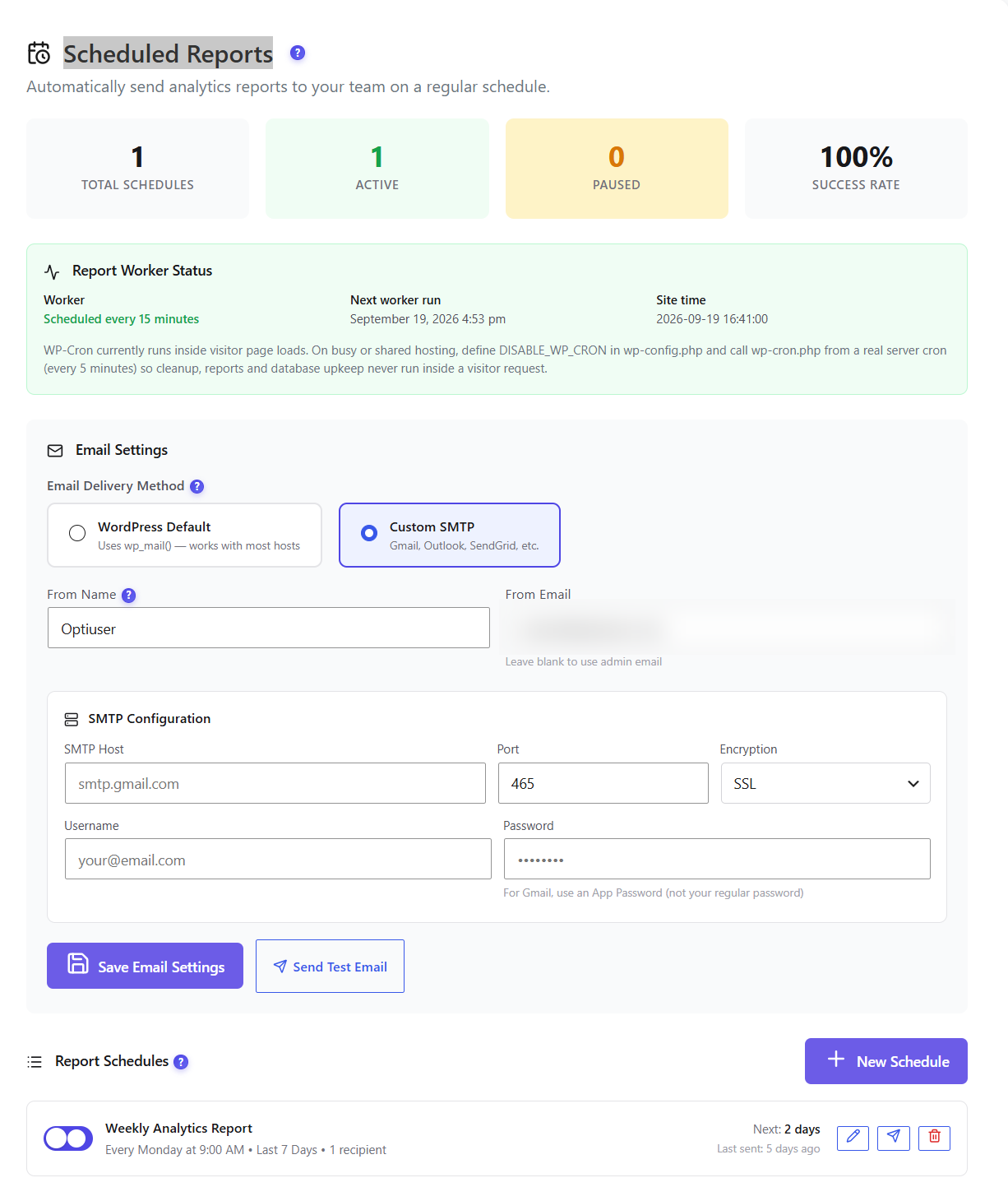
Scheduled e-mail reports settings
Free: the scheduled report settings. The Shop block is added to the scheduled report e-mail. Data of optiuser.com, sender address blurred.

Report e-mail FREE

Your shop figures in your inbox

The Shop block goes into the scheduled report e-mail, on the schedule you set. You see the products that lose visits without opening WordPress.

  • Shop block in the report e-mail (Free)
  • Frequency = your report setting

Check this

When did you last look at your product pages’ figures? If the answer is “never”, schedule the e-mail.

Privacy FREE PRO

Shop data, without buyer data

Order numbers and coupon codes are never stored, not even hashed. In Anonymous mode (the default, no cookies), the plugin keeps daily totals per product only.

Self-hosted: recordings and analytics are stored on your own WordPress site (database and uploads folder), not on our servers.

Free and Pro

FeatureFREEPRO
Product views, add to cart, paid orders, lost visits per productYesYes
FunnelsYesYes
Smart InsightsYesYes
Click heatmapYesYes
Shop block in the report e-mailYesYes
Lost sales in € (range)NoYes
Payment errors by payment method and error codeNoYes
Scroll, move and attention heatmapsNoYes
Recordings with shop events (Full Tracking, after consent)NoYes

Prices: see the pricing page.

FAQ

Does it work without WooCommerce?
The Shop module needs WooCommerce. Heatmaps, funnels and Smart Insights work on any WordPress site.
Is the € loss exact?
No. It is an estimated range built from your own orders.
Does it store my customers’ order numbers or coupons?
No. Order numbers and coupon codes are never stored.
Does the country lookup call an external service?
No. Since version 1.10.1, the country comes from a local DB-IP Lite database shipped with the plugin, or from Cloudflare headers when present: the visitor’s IP address is not sent by the plugin to any geolocation service. Versions up to 1.10.0 could send it to ip-api.com / ipwho.is: update to 1.10.1. IP Geolocation by DB-IP (db-ip.com), CC BY 4.0.

Install the Free plugin, open Shop, and see which product page loses the most visits.

Explore
Drag