
Google looks at how your pages feel to real people. Is the page fast? Does it react when I tap? Does the text jump around while it loads? These three checks are called Core Web Vitals.
They matter for two reasons. Google uses them as one of many signals for ranking. And, more important, slow and jumpy pages lose visitors and sales.
This guide explains Core Web Vitals on WordPress in plain words: what each one means, what score to aim for, what usually breaks them, and how to measure them on your own visitors.
Contents
The three Core Web Vitals, in one table
| Vital | What it checks | Good | Needs work | Poor |
|---|---|---|---|---|
| LCP (Largest Contentful Paint) | How fast the main content shows up | 2.5 s or less | 2.5 to 4 s | More than 4 s |
| INP (Interaction to Next Paint) | How fast the page reacts to a tap or click | 200 ms or less | 200 to 500 ms | More than 500 ms |
| CLS (Cumulative Layout Shift) | How much the page jumps while loading | 0.1 or less | 0.1 to 0.25 | More than 0.25 |
LCP: "Can I see the page yet?"
LCP measures when the biggest thing on the screen appears. Often it is the hero image or the main title. If it takes 5 seconds, people feel the page is slow, even if the rest loaded earlier.
INP: "Did my tap work?"
INP measures the delay between a click and the screen changing. A slow INP feels like a broken button. It often leads to rage clicks.
CLS: "Why did the text jump?"
CLS measures how much things move while the page loads. You go to tap a link, an ad appears above it, and you tap the wrong thing. That is layout shift.
The usual WordPress causes (and fixes)
| Problem | Common WordPress cause | Fix |
|---|---|---|
| Slow LCP | Huge hero image, no page cache | Compress and resize the image, preload it, use a cache plugin and a CDN |
| Slow LCP | Too many CSS and font files before the content | Remove unused plugins, load fonts with swap, delay non-critical CSS |
| Slow INP | Heavy page builder scripts, sliders, chat widgets | Delay third-party widgets until the visitor interacts |
| Slow INP | Many tracking scripts firing on every click | Keep only the tools you use, load them with defer |
| High CLS | Images without width and height | Always set width and height, WordPress does it for images added in the editor |
| High CLS | Cookie banners, ads or embeds that push content | Reserve space for them, or show banners as an overlay |
Lab tests vs real visitors
PageSpeed Insights runs one test from a data center. It is useful, but it is one fast computer on a good connection. Your visitors use old phones, slow networks and different pages.
That is why you want real user data, measured on your actual visitors. It shows problems that only appear on mobile, on slow networks, or on pages PageSpeed never tested.
Opti-Behavior Pro measures LCP, INP and CLS on your real visitors, per page and per device, and gives each page a score from 0 to 100.
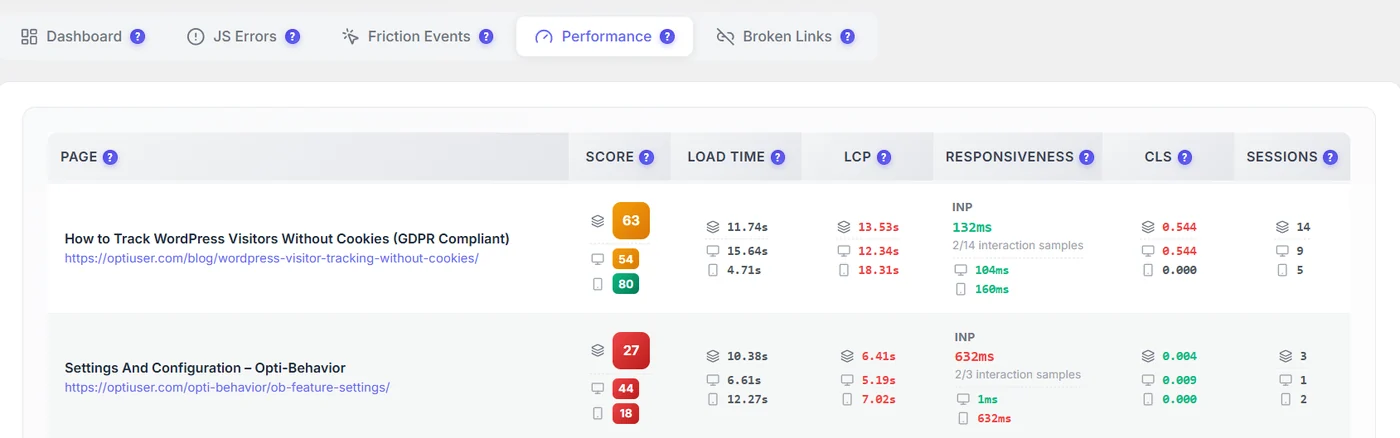
It also links performance to behavior. You can see if a slow page also has more exits or more rage clicks, and open the recordings of those visits.
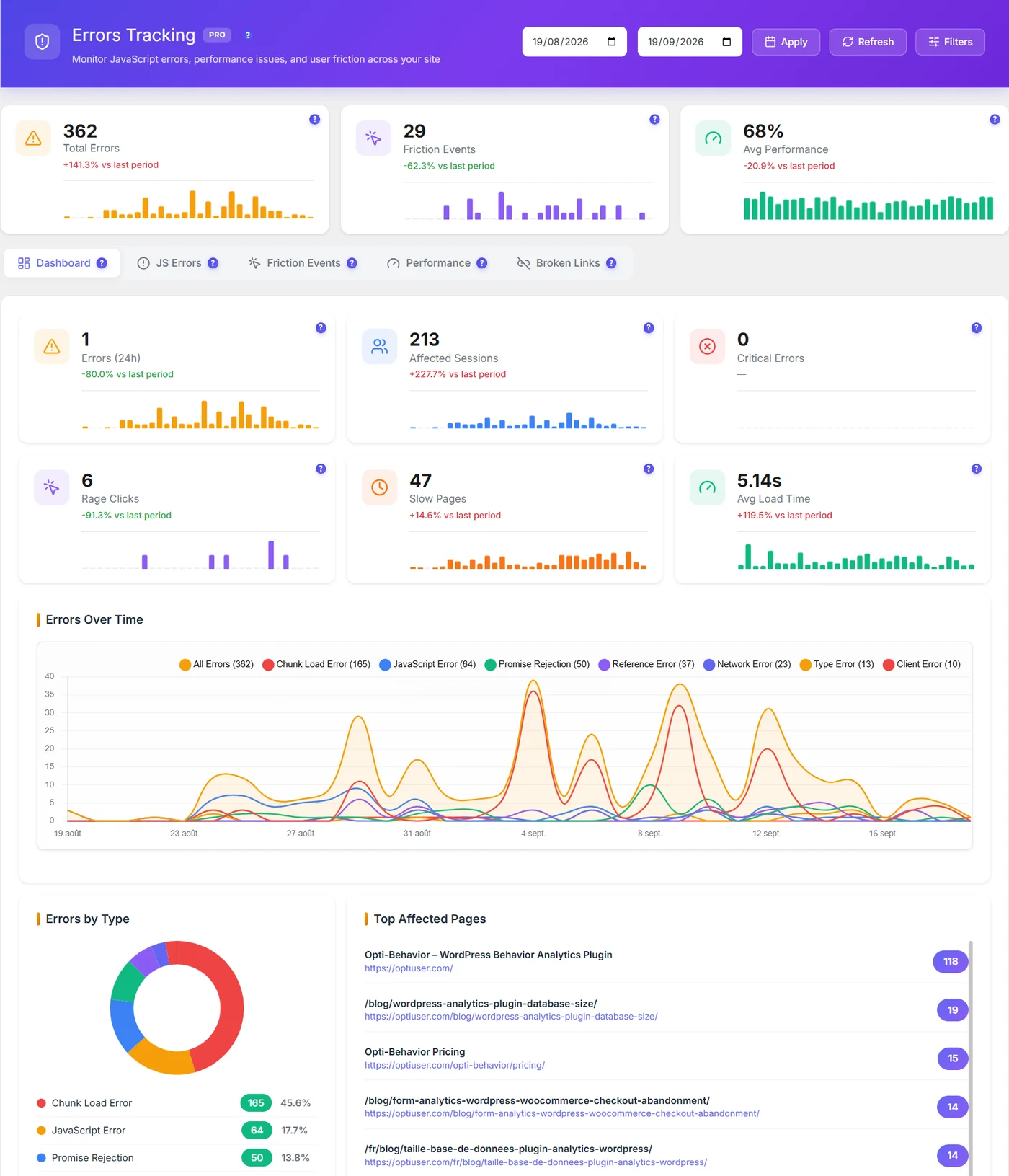
Good to know: "No interaction captured" for INP simply means no visitor clicked or tapped during the measurement. It is not an error.
Does an analytics plugin hurt Core Web Vitals?
It can, if the script is heavy or blocks the page. That is a fair worry. We measured Opti-Behavior with PageSpeed Insights before and after install, and shared the full numbers in Does an analytics plugin slow down WordPress?. In short: the trackers are small, minified and loaded with defer so they do not block the first paint.
A simple monthly routine
- Open your performance report once a month.
- Sort pages by visits. Only care about pages people actually use.
- For each busy page in red, check which vital fails: LCP, INP or CLS.
- Apply the fix from the table above.
- Check the same page again two weeks later on real visitors.
Core Web Vitals: the bottom line
Core Web Vitals come down to three feelings: is it fast, does it react, does it stay still. Check them on your real visitors, fix the busiest red pages first, and check again two weeks later.
Measure Core Web Vitals on your real visitors
Start with the free plugin. Pro adds real-user performance scores, error tracking and a 6-month free trial.
Core Web Vitals WordPress FAQ
What are Core Web Vitals?
They are three measures of page experience from Google: LCP for loading speed, INP for how fast the page reacts, and CLS for how much the layout jumps.
What is a good Core Web Vitals score?
LCP of 2.5 seconds or less, INP of 200 milliseconds or less, and CLS of 0.1 or less, for at least 75% of visits.
How do I check Core Web Vitals on WordPress?
Use PageSpeed Insights for a quick lab test, and a real user monitoring tool, like Opti-Behavior Pro, to see the scores of your actual visitors per page and device.
Why is my PageSpeed score different from real visitors?
PageSpeed runs one test on a fast machine. Real visitors use many devices and networks, so their numbers are often slower, especially on mobile.