Skip links
PRO 6-Month Free Trial

Session
Recordings

Watch real user sessions replayed in full HD. Multi-page tracking follows visitors across your entire site. 20+ filters, privacy masking, session timeline — all self-hosted on YOUR server.

Unlimited Sessions
Every visitor session captured — no daily or monthly limits
20+
Filters
Browser, country, device, OS, UTM, duration, date & more
Multi-Page
Track visitors across entire site in a single session timeline
Privacy Masking
Auto-mask inputs plus custom CSS selector masking
Opti-Behavior session recording player with full page replay
100% Self-Hosted
GDPR Compliant
Real-Time Updates
Unlimited Tracking

See Your Site Through Your Visitors’ Eyes

Every click, scroll, resize and page navigation is captured and replayed frame-by-frame. Understand user behavior like never before.

Session recording player with HD replay

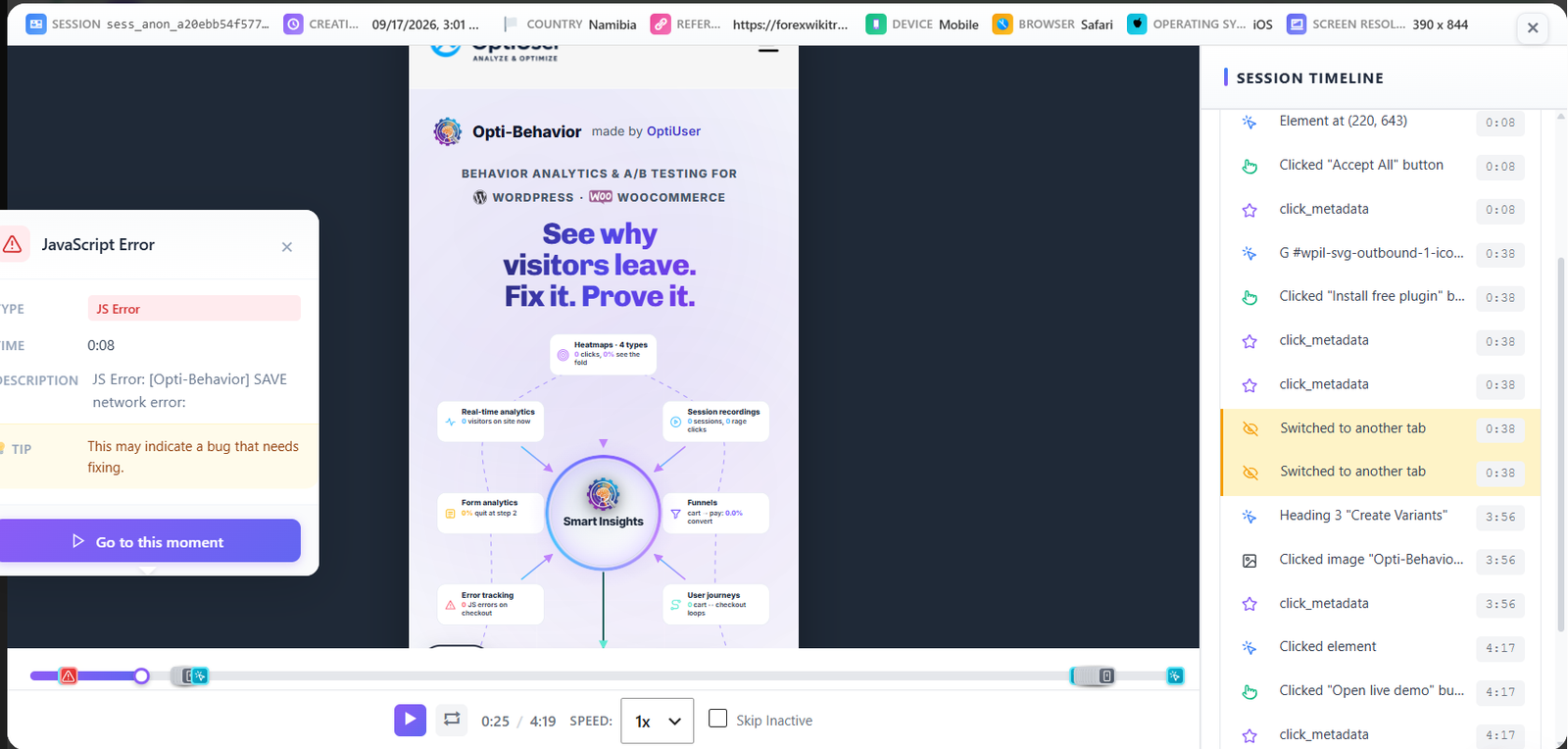
HD Session Replay Player

Watch sessions in a full-width player built on the rrweb library. Playback speed controls (1x–8x), play/pause, skip to events, and a visual timeline with per-page markers. See mouse movements, clicks, form interactions, scroll behavior, and page navigations replayed exactly as they happened. Scripts load synchronously in <head> at priority 1 — before any other plugin — to ensure 100% visitor coverage from the very first page load.

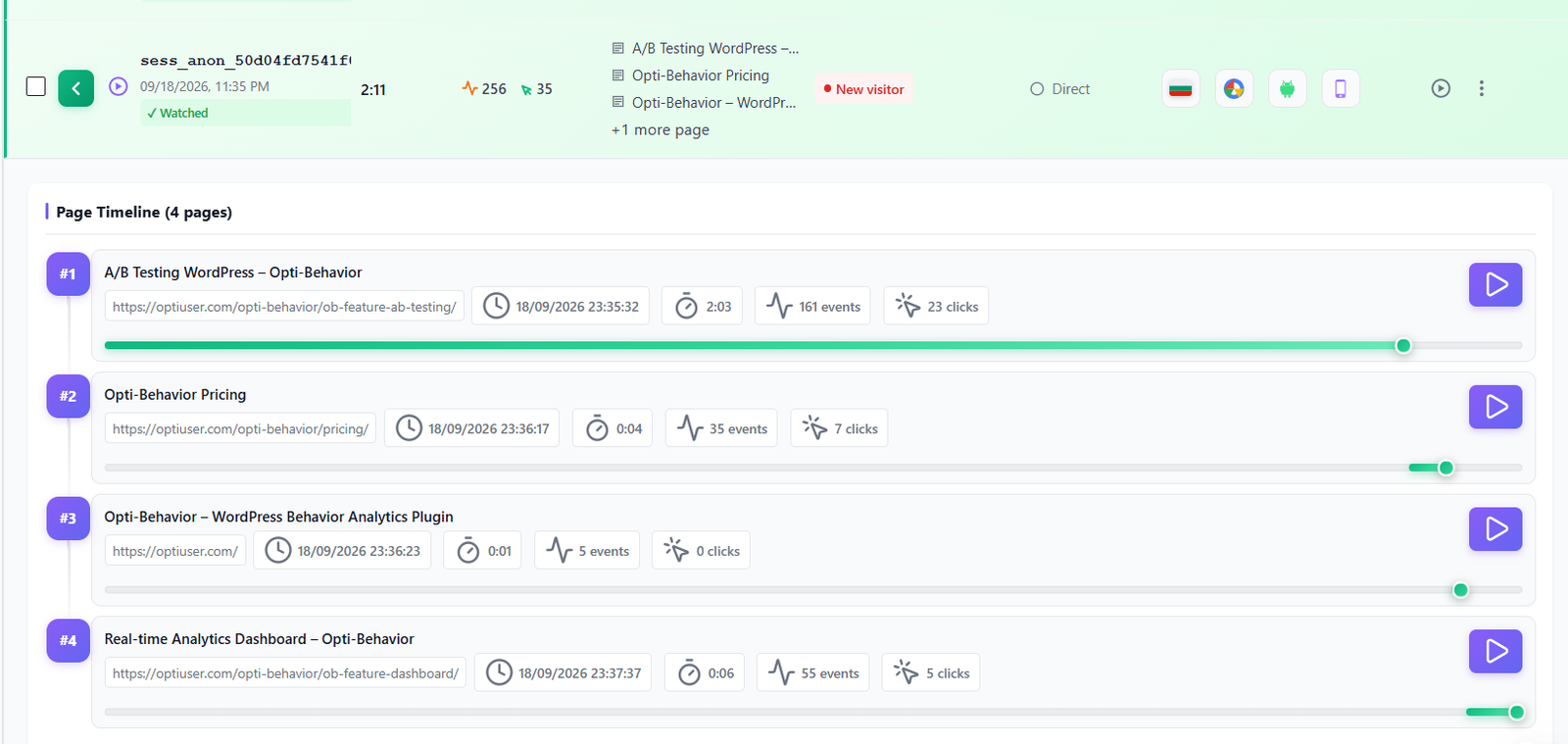
Page timeline with events per page

Multi-Page Session Timeline

Track visitors across multiple pages in a single unified session. The page timeline shows every navigation event — time spent per page, events triggered per page, and clear page transition markers. Ideal for understanding multi-step journeys: landing page → product → cart → checkout — all in one continuous replay. Never lose context when a visitor navigates mid-session.

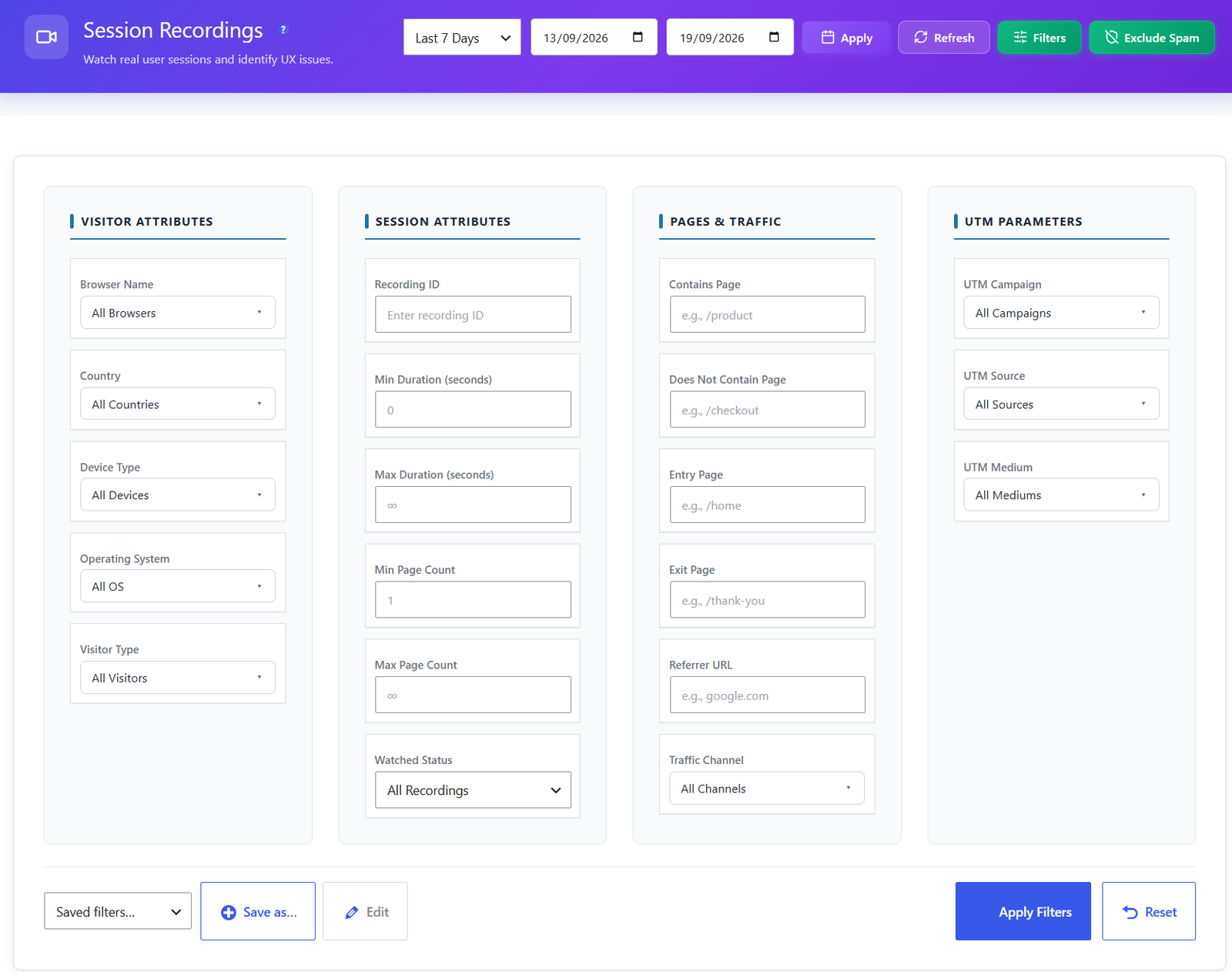
Advanced session filters panel with 20+ options

20+ Advanced Filters

Find exactly the sessions you need with over 20 filter criteria: browser, country, device type, operating system, UTM campaign / source / medium, page URL, session duration, page count, date range, user type (logged-in vs. anonymous), watched / unwatched status, and favorites. Combine multiple filters simultaneously to isolate precise audience segments — e.g. mobile visitors from Germany who watched the checkout page for under 30 seconds.

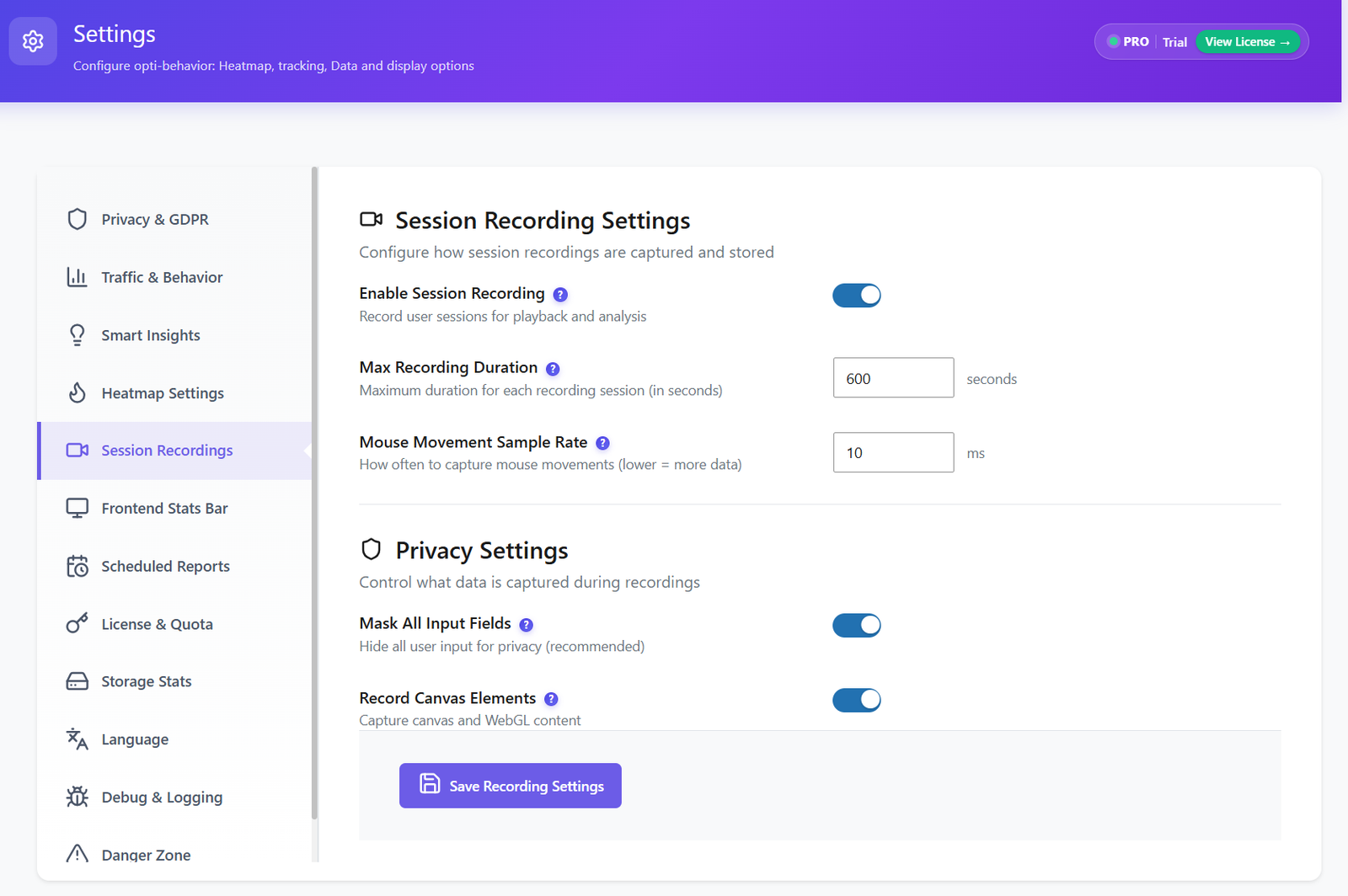
Privacy masking settings for session recordings

Privacy-First Recording

All sensitive form fields (passwords, emails, credit cards) are automatically masked before any data is captured using rrweb’s maskAllInputs mode. Define custom CSS selector masks to hide any additional element from recordings. Two privacy modes: Anonymous (maximum masking — all text content hidden, gravatar and profile images blocked) and Full (configurable with explicit consent event support via optibehavior:consent_updated). Zero third-party access — all data stays on YOUR server.

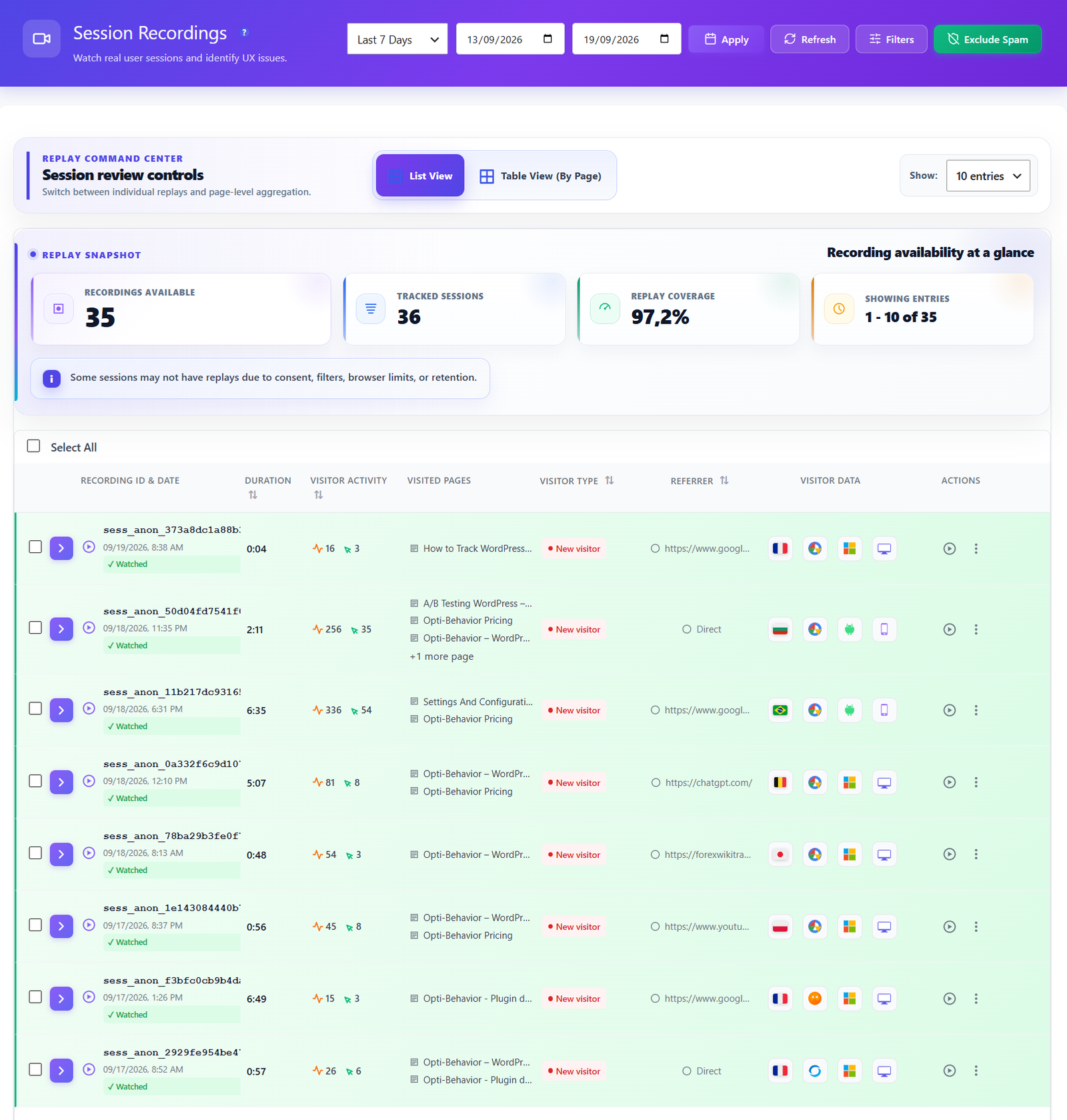
Recording list with bulk actions and favorites

Bulk Actions, Favorites & Downloads

Manage your recording library at scale. Bulk delete sessions to free up disk space instantly. Mark recordings as watched / unwatched to track your review progress across the team. Star favorites for sessions worth revisiting. Download individual recordings as files for offline analysis or sharing with stakeholders. The paginated recording list stays fast even with thousands of sessions stored.

Encrypted file-based recording storage on your server

Encrypted Storage & Data Ownership

Recording data is stored in an encrypted file-based storage system on your own server — keeping your WordPress database lean and fast. All recording files are encrypted at rest. You own 100% of the data with no external API calls and no session data shared with any third party. Configure automatic retention cleanup to purge old recordings and control disk usage over time.

Caching plugin compatibility for rrweb recording scripts

Works With All Caching Plugins

The rrweb recording scripts are automatically excluded from optimization by all major caching plugins. Built-in compatibility filters for Autoptimize, LiteSpeed Cache, WP Rocket, SG Optimizer, and Cloudflare Rocket Loader prevent scripts from being merged, deferred, or delayed. Scripts also include data-cfasync="false", data-no-defer, and data-no-optimize attributes — ensuring recordings start immediately on every page load with zero manual exclusion configuration required.

Privacy-First Recording

Session recordings are designed with privacy at the core. Sensitive data is automatically masked, and all recordings are stored on your own server.

  • Automatic input field masking (passwords, emails, credit cards)
  • Custom CSS selector masking for any element
  • All data stored on YOUR server — zero third-party access
  • GDPR-compliant with consent integration support
  • Configurable recording scope (specific pages or entire site)
  • Auto-cleanup with configurable retention periods
  • Anonymous mode: mask all text content and block identifying images globally
  • Consent mode: recording starts only after explicit visitor consent event
  • Encrypted file-based storage — zero WordPress database bloat

How It Works

1

Enable Session Recording

Activate session recording in the Opti-Behavior Pro settings. Choose recording scope — record all pages or specific URLs only. Admins are excluded from recording by default; use ?opti_behavior_test_recording=1 to preview recordings as a visitor.

2

Visitor Sessions Are Captured

The rrweb library loads synchronously in <head> at priority 1 — before any other plugin. DOM mutations, mouse movements, clicks, scrolls, and page navigations are captured in real-time. All data is compressed and stored in an encrypted file-based storage system on your own server. Caching plugin exclusions are applied automatically.

3

Browse & Filter Recordings

Use 20+ filters to find sessions by country, device, browser, OS, UTM parameters, pages visited, session duration, watched/unwatched status, or date range. Mark sessions as favorites. Bulk delete sessions you no longer need.

4

Watch & Learn

Play back sessions in the HD player. Speed up through idle time at up to 8x, skip between page events using the timeline, and identify exactly where users get confused, frustrated, or leave. Use Watched / Unwatched tracking and Favorites to manage your review workflow.

Who Uses Session Recordings?

Bug Hunting

Watch what users did right before reporting a bug. See the exact sequence of clicks, pages, and interactions that triggered the issue — no more guessing.

Checkout Optimization

Watch real users navigate your checkout flow. See where they hesitate, where they click the wrong button, and where they abandon the process entirely.

UX Research

Replace expensive user testing sessions with real visitor recordings. Watch hundreds of sessions to identify patterns in how users interact with your design.

Session Recording Comparison

Feature Opti-Behavior Hotjar MS Clarity Mouseflow
Session Recordings✓ Pro
Multi-Page Tracking✓ Pro
20+ Filters✓ Pro
Privacy Masking✓ Pro
Playback Speed Control✓ Pro
Download Recordings✓ Pro
Self-Hosted Data
Unlimited Sessions✗ (35/day)
Price$69/yr$213+/mo$0*$31+/mo

* Microsoft Clarity is free but Microsoft uses your visitors’ data for advertising.

Recordings FAQ

Are session recordings stored on my server?
Yes. All recording data is stored in an encrypted file-based storage system on your own server. No data is sent to external servers. You are the sole data controller, which makes GDPR compliance straightforward since there is no third-party data processing.
How many sessions can I record?
Unlimited. There are no session caps or daily limits. Every visitor session is recorded automatically. You can configure recording settings to include or exclude specific pages, user roles, or traffic sources.
Does recording impact website performance?
The recording script is lightweight (~15KB async) and uses the rrweb library which captures DOM mutations efficiently. It does not re-render pages or take screenshots — it records DOM changes, making it extremely fast with minimal impact on page load times.
Can I mask sensitive content in recordings?
Yes. Opti-Behavior includes built-in privacy masking. Sensitive form fields (passwords, credit cards) are automatically masked. You can also configure additional CSS selectors to mask any content you want hidden from recordings.
Can I filter and search through recordings?
Yes. The recordings list offers 20+ filter criteria including browser, country, device, operating system, UTM parameters, visited pages, session duration, and more. You can also mark recordings as favorites and track watched/unwatched status.
Can I control playback speed?
Yes. The HD player includes playback speed controls ranging from 1x to 8x. Speed through inactive periods where visitors were idle, then slow down to normal speed to watch key interactions in detail. You can also jump directly to specific events in the session timeline using the event markers.
Does it track users across multiple pages?
Yes. Multi-page tracking follows visitors as they navigate across your entire site within a single session. The session timeline shows each page visited with the time spent on it, the number of events recorded per page, and clear transition markers. You can watch a visitor journey from your homepage through to checkout — all in one continuous replay without losing any context.
Can I download or export recordings?
Yes. Individual recordings can be downloaded as files directly from the recording list or the player view. This lets you archive important sessions, share them with team members who don’t have admin access, or keep them for compliance purposes even after the retention period expires.
Does it work with caching plugins?
Yes. Opti-Behavior Pro includes automatic compatibility filters for all major caching and optimization plugins: Autoptimize, LiteSpeed Cache, WP Rocket, SG Optimizer, and Cloudflare Rocket Loader. The rrweb and session-recorder scripts are automatically excluded from JS combining, deferring, and delay-execution — so they always load synchronously in <head> for maximum recording coverage. No manual exclusion configuration is required.

Watch Real Users, Find Real Insights

Get Opti-Behavior Pro and start recording visitor sessions today. All data stays on your server — no session limits, no data sharing, no monthly fees.

Explore
Drag