Skip links
Opti-Behavior
Opti-Behavior
made by OptiUser
FREE PRO

Opti-Behavior vs Jetpack Stats:
Keep Your Behavior Data Local, Not in the Cloud (2026)

Short answer: Jetpack Stats is Automattic's simple pageview counter that surfaces views, top posts and referrers inside WordPress — processed through the WordPress.com cloud. Opti-Behavior adds the behavior layer a pageview counter can't show — heatmaps, session recordings, funnels and A/B testing — all stored on your own server. They solve different problems.

Jetpack Stats ships inside the Jetpack suite (Jetpack has 3 million+ installs) and is one of the easiest ways to see pageviews and top content. But it requires a connected WordPress.com account and processes your traffic in Automattic's cloud, so the data is not self-hosted. It has no heatmaps, no session recordings, no funnels, no A/B testing — its map of visitors is a geographic view, not on-page behavior. Opti-Behavior keeps every click on your own server and shows you why visitors convert — or leave.

⭐ 5/5 stars · 3 reviews on WordPress.org 📈 400+ active installs 🇫🇷 Made in France 🔒 GDPR-native

TL;DR — Which should you pick?

  • Pick Jetpack Stats if you want a dead-simple, no-setup view of pageviews and top content, you're happy on the WordPress.com cloud, and you already run Jetpack.
  • Pick Opti-Behavior if you want to see behavior — heatmaps, session replay, conversion funnels, form drop-off and A/B tests — with every metric stored on your own server, no WordPress.com account required.
  • Run both and get the best of each: Jetpack Stats for glance-able cloud pageview counts, Opti-Behavior for the self-hosted behavior and conversion layer. They don't conflict.

Cloud Pageviews vs Behavior You Own

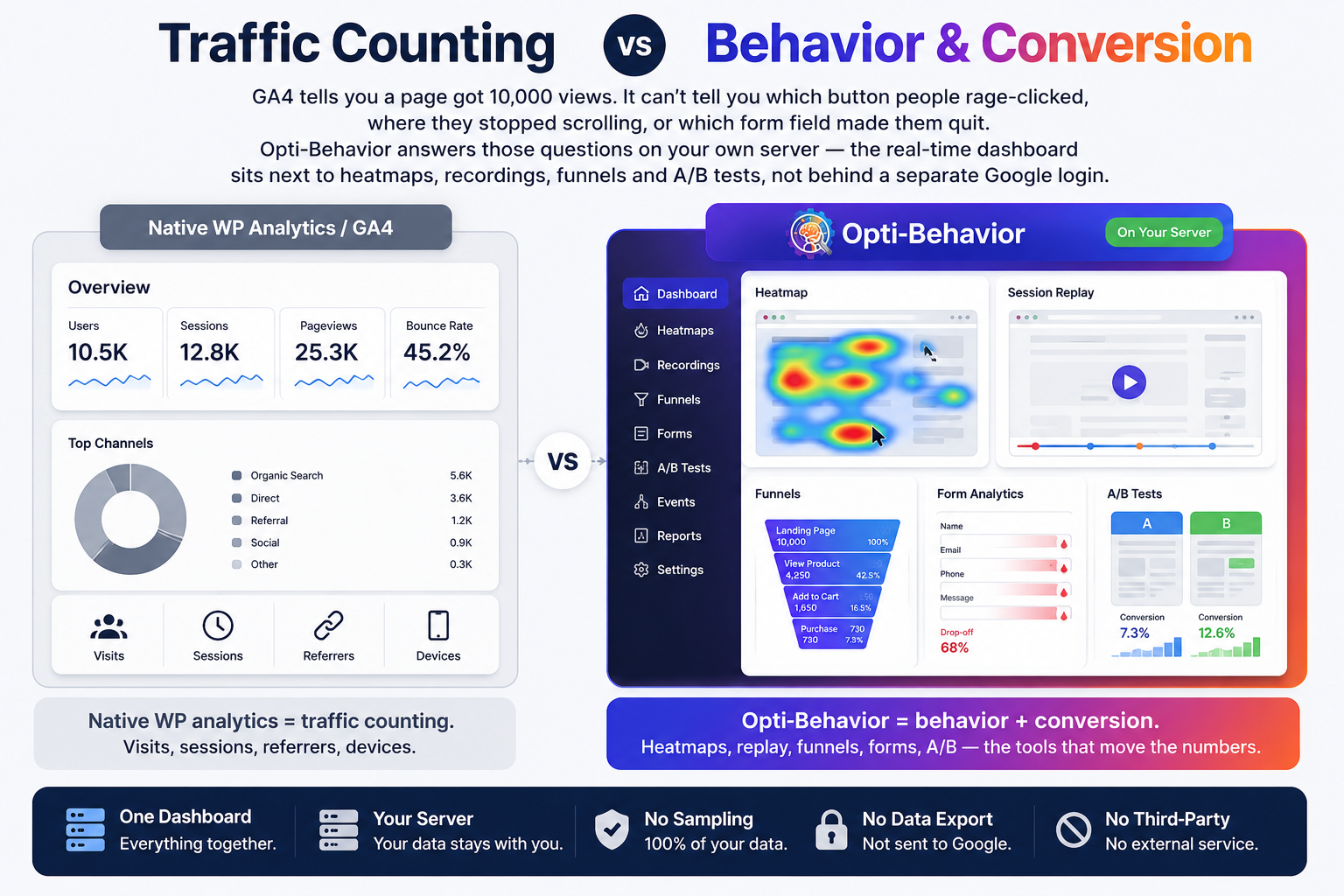
Jetpack Stats tells you a page got 10,000 views and shows where in the world they came from. It can't tell you which button people rage-clicked, where they stopped scrolling, or which form field made them quit — and the counting happens on WordPress.com, not your server. Opti-Behavior answers those questions on your own infrastructure — the real-time dashboard sits next to heatmaps, recordings, funnels and A/B tests.

  • Jetpack Stats = cloud pageview counting. Views, top posts, referrers, a geographic map.
  • Opti-Behavior = behavior + conversion. Heatmaps, replay, funnels, forms, A/B — the tools that move the numbers.
  • One dashboard, your server. No WordPress.com account, no data handed to Automattic, no third-party service.
Side-by-side comparison of cloud pageview counting versus the Opti-Behavior behavior and conversion dashboard with heatmaps, recordings, funnels and A/B testing

Feature-by-Feature Comparison

Jetpack Stats answers “how many, and from where?”. Opti-Behavior answers “why?” — and keeps the data on your server. This table shows where each tool is built to win.

Feature-by-feature comparison of Opti-Behavior and Jetpack Stats.
FeatureOpti-BehaviorJetpack Stats
Click Heatmaps Free Not available
Scroll / Move / Attention Heatmaps Pro Not available
Session Recordings & Replay Pro Not available
Conversion Funnels Free Not available
Form Analytics (field drop-off) Pro Not available
User Journeys (Sankey flow) Pro Not available
Error & Core Web Vitals Tracking Pro Not available
A/B Testing (built in) Free Not available
Pageview & Top Content Stats Free Core strength
Real-Time Visitor Stats Free Yes
Geographic Visitor Map Free Yes (map, not a behavior heatmap)
Smart Insights (CRO recommendations) Free Not available
Data Export (CSV / JSON / ZIP) Free Not available
Bot & Spam Detection FreeAutomattic-side filtering
Works Without a WordPress.com Account Yes Account required
Self-Hosted Data (you own it) Yes WordPress.com cloud
Works Without Cookies YesCookieless view counting
Session / View LimitsUnlimited10K site-views/mo on the paid tier (upgradable)
Price€0 – €89/yrFree for personal; commercial from €7.95/mo billed yearly

Jetpack Stats runs inside the Jetpack plugin (Automattic); standalone active-install and rating figures are not published separately, and the commercial plan is shown in EUR (€7.95/mo billed yearly, includes a 10K site-views/mo cap). Competitor figures verified July 2026 from WordPress.org and jetpack.com/stats; subject to change. Verify current pricing on jetpack.com.

Add the behavior layer in minutes

Keep Jetpack Stats for glance-able pageviews — add Opti-Behavior for heatmaps, recordings, funnels and A/B tests on your own server.

Where Opti-Behavior Wins

Jetpack Stats reports how many people visited and where they came from. Opti-Behavior shows you what they did — the behavior a cloud pageview counter was never built to capture.

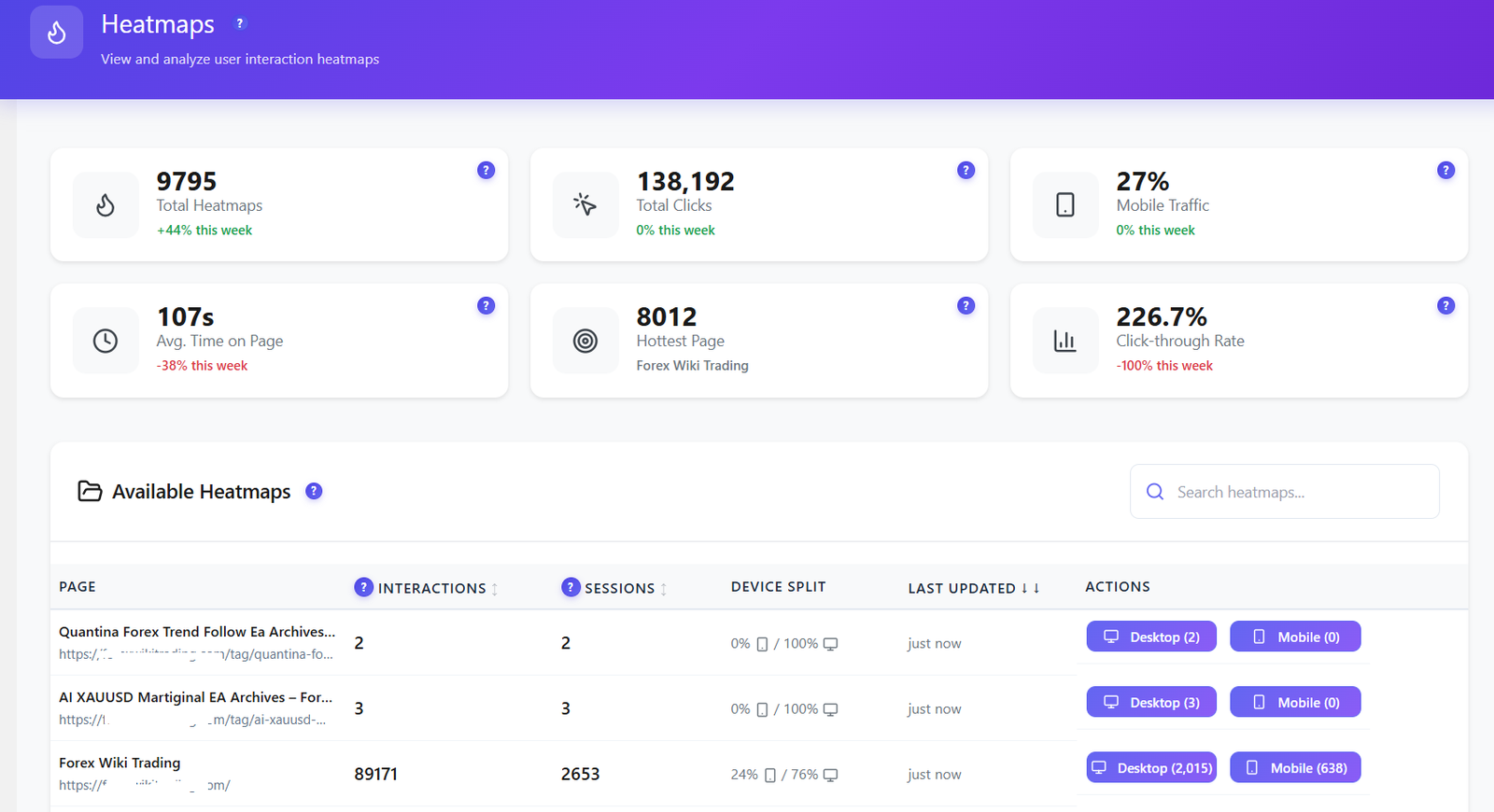
Opti-Behavior heatmaps dashboard with total heatmaps, total clicks, mobile traffic share and hottest page
Heatmaps. See every click, tap and hot zone by page and device — Jetpack Stats has none of this.
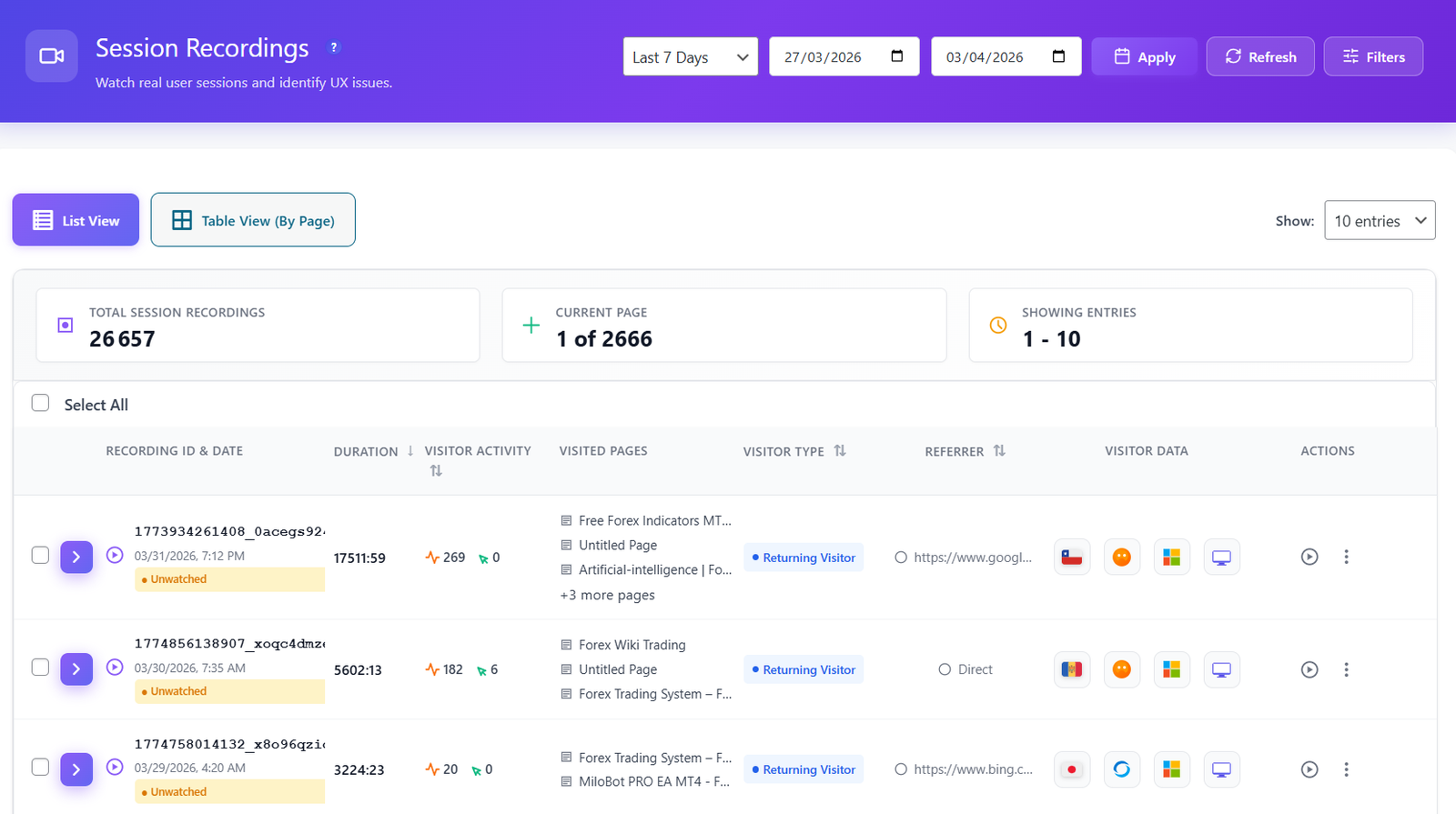
Opti-Behavior session recordings list showing duration, visited pages, visitor type and device for each session
Session recordings. Replay real visits and watch exactly where people get stuck — impossible with a cloud pageview counter.
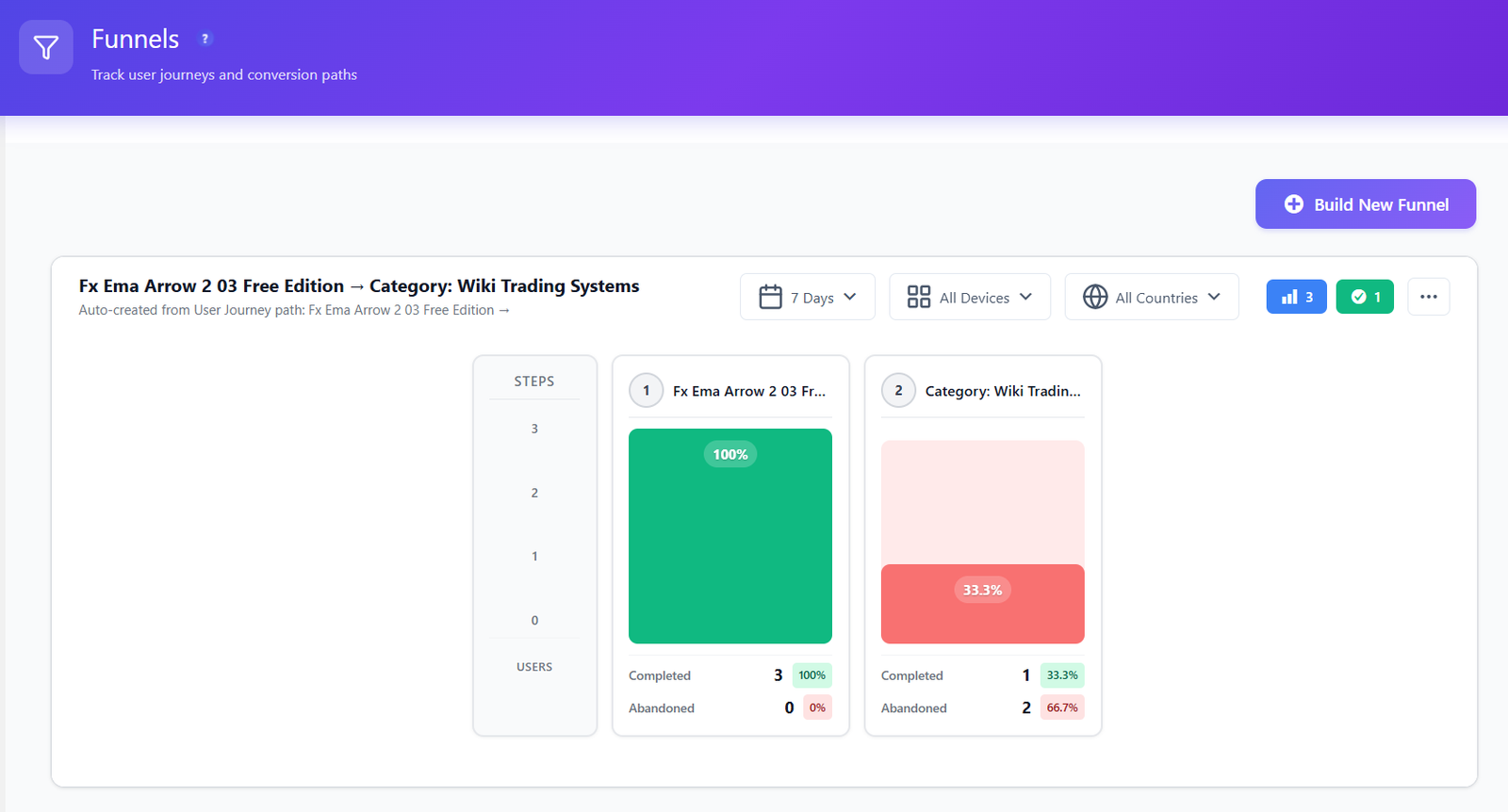
Opti-Behavior conversion funnel showing completion and abandonment rates step by step
Conversion funnels. Build multi-step funnels and see the exact step visitors abandon — from your own on-server data.
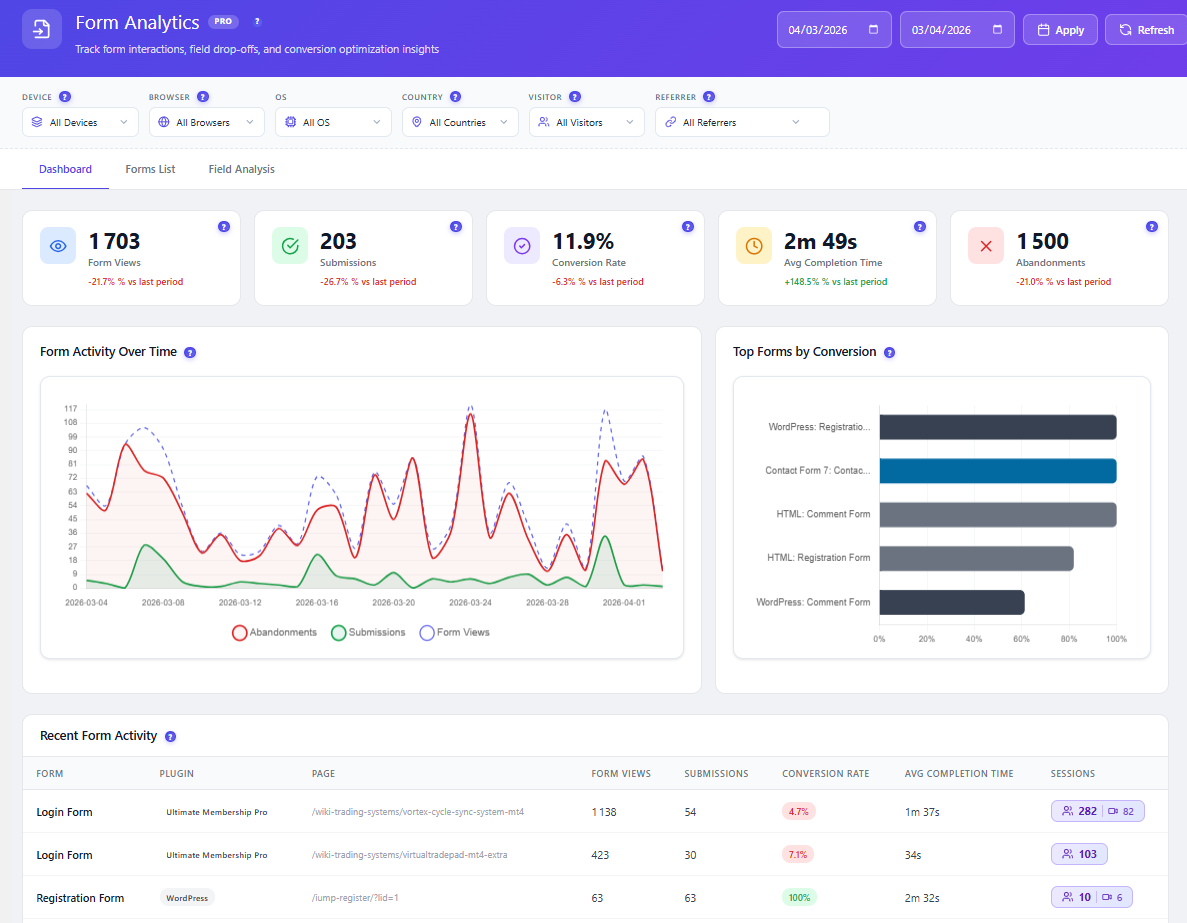
Opti-Behavior form analytics with form views, submissions, conversion rate, average completion time and abandonments
Form analytics. Field-level drop-off shows the exact input that kills your submissions.

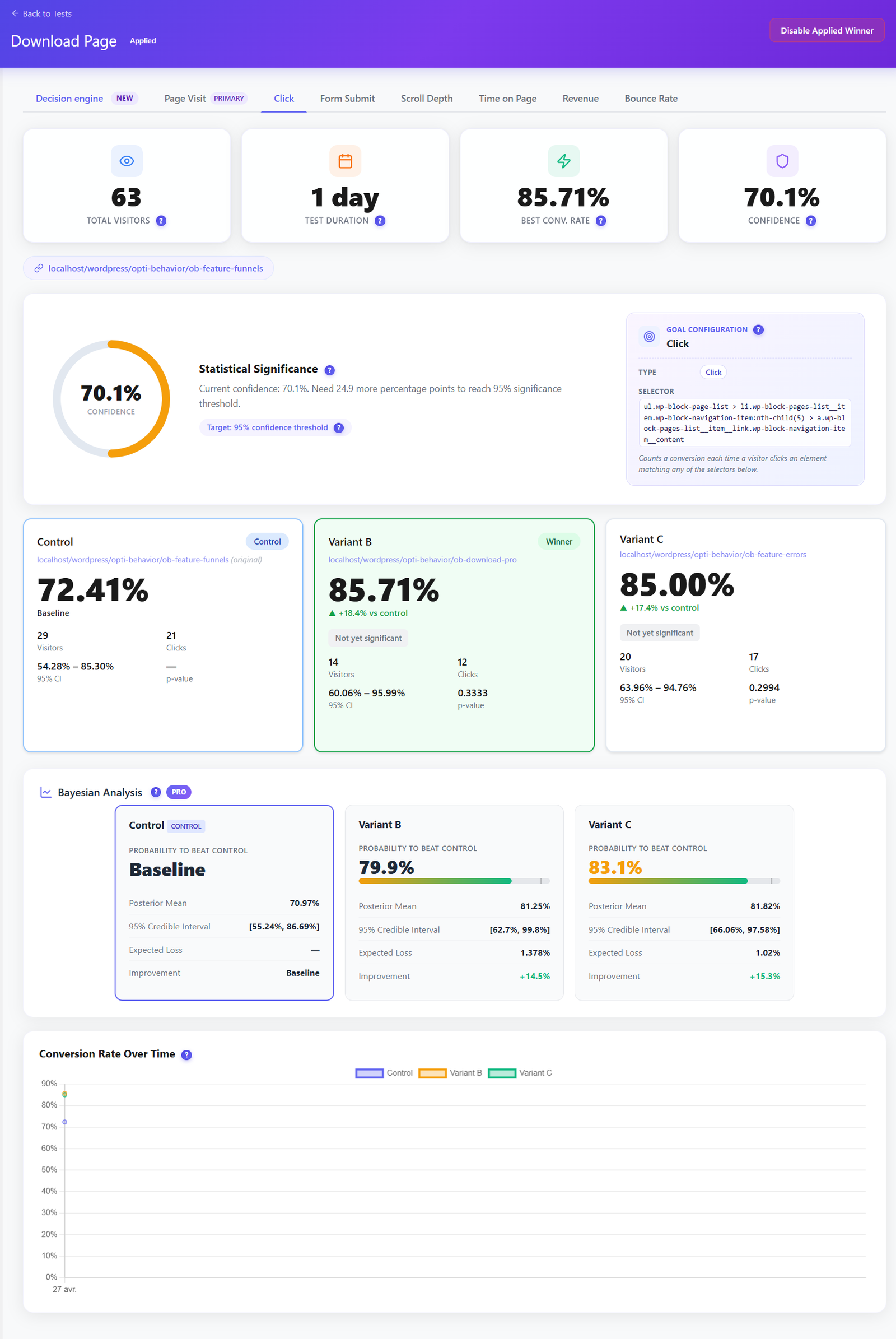
A/B Testing Built In — Free

Jetpack Stats can only count what happened after you ship a change. Opti-Behavior lets you test it first. Run split tests on headlines, buttons and layouts, track conversion goals and let the built-in decision engine call the winner — no separate A/B tool, no WordPress.com account.

  • Visual split tests on pages and elements, set up without code.
  • Conversion-goal tracking so you optimise for signups and sales, not just clicks.
  • Included in the free plugin — not a paid upsell.
Opti-Behavior A/B testing results dashboard showing Control, Variant B and Variant C conversion rates, statistical significance and Bayesian analysis with a winning variant

Smart Insights — CRO Advice, Not Just Charts

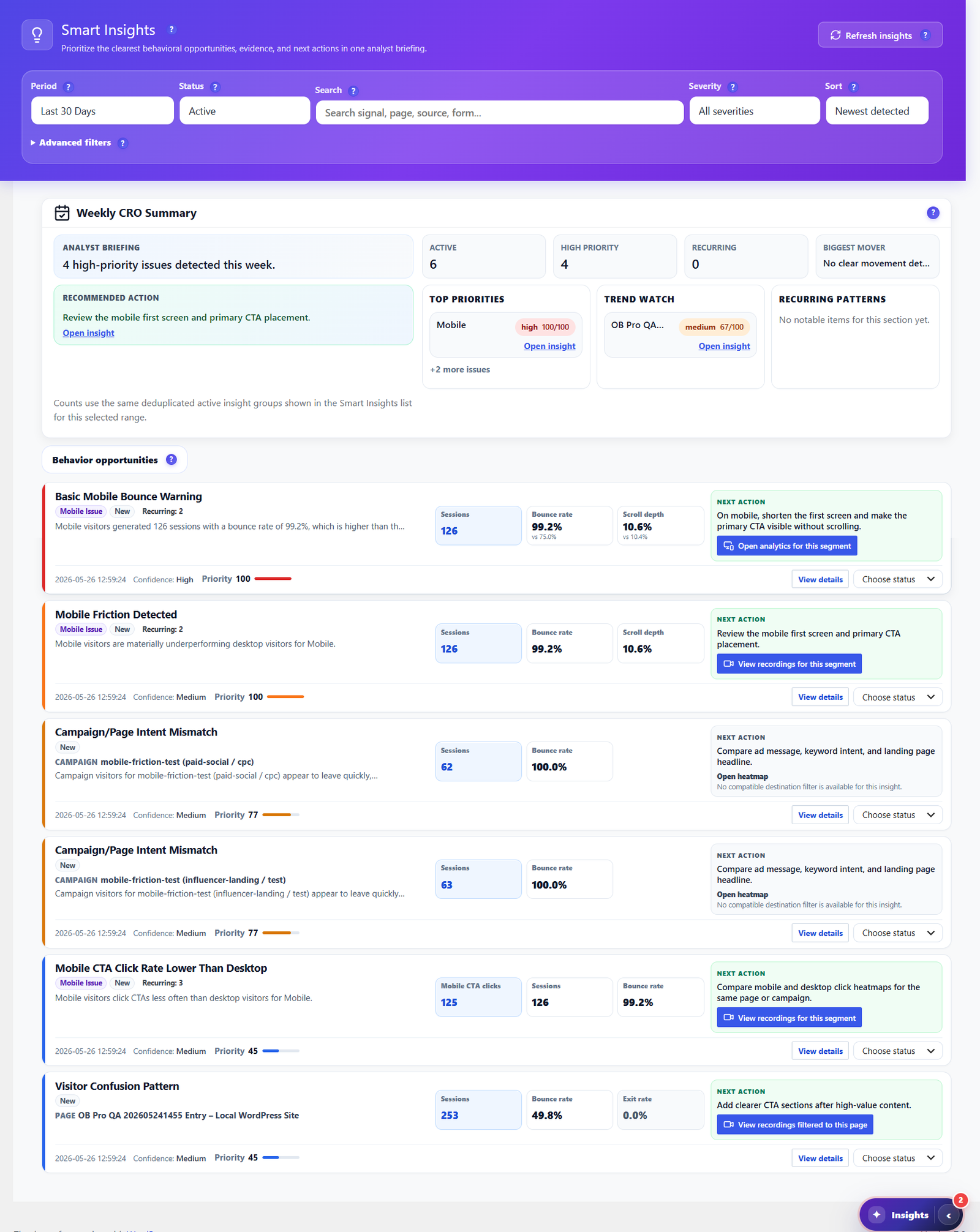
Jetpack Stats hands you a pageview chart and a list of top posts. Opti-Behavior goes further: Smart Insights reads your own heatmaps, funnels, forms and engagement signals, then writes a prioritized weekly CRO briefing — each item with evidence and a recommended next action. It tells you what to fix next, not just what happened.

  • Weekly CRO summary ranking high-priority issues by impact.
  • Behavior-based recommendations for bounce, scroll, exit and mobile friction.
  • One click to the evidence — jump straight to the heatmap, funnel or recording behind each insight.
  • Included free, with deeper cross-source evidence in Pro.
Opti-Behavior Smart Insights center with a weekly CRO summary, prioritized behavior opportunities and recommended next actions for each issue

Own Your Reports & Your Raw Data

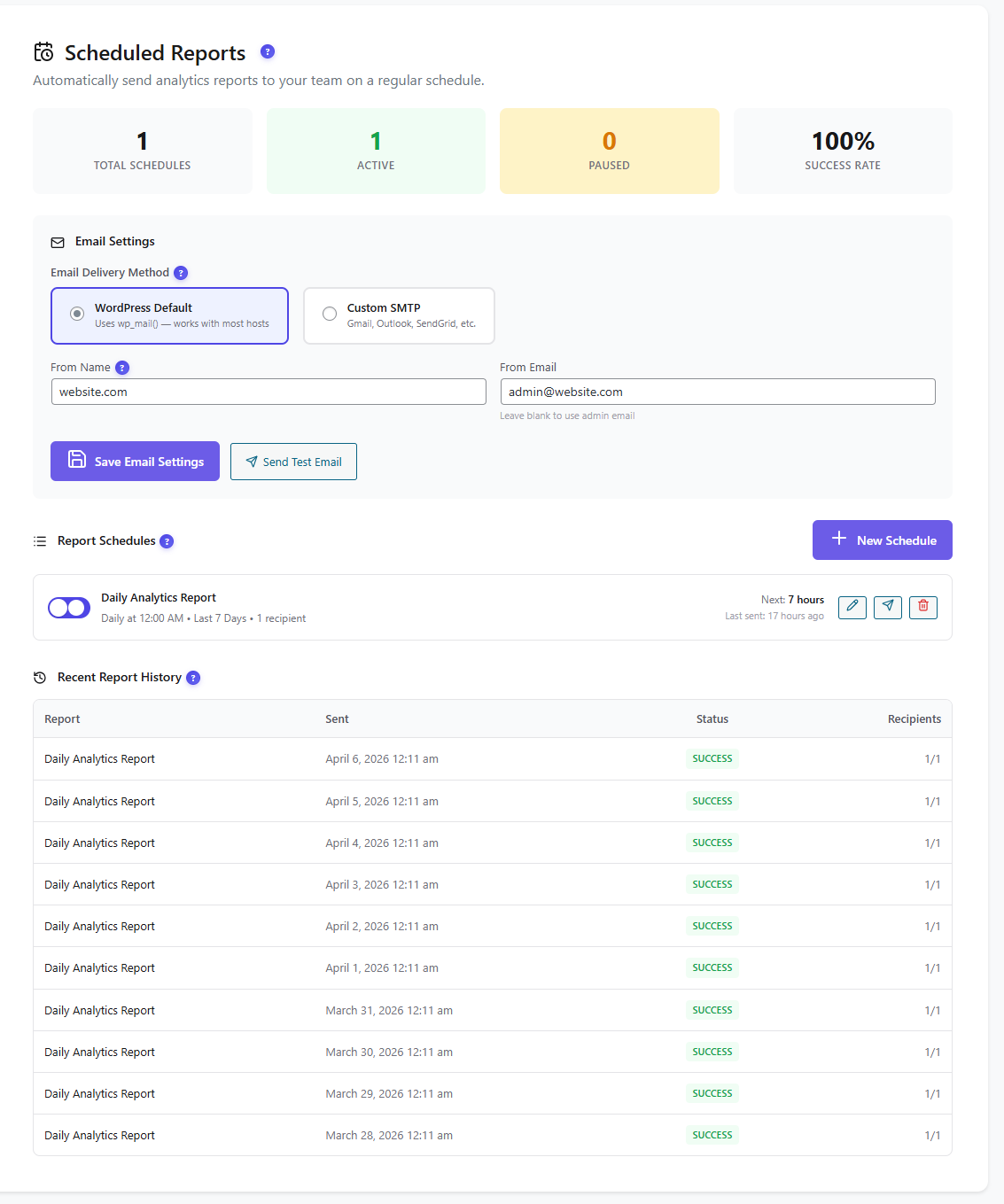
Jetpack Stats keeps your numbers on the WordPress.com cloud and shows them through a connected account. Opti-Behavior schedules self-hosted email reports (daily, weekly or monthly) and lets you export the raw data as CSV, JSON or ZIP whenever you want. Your reporting, your recipients, your server — no WordPress.com account required.

  • Scheduled email reports via WordPress mail or custom SMTP, with delivery history.
  • One-click CSV / JSON / ZIP export of your analytics datasets.
  • No external service — data never leaves your WordPress install.
Opti-Behavior scheduled reports screen showing email delivery settings, an active daily analytics report schedule and a table of successful report deliveries

Follow the Whole Journey

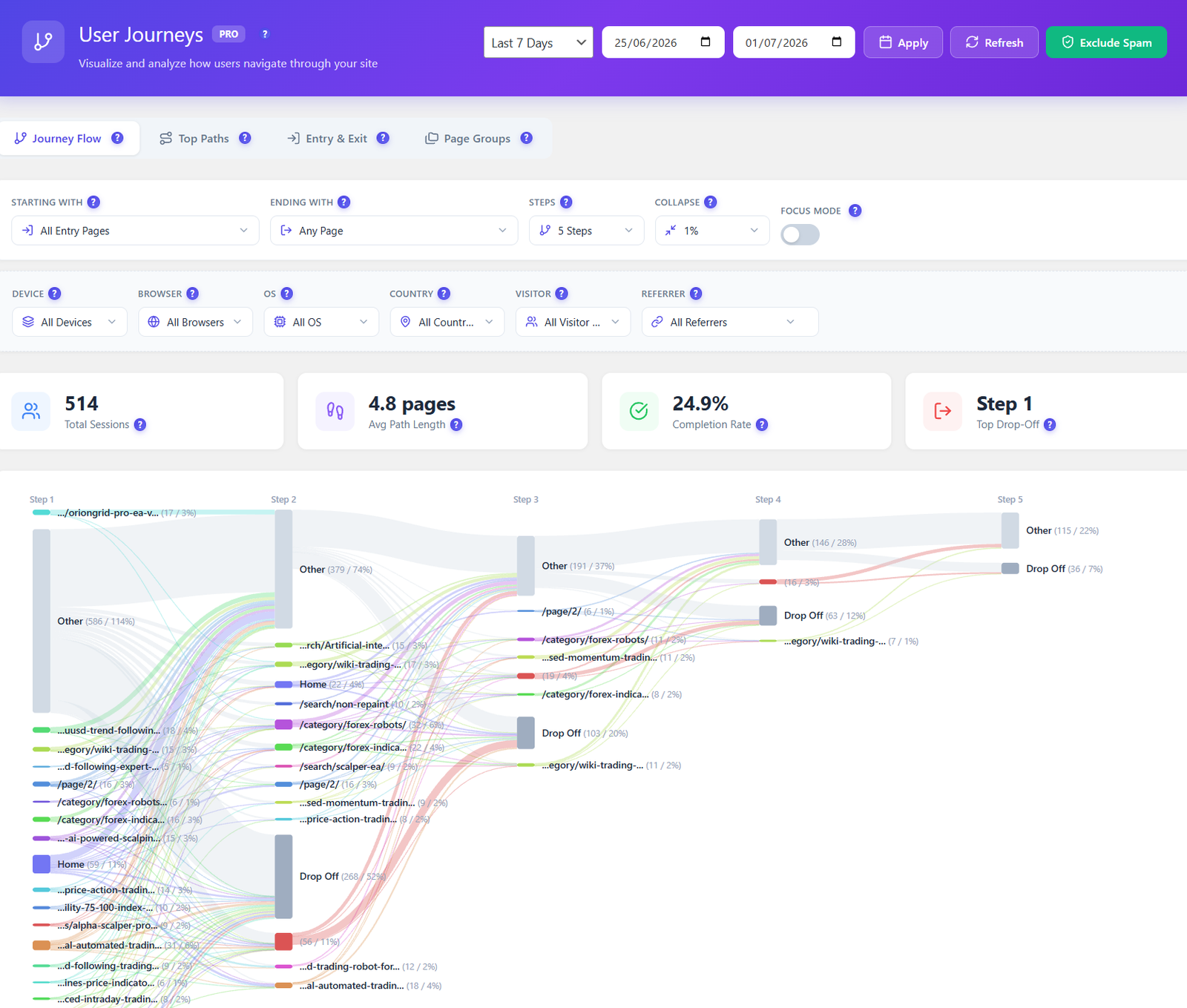
Jetpack Stats shows top pages and referrers, but not how visitors move between them. Opti-Behavior Pro maps every route across your site as a visual Sankey diagram — entry pages, top paths, and the exact steps where visitors drop off — so you fix the leaks that lose conversions.

  • Visual journey flow from entry to exit, page by page.
  • Drop-off highlighted at each step, not buried in a table.
  • Filter by device, country, referrer and visitor type.
Opti-Behavior user journeys Sankey diagram showing session paths, average path length, completion rate and drop-off steps

Privacy & Data Ownership

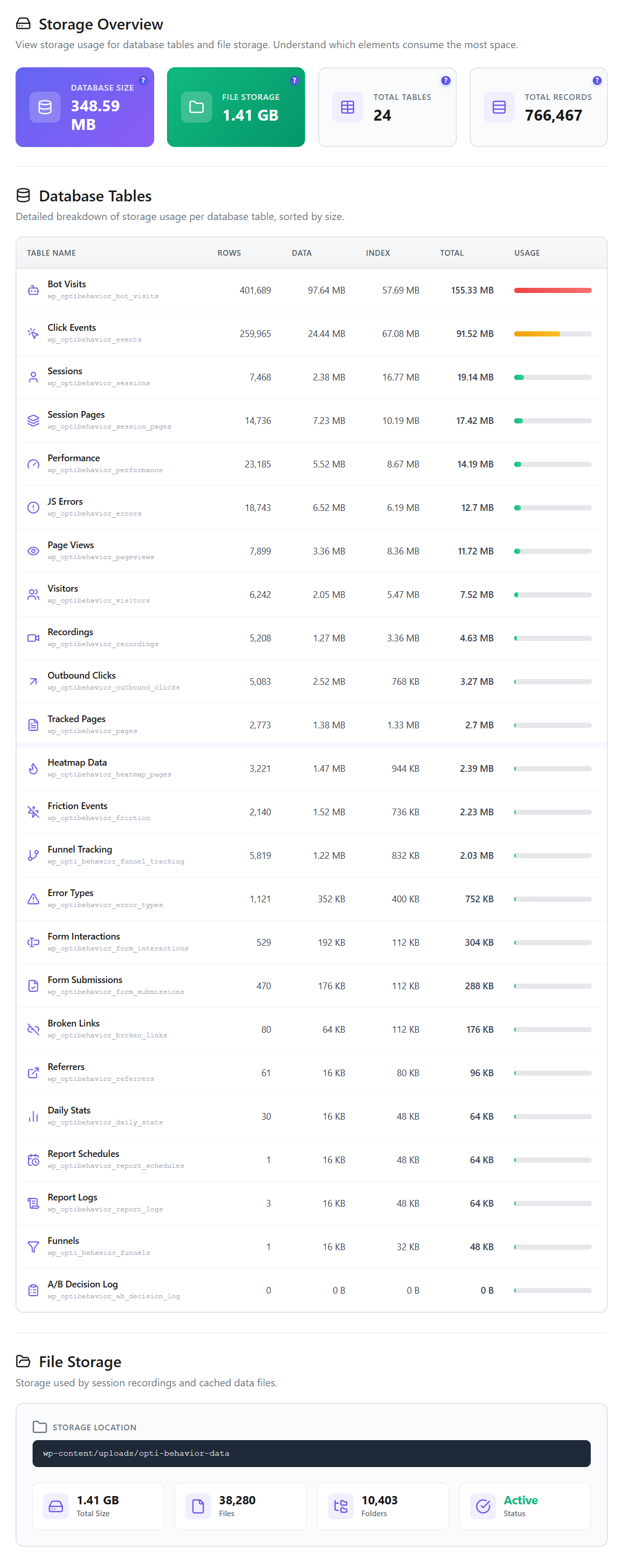
This is the core difference, not a footnote: because Opti-Behavior stores every click, heatmap and recording on your own WordPress server, you stay the sole data controller with no export to a third-party cloud. Core tracking runs without cookies (so many sites skip the consent banner), with anonymous mode, consent-plugin detection and GDPR/CCPA-ready settings — plus built-in bot & spam filtering to keep reports clean. Jetpack Stats, by contrast, requires a connected WordPress.com account and processes your traffic on Automattic's cloud.

Opti-Behavior storage overview showing self-hosted database tables, total database size, file storage and total records stored on your own WordPress server

Where Jetpack Stats Is Strong (an honest take)

  • Extremely simple — near-zero setup and an at-a-glance view of pageviews, top posts and referrers.
  • Backed by Automattic and bundled with the widely used Jetpack suite (3 million+ installs across Jetpack).
  • Genuinely free for personal, non-commercial sites, with a polished real-time dashboard.
  • Lightweight, cookieless view counting plus a geographic visitor map and WooCommerce/Jetpack Social integration.
  • The right call if all you want is a quick, hands-off pageview trend and you're comfortable on the WordPress.com cloud.

How to Add Opti-Behavior

1

Install the Free Plugin

Download Opti-Behavior from WordPress.org and activate it. It runs independently of Jetpack — no WordPress.com connection required, and the two don't conflict.

2

Tracking Starts Automatically

Behavior tracking, click heatmaps, funnels and A/B testing begin immediately — no external account, no API keys, no cloud service.

3

Unlock Pro When Ready

Start a 6-month free Pro trial to add scroll/move/attention heatmaps, session recordings, form analytics, user journeys and real-user error tracking.

Opti-Behavior vs Jetpack Stats FAQ

Is Opti-Behavior a Jetpack Stats alternative?
Yes and no. Opti-Behavior is a self-hosted analytics and behavior suite that runs entirely on your WordPress server. It replaces Jetpack Stats if your goal is behavior and conversion data — heatmaps, recordings, funnels and A/B tests — kept off the cloud. Jetpack Stats is a simpler cloud pageview counter, so many teams run both: Jetpack for glance-able counts, Opti-Behavior for the on-site behavior layer.
Does Jetpack Stats store data on my server?
No. Jetpack Stats requires a connected WordPress.com account and processes your traffic on Automattic's cloud, so the data is not self-hosted. Opti-Behavior stores all analytics and behavior data on your own WordPress server with no third-party processing and no external account.
Does Jetpack Stats include heatmaps or session recordings?
No. Jetpack Stats focuses on pageviews, top content and a geographic visitor map — that map is not an on-page behavior heatmap. It has no click/scroll heatmaps, no session recordings, no funnels and no A/B testing. Opti-Behavior includes click heatmaps, conversion funnels and A/B testing in the free version, plus scroll/move/attention heatmaps and full session replay in Pro — all native, no extra plugin.
Do I need Jetpack or a WordPress.com account to use Opti-Behavior?
No. Opti-Behavior is a standalone plugin with no dependency on Jetpack or WordPress.com. You can run it alone or alongside Jetpack Stats — they track independently and don't conflict.
Is Jetpack Stats free?
Jetpack Stats is free for personal, non-commercial sites; commercial sites need a paid plan (from €7.95/mo billed yearly at intro pricing, with a 10K site-views/mo cap). Opti-Behavior has a free version on WordPress.org with heatmaps, funnels and A/B testing, no commercial-use surcharge and unlimited sessions; Pro adds recordings, advanced heatmaps, form analytics and journeys.
Will running Opti-Behavior slow down my site?
Opti-Behavior uses a lightweight tracking script and a hybrid file/database storage engine built for speed. It records to your own server instead of calling a cloud service on every pageview, and runs independently of Jetpack Stats.

Bring Your Analytics Back to Your Own Server

Install Opti-Behavior free and start seeing heatmaps, funnels and A/B tests on your own server — no signup, no WordPress.com account, no data sent to the cloud.

Explore
Drag