Skip links
iconOpti-Behavior
made by OptiUser

Form analytics for wp mark whiteWordPress · woo markWooCommerce PRO

See which field
makes visitors
quit your form.

Field-by-field drop-off, time, errors and refills for every form on your site — Contact Form 7, WPForms, Gravity Forms and 13 more, detected automatically — plus a replay of each abandoned session, stored on your own WordPress server.

Form analytics is a Pro module · 6 Months Free · No credit card

Admin in 6 languages · Multisite ready

← Back to overview

9.6%

conversion — 369 of 408 form views ended in an abandonment.

Do this

Open the form with the lowest conversion first.

30%

of visitors who start the form quit at the phone field. The leak sits in one field.

Fix

Make the phone field optional, or say why you need it.

41%

of visitors leave the phone field blank, with 3 errors and 2 refills.

Fix

Loosen the format rule and add an example.

15

seconds stuck on the phone field, an error, then the visitor leaves.

Fix

Watch three abandoned sessions before you rewrite the form.

Slice every form by
  • Device
  • Browser
  • OS
  • Country
  • Visitor type
  • Referrer
  • UTM campaign
  • Date range
Example data
wp mark white
5.0 Rated on WordPress.org
1,700+ active installsSites running Opti-Behavior today
woo mark
Built for WooCommerceCheckout, cart and product-page funnels
Self-hosted: recordings and analytics are stored on your own server.Native WordPress · no cookies required
Cache plugin compatible
wp rocketWP Rocketlitespeed cacheLiteSpeed Cachew3 total cacheW3 Total Cachewp super cacheWP Super CacheautoptimizeAutoptimizesg optimizerSG OptimizerperfmattersPerfmatterswp optimizeWP-Optimizejetpack boostJetpack BoostbreezeBreezewp fastest cacheWP Fastest CachehummingbirdHummingbirdnitropackNitroPackflyingpressFlyingPresscache enablerCache Enablerswift performanceSwift Performanceasset cleanupAsset CleanUp
Works with all themes & page builders
elementorElementordiviDivibeaver builderBeaver BuilderwpbakeryWPBakerygutenbergGutenbergOxygenbrizyBrizybreakdanceBreakdancesiteoriginSiteOriginastraAstrageneratepressGeneratePresskadenceKadencethemifyThemifymotopressMotoPresslive composerLive ComposeroceanwpOceanWPblocksyBlocksyneveNeve
16
Form Plugins
16 detected automatically, plus any plain HTML form
5
KPIs per Form
Views, submissions, conversion, completion time, abandonments
6
Field Metrics
Interactions, time, refills, errors, left blank, abandonments
✓
Session Replay
Watch any submitted or abandoned form session

Submissions count the winners. Form analytics count the ones who left.

Most tools only see the thank-you page. Every visitor who started and quit is invisible — until now.

The problem

You count sends, not the ones who quit

A form with 39 submissions looks fine until you learn 369 people abandoned it.

With Opti-BehaviorViews, submissions, conversion rate, completion time and abandonments for every form, with the change vs the last period.

The problem

You cannot tell which field is the problem

Ten fields, one conversion number. Somewhere in there is the field that scares people off.

With Opti-BehaviorA field drop-off funnel shows sessions reached per field, so the biggest gap is your culprit.

The problem

Validation friction stays hidden

Strict formats, unclear errors and retyping never show up in a pageview count.

With Opti-BehaviorPer field: average time, refills, errors and left-blank rate.

The problem

You cannot see how they struggled

Numbers say where they left. They do not show the hesitation, the retyping or the error.

With Opti-BehaviorEvery submitted or abandoned session has a Watch button that opens the replay.

From the dashboard to the one field that loses them

Every form on your site, tracked field by field, on your own server — whichever form plugin you use.

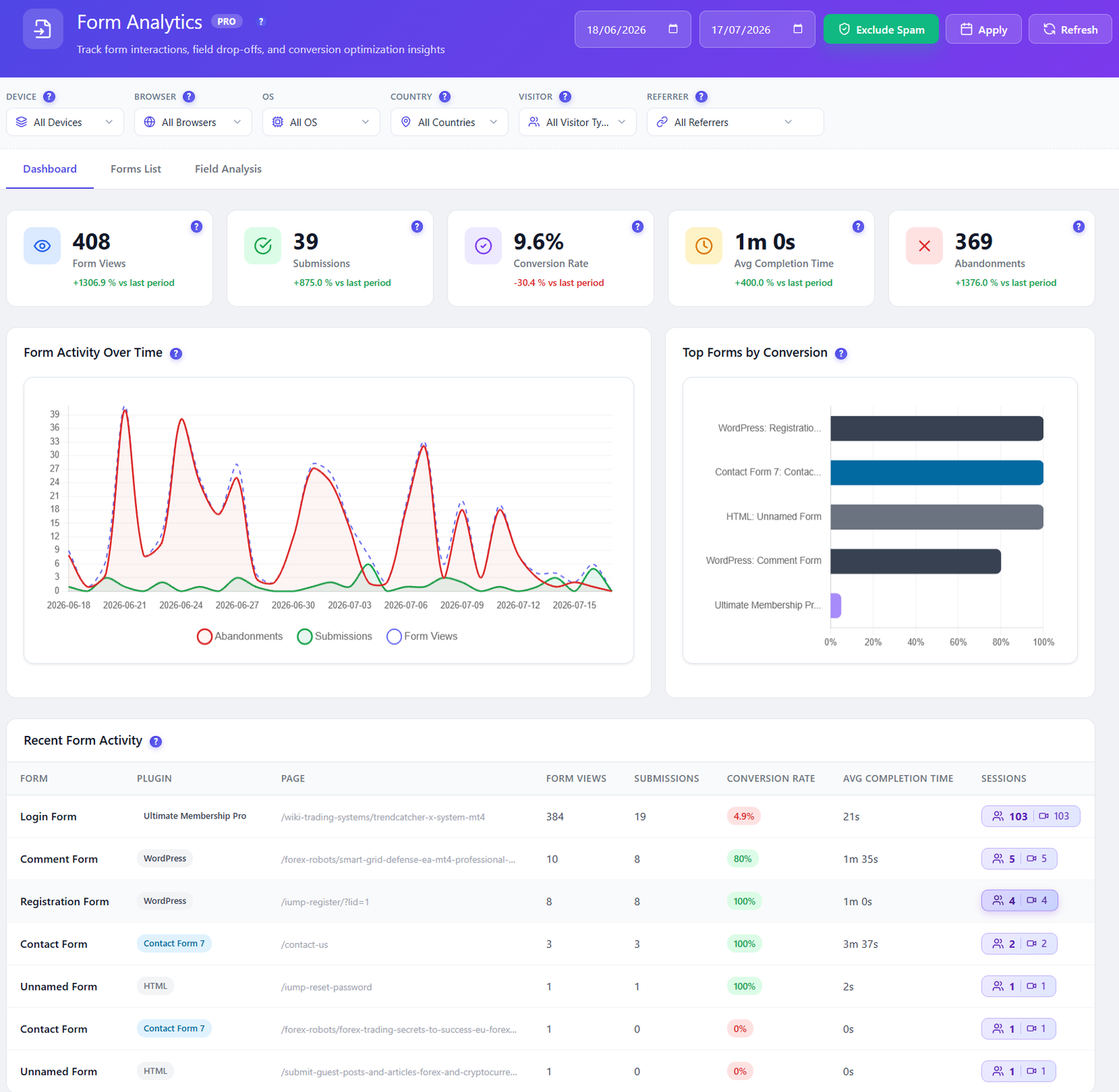
Opti-Behavior Form Analytics dashboard with form views, submissions, conversion rate, average completion time and abandonments, an activity chart, top forms by conversion and recent form activity

Form dashboard PRO

Every form, five numbers, one screen.

Form views, submissions, conversion rate, average completion time and abandonments, each with its change against the previous period. Below them, a chart of views, submissions and abandonments over time and a ranking of your forms by conversion.

  • Period-over-period change on every KPI
  • Views, submissions and abandonments over time, to spot the day a redesign helped or hurt
  • Recent form activity with the plugin behind each form and the sessions recorded

Fix itRedesigned a form? Compare the two periods before you celebrate.
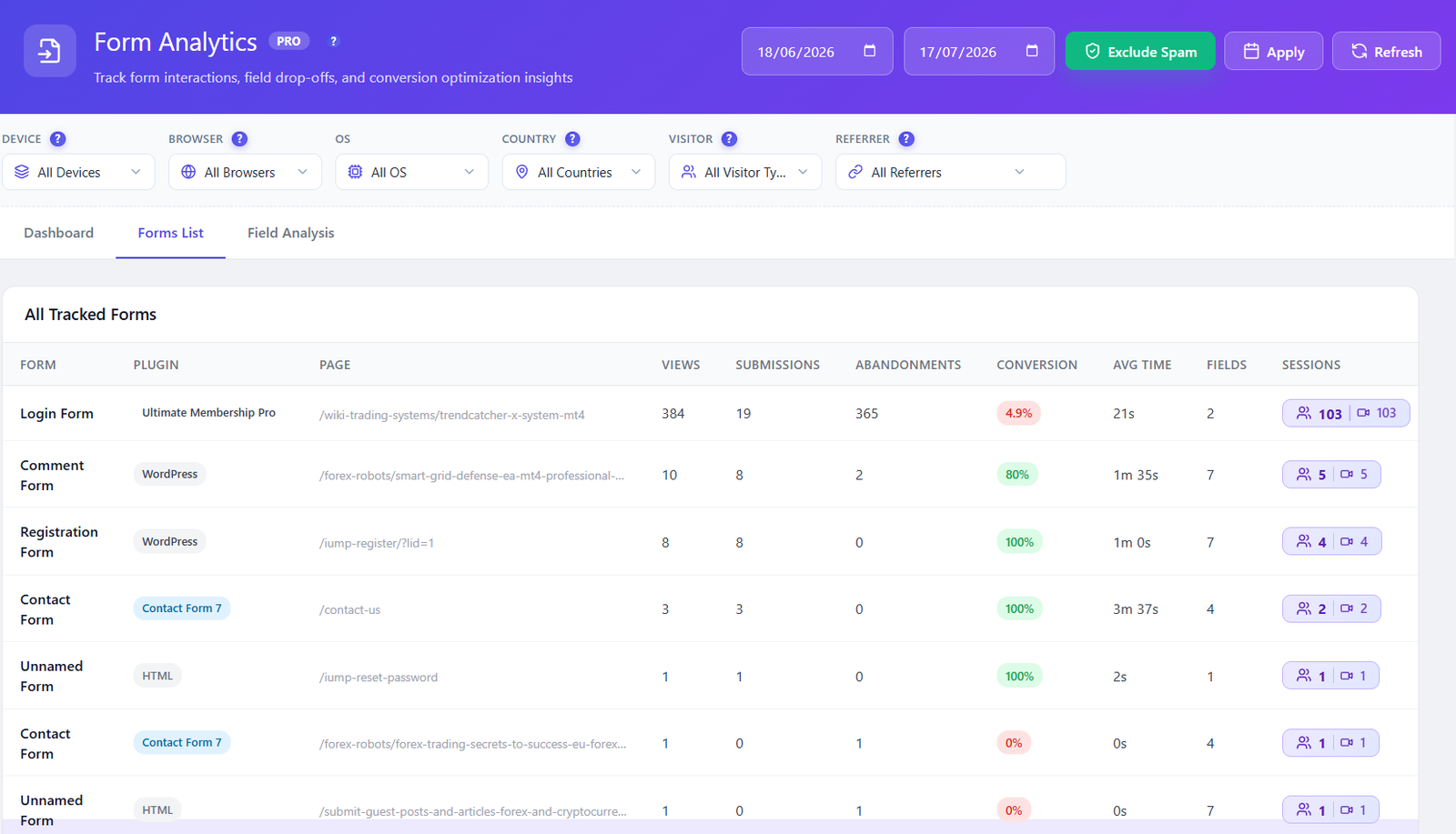
Opti-Behavior Forms List table of all tracked forms with plugin, page, views, submissions, abandonments, conversion, average time, fields and sessions

Forms list PRO

All tracked forms, found on their own.

You do not register forms one by one. Every form that appears on your site shows up in the list with its plugin, the page it lives on, views, submissions, abandonments, conversion, average time and number of fields.

  • Plugin badge on each form: Contact Form 7, WPForms, WordPress, HTML…
  • The page each form lives on, so the same form on two pages is not mixed up
  • Sessions and recordings count on every row, one click from the replay

Fix itSort by abandonments and start with the form that loses the most people.

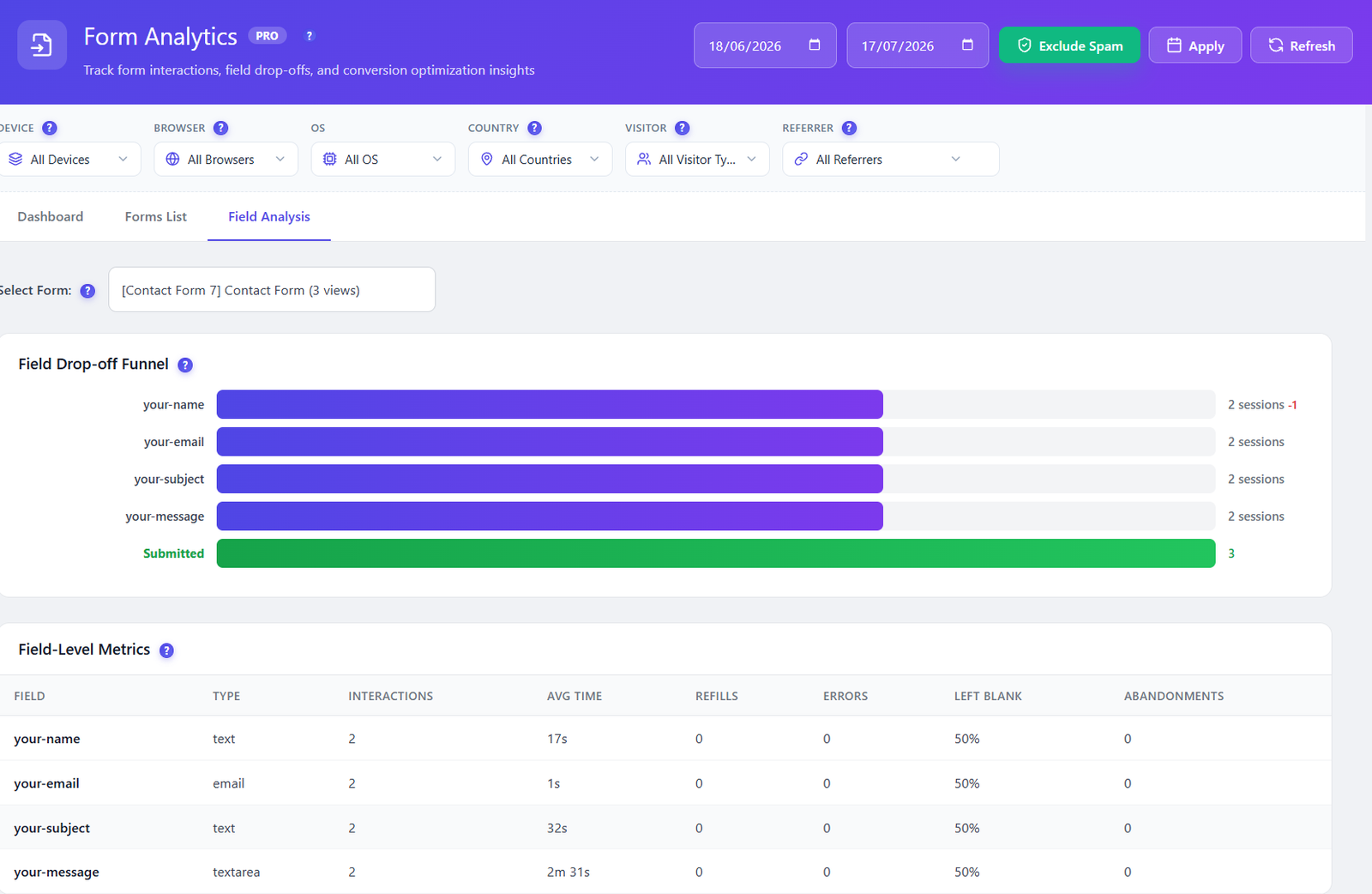
Opti-Behavior Field Analysis with a field drop-off funnel showing sessions per field down to Submitted, and a field-level metrics table

Field analysis PRO

Find the field that loses them.

Pick a form and see a drop-off funnel field by field: how many sessions reached each one, how many were lost on it, and how many submitted. Under it, the numbers for every field: interactions, average time, refills, errors, left blank and abandonments.

  • Sessions reached and sessions lost, field by field
  • Average time on each field — the one that takes two minutes is the one to simplify
  • Refills and errors show validation that fights your visitors

Fix itThe field with the biggest gap is your first edit.

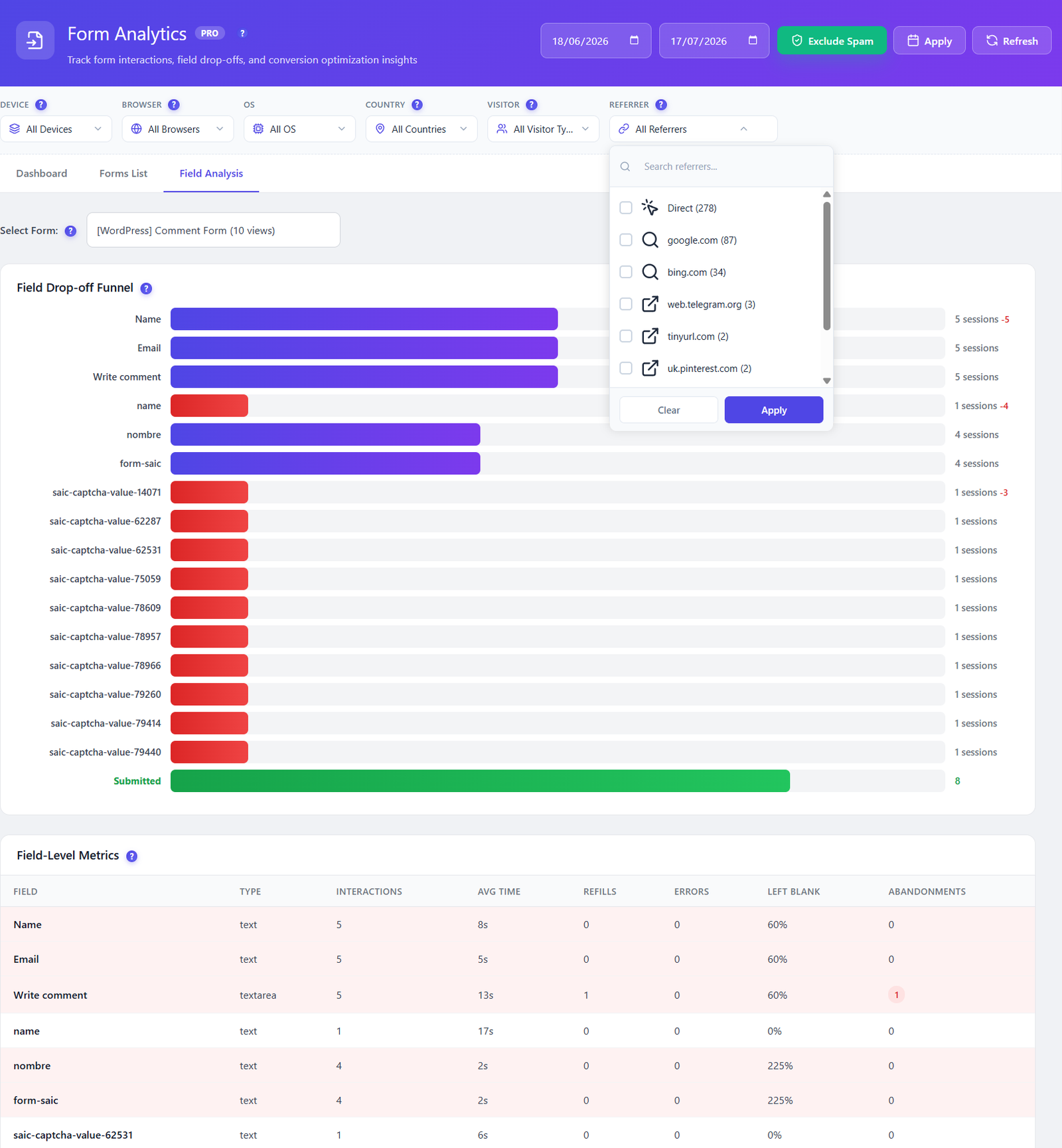
Opti-Behavior Form Analytics filters for device, browser, OS, country, visitor type and referrer, with an open referrer list showing Direct, google.com and bing.com

Audience filters PRO

Does the form fail on mobile only?

Six filters sit above every view: device, browser, OS, country, visitor type and referrer. Search the referrer list and compare visitors from Google with visitors from a campaign, on the same form.

  • Device, browser, OS, country, visitor type, referrer
  • A searchable referrer list with counts: Direct, Google, Bing and more
  • Exclude Spam removes bot sessions from every number

Fix itConversion fine on desktop, poor on mobile? Look at the phone field first.

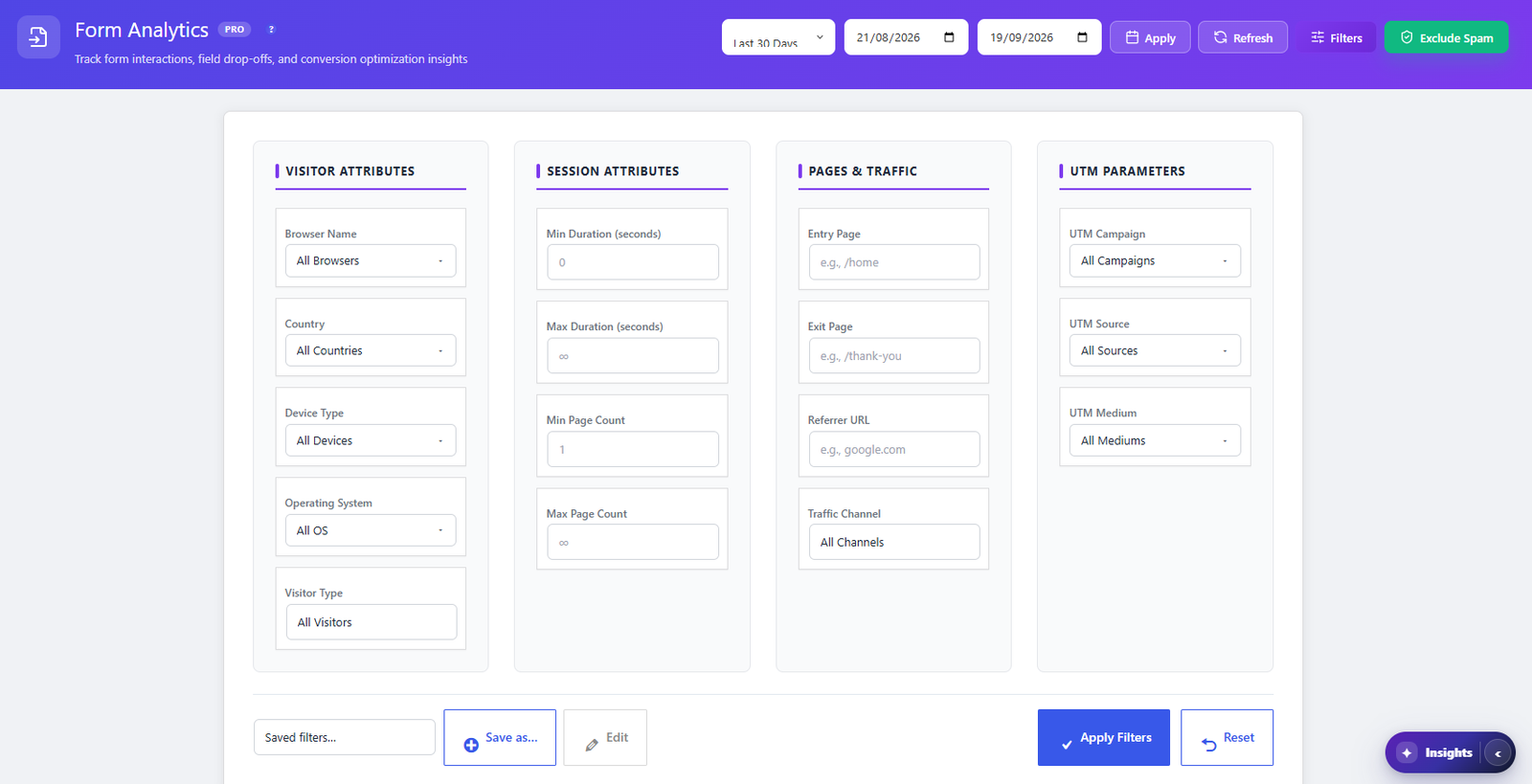
Opti-Behavior Form Analytics advanced filter panel with visitor attributes, session attributes, pages and traffic, and UTM parameters, plus saved filters

Advanced filters PRO

Ask sharper questions, then save them.

Open the Filters panel to narrow by who the visitor is, how the session went, which pages they saw and which campaign brought them. Save the combination and reuse it in one click.

  • Visitor: browser, country, device type, operating system, visitor type
  • Session: minimum and maximum duration and page count
  • Pages & traffic: entry page, exit page, referrer URL, traffic channel
  • UTM: campaign, source and medium
  • Saved filters and date range presets

Fix itPaid-campaign visitors who abandon at the phone field? Save that view and check it weekly.

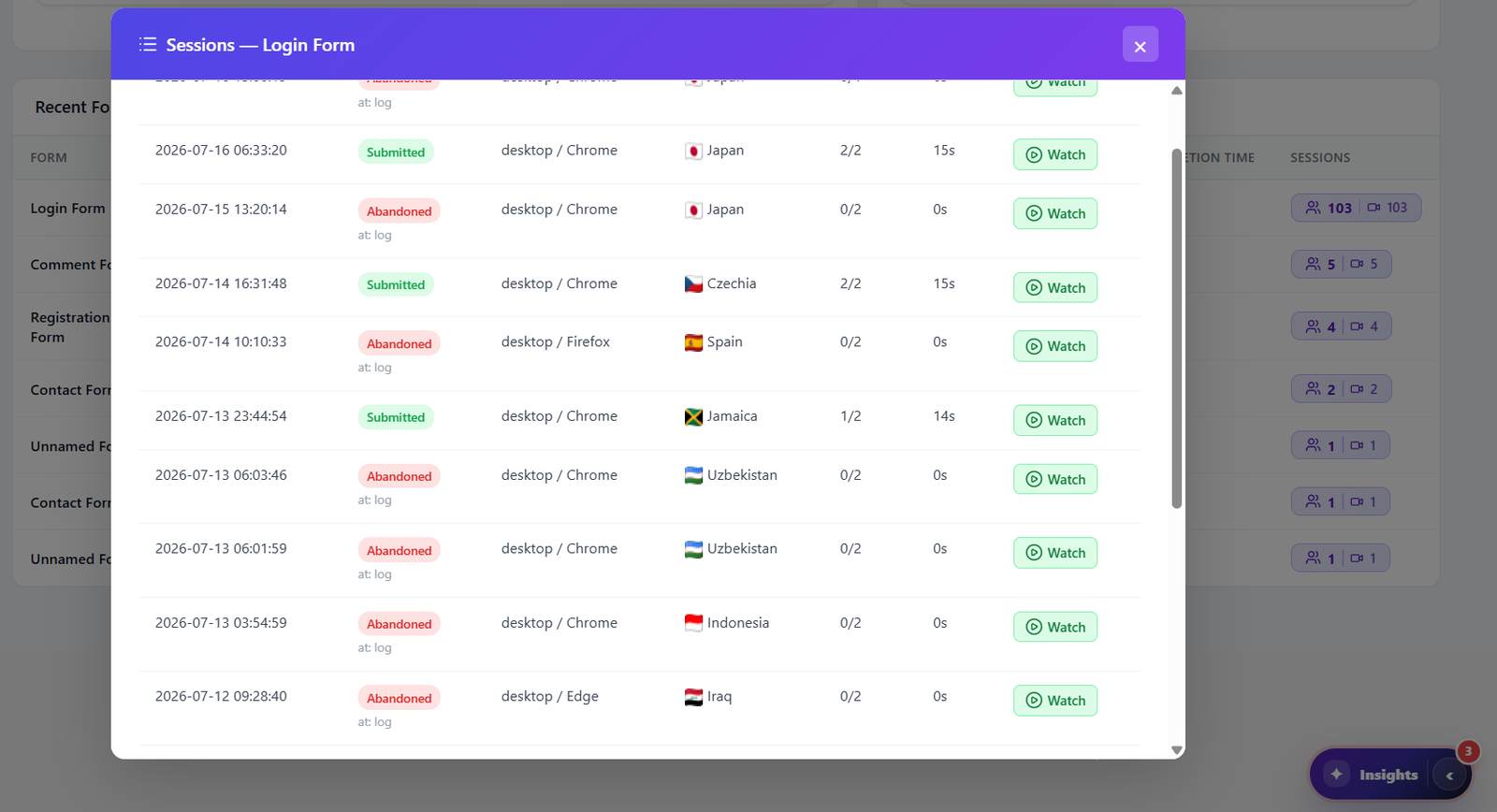
Opti-Behavior form sessions list showing Submitted and Abandoned sessions with date, device, browser, country, fields filled, time and a Watch button

Form sessions PRO

Watch how they filled it in, or gave up.

Click a form to list its sessions, each marked Submitted or Abandoned with the field where they stopped, the device, browser and country, and how many fields they filled. One click on Watch opens the session replay.

  • Abandoned sessions show the field they stopped at
  • Fields filled out of total, and time spent, on every row
  • Replay the hesitation, the retyping and the error message

Fix itWatch three abandoned sessions in a row: the same pattern usually shows up.

Compatibility PRO

Your form plugin, detected on its own.

The tracker recognizes 16 form plugins and builders from their markup and events, so there is no shortcode, no per-form setup and no code to add. Anything it does not know falls back to plain HTML form tracking.

  • Contact Form 7, WPForms, Gravity Forms, Ninja Forms, Fluent Forms, Formidable, Forminator, Everest Forms, SureForms, MetForm
  • Elementor forms, Gutenverse Form, Calculated Fields Form
  • WooCommerce checkout, Ultimate Membership Pro, and WordPress comment, login and registration forms
  • Multi-step and dynamically rendered fields are picked up as they appear

Fix itChanging form plugin next year? Your analytics keep working, whichever one you pick.

Privacy & exclusions PRO

Only how they fill it in, never what they type.

Password and card inputs are never captured, and only interaction metadata is stored — time, focus, blur, errors, refills — not the content. You can exclude search forms and login forms altogether and list field names to ignore. The tracker is excluded from caching and optimization plugins automatically.

  • No typed content stored: time, focus, blur, errors and refills only
  • Exclude search forms and login forms in Settings
  • Ignore any field by name, for coupons, notes or internal fields
  • Compatible with Autoptimize, LiteSpeed Cache, WP Rocket and SG Optimizer

Fix itAdd your coupon or order-note field name to the ignore list.

Watch form analytics in action

A short tour of the form analytics screens inside a real WordPress admin.

How It Works

1

Enable form tracking

Turn on form analytics in the Opti-Behavior Pro settings. The tracker finds every form on your pages by itself; you can exclude search and login forms or ignore fields by name.

2

Every field interaction is recorded

Focus, blur, typing time, errors and refills are logged per field with the session, on your own server. The content typed is never stored, and password and card fields are skipped.

3

Read the dashboard and the field funnel

See five KPIs per form with the change vs the last period, then open a form to find the field where sessions are lost. Filter by device, country, referrer or campaign.

4

Watch, simplify, compare

Replay abandoned sessions to see the hesitation, simplify the field, then compare the same form over a later date range to confirm conversion went up.

Who Uses Form Analytics?

Lead Generation

Find the field that costs you leads and simplify it. Watch what happens right before someone gives up on a quote or contact form.

Checkout & Sign-up

WooCommerce checkout and registration forms are tracked too. See which field triggers errors or retyping.

UX & Conversion Teams

Test a shorter form, then compare the two periods field by field instead of judging by one conversion number.

How Opti-Behavior form analytics compare

Few tools go below the submission count. What decides it is field-level depth, where the data lives and what it costs.

Opti-Behavior vs
Opti-BehaviorHotjar · ContentsquareMicrosoft ClarityMouseflow
Data stays on your server✓✗✗ Microsoft servers*✗
Native WordPress · no external account✓✗✗✗
Form analytics included✓ Pro✗✗Paid
Detects your form plugin by itself✓ 16 + any HTML form✗✗✓
Field drop-off funnel✓ Pro✗✗✓
Time, refills, errors & left-blank per field✓ Pro✗✗✓
Replay of abandoned form sessions✓ Pro✗✗Partial · separate recordings
Period-over-period change on KPIs✓ Pro✗✗✗
What the price covers✓ All 9 analytics modulesHeatmaps + replay · surveys from $99/mo extraHeatmaps + recordingsTiers by session volume
Price€0 – €89/yrwhole plugin, all 9 analytics modules$0 – from $49/mo$0*$0 – from $25/mo

* Clarity is free; Microsoft acts as an independent data controller and may use behavioral data for advertising, and collection is limited in the EU without consent. Hotjar merged into Contentsquare in July 2025: its column shows the Contentsquare Free and Growth plans. Mouseflow keeps form analytics for paid plans. Competitor plans change often — updated from each vendor’s pricing page and documentation.

Form analytics FAQ

Which form plugins are supported?
Sixteen are detected automatically: Contact Form 7, WPForms, Gravity Forms, Ninja Forms, Fluent Forms, Formidable Forms, Forminator, Everest Forms, SureForms, MetForm, Elementor forms, Gutenverse Form, Calculated Fields Form, WooCommerce checkout, Ultimate Membership Pro and the native WordPress forms. Any other plain HTML form falls back to generic tracking.
What is tracked for each field?
Interactions, average time spent, refills (corrections), errors, how often the field is left blank, and abandonments at that field. The field drop-off funnel adds the sessions that reached each field and the ones that submitted.
Can I watch how someone filled in, or abandoned, a form?
Yes. Each form lists its sessions, marked Submitted or Abandoned, and every session has a Watch button that opens the session replay. This uses the Session Recordings module, included in Pro.
How is abandonment counted?
A session that interacted with the form and did not submit it counts as an abandonment, and the field where it stopped is recorded. Pro Smart Insights also raises signals for high form abandonment and for form error friction.
Are password and card fields protected?
Yes. Password and card inputs are never captured, and only interaction metadata is stored, such as timing, focus, blur, errors and refills. The text a visitor types is not stored.
Can I exclude forms or fields?
Yes. You can exclude search forms and login forms entirely and list field names to ignore, for example a coupon or internal field. Honeypot and hidden anti-spam fields are skipped automatically.
Does it handle multi-step and dynamic forms?
Yes. Fields that appear later, as in multi-step forms or forms rendered by JavaScript, are registered as they show up, so each step is tracked.
Will spam or bots skew my numbers?
Exclude Spam, in the header of every view, removes bot sessions from the numbers. Visible honeypot decoys are ignored automatically.
Does it work with caching plugins?
Yes. Opti-Behavior Pro includes compatibility filters for Autoptimize, LiteSpeed Cache, WP Rocket and SG Optimizer so the tracker script is not combined, deferred or delayed. No manual exclusion is needed.
Where is form data stored?
On your own WordPress server, in your own database. No external service is involved and no typed content is stored, so you stay the sole data controller.

Find the Field That Loses Your Leads

Get Opti-Behavior Pro and see, field by field, where visitors give up on your forms. All data stays on your server — no third parties, no monthly fees.

No credit card · Cancel anytime

Explore
Drag