Skip links
Opti-Behavior
Opti-Behavior
made by OptiUser
FREE PRO

Opti-Behavior vs Lucky Orange:
The Behavior Tools, Self-Hosted & Without Session Caps (2026)

Short answer: Lucky Orange and Opti-Behavior both cover heatmaps, session recordings, funnels and form analytics. The difference is where your data lives and how you pay. Lucky Orange is cloud-hosted and priced by monthly-session tiers with hard caps; Opti-Behavior runs entirely on your own WordPress server, with unlimited sessions and one license — no per-session fees, no data leaving your site.

Lucky Orange is a polished, easy-to-use behavior suite with recordings, heatmaps, funnels, surveys and live chat. But every visit is recorded to Lucky Orange's cloud, and paid plans meter you by monthly sessions. Opti-Behavior keeps every click, heatmap and recording on your own server, tracks unlimited sessions, and its free plugin never expires.

📈 1700+ active installs 🇫🇷 Made in France 🔒 Self-hosted: visitor data stays on your own server

TL;DR — Which should you pick?

  • Pick Lucky Orange if you want a hosted, all-in-one suite with recordings, heatmaps, funnels, surveys and built-in live chat, and you're comfortable with cloud hosting and session-based pricing.
  • Pick Opti-Behavior if you want heatmaps, recordings and funnels but self-hosted — unlimited sessions, one license, and every visitor's data kept on your own WordPress server.
  • Replacing Lucky Orange? Opti-Behavior covers the core behavior tools without per-session caps or a monthly cloud bill, and adds built-in A/B testing and Smart Insights that Lucky Orange doesn't offer.

Behavior Tools — On Your Own Server

Lucky Orange and Opti-Behavior both show you what visitors actually do: where they click, how far they scroll, and where they abandon. The difference is architecture. Lucky Orange streams every session to its cloud and charges by monthly-session tier. Opti-Behavior records to your own WordPress database — the real-time dashboard sits right next to heatmaps, recordings, funnels and A/B tests, with no session meter running in the background.

  • Self-hosted by design. Every click, heatmap and recording stays on your server.
  • Unlimited sessions. No monthly-session caps, no overage tiers, no upgrade prompts when traffic spikes.
  • One license, no metering. A free plugin plus optional Pro — not a recurring cloud subscription priced by traffic.
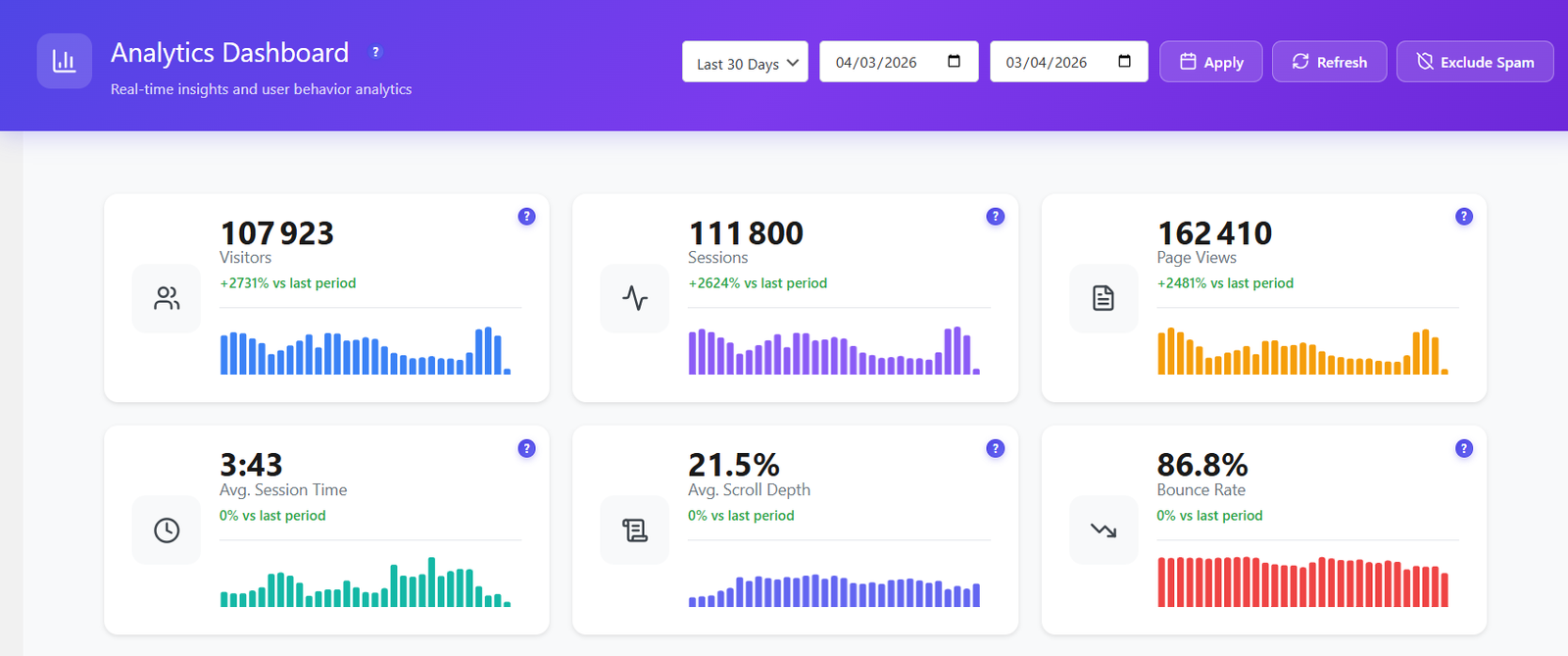
Opti-Behavior self-hosted analytics dashboard showing real-time visitors, pageviews, engagement and behavior metrics on your own WordPress server

Feature-by-Feature Comparison

Lucky Orange and Opti-Behavior overlap heavily on behavior tools. This table shows where each is built to win — hosting, pricing model and the extras each one adds.

Feature-by-feature comparison of Opti-Behavior and Lucky Orange.
FeatureOpti-BehaviorLucky Orange
Click Heatmaps✓ Free✓ Yes
Scroll / Move Heatmaps✓ Pro✓ Yes
Session Recordings & Replay✓ Pro✓ Yes
Conversion Funnels✓ Free✓ Yes
Form Analytics (field drop-off)✓ Pro✓ Yes
Surveys & Live Chat✗ Not the focus✓ Core strength
User Journeys (Sankey flow)✓ Pro✗ Not available
A/B Testing (built in)✓ Free✗ Not offered
Smart Insights (CRO recommendations)✓ Free✗ Not available
Error & Core Web Vitals Tracking✓ Pro (real-user)✗ Not available
Self-Hosted Data (you own it)✓ Yes✗ Cloud-hosted
Works Without Cookies✓ YesSee vendor site
Session LimitsUnlimitedSee vendor site
Free Tier✓ Free plugin (never expires)See vendor site
Price€0 – €89/yrSee vendor site

Competitor features and pricing change often: check the vendor's own site before deciding.

Move your behavior data in-house

Get heatmaps, recordings and funnels — self-hosted, with unlimited sessions and no monthly cloud bill.

Behavior Tools — Self-Hosted

Everything you use Lucky Orange for day to day — heatmaps, recordings, funnels and form analytics — runs in Opti-Behavior on your own server, with no session meter.

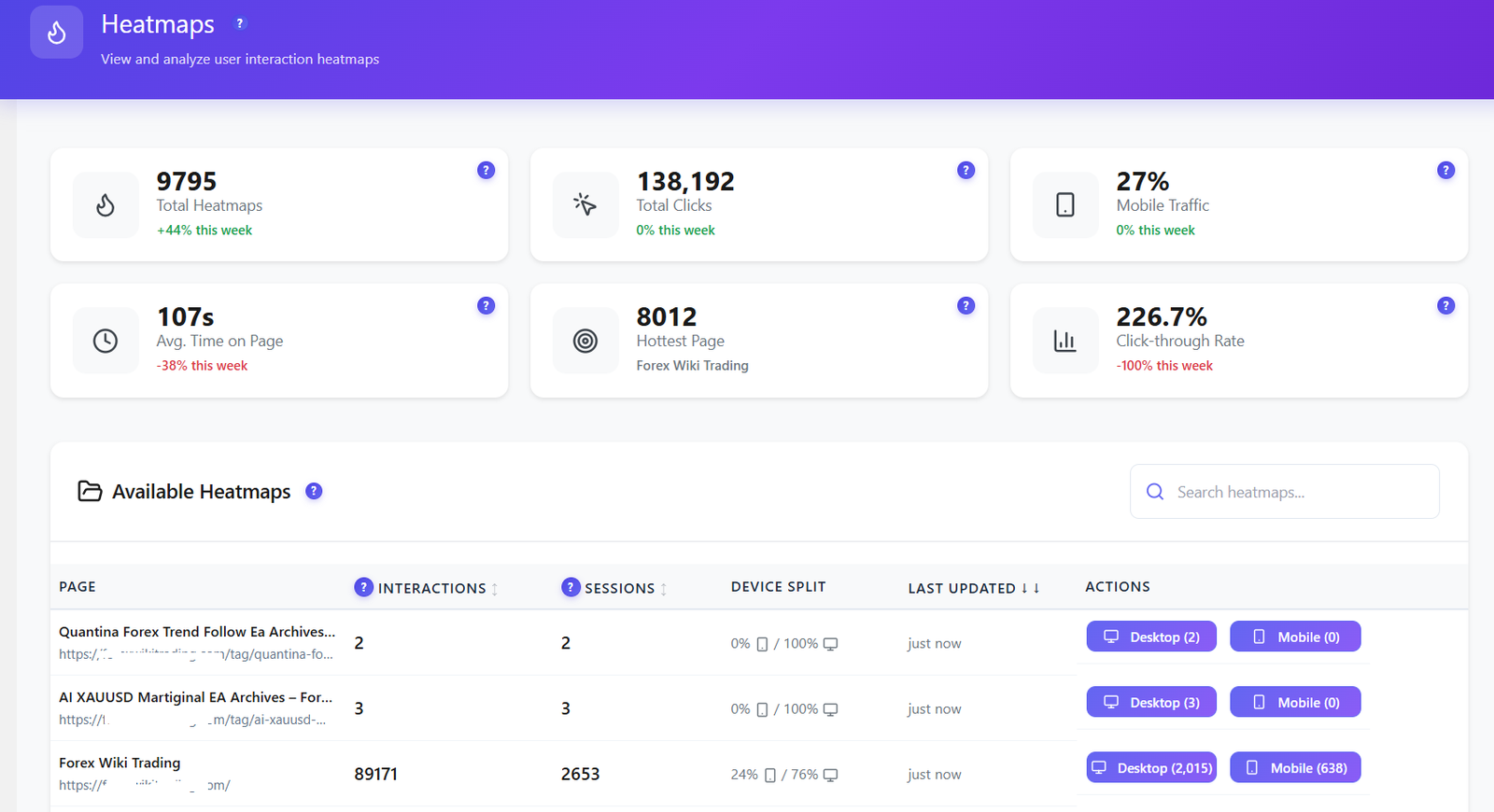
Opti-Behavior heatmaps dashboard with total heatmaps, total clicks, mobile traffic share and hottest page
Heatmaps. See every click, tap and hot zone by page and device — stored on your server.
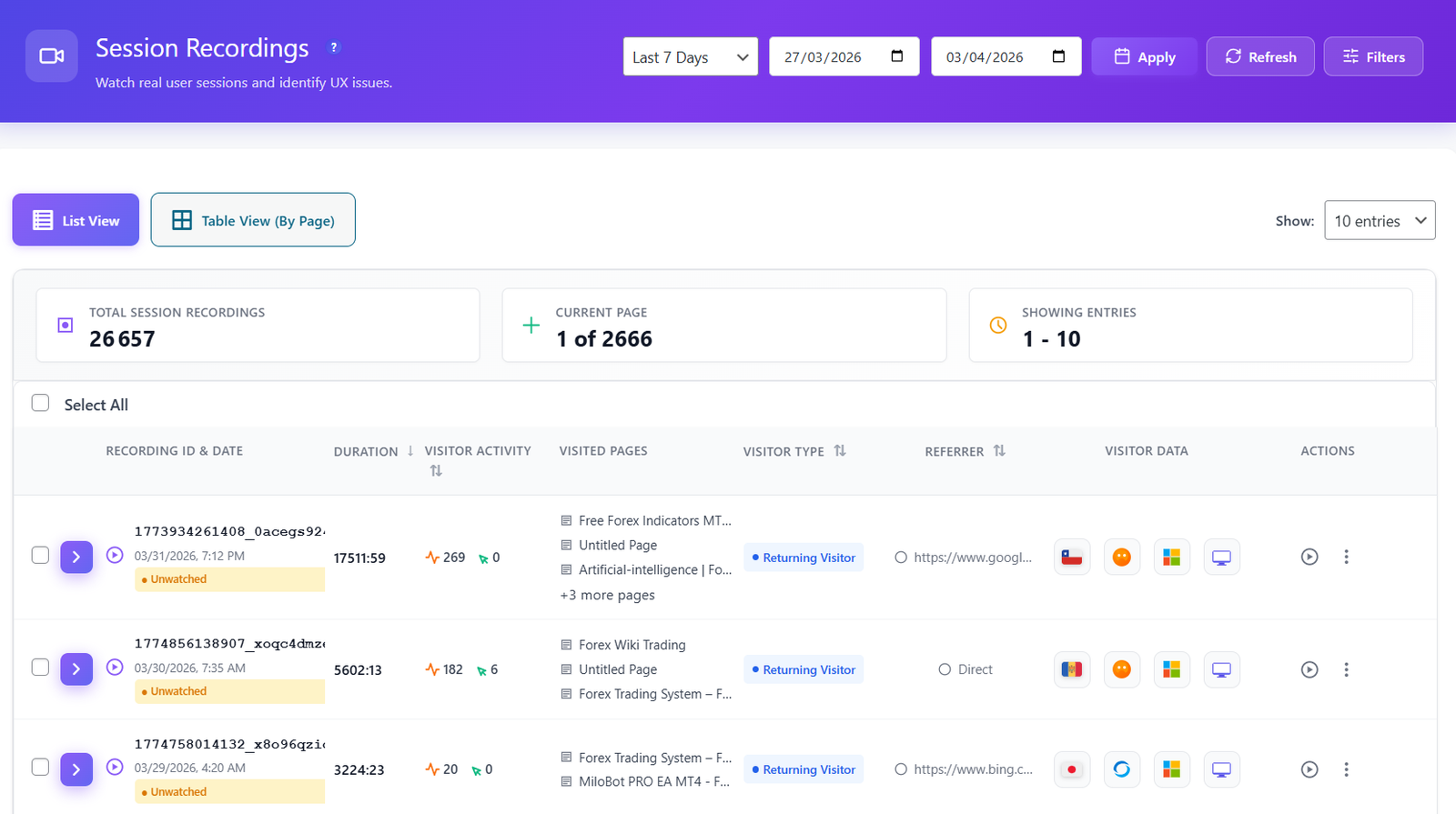
Opti-Behavior session recordings list showing duration, visited pages, visitor type and device for each session
Session recordings. Replay real visits and watch where people get stuck — no per-session cap on how many you keep.
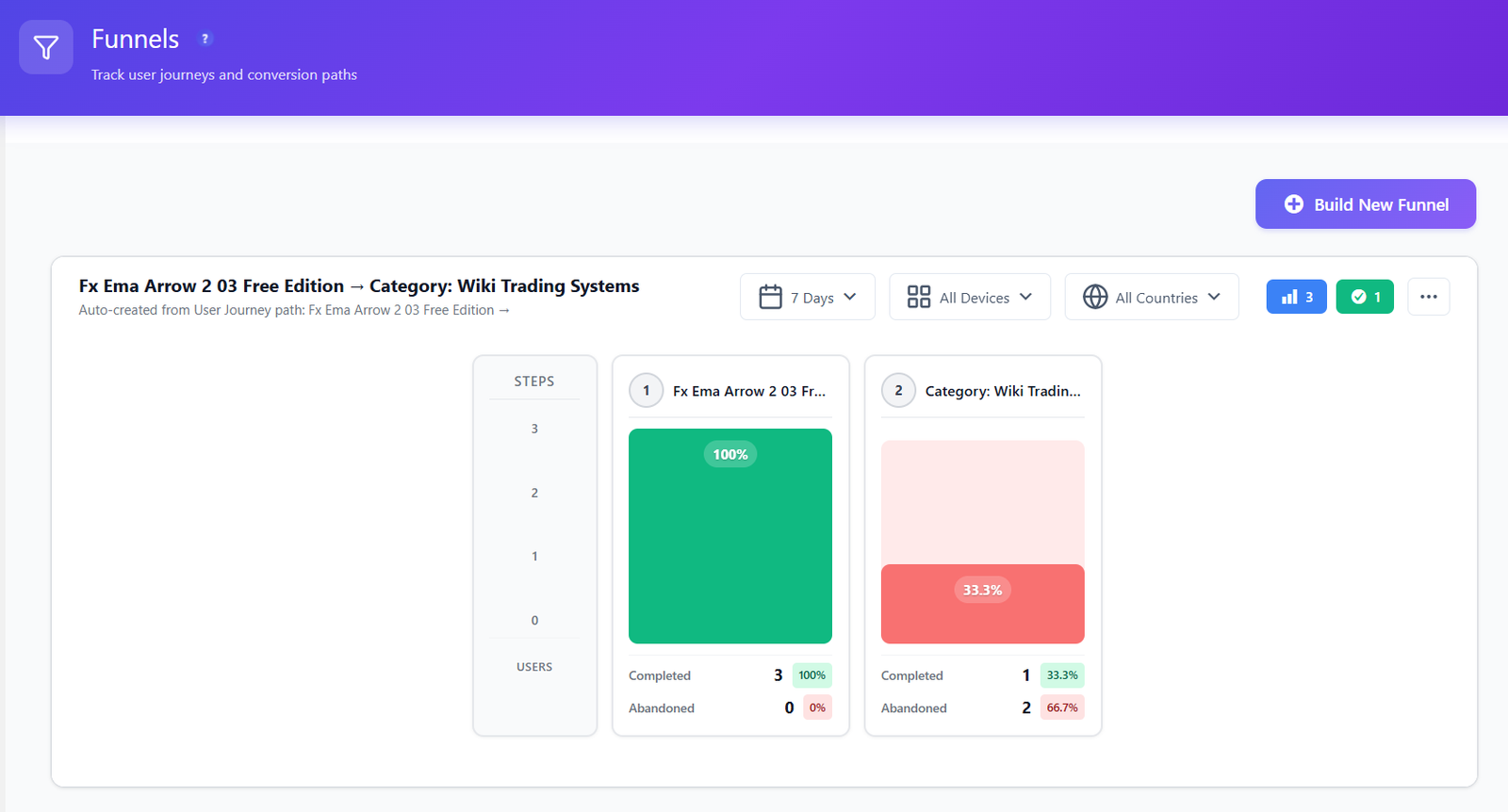
Opti-Behavior conversion funnel showing completion and abandonment rates step by step
Conversion funnels. Build multi-step funnels and see the exact step visitors abandon — from your own on-server data.
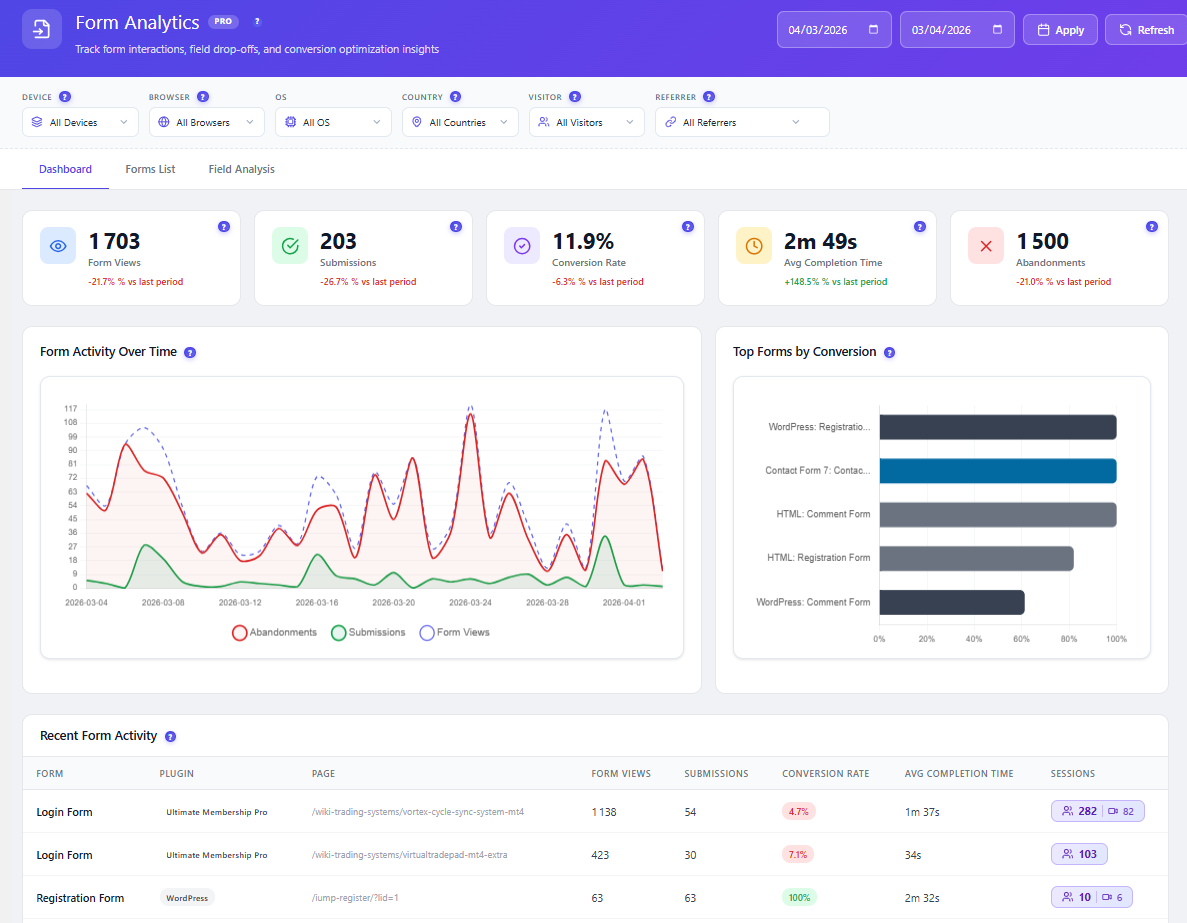
Opti-Behavior form analytics with form views, submissions, conversion rate, average completion time and abandonments
Form analytics. Field-level drop-off shows the exact input that kills your submissions.

A/B Testing Built In — Free

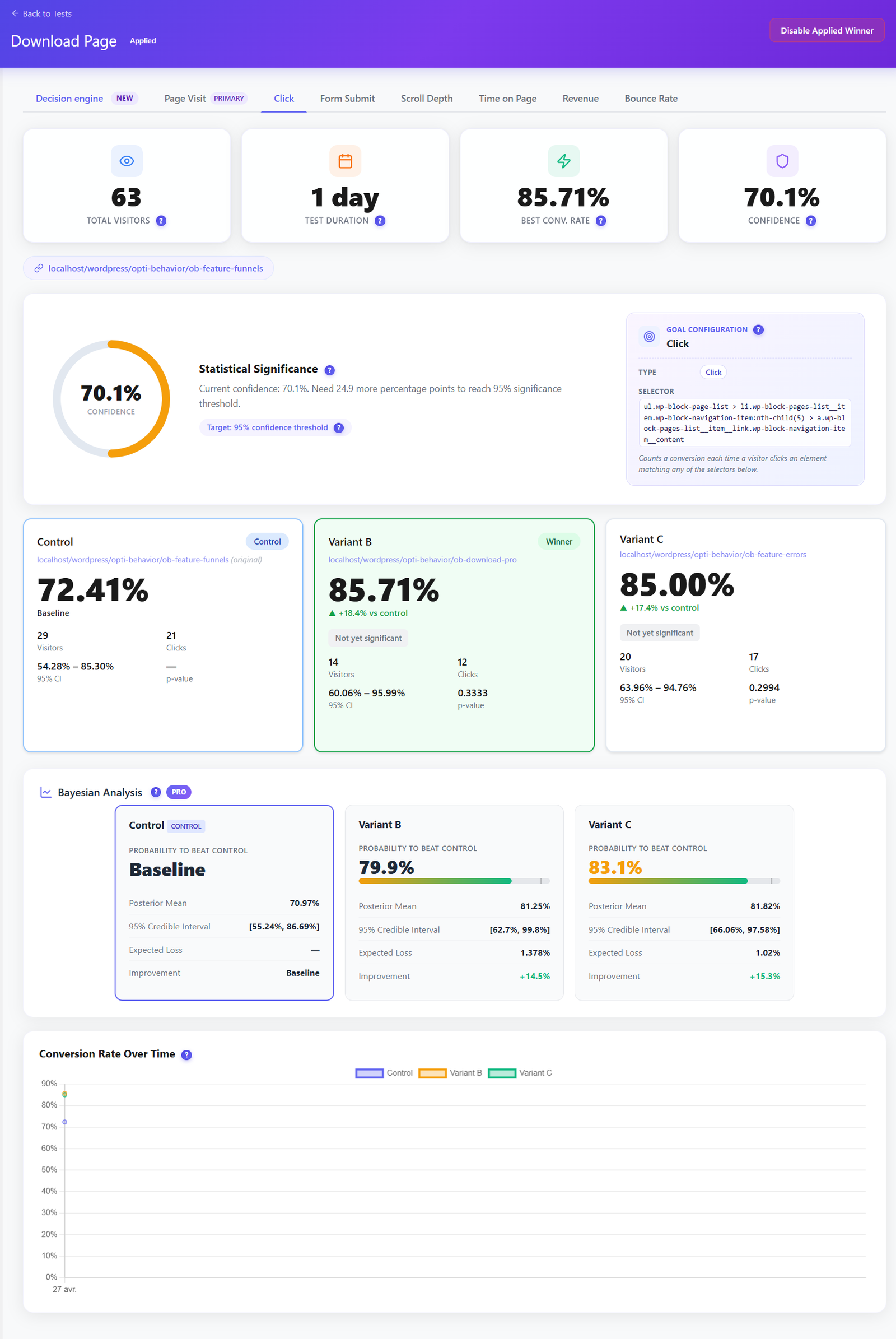
Lucky Orange helps you spot friction, but it doesn't let you test a fix — A/B testing isn't part of the suite. Opti-Behavior includes it. Run split tests on headlines, buttons and layouts, track conversion goals, and let the built-in decision engine call the winner — no separate A/B tool, no extra subscription.

  • Visual split tests on pages and elements, set up without code.
  • Conversion-goal tracking so you optimise for signups and sales, not just clicks.
  • Included in the free plugin — not a paid upsell.
Opti-Behavior A/B testing results dashboard showing Control, Variant B and Variant C conversion rates, statistical significance and Bayesian analysis with a winning variant

Smart Insights — CRO Advice, Not Just Recordings

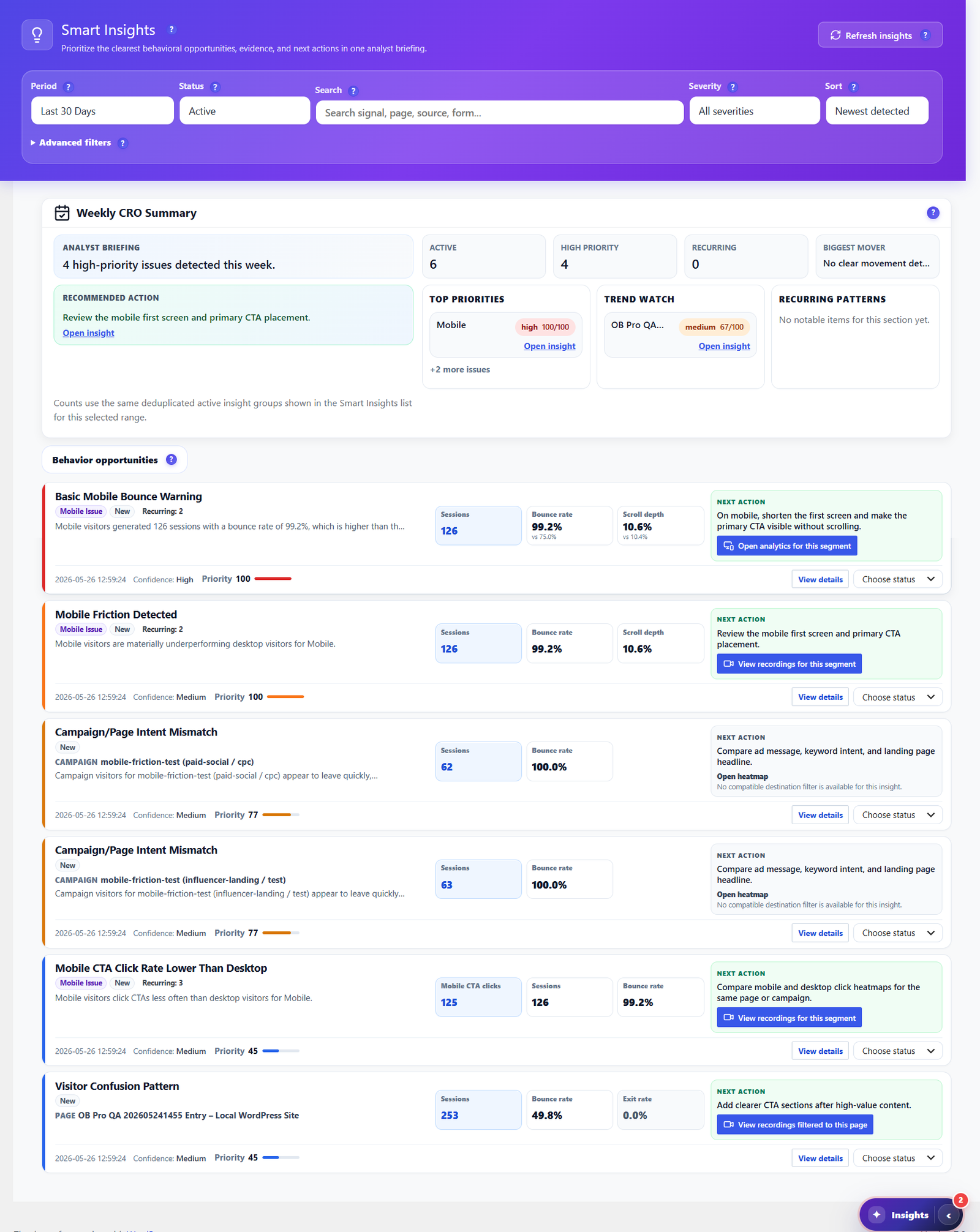
Lucky Orange gives you the raw material — recordings, heatmaps, funnels — and leaves the analysis to you. Opti-Behavior goes further: Smart Insights reads your own heatmaps, funnels, forms and engagement signals, then writes a prioritized weekly CRO briefing, each item with evidence and a recommended next action. It tells you what to fix next, not just what happened.

  • Weekly CRO summary ranking high-priority issues by impact.
  • Behavior-based recommendations for bounce, scroll, exit and mobile friction.
  • One click to the evidence — jump straight to the heatmap, funnel or recording behind each insight.
  • Included free, with deeper cross-source evidence in Pro.
Opti-Behavior Smart Insights center with a weekly CRO summary, prioritized behavior opportunities and recommended next actions for each issue

Follow the Whole Journey

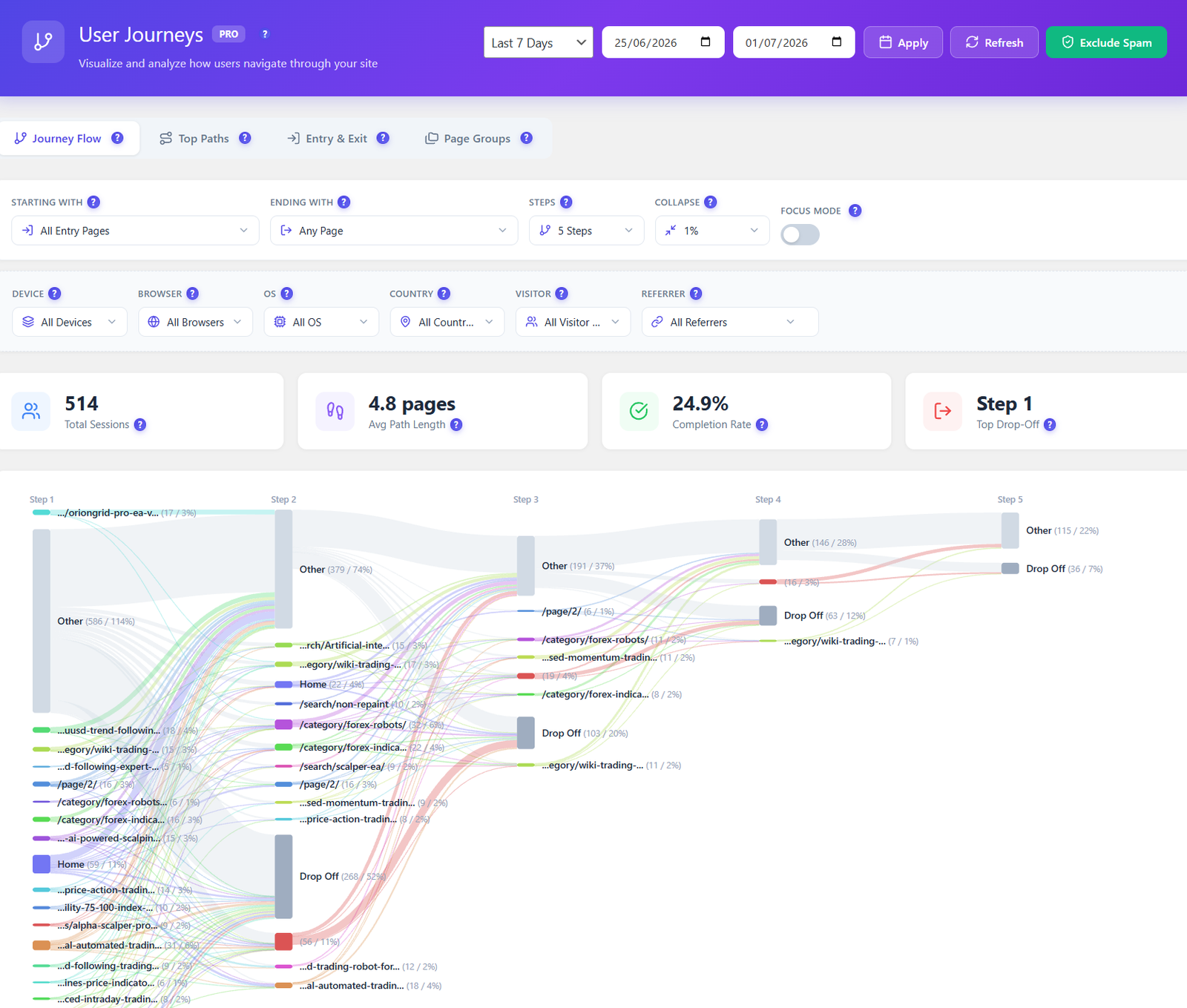
Lucky Orange shows individual recordings and funnels, but not a whole-site flow. Opti-Behavior Pro maps every route across your site as a visual Sankey diagram — entry pages, top paths, and the exact steps where visitors drop off — so you fix the leaks that lose conversions.

  • Visual journey flow from entry to exit, page by page.
  • Drop-off highlighted at each step, not buried in a table.
  • Filter by device, country, referrer and visitor type.
Opti-Behavior user journeys Sankey diagram showing session paths, average path length, completion rate and drop-off steps

Privacy & Data Ownership

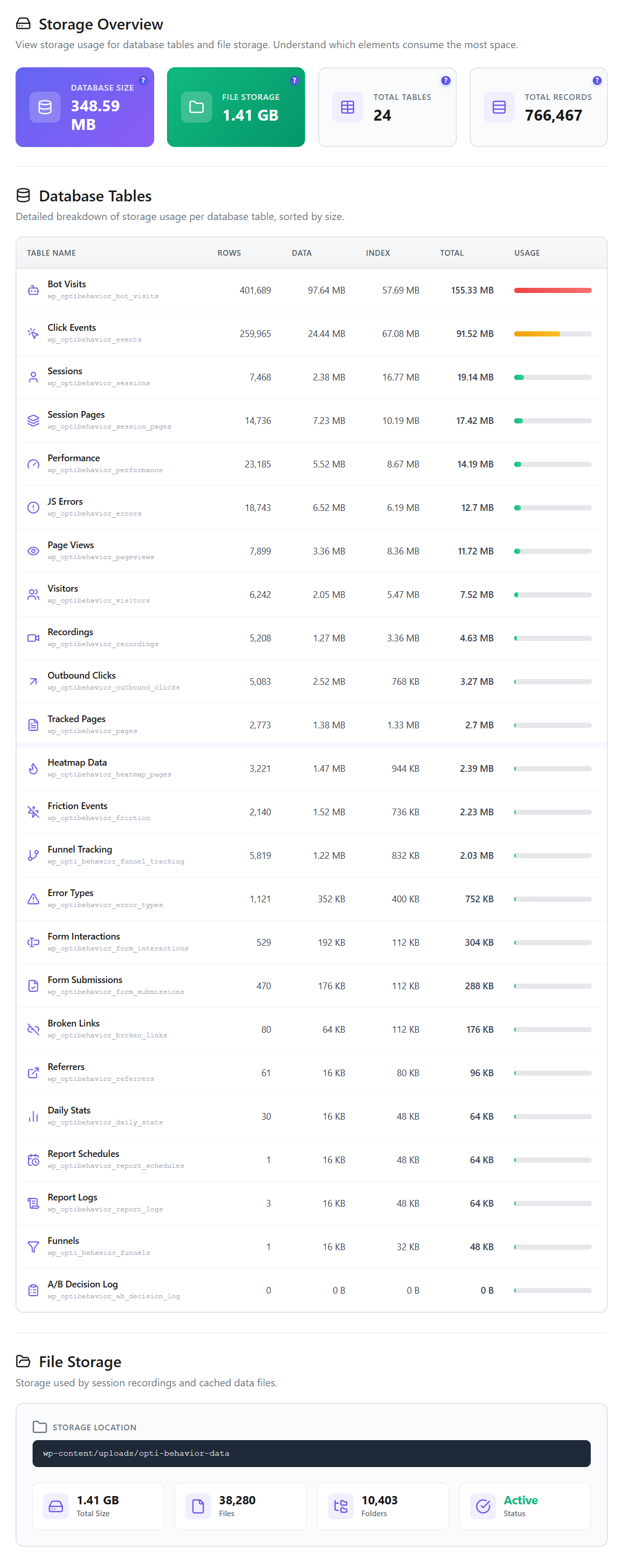
This is the real headline against a cloud tool: Opti-Behavior stores every click, heatmap and recording on your own WordPress server. Core tracking runs without cookies, with anonymous mode, consent-plugin detection and privacy settings, plus built-in bot & spam filtering to keep reports clean.

Opti-Behavior storage overview showing self-hosted database tables, total database size, file storage and total records stored on your own WordPress server

Where Lucky Orange Is Strong (an honest take)

  • Genuinely easy to set up with a clean, friendly UI — a great first behavior tool for non-technical teams.
  • Recordings, heatmaps, funnels, surveys and live chat all in one hosted product — the live chat is a real differentiator Opti-Behavior doesn't include.
  • Good for spotting friction fast, with announcements and on-site surveys to gather qualitative feedback.
  • Fully managed cloud — nothing to host, patch or maintain yourself.
  • Positive user reviews and a low entry price for small sites that fit within the session tiers.

How to Switch to Opti-Behavior

1

Install the Free Plugin

Download Opti-Behavior from WordPress.org and activate it. No account, no API key, no external service to connect.

2

Tracking Starts Automatically

Behavior tracking, click heatmaps, funnels and A/B testing begin immediately — recorded to your own server, with unlimited sessions.

3

Unlock Pro When Ready

Start a 6-month free Pro trial to add scroll/move heatmaps, full session recordings, form analytics, user journeys and real-user error tracking.

Opti-Behavior vs Lucky Orange FAQ

Is Opti-Behavior a Lucky Orange alternative?
Yes. Opti-Behavior covers the core behavior tools Lucky Orange is used for — heatmaps, session recordings, conversion funnels and form analytics — but self-hosted on your own WordPress server. It adds built-in A/B testing and Smart Insights that Lucky Orange doesn't offer. The main things Lucky Orange has that Opti-Behavior doesn't are on-site surveys and live chat.
Does Lucky Orange have a free plan?
No. Lucky Orange offers paid plans priced by monthly sessions. Opti-Behavior's free plugin on WordPress.org never expires and has no session cap.
Where is my visitor data stored?
With Lucky Orange, sessions are recorded to Lucky Orange's cloud. With Opti-Behavior, every click, heatmap and recording is stored in your own WordPress database on your server.
Are there session limits with Opti-Behavior?
No. Opti-Behavior tracks unlimited sessions on a single license. Lucky Orange meters you by monthly-session tiers and you upgrade (or get throttled) as traffic grows. With Opti-Behavior a traffic spike costs you nothing extra.
Does Opti-Behavior do A/B testing like Lucky Orange?
Opti-Behavior includes built-in A/B testing in the free plugin — visual split tests with conversion-goal tracking and a statistical decision engine. Lucky Orange focuses on recordings, heatmaps, funnels, surveys and live chat and does not offer built-in A/B testing.
Will running Opti-Behavior slow down my site?
Opti-Behavior records to your own server. For a measured test (PageSpeed on one test page, plugin on vs off), see our performance test.

Own Your Behavior Data — Without the Session Meter

Install Opti-Behavior free and get heatmaps, recordings, funnels and A/B tests on your own server — unlimited sessions, no cloud subscription.

Explore
Drag