Cookie Consent on WordPress: How to Make Your Banner and Your Analytics Work Together

Julie runs a small bakery in Brussels. Last spring, a friend who works in data protection visited her website on his laptop. He opened the browser tools, looked for ten seconds, and said: "Your cookie banner is pretty. But your analytics started tracking me before I clicked anything."
Julie was surprised. She had installed a well-known consent plugin. She had clicked "yes, this is GDPR compliant" during the setup. And yet her analytics script loaded the moment the page opened, set its cookies, and only then did the banner appear.
This is one of the most common problems we see on WordPress sites. The banner and the analytics tool do not talk to each other. This guide explains how cookie consent on WordPress should work with analytics, how to check your own site in two minutes, and how to connect the most popular consent plugins properly.
Not legal advice. This guide explains the technical side. For your exact situation, ask a data protection adviser.
Contents
- How cookie consent is supposed to work
- Why the banner and the analytics often do not match
- Check your own site in 2 minutes
- Solution 1: Analytics that does not need consent
- Solution 2: Full tracking that really follows the banner
- The built-in banner, if you have no consent plugin
- Let visitors change their mind
- Common mistakes with cookie consent on WordPress
- What Julie changed
- Cookie consent on WordPress FAQ
How cookie consent is supposed to work
Here is the correct order, in four steps:
- A visitor arrives. Nothing that needs consent runs yet: no analytics cookies, no marketing pixels.
- The banner asks. "Accept" and "Reject" are equally easy to click.
- If the visitor accepts statistics, the analytics tool may start tracking with cookies.
- If the visitor rejects, or ignores the banner, the tool must stay quiet, or switch to a mode that needs no consent.
And one more rule people forget: visitors must be able to change their mind later, as easily as they said yes.
Why the banner and the analytics often do not match
On WordPress, the banner and the analytics usually come from two different plugins. Each one does its own job:
| Plugin | Its job | What it does not know |
|---|---|---|
| Consent plugin (Cookiebot, Complianz, CookieYes…) | Shows the banner and stores the choice | Which scripts your other plugins load |
| Analytics plugin | Loads its tracking script | What the visitor answered in the banner |
If nothing connects the two, the analytics plugin loads its script as usual. The banner is just decoration.
Other common reasons:
- Script combining by cache plugins. An optimization plugin merges scripts into one file, and the consent plugin can no longer block the analytics part.
- Scripts added by hand in the theme header, outside of any plugin.
- "Implied consent" settings that treat scrolling or continuing to browse as a yes. In the EU, that is generally not valid consent.
Check your own site in 2 minutes
You do not need to be technical.
- Open your site in a private window (so no old choice is remembered).
- Before clicking the banner, press F12, go to Application > Cookies (Chrome) and look at the list.
- Look for analytics cookies: _ga (Google Analytics), _clck and _clsk (Microsoft Clarity), _hj (Hotjar), or your analytics plugin’s cookie.
- Click Reject. Reload the page. Check again.
If analytics cookies appear before you click, or stay after you reject, the banner and the analytics are not connected.
Solution 1: Analytics that does not need consent
The simplest fix is to use analytics that sets no cookie and collects no personal data. Then there is nothing to consent to for that tool.
Opti-Behavior works this way in Anonymous Mode: no cookie, no stored IP address, no geolocation call. Each visit gets a daily code made on your server, which changes every day and cannot point back to a person. In this mode Opti-Behavior does not show its own banner. Whether you still need consent depends on your country and setup: ask your legal adviser or DPO.
You keep traffic numbers, heatmaps, funnels and A/B tests. You lose returning visitors across days and countries. For most small sites, that trade is fine.
Solution 2: Full tracking that really follows the banner
If you need returning visitors, countries or long journeys, you need cookies, so you need consent. The key is that the analytics must read the answer from the banner.
In Opti-Behavior, choose Full Tracking in Settings > Privacy & GDPR, then scroll to Consent Banner Configuration. You have three choices for the banner source:
| Option | When to use it |
|---|---|
| Auto-detect (recommended) | Uses your consent plugin if a supported one is active, and the built-in banner otherwise. Visitors never see two banners. |
| Always use built-in banner | Shows the Opti-Behavior banner even if a consent plugin is installed, for example when that plugin does not cover analytics. |
| Always use your plugin | Never shows its own banner and follows the answer given in your plugin. |
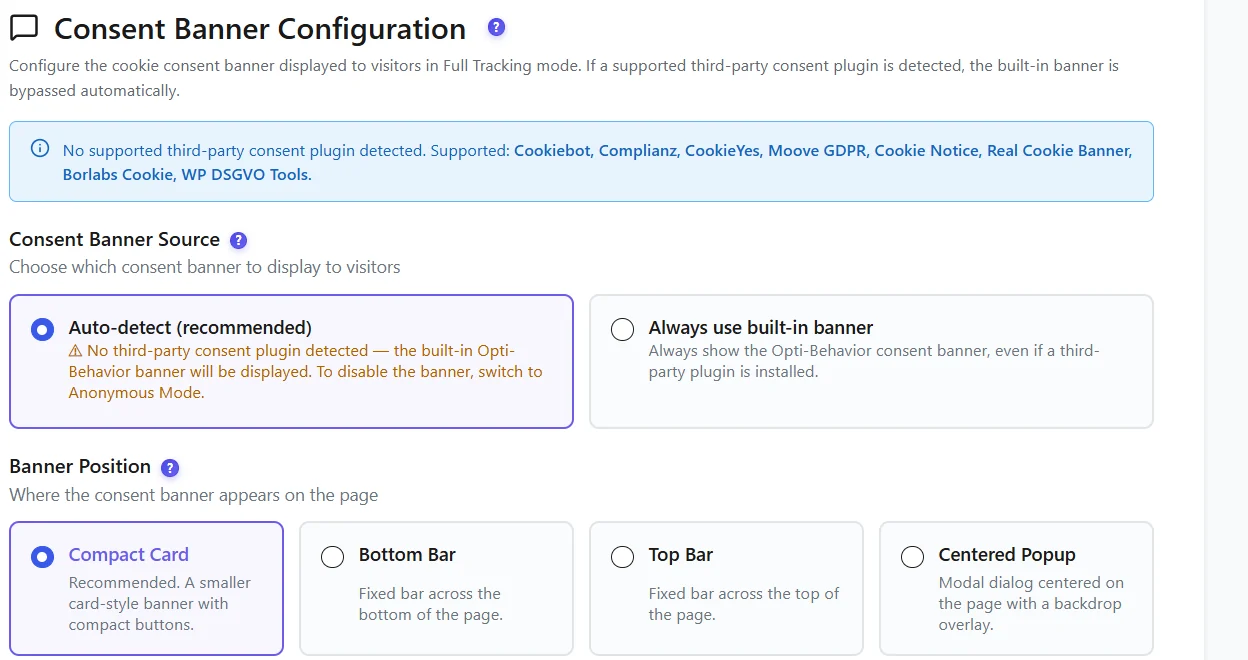
Supported consent plugins: Cookiebot, Complianz, CookieYes, Moove GDPR (GDPR Cookie Compliance), Cookie Notice, Real Cookie Banner, Borlabs Cookie and WP DSGVO Tools. Opti-Behavior reads the visitor’s answer in the statistics (analytics) category of that plugin.
What happens for each answer:
| Visitor’s answer | What Opti-Behavior does |
|---|---|
| Accepts statistics | Full Tracking with cookies from that moment |
| Refuses | Keeps counting the visit cookie-free, with no personal data |
| Does not answer yet | Same as refuse: cookie-free counting only |
| Accepts later | Switches to Full Tracking from that moment |
That middle row matters a lot. With many tools, "refuse" means the visit disappears from your reports. Here you still see the visit, just without anything personal.
The built-in banner, if you have no consent plugin
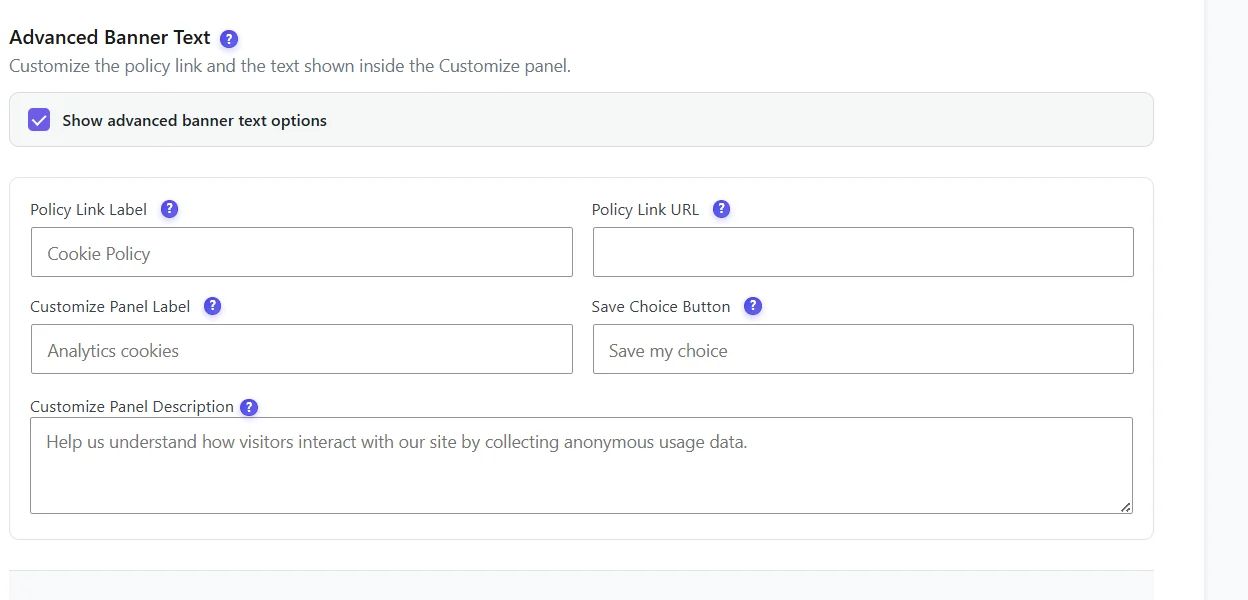
If you do not use a consent plugin, the built-in banner is light and simple. You can set its colors, texts and position.
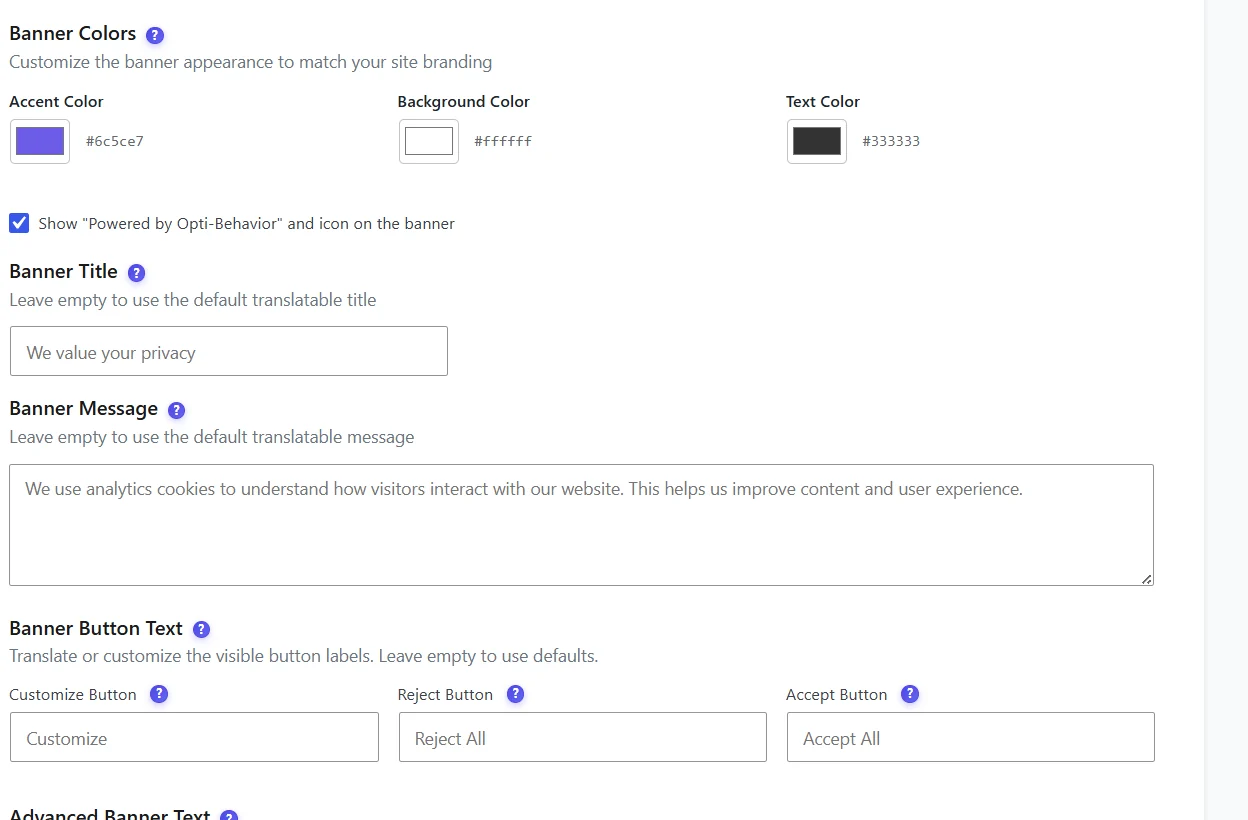
Good settings for a fair banner:
- Same look for Accept and Reject. No grey, tiny "reject" link.
- Short, clear text. "We use cookies to understand how visitors use our site. You can accept or refuse."
- Link to your cookie policy.
- Remember the choice for 6 months (the default, following the French CNIL recommendation), or 12 months as an option. Then ask again.
Let visitors change their mind
GDPR says withdrawing consent must be as easy as giving it. Opti-Behavior includes a cookie preferences shortcode you can put on your cookie policy page. It shows a small box where visitors can change their choice. Withdrawing deletes the tracking cookies and identifiers right away. A/B tests, recordings (Pro), form analytics (Pro) and error tracking (Pro) all follow the same answer: nothing is recorded with personal data without consent.
Common mistakes with cookie consent on WordPress
- Two banners at once. Your consent plugin and your analytics each show one. Use auto-detection so only one appears.
- Scripts in the theme header. They skip every consent rule. Move them into a plugin that respects consent, or remove them.
- Cache plugin combining scripts. Exclude your analytics and consent scripts from JavaScript combining. Opti-Behavior registers its own scripts with the common cache plugins, but check your settings.
- Forgetting other tools. YouTube embeds, chat widgets, social buttons and ad pixels need consent too.
- Testing only once. Re-check after every plugin update.
What Julie changed
Julie had two choices. She did not need returning visitors or countries. She wanted to know which cakes people looked at and whether they found her opening hours. So she switched her analytics to Anonymous Mode, kept her consent plugin for the Instagram embed and the map, and removed an old tracking snippet her previous web designer had pasted in the theme header.
Her friend checked again with the browser tools. No analytics cookie before the click. No analytics cookie after "Reject". And Julie still saw all her visitors in her reports, including the ones who refused.
For the wider picture, read our plain-English guides on analytics without cookies and cookieless tracking.
Make your analytics respect cookie consent
Opti-Behavior is free on WordPress.org. Use Anonymous Mode with no banner, or Full Tracking that follows Cookiebot, Complianz, CookieYes and five other consent plugins.
Cookie consent on WordPress FAQ
Do I need a cookie consent banner on my WordPress site?
In the EU and UK you usually need one if you use cookies or trackers that are not strictly necessary, such as most analytics, marketing pixels and embedded videos. If your analytics is cookieless and collects no personal data, it usually needs no consent.
Why does my analytics track visitors before they accept cookies?
Usually because the analytics plugin does not read the answer from your consent plugin, the script was added by hand in the theme, or a cache plugin combines scripts so the consent plugin cannot block them.
Which consent plugins work with Opti-Behavior?
Cookiebot, Complianz, CookieYes, Moove GDPR, Cookie Notice, Real Cookie Banner, Borlabs Cookie and WP DSGVO Tools are detected automatically. Otherwise, use the built-in banner or Anonymous Mode.
How long should a cookie consent choice be remembered?
Many sites use 6 months, following the French CNIL recommendation, then ask again. Opti-Behavior uses 6 months by default, with 12 months as an option.
What happens to my analytics when visitors refuse cookies?
With most tools, those visits disappear. With Opti-Behavior, refused and unanswered visits are still counted cookie-free, without personal data.