Skip links
Opti-Behavior
Opti-Behavior
made by OptiUser
FREE PRO

Opti-Behavior vs ExactMetrics:
A Behavior Suite, Not Another GA4 Report (2026)

Short answer: ExactMetrics is a Google Analytics 4 connector that surfaces GA4 traffic, eCommerce and PPC reports inside WordPress. Opti-Behavior adds the behavior layer GA4 can't show — heatmaps, session recordings, funnels and A/B testing, all self-hosted. They solve different problems and can run side by side.

ExactMetrics is a popular way to plug Google Analytics 4 into WordPress — 300,000+ installs. But it is a reporting front-end for GA4: it pipes your visitor data to Google, then reads Google's numbers back into your dashboard. It has no click heatmaps, no session recordings, no visual A/B testing and no on-page behavior, and it needs a Google Analytics property to work at all. Opti-Behavior keeps every click on your own server and shows you why visitors convert — or leave.

⭐ 5/5 stars · 3 reviews on WordPress.org 📈 400+ active installs 🇫🇷 Made in France 🔒 GDPR-native

TL;DR — Which should you pick?

  • Pick ExactMetrics if your reporting is built on Google Analytics 4 and you mainly want GA4 traffic, eCommerce revenue and multi-channel PPC conversions surfaced inside WordPress.
  • Pick Opti-Behavior if you want to see behavior — heatmaps, session replay, conversion funnels, form drop-off and A/B tests — without shipping visitor data to Google or wiring up a GA4 property.
  • Run both and get the best of each: ExactMetrics for GA4-sourced acquisition and eCommerce reporting, Opti-Behavior for the self-hosted behavior and conversion layer GA4 can't provide. They don't conflict.

GA4 Reporting vs On-Server Behavior

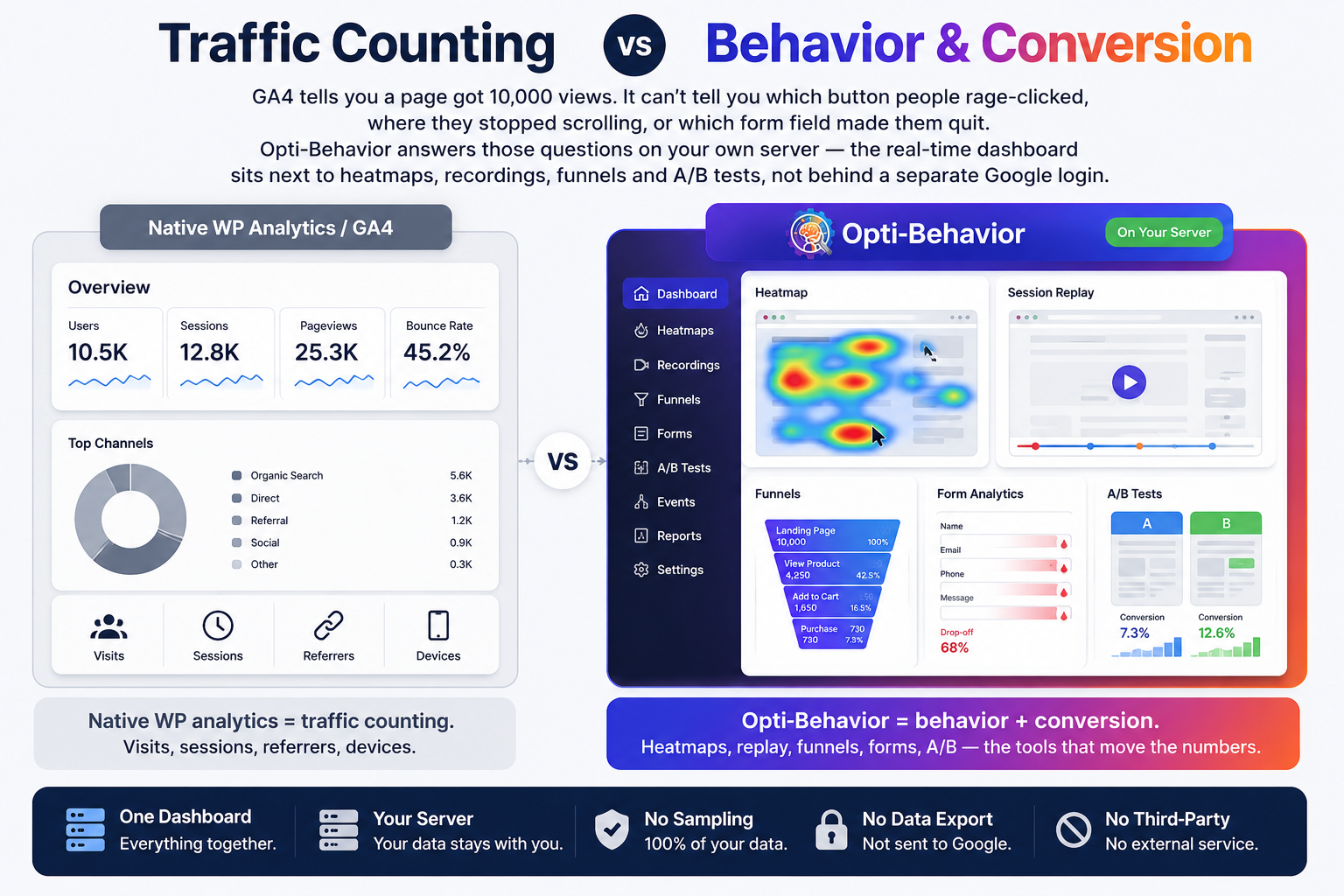
ExactMetrics tells you GA4 counted 10,000 sessions and $4,000 in revenue. It can't tell you which button people rage-clicked, where they stopped scrolling, or which form field made them quit — because GA4 doesn't capture that. Opti-Behavior answers those questions on your own server, with the real-time dashboard sitting next to heatmaps, recordings, funnels and A/B tests — not behind a separate Google login.

  • ExactMetrics = GA4 reporting. Sessions, referrers, eCommerce revenue, PPC conversions — all pulled from Google.
  • Opti-Behavior = behavior + conversion. Heatmaps, replay, funnels, forms, A/B — the tools that move the numbers.
  • One dashboard, your server. No GA4 property, no sampling, no data handed to Google.
Side-by-side comparison of Google Analytics-style traffic reporting versus the Opti-Behavior behavior and conversion dashboard with heatmaps, recordings, funnels and A/B testing

Feature-by-Feature Comparison

ExactMetrics answers “how many, and how much revenue?”. Opti-Behavior answers “why?”. This table shows where each tool is built to win.

Feature-by-feature comparison of Opti-Behavior and ExactMetrics.
FeatureOpti-BehaviorExactMetrics
Click Heatmaps Free Not available
Scroll / Move / Attention Heatmaps ProGA4 scroll-depth event only
Session Recordings & Replay Pro Not available
Conversion Funnels FreeGA4 eCommerce funnel report
Form Analytics (field drop-off) ProGA4 form events only
User Journeys (Sankey flow) ProVia GA4 path exploration
Error & Core Web Vitals Tracking Pro (real-user)GA4 Exceptions / Site Speed report
A/B Testing (built in) Free Only via deprecated Google Optimize
GA4 eCommerce Revenue ReportingConversion goals & revenue Core strength
Multi-Channel PPC Conversion Tracking Not the focus Google / Meta / TikTok
Smart Insights (CRO recommendations) FreeAI insights over GA4 data
Conversion Goals (click / scroll / form / revenue) FreeGA4 events / goals
Scheduled Email Reports FreeGA4 email summary
Data Export (CSV / JSON / ZIP) FreeVia Google Analytics
Bot & Spam Detection FreeRelies on GA filters
Self-Hosted Data (you own it) Yes Google-hosted
Works Without Cookies Yes consent banner usually required
Session LimitsUnlimitedGA4 sampling & quotas
Price€0 – €89/yrFree (Lite); $99.50–$399.50/yr

ExactMetrics is a Google Analytics 4 connector: visitor data is processed by Google, not stored on your own server, and a GA4 property is required. Intro pricing renews higher (roughly $199–$799/yr). Competitor figures (300,000+ active installs, 2.5/5 rating, 1,547 reviews) and pricing verified July 2026 from WordPress.org and exactmetrics.com; subject to change.

Add the behavior layer in minutes

Keep ExactMetrics for GA4 traffic and eCommerce reports — add Opti-Behavior for heatmaps, recordings, funnels and A/B tests on your own server.

Where Opti-Behavior Wins

ExactMetrics reports how many people visited and how much they spent. Opti-Behavior shows you what they did — the behavior a GA4 connector was never built to capture.

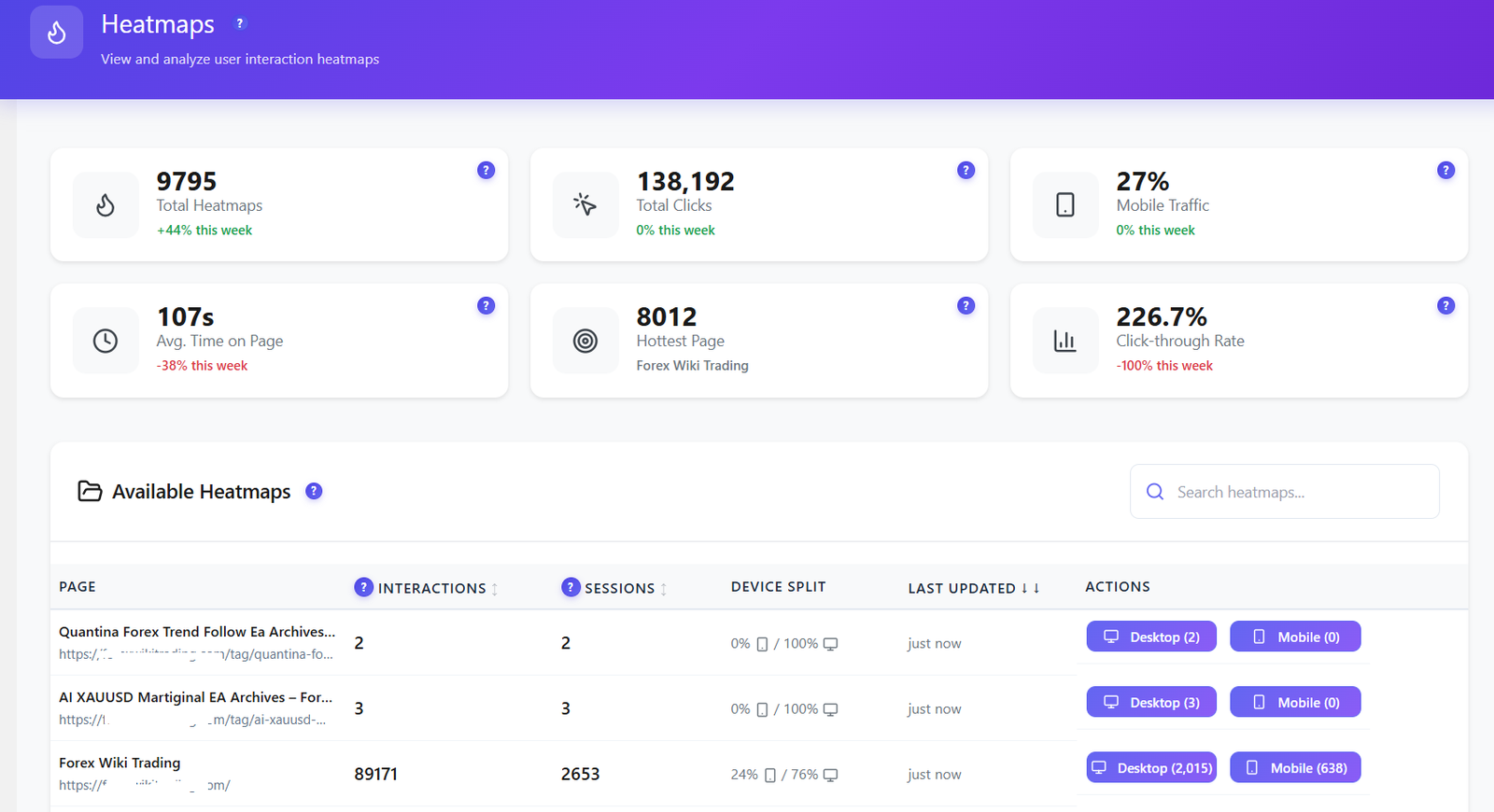
Opti-Behavior heatmaps dashboard with total heatmaps, total clicks, mobile traffic share and hottest page
Heatmaps. See every click, tap and hot zone by page and device — not just a GA4 scroll event.
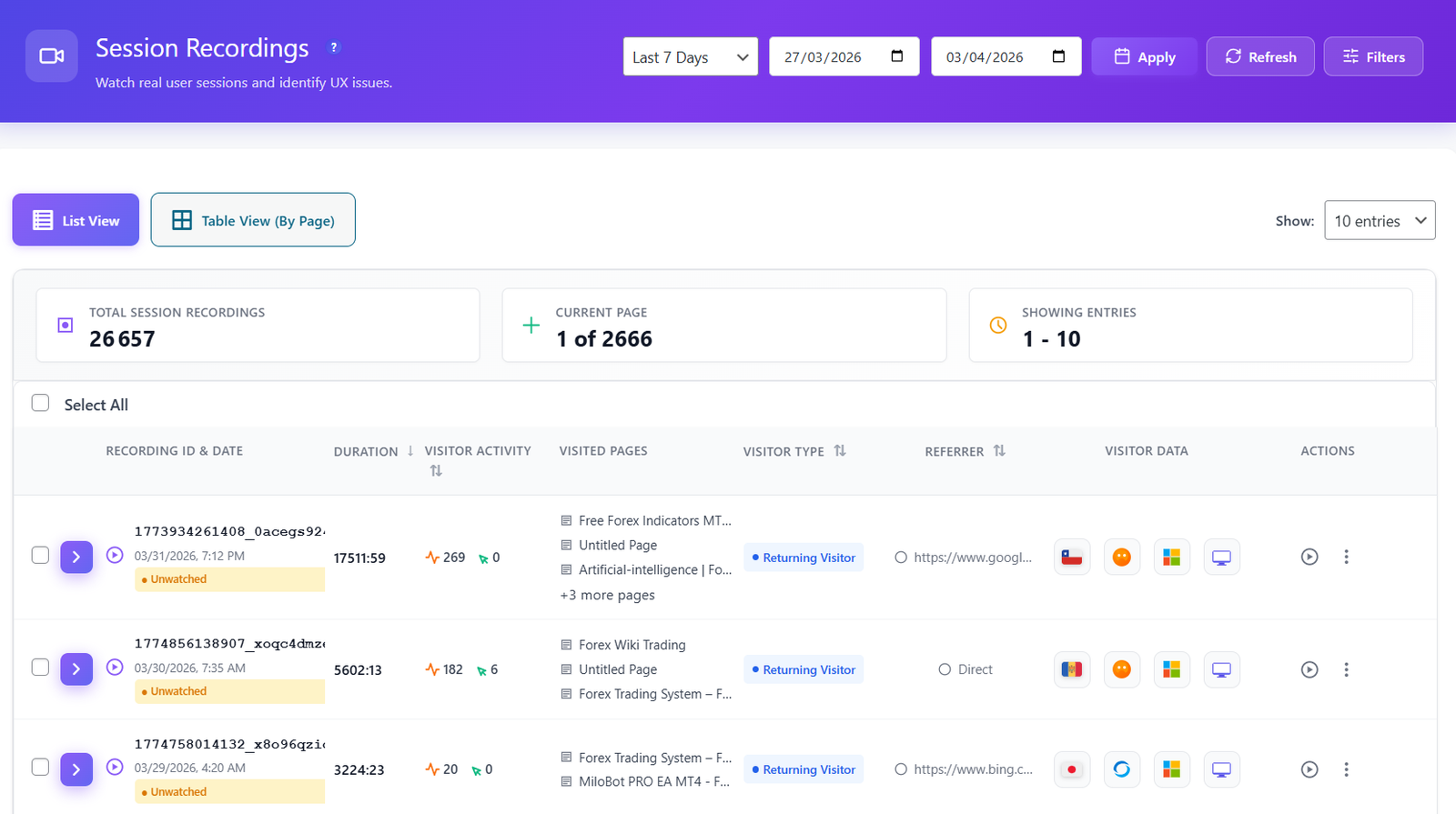
Opti-Behavior session recordings list showing duration, visited pages, visitor type and device for each session
Session recordings. Replay real visits and watch exactly where people get stuck — impossible with a GA4 connector.
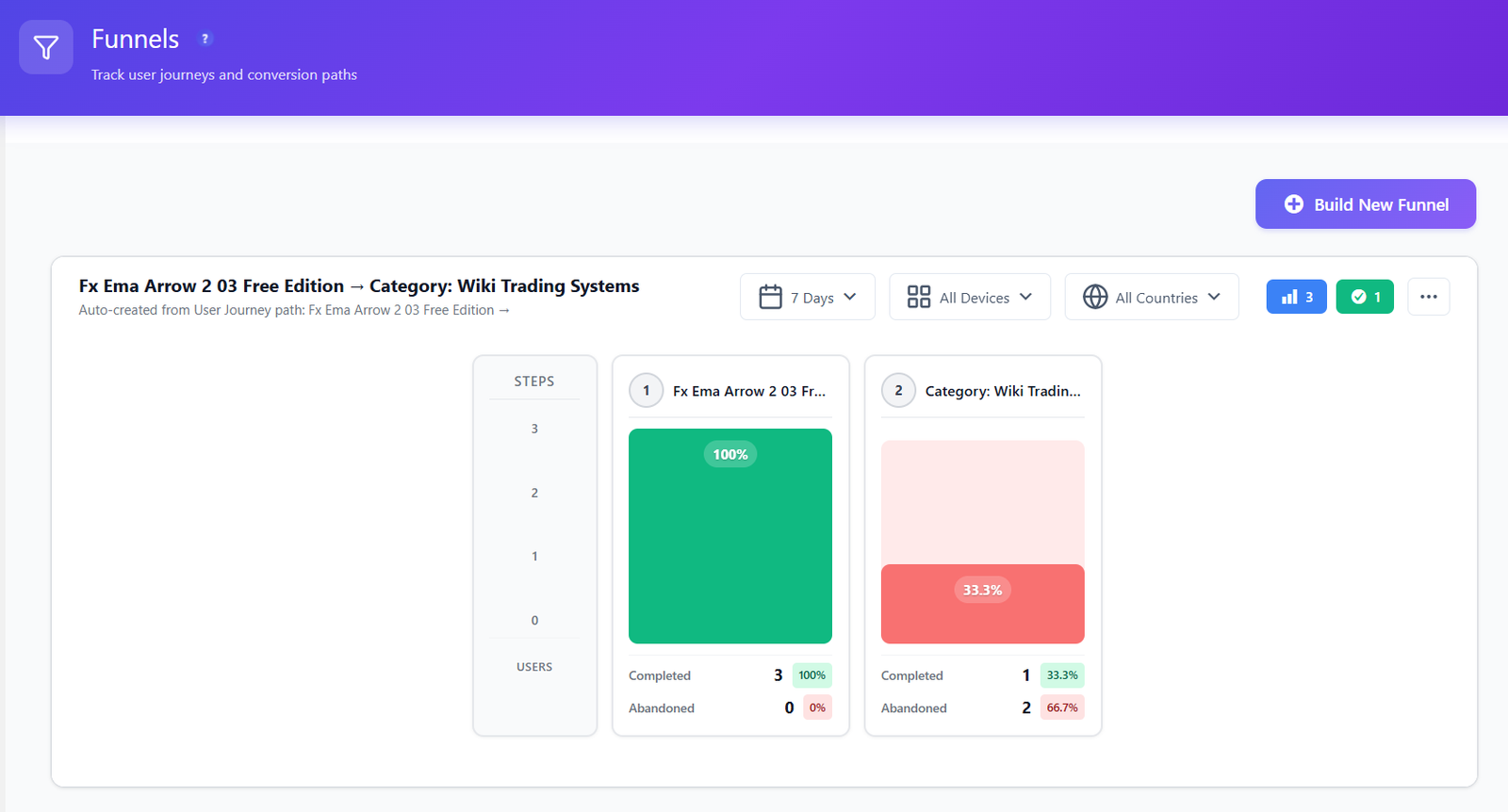
Opti-Behavior conversion funnel showing completion and abandonment rates step by step
Conversion funnels. Build multi-step funnels and see the exact step visitors abandon — from your own on-server data, not a GA4 export.
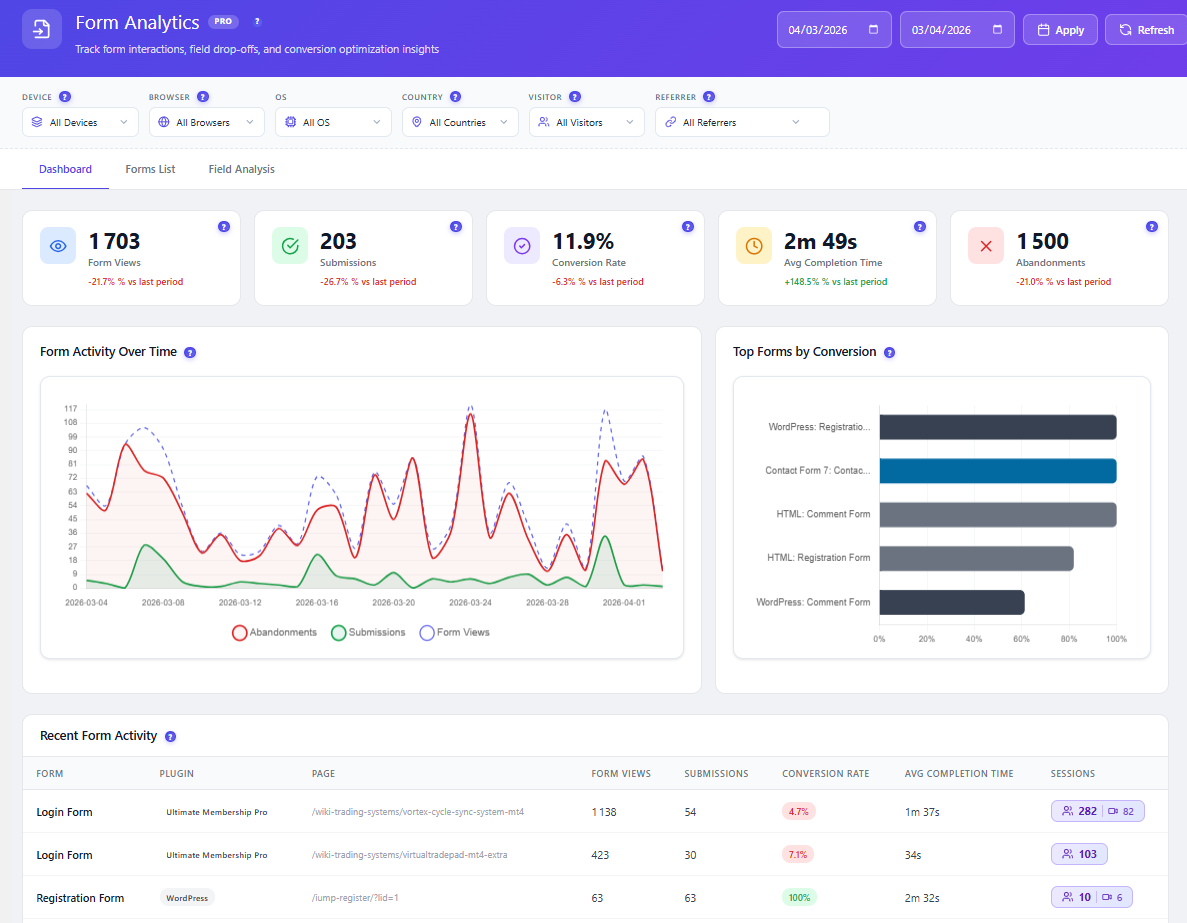
Opti-Behavior form analytics with form views, submissions, conversion rate, average completion time and abandonments
Form analytics. Field-level drop-off shows the exact input that kills your submissions.

A/B Testing Built In — Free

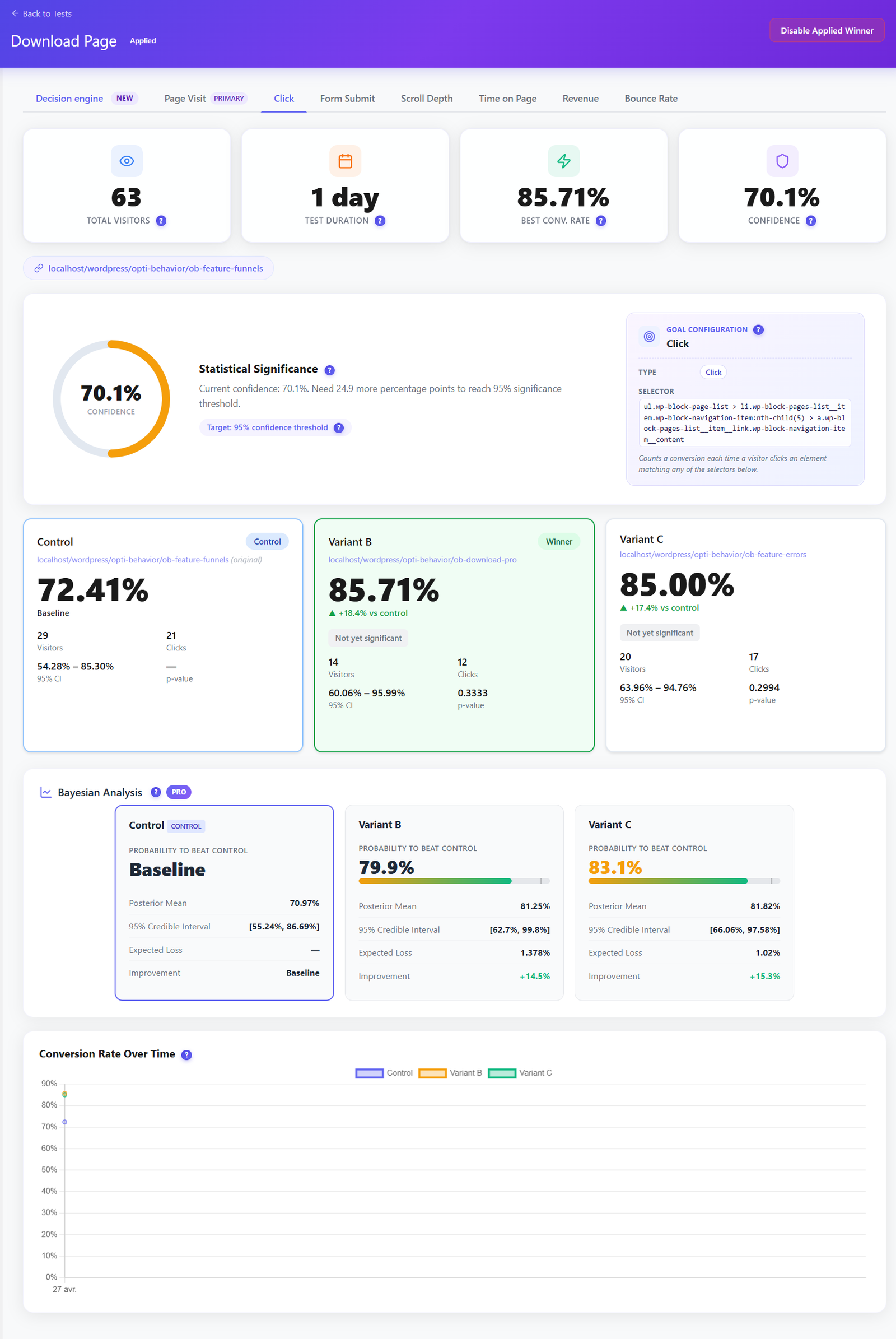
ExactMetrics can only report a change after you ship it, using Google's data — and its old A/B route relied on Google Optimize, which Google has retired. Opti-Behavior lets you test first. Run split tests on headlines, buttons and layouts, track conversion goals and let the built-in decision engine call the winner — no separate A/B tool, no Google account.

  • Visual split tests on pages and elements, set up without code.
  • Conversion-goal tracking so you optimise for signups and sales, not just clicks.
  • Included in the free plugin — not a paid upsell or a deprecated Google add-on.
Opti-Behavior A/B testing results dashboard showing Control, Variant B and Variant C conversion rates, statistical significance and Bayesian analysis with a winning variant

Smart Insights — CRO Advice, Not Just GA4 Charts

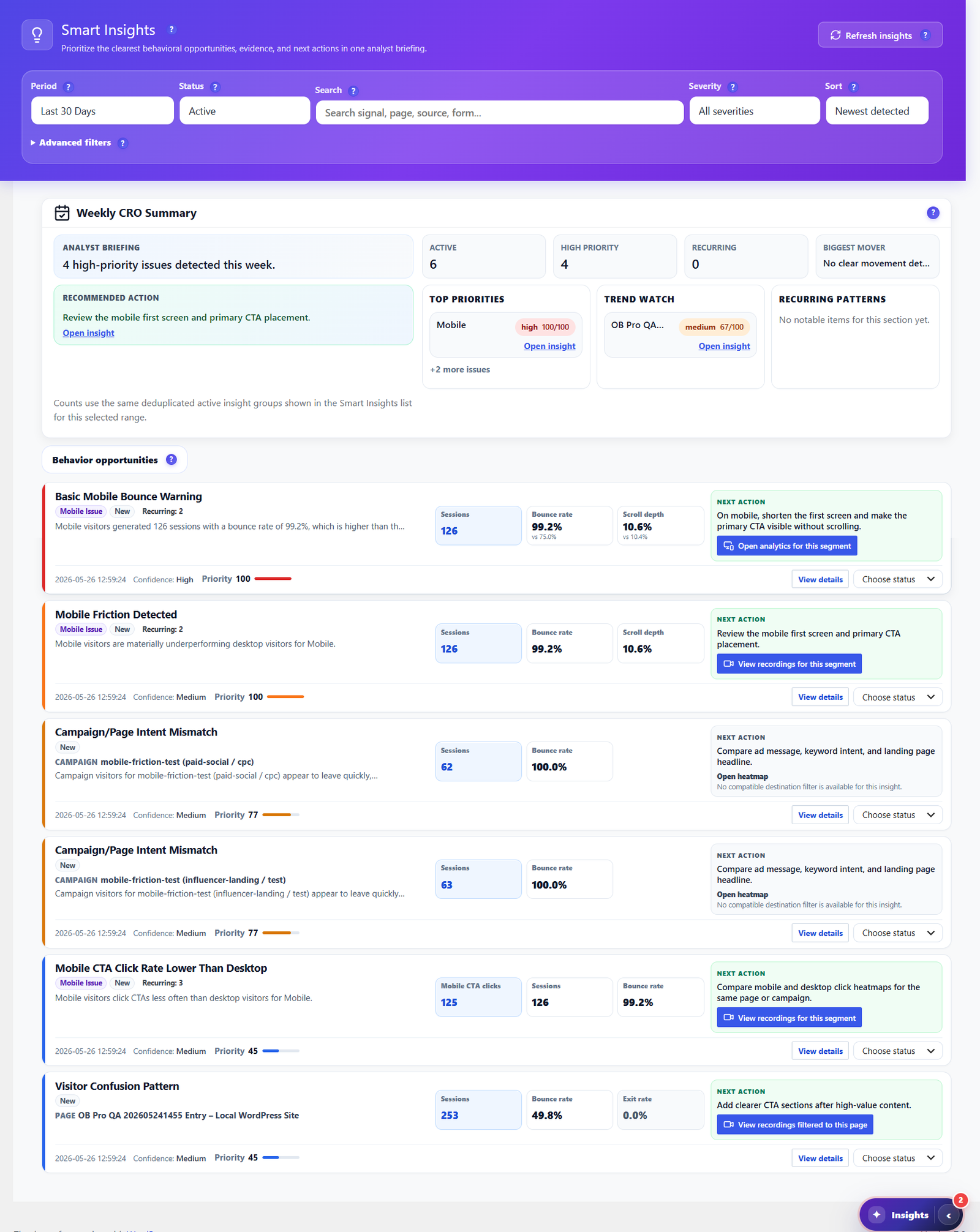
ExactMetrics hands you Google's numbers, with AI insights that summarise the GA4 data you already have. Opti-Behavior goes further: Smart Insights reads your own heatmaps, funnels, forms and engagement signals, then writes a prioritized weekly CRO briefing — each item with evidence and a recommended next action. It tells you what to fix next, not just what happened.

  • Weekly CRO summary ranking high-priority issues by impact.
  • Behavior-based recommendations for bounce, scroll, exit and mobile friction.
  • One click to the evidence — jump straight to the heatmap, funnel or recording behind each insight.
  • Included free, with deeper cross-source evidence in Pro.
Opti-Behavior Smart Insights center with a weekly CRO summary, prioritized behavior opportunities and recommended next actions for each issue

Own Your Reports & Your Raw Data

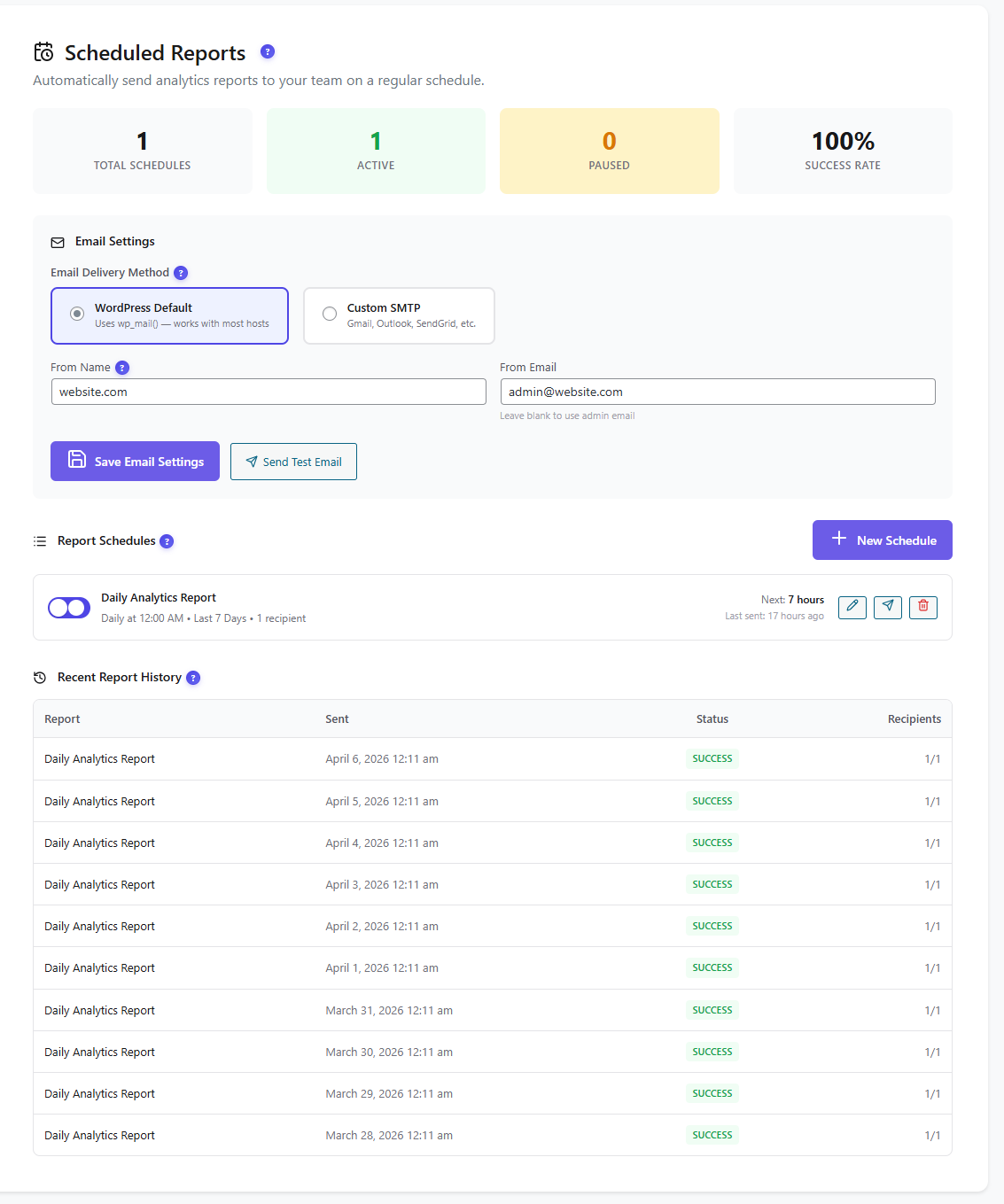
Both tools can email or export reports — but ExactMetrics's numbers live in Google Analytics and its recap is built from GA4 data. Opti-Behavior schedules self-hosted email reports (daily, weekly or monthly) and lets you export the raw data as CSV, JSON or ZIP whenever you want. Your reporting, your recipients, your server — no Google account required.

  • Scheduled email reports via WordPress mail or custom SMTP, with delivery history.
  • One-click CSV / JSON / ZIP export of your analytics datasets.
  • No external service — data never leaves your WordPress install.
Opti-Behavior scheduled reports screen showing email delivery settings, an active daily analytics report schedule and a table of successful report deliveries

Follow the Whole Journey

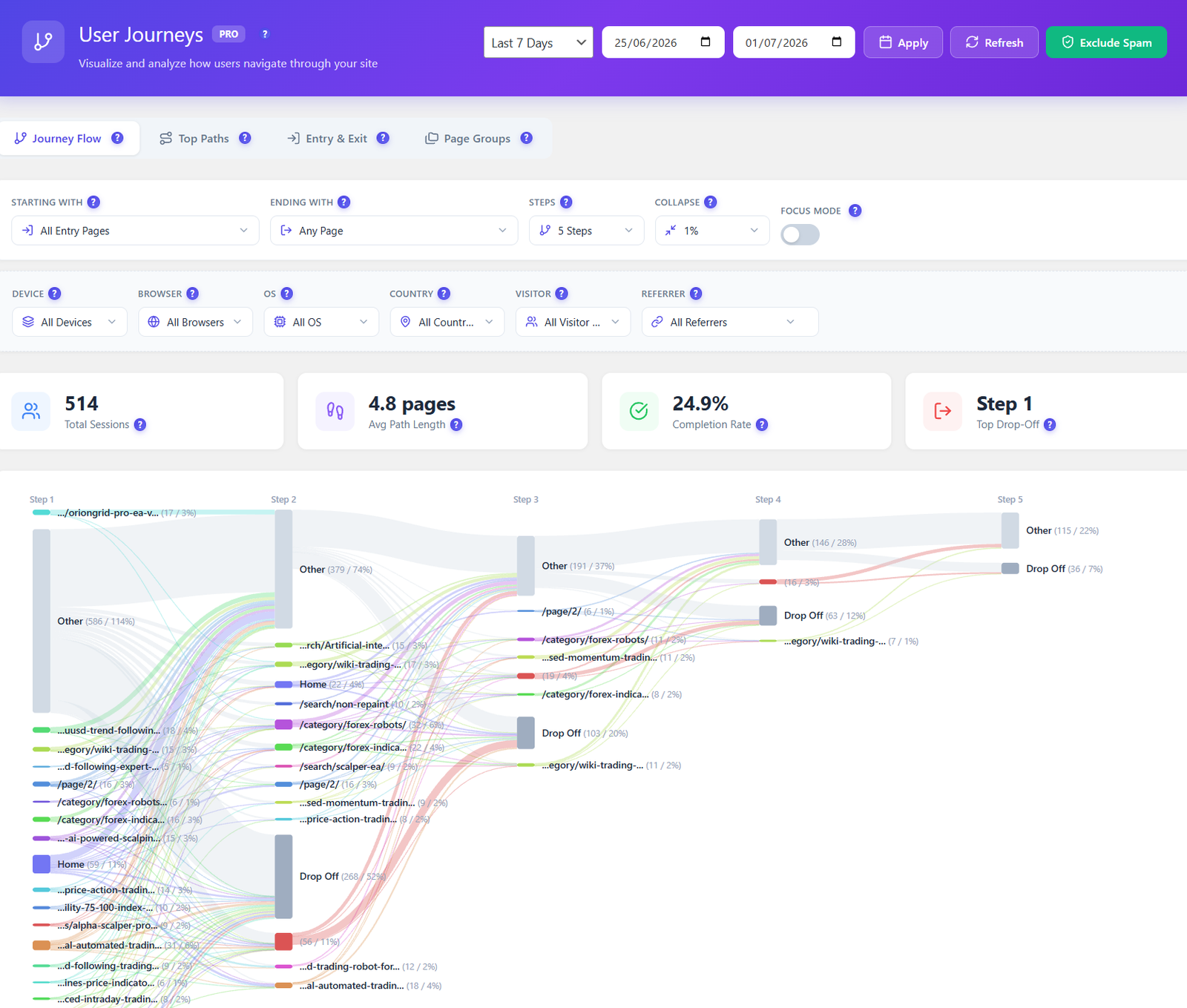
GA4 path exploration surfaced by ExactMetrics is clunky and sampled. Opti-Behavior Pro maps every route across your site as a visual Sankey diagram — entry pages, top paths, and the exact steps where visitors drop off — so you fix the leaks that lose conversions.

  • Visual journey flow from entry to exit, page by page.
  • Drop-off highlighted at each step, not buried in a table.
  • Filter by device, country, referrer and visitor type.
Opti-Behavior user journeys Sankey diagram showing session paths, average path length, completion rate and drop-off steps

Privacy & Data Ownership

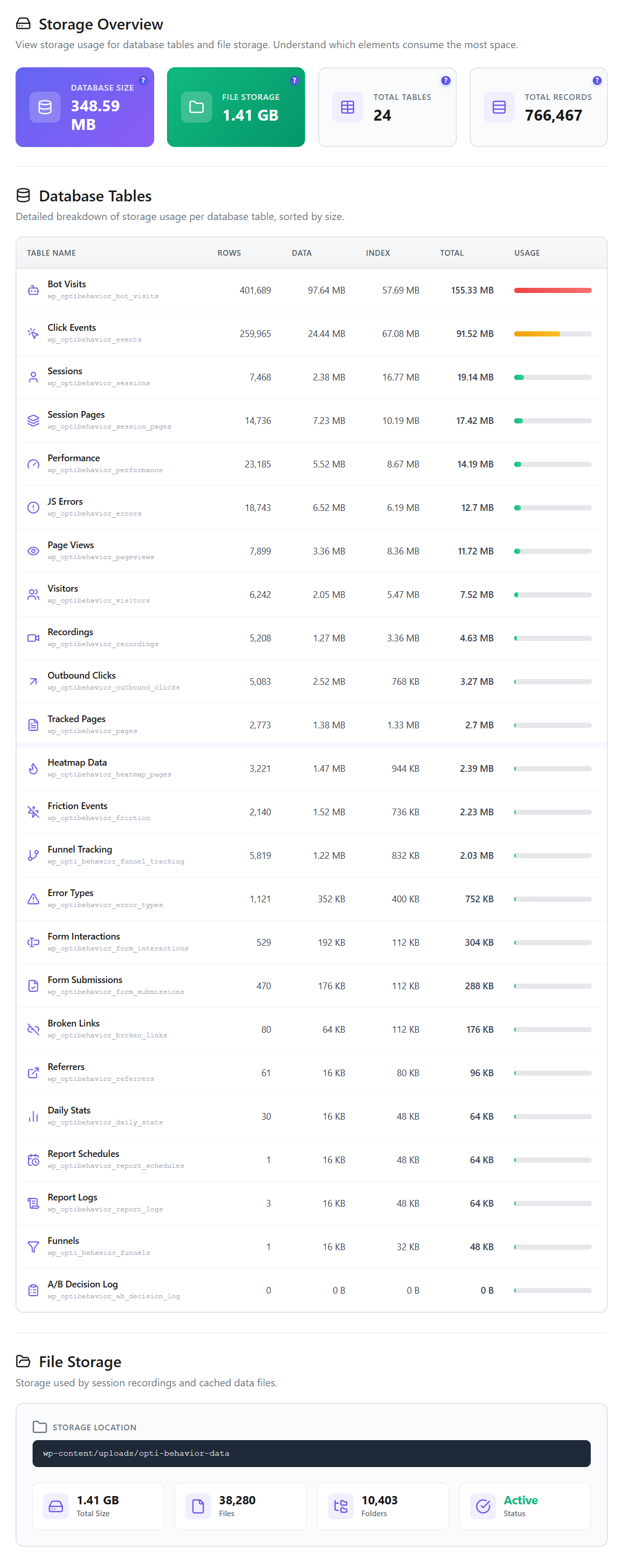
A bonus, not the headline: because Opti-Behavior stores every click, heatmap and recording on your own WordPress server, you stay the sole data controller with no export to Google. Core tracking runs without cookies (so many sites skip the consent banner), with anonymous mode, consent-plugin detection and GDPR/CCPA-ready settings — plus built-in bot & spam filtering to keep reports clean. ExactMetrics, by design, sends visitor data to Google Analytics and usually needs a cookie-consent banner.

Opti-Behavior storage overview showing self-hosted database tables, total database size, file storage and total records stored on your own WordPress server

Where ExactMetrics Is Strong (an honest take)

  • Best-in-class Google Analytics 4 setup without code — it wires GA4 into WordPress with sensible defaults in minutes.
  • Deep eCommerce and PPC conversion tracking across Google, Meta, TikTok, Pinterest, LinkedIn and Snap — strong for paid-acquisition teams.
  • 25+ integrations (WooCommerce, Easy Digital Downloads, MemberPress, popular form plugins) surfacing GA4 data inside the WP dashboard.
  • GA4 enhancements out of the box: scroll depth, outbound links, file downloads, an eCommerce funnel report and AI insights over your data.
  • The right call if your organisation already standardises reporting on Google Analytics and wants those numbers inside WordPress. (Note: its WordPress.org rating is a low 2.5/5 across 1,547 reviews, with many complaints that key features are paywalled and setup is GA-dependent.)

How to Add Opti-Behavior

1

Install the Free Plugin

Download Opti-Behavior from WordPress.org and activate it. Keep ExactMetrics running alongside — they cover different jobs and don't conflict.

2

Tracking Starts Automatically

Behavior tracking, click heatmaps, funnels and A/B testing begin immediately — no Google account, no GA4 property, no API keys.

3

Unlock Pro When Ready

Start a 6-month free Pro trial to add scroll/move/attention heatmaps, session recordings, form analytics, user journeys and real-user error tracking.

Opti-Behavior vs ExactMetrics FAQ

Is Opti-Behavior an ExactMetrics alternative?
Yes and no. Opti-Behavior is a self-hosted analytics and behavior suite that runs entirely on your WordPress server. It replaces ExactMetrics if your goal is behavior and conversion data — heatmaps, recordings, funnels and A/B tests — kept off Google. But ExactMetrics's GA4 eCommerce and multi-channel PPC reporting has no direct equivalent in Opti-Behavior, so many teams run both: ExactMetrics for GA4 acquisition and revenue, Opti-Behavior for the on-site behavior layer.
Does ExactMetrics have heatmaps or session recordings?
No. ExactMetrics is a reporting connector for Google Analytics 4, and GA4 provides neither heatmaps nor session recordings. It can track a GA4 scroll-depth event, but there is no visual heatmap overlay or replay. Opti-Behavior includes click heatmaps, conversion funnels and A/B testing in the free version, plus scroll/move/attention heatmaps and full session replay in Pro — all native, on your own server.
Does Opti-Behavior need a Google Analytics account?
No. ExactMetrics requires a GA4 property and sends visitor data to Google to work at all. Opti-Behavior is fully self-contained: it collects and stores data on your WordPress server with no Google account, GA4 property or API key. You can start capturing behavior the moment the plugin is active.
Can ExactMetrics run A/B tests?
Not natively. Its earlier A/B testing route relied on Google Optimize, which Google has retired, so there is no built-in split testing today. Opti-Behavior ships A/B testing in the free plugin — visual split tests on pages and elements, conversion-goal tracking and a built-in decision engine to call the winner.
Do I still need a cookie-consent banner?
ExactMetrics loads Google Analytics, which typically requires cookie consent under GDPR. Opti-Behavior's core tracking works without cookies and stores data locally, so many sites run it with no consent banner. It also ships an anonymous mode and consent-plugin detection.
Can I run Opti-Behavior and ExactMetrics together?
Yes. They track independently and don't conflict. A common setup is ExactMetrics for GA4 traffic, eCommerce and PPC reporting, plus Opti-Behavior for on-site behavior, funnels and split testing on your own server.

Add the Behavior Layer GA4 Is Missing

Install Opti-Behavior free and start seeing heatmaps, funnels and A/B tests on your own server — no signup, no GA4 property, no data sent to Google.

Explore
Drag