
You want to see where people click on your WordPress site. Good idea. A heatmap shows it in one picture. Red spots mean many clicks. Blue spots mean few clicks.
But there are many ways to add a heatmap to WordPress. Some are plugins that keep the data on your own server. Some are cloud tools that send every visit to another company. Some are free. Some charge you for every visit.
This guide compares 8 options for a WordPress heatmap plugin. We make one of them (Opti-Behavior), so we are not neutral. To be fair, we list the real limits of each tool, including ours.
Quick answer: If you want heatmaps that stay on your own server and cost nothing to start, use Opti-Behavior (free click heatmaps) or Aurora Heatmap. If you want a free cloud tool and you are fine with a cookie banner, use Microsoft Clarity. If you need surveys and feedback widgets, Hotjar is stronger.
Contents
- What a heatmap plugin actually does
- The 3 questions to ask before you pick one
- The 8 WordPress heatmap plugin options compared
- Each WordPress heatmap plugin in plain words
- How to add a heatmap to WordPress in 5 minutes
- What to look for in your first heatmap
- Our honest pick
- What makes a good WordPress heatmap plugin?
- Common problems after installing a WordPress heatmap plugin
- WordPress heatmap plugin: the bottom line
- WordPress heatmap plugin FAQ
What a heatmap plugin actually does
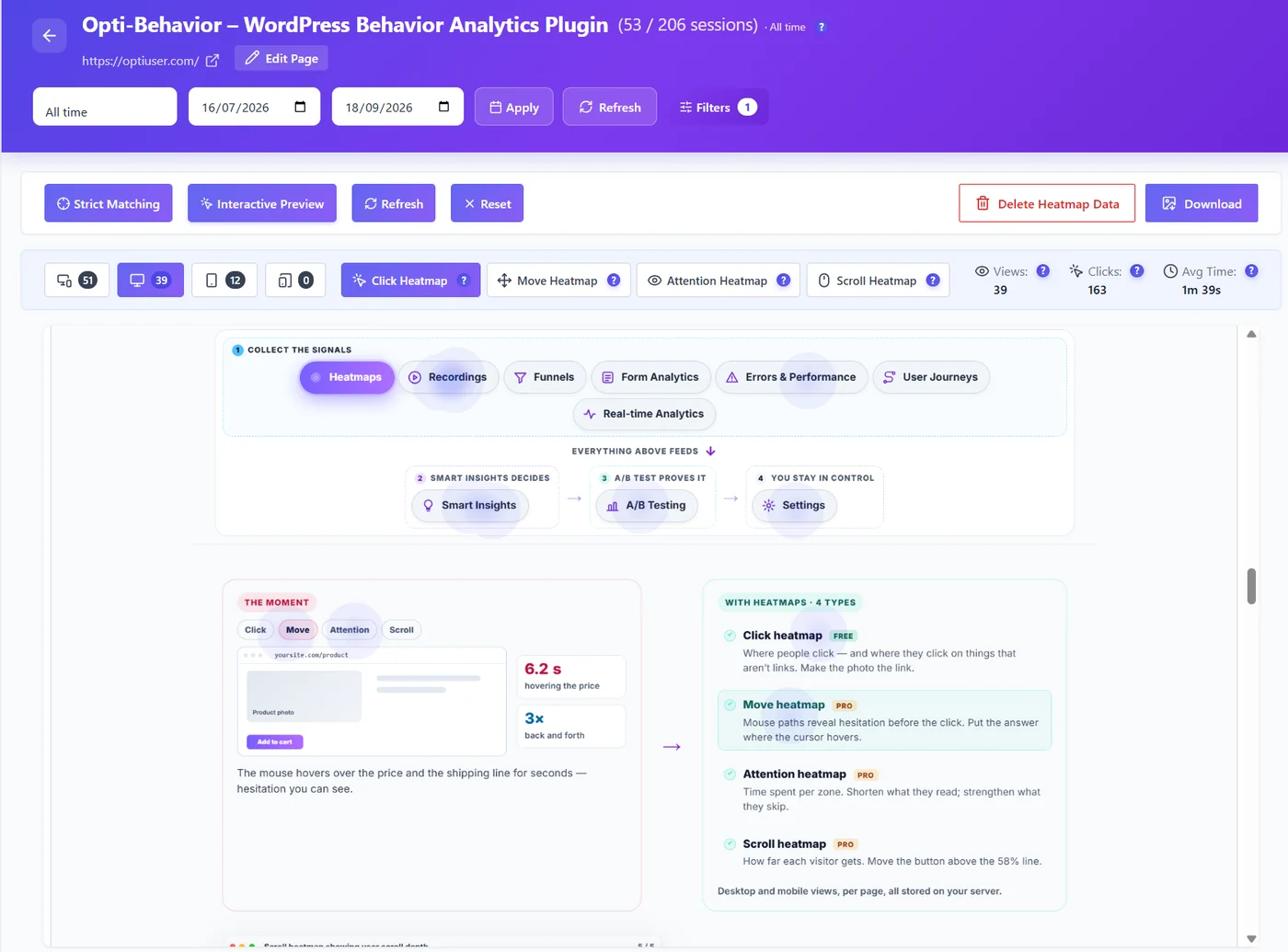
A heatmap plugin adds a small script to your pages. The script notes where each visitor clicks, how far they scroll and, with some tools, where the mouse moves. Then it paints all those visits on top of a picture of your page.
There are four common types:
- Click heatmap: where people click or tap.
- Scroll heatmap: how far down the page people go.
- Move heatmap: where the mouse goes (on desktop).
- Attention heatmap: where people stay the longest.
A heatmap answers simple questions. Do people see the Buy button? Do they click on an image that is not a link? Do they stop reading before the price? Not on WordPress? See our guide to website heatmap tools that work on any CMS.
The 3 questions to ask before you pick one
1. Where does the data go?
This is the big one. Cloud tools send each visit to their servers. Plugins like Opti-Behavior keep it in your WordPress database and files. If your visitors are in Europe, data in the cloud usually means you need a consent banner before the tool can run.
2. How do you pay?
Many cloud tools price by sessions. A session is one visit. More traffic means a bigger bill, or data that stops being recorded when you hit your limit. Self-hosted plugins usually charge a flat price per site.
3. Does it slow the site down?
Every script costs a little speed. Look for a small script that loads late (deferred) and does not block the page. We measured our own plugin with PageSpeed Insights in this test.
The 8 WordPress heatmap plugin options compared
| Tool | How it runs | Data location | Free option | Heatmap types |
|---|---|---|---|---|
| Opti-Behavior | WordPress plugin | Your server | Yes, click heatmaps in the free plan | Click (free). Scroll, move, attention (Pro) |
| Microsoft Clarity | Cloud, plugin adds the code | Microsoft cloud | Yes, free and unlimited | Click, scroll, area |
| Hotjar | Cloud, add the code | Hotjar cloud (Contentsquare) | Free tier with limits | Click, move, scroll |
| Crazy Egg | Cloud, plugin adds the code | Crazy Egg cloud | Trial, then paid | Click, scroll, confetti |
| Mouseflow | Cloud, plugin adds the code | Mouseflow cloud | Free plan, 500 sessions | Click, scroll, move, attention |
| Lucky Orange | Cloud, plugin adds the code | Lucky Orange cloud | 7-day trial only | Click, scroll, move |
| Aurora Heatmap | WordPress plugin | Your server | Yes (paid version too) | Click, scroll |
| Matomo + Heatmap add-on | Self-hosted Matomo | Your Matomo server | Matomo is free, heatmap add-on is paid | Click, move, scroll |
Prices change often. Always check the vendor’s own pricing page before you buy.
Each WordPress heatmap plugin in plain words
Opti-Behavior
Opti-Behavior is a WordPress plugin. Everything is stored on your own server, so no visit data goes to another company. The free version gives you click heatmaps, a real-time dashboard, funnels and A/B tests. Pro (from €89 per year for one site) adds scroll, move and attention heatmaps, session recordings, form analytics and error tracking.
It can also run without cookies. In Anonymous Mode, visitor data stays on your own server. Whether you still need consent depends on your setup: ask your data protection adviser. You can read how that works in our cookieless tracking guide.
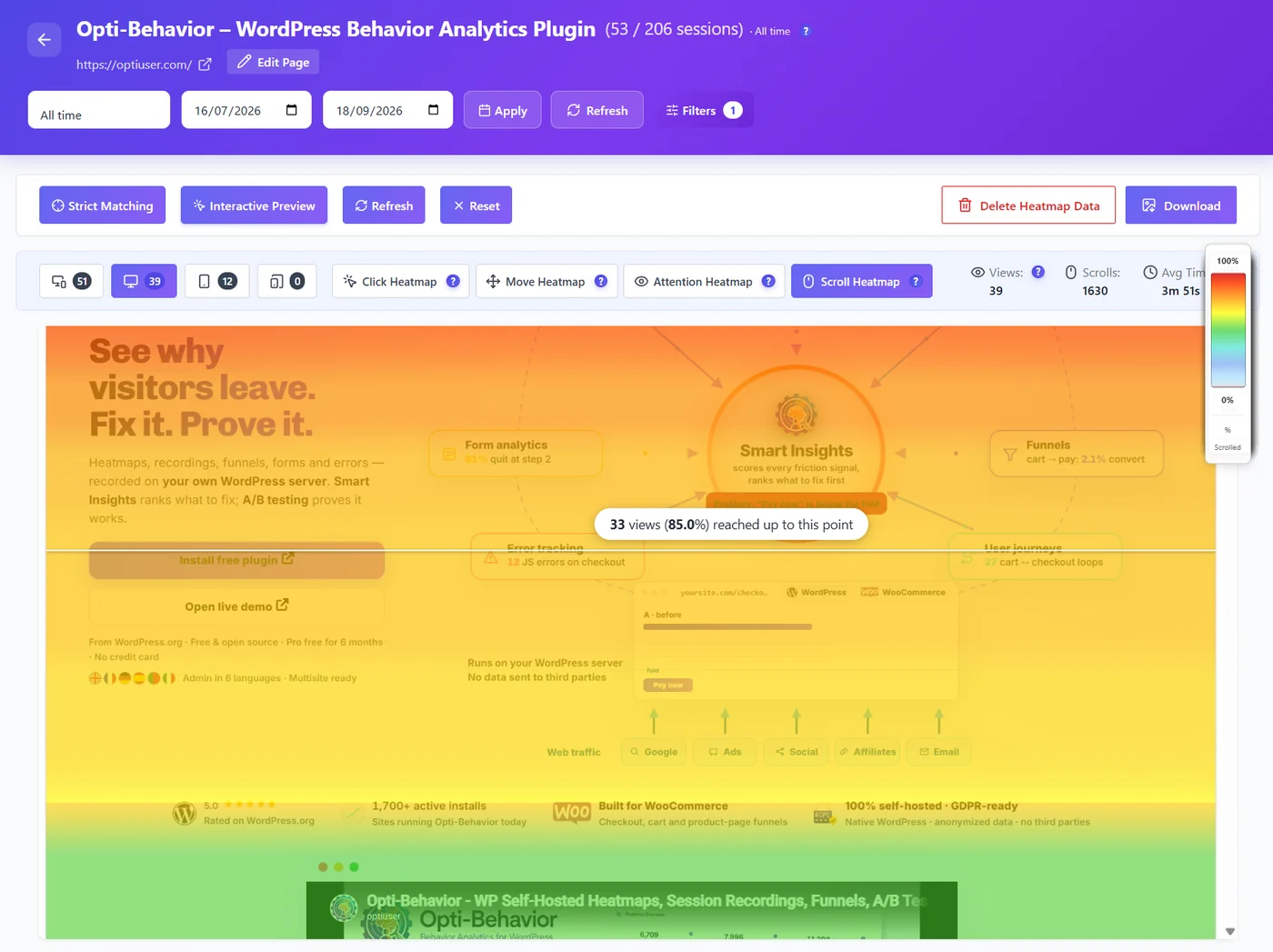
Good for: site owners who want the data on their own server, and WooCommerce stores.
Limits: no surveys or feedback widgets. The data lives on your hosting, so a very large site needs decent hosting. We tested it with 155,000 sessions in 90 days to see how big the database gets.
Microsoft Clarity
Clarity is free and has no session limit. That is hard to beat on price. You add it with the official plugin or a code snippet.
The catch is the data. It goes to Microsoft. Microsoft’s terms say it can use the data as an independent controller, including for advertising. Most EU sites need a consent banner before Clarity runs. We explain this in Microsoft Clarity and GDPR.
Good for: people who want free heatmaps fast and already use a consent banner.
Limits: no funnels builder, no A/B testing, no form analytics.
Hotjar
Hotjar is the best-known name. It has heatmaps, recordings and very good surveys and feedback tools. It is a cloud tool. Paid plans are priced by the number of sessions per month.
Good for: teams that want surveys and user feedback next to heatmaps.
Limits: cost grows with traffic. Data in the cloud. No built-in A/B testing.
Crazy Egg
Crazy Egg made heatmaps popular. It adds a "confetti" view that colors clicks by traffic source. It is a paid cloud tool with a free trial.
Good for: marketers who like the confetti view and simple A/B tests.
Limits: paid only after the trial. Data in the cloud.
Mouseflow
Mouseflow has all four heatmap types and a friction score. Its free plan records 500 sessions a month. Paid plans go up by session volume.
Good for: small sites that stay under the free limit.
Limits: session caps. Data in the cloud.
Lucky Orange
Lucky Orange mixes heatmaps, recordings, live chat and surveys. It has a 7-day trial and paid plans that start around $32 per month for a set number of sessions.
Good for: shops that want chat and heatmaps in one place.
Limits: no free plan, session caps, data in the cloud.
Aurora Heatmap
Aurora Heatmap is a small WordPress plugin that stores heatmaps in your own database. It is simple and light.
Good for: a basic, local click and scroll view.
Limits: no recordings, funnels or A/B testing.
Matomo with the Heatmap add-on
Matomo is a full self-hosted analytics platform. Heatmaps and session recordings come as a paid add-on. You need to run and update Matomo yourself.
Good for: teams that already run Matomo.
Limits: more setup and upkeep. Heatmaps are an extra purchase.
How to add a heatmap to WordPress in 5 minutes
Here is the path with Opti-Behavior. Other plugins follow similar steps.
- In WordPress, go to Plugins > Add New and search for "Opti-Behavior".
- Click Install, then Activate.
- Open Opti-Behavior > Heatmaps. Tracking starts on its own.
- Visit your site from another browser or your phone, and click around.
- Come back after a few visits. Pick a page to see its heatmap.
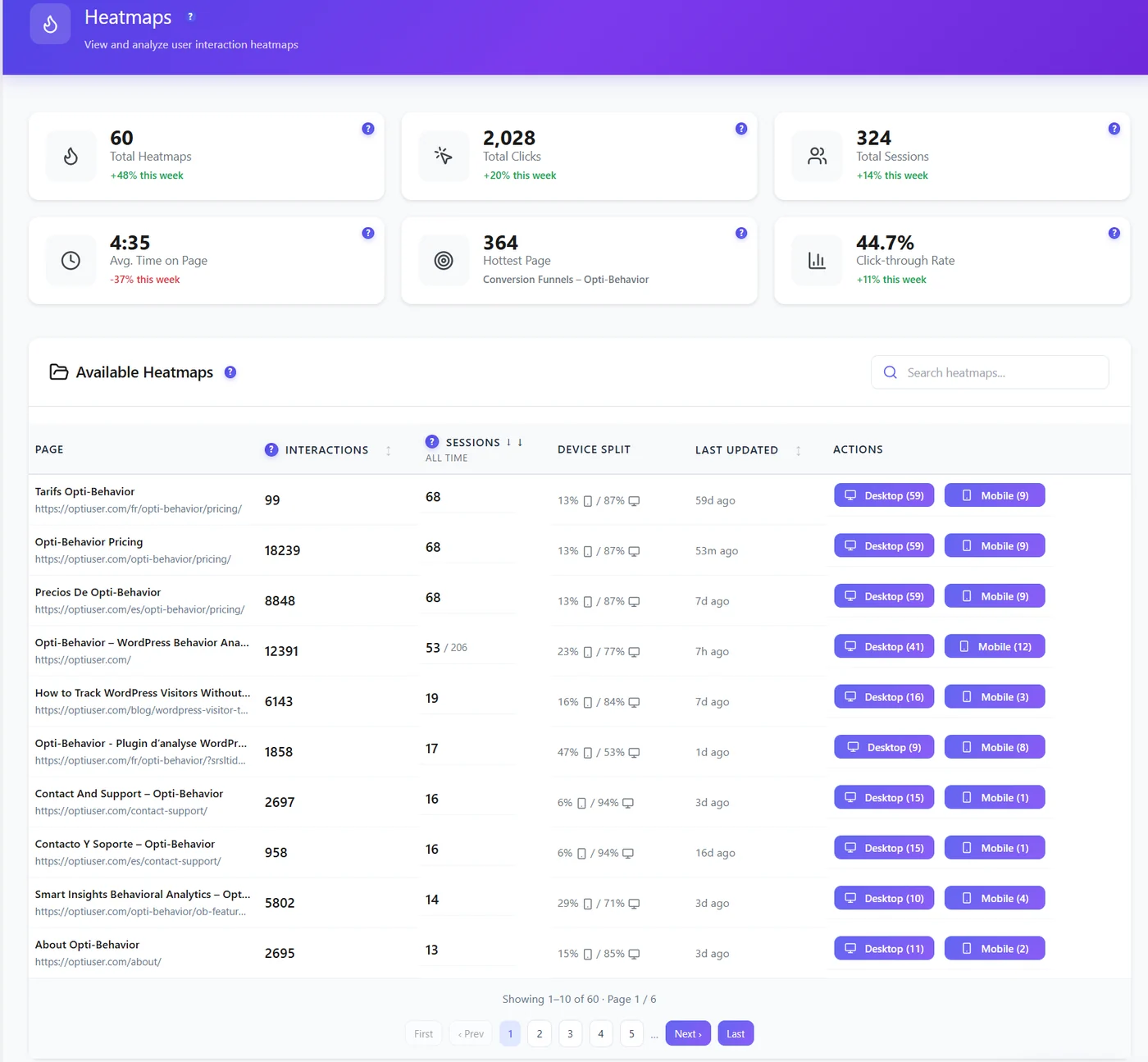
Tip: Look at desktop and mobile heatmaps separately. People tap very differently on a phone. The device switch sits at the top of the heatmap.
What to look for in your first heatmap
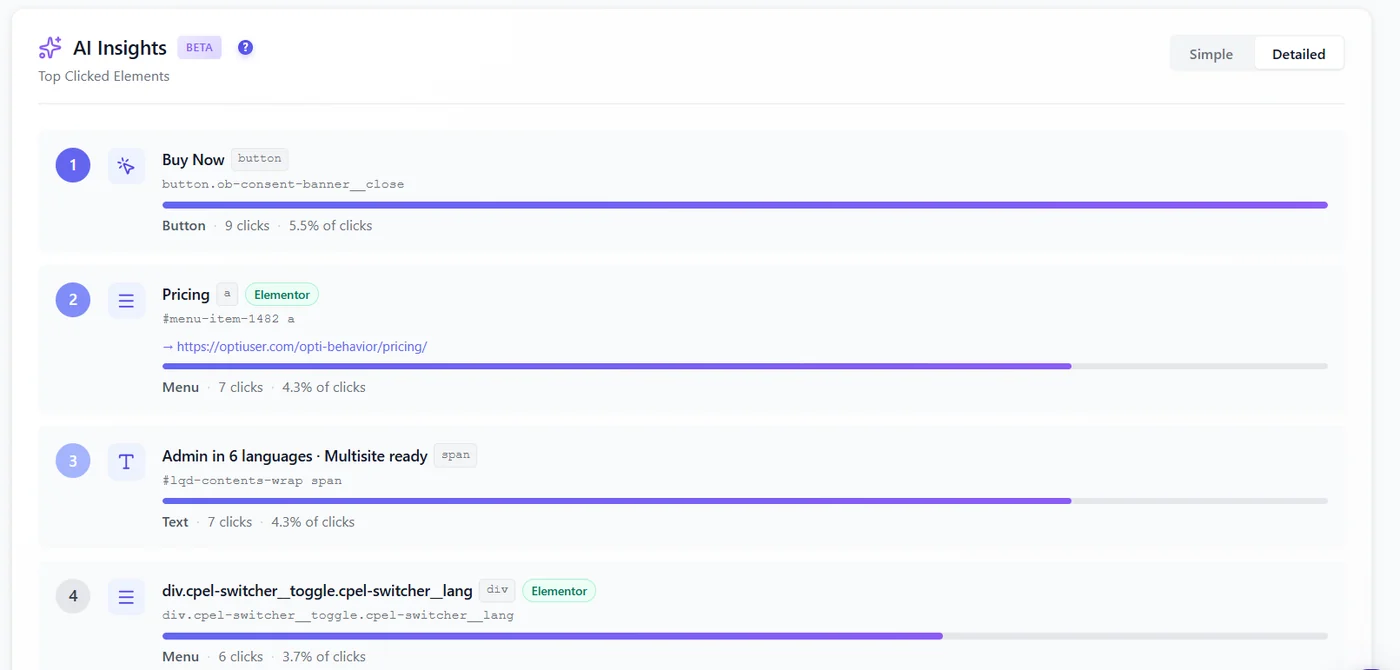
- Clicks on things that are not links. People think it is a button. Make it one, or change the design.
- The main button has few clicks. Maybe it is too low, too pale, or the text is unclear.
- Most people stop before the price. Move key info higher.
- Many clicks on the menu. Visitors may not find what they want on the page.
Our honest pick
There is no single best WordPress heatmap plugin for everyone.
- Want free and fast, and you already show a cookie banner? Microsoft Clarity.
- Want surveys and feedback? Hotjar.
- Want your data on your own server, no session limits and A/B tests in the same plugin? Opti-Behavior.
What makes a good WordPress heatmap plugin?
Use this short checklist before you install anything:
- Light script. It should be small and load with defer, so your page speed stays the same.
- Works with your cache plugin. LiteSpeed, WP Rocket and Autoptimize can block or delay tracking scripts.
- Desktop and mobile split. A good WordPress heatmap plugin shows each device on its own.
- Clear privacy mode. You should know if it sets cookies and where the data goes.
- No surprise limits. Check what happens when you pass the monthly session quota.
- Something to do next. Funnels, recordings or A/B tests help you act on what you see.
Common problems after installing a WordPress heatmap plugin
- The heatmap stays empty. Most of the time a cache or "optimize JavaScript" setting delays the script. Our guide on heatmaps not working after a cache plugin fixes it step by step.
- Your own clicks show up. Exclude logged-in admins and your IP address.
- The page looks different from the live site. Sliders, pop-ups and lazy-loaded images can shift. Compare with a recording.
- Very few visits. A quiet page needs a few weeks before the pattern is clear.
WordPress heatmap plugin: the bottom line
Pick a WordPress heatmap plugin by answering three questions: where the data goes, how you pay when traffic grows, and what you can do after you spot a problem. Then look at one page a week and fix one thing at a time.
Try a heatmap on your own WordPress site
Install the free plugin, visit a page, and see your first click map today. Or open the live demo to look around first.
WordPress heatmap plugin FAQ
What is the best free WordPress heatmap plugin?
For a free plugin that keeps data on your server, Opti-Behavior (click heatmaps are in the free plan) and Aurora Heatmap are good choices. Microsoft Clarity is free too, but it is a cloud tool and sends data to Microsoft.
Do heatmap plugins slow down WordPress?
A good one adds very little. Look for a small script that loads with defer. We measured Opti-Behavior with PageSpeed Insights and published the numbers on our blog.
Do I need a cookie banner for a heatmap?
For cloud tools that set cookies, usually yes in the EU. Opti-Behavior has an Anonymous Mode that runs without cookies, and visitor data stays on your own server. Whether you still need consent depends on your setup: ask your data protection adviser.
How many visits do I need before a heatmap is useful?
Around 100 to 200 visits on a page usually shows a clear pattern. Busy pages get there in a day. Quiet pages may take a few weeks.
Can I use heatmaps with WooCommerce?
Yes. Heatmaps work on product, cart and checkout pages. Opti-Behavior also has WooCommerce funnels and A/B tests on products.