
Table of Contents
In Anonymous Mode Opti-Behavior sets no cookie and stores no IP address. This page explains how it still counts visitors, and how IP addresses are handled in Full Tracking.
How cookieless counting works #
- Each visit gets a daily hash, computed on your server from technical data and a secret that changes every day. The hash cannot be reversed to an IP address or a person.
- The same visitor on the same day is recognised; the next day they get a new hash. That is why returning visitors are not recognised across days.
- No cookie, no local storage identifier. Note: Pro versions up to 1.10.0 send the visitor’s IP address to ip-api.com / ipwho.is to find the country, even in Anonymous Mode or without the visitor’s consent. Version 1.10.0.1 fixes this: update when it is available.
IP addresses in Full Tracking #
- The IP address is sent to ip-api.com (or ipwho.is if it fails) to find the country, region, city and time zone. In the Free plugin, this happens only after consent. In Pro up to 1.10.0, it also happens without consent (see the note above). A per-minute limit applies to lookups.
- The real visitor IP is read from
CF-Connecting-IPonly when the request comes from Cloudflare, and fromX-Forwarded-For/X-Real-IPonly when it comes from a proxy on your own network. Otherwise the connection IP is used, so a visitor cannot fake their IP with a header. - The real-time visitors list shows “Anonymous” instead of an IP in Anonymous Mode.
Exclude your own IPs #
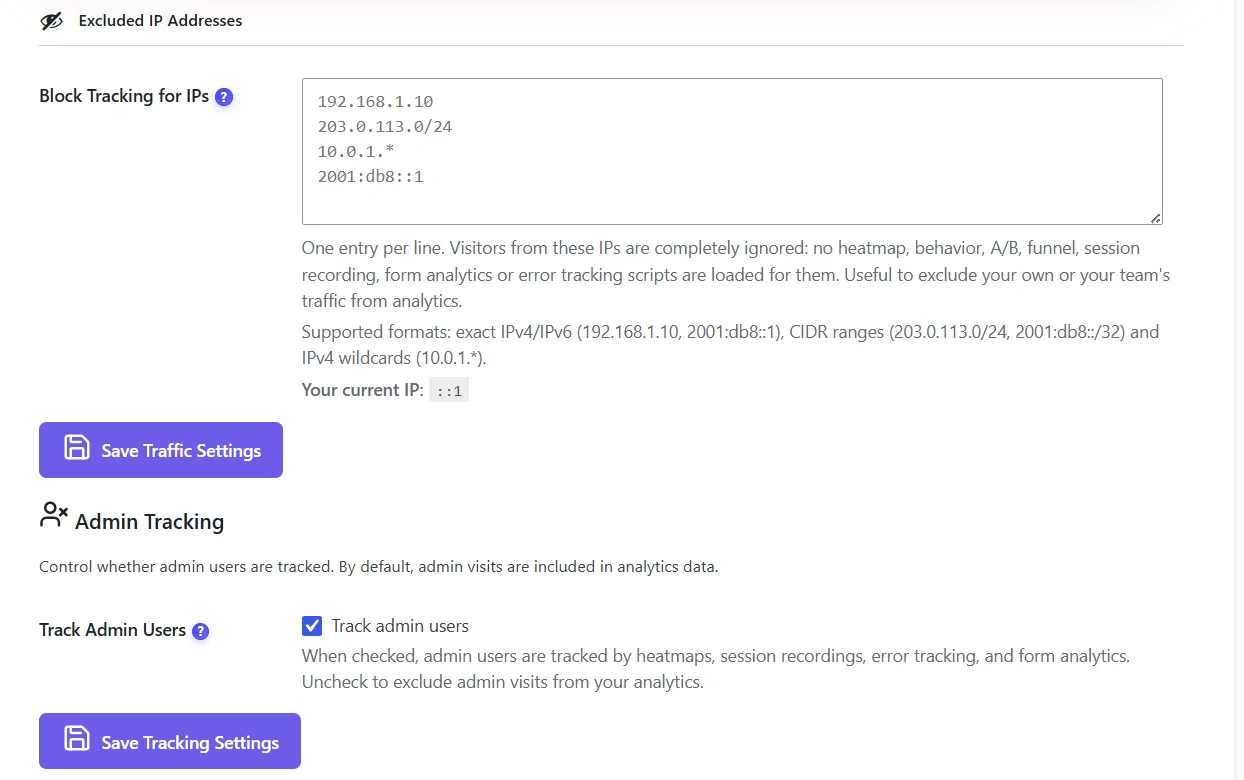
One entry per line: exact IPv4 or IPv6 (192.168.1.10), CIDR ranges (203.0.113.0/24) or wildcards (10.0.1.*). Visits from these IPs are completely ignored: no heatmap, recording or statistic. Your current IP is shown under the box.
Expected result #
In Anonymous Mode, no optibehavior cookie appears in the browser; excluded IPs produce no data at all.
FAQ #
Can I see IP addresses in Anonymous Mode? #
No. They are not stored.
Does excluding IPs work with a CDN? #
Yes, as long as the CDN is Cloudflare or a proxy on your network, so the real visitor IP is known.


