
Table of Contents
There are two ways to create a funnel: accept a suggested funnel (fastest) or build your own.
Option 1 – From a suggestion #

Click Create funnel on a card, or Customize to open the builder pre-filled. See Suggested funnels.
Option 2 – Build it #
- Go to Opti-Behavior → Funnels and click Build New Funnel.
- Give it a clear name and a description (“Purchase – from shop to order received”).
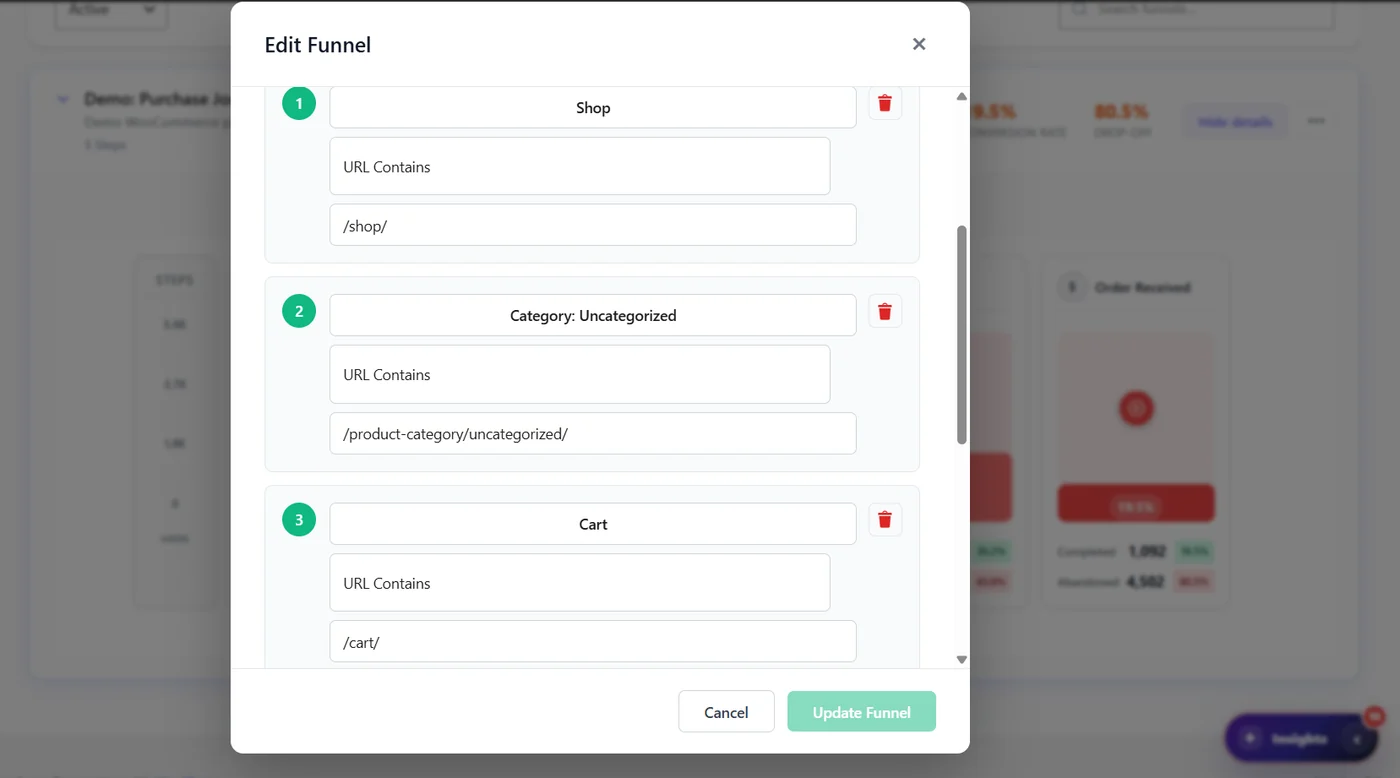
- Add each step: a name and a URL rule, for example Cart – URL Contains – /cart/.
- Put the steps in the order visitors follow. Two to six steps work best.
- Click Save Funnel.
Check it #
- Open each step URL in your browser: does it match the rule?
- Make a test journey in a private window and check the funnel after a few minutes.
- With Pro, a funnel created from a suggestion is filled immediately from your past sessions.
Expected result #
The funnel appears in the list and starts counting visitors who reach its first step.
FAQ #
My funnel stays at zero. #
The first step’s rule matches no page: check the URL, your language prefixes (/fr/) and translated slugs.
Cached pages still use the old funnel. #
Keep Purge cache after funnel modification on (Danger Zone → Smart Cleanup).
Can I count a button click as a step? #
Funnel steps are pages. To measure a click, use an A/B test goal or Top Clicked Elements.


