
Table of Contents
Pro feature. WooCommerce product testing needs Opti-Behavior Pro. Start the 6-month free trial.
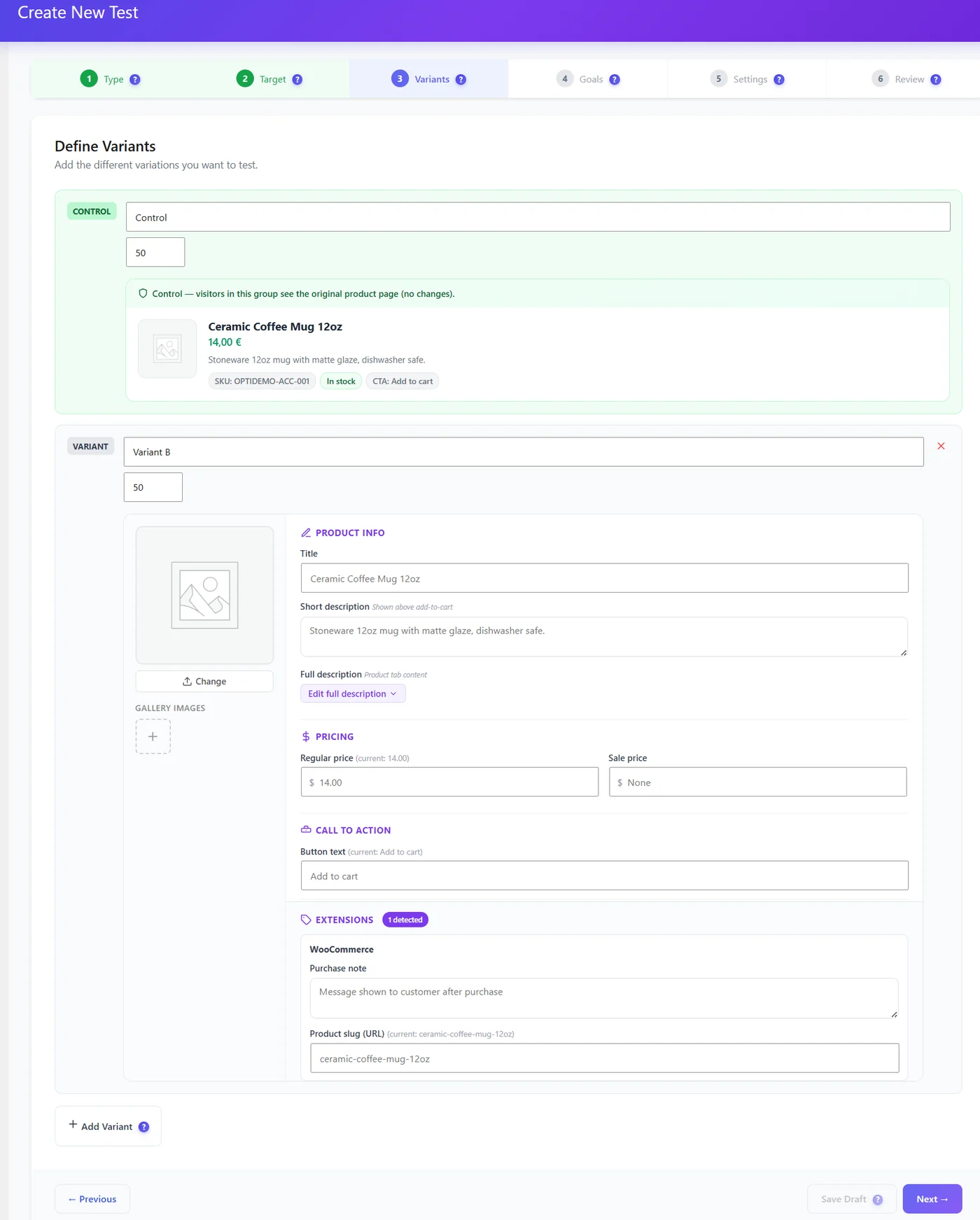
| You can change | Example |
|---|---|
| Image and gallery | Lifestyle photo vs product on white |
| Title | Benefit in the title |
| Short and full description | Bullet points vs paragraph |
| Regular and sale price | Price test |
| Call to action text | “Add to cart” vs “Buy now – ships today” |
| Purchase note, slug | Extensions detected |
Goals #
- WooCommerce purchase of the test product.
- Revenue from orders attributed to the test.
- Add-to-cart clicks as a secondary goal.
Good WooCommerce test ideas #
- Lifestyle photo as first image.
- Benefit-led title (“Keeps coffee hot for 12 hours”).
- Short description in 3 bullet points.
- “Free delivery” in the button text or near it.
- A small price change on a best-seller (check your local rules).
Expected result #
Each variant shows purchases and revenue; the winner can be applied to the product permanently.
FAQ #
Is a price test legal? #
Check your local consumer rules; show the same final price at checkout as on the variant.
Does it affect cached product pages? #
Variants are cached separately thanks to the A/B cache cookie.


