Table of Contents
Requires Opti-Behavior Pro. The signals below are part of Opti-Behavior Pro Smart Insights. View pricing or start the 6-month free trial.
A recommendation is only useful if you can verify and act on it. Pro Smart Insights attach the supporting evidence and a one-click link to the exact report behind each signal.
Requirements #
- Plan: Opti-Behavior Pro
Steps #
- Go to WP Admin → Opti-Behavior → Insights.
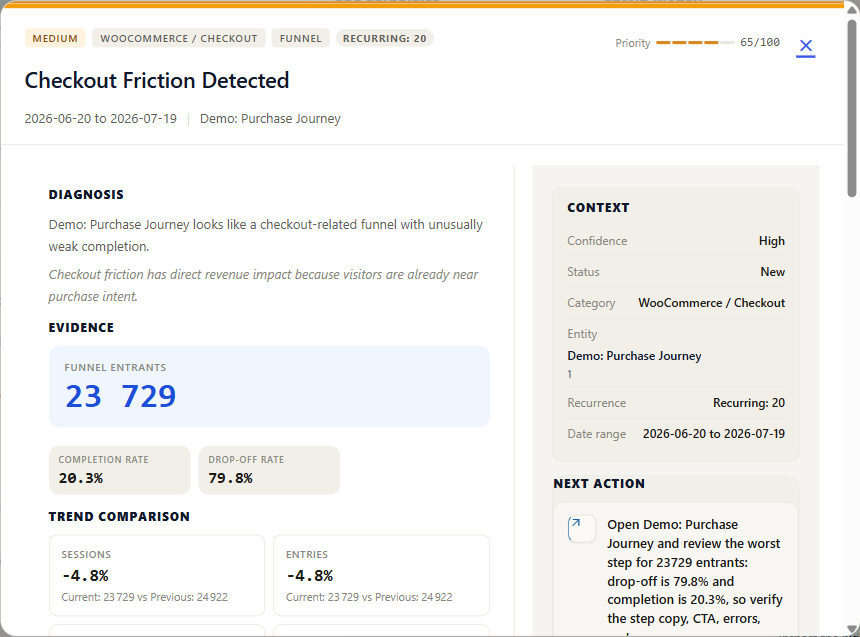
- Open a signal to see its evidence: the metrics and data points that triggered it.
- Use the destination link to jump to the supporting report — for example a funnel, a heatmap, a recording, a form, or the errors page.
- Confirm the finding, then act (fix the page, start an A/B test, etc.).
Where links lead #
- Funnel drop-off signals link to the relevant funnel.
- Friction and error signals link to Errors & Performance or a session recording.
- Form signals link to Form Analytics.
Expected result #
You can go from “here is a problem” to the exact report that proves it in one click, then take action.
FAQ #
Why does an insight have no destination link? #
Some signals are observations without a single source report; their evidence is shown inline instead.