
Table of Contents
Pro feature. Errors Tracking is part of Opti-Behavior Pro. Start the 6-month free trial to unlock it.
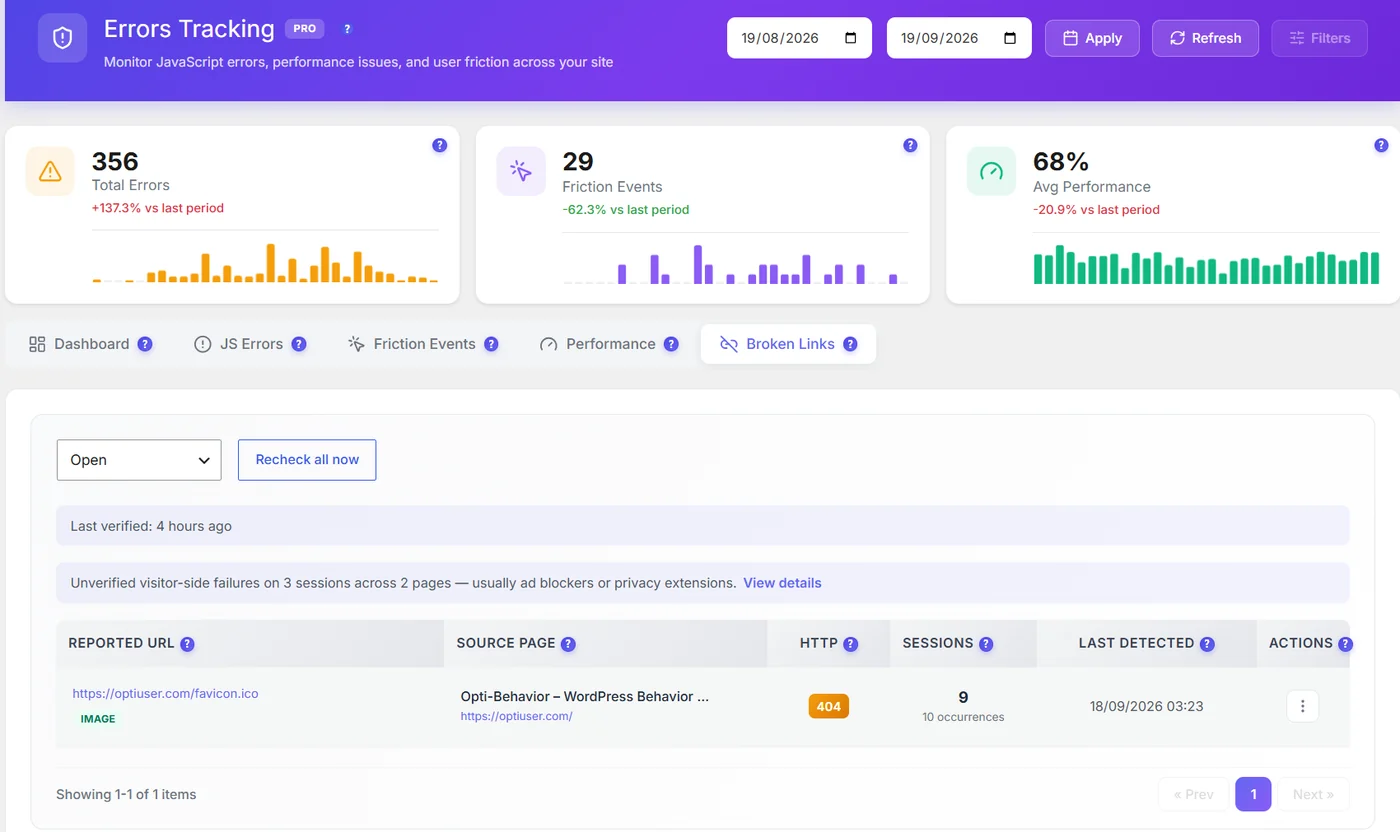
| Column | Meaning |
|---|---|
| Reported URL | The broken link or resource, with its type (link, image…) |
| Source page | The page that contains it |
| HTTP | The status returned (404, 500…) |
| Sessions / occurrences | How many visits hit it |
| Last detected | Most recent occurrence |
How it works #
- Visitors’ browsers report failed links and resources; Opti-Behavior then verifies them from your server.
- Recheck all now verifies again; fixed links close automatically.
- Failures that could not be confirmed (usually ad blockers or privacy extensions) are counted separately, not listed as broken.
Fix #
- Correct the link in the source page, or add a redirect (Rank Math, Redirection…).
- Missing image: re-upload it or remove it.
- Then click Recheck.
Common broken links #
| Case | Fix |
|---|---|
| Old URL after changing a permalink | 301 redirect to the new URL |
| Deleted product or post still linked | Remove the link or redirect to a similar page |
| Missing favicon or image | Upload the file again |
| Typo in a menu link | Correct it in Appearance → Menus |
Expected result #
The Open list shrinks to zero as you fix links.


