
Your other reports show one angle each: heatmaps, recordings, errors, forms, funnels. Page X-Ray puts them together for one page and answers three questions: is this page healthy, what is it costing me, and what should I fix first?
Pro feature. Page X-Ray is part of Opti-Behavior Pro. In the free version the tab shows a lock, a PRO badge and an example report. Start the 6-month free trial to unlock it.
Where to find it #
Go to WP Admin → Opti-Behavior → Smart Insights (in the What to fix group of the menu) and open the Page X-Ray tab. You can also open a page’s report from the Dossier button of the Heatmaps list, or from a Smart Insights card about a page.
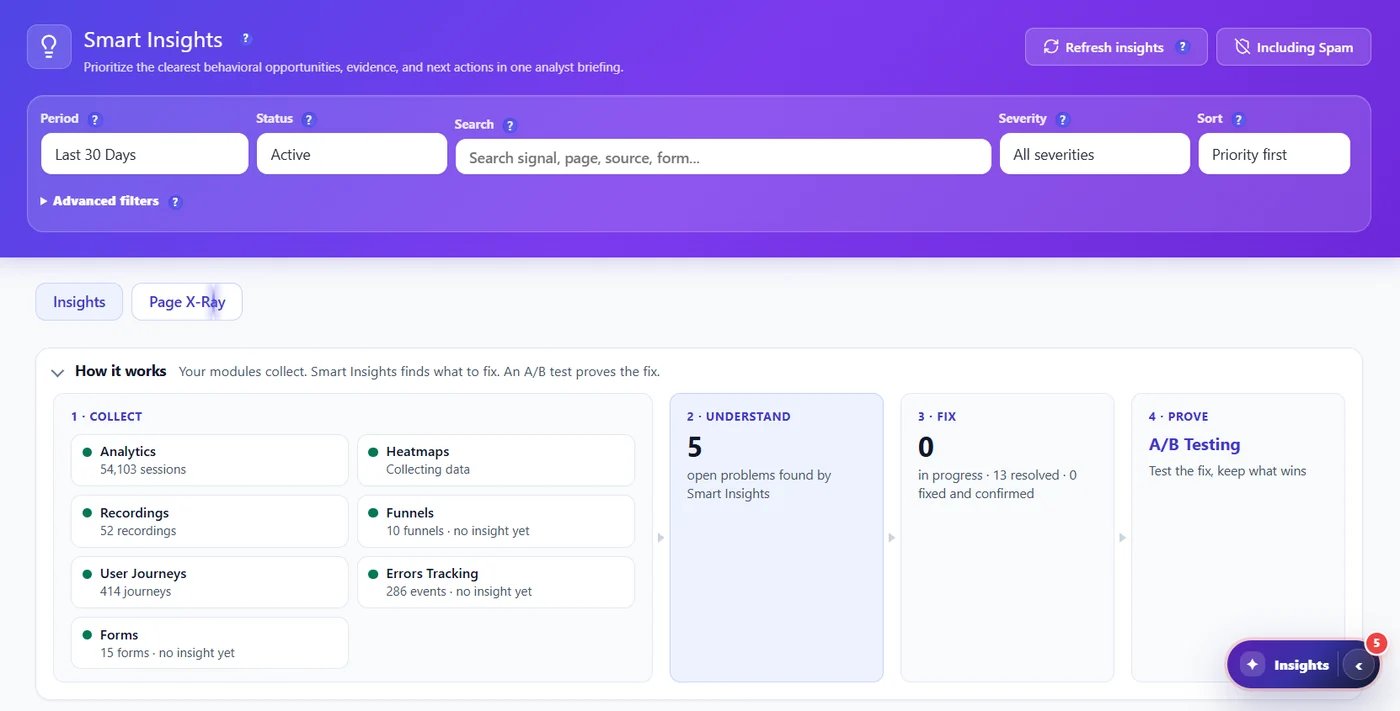
1. Your pages, ranked #
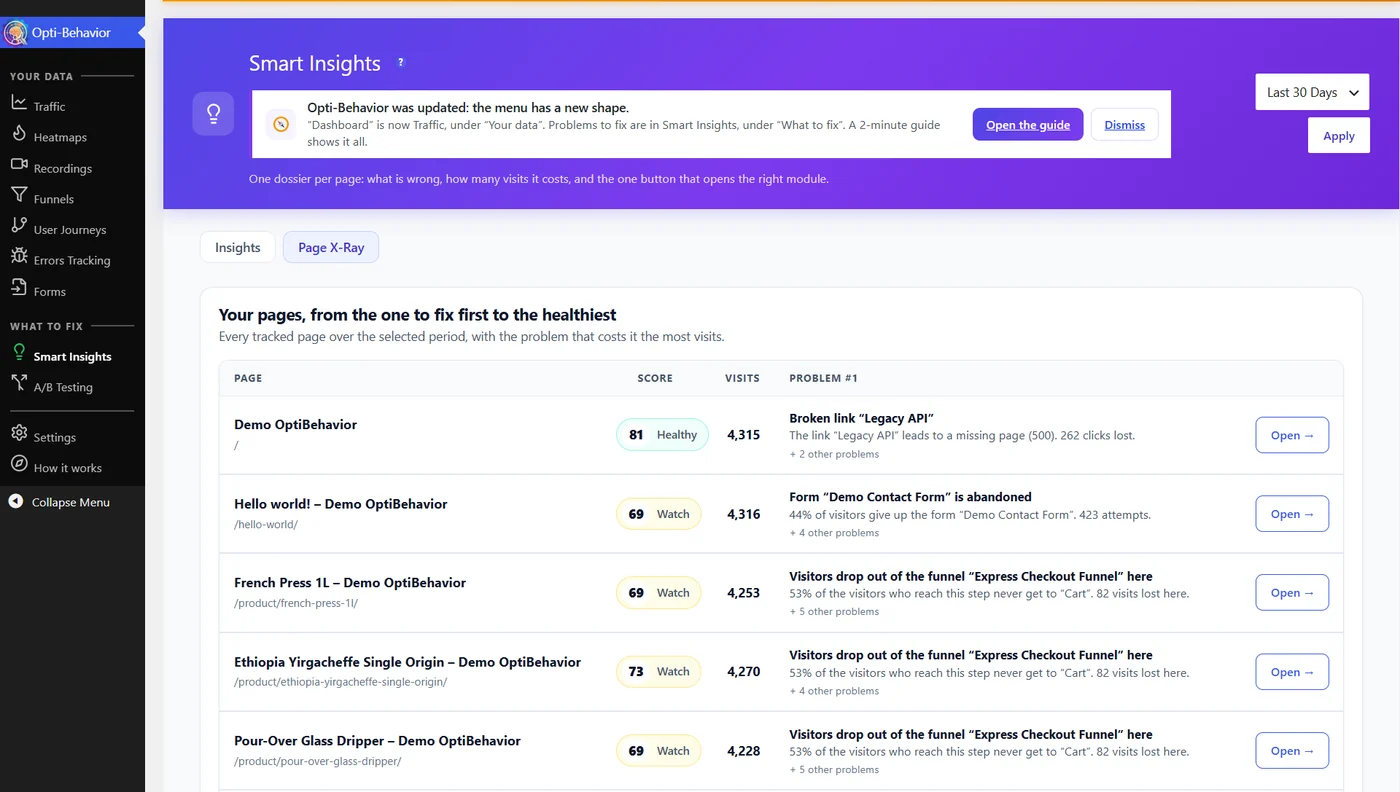
The tab opens on the list of your pages, from the one to fix first to the healthiest. Each row shows the health score (Healthy, Watch or Fix), the visits over the period and the problem number one. Click Open to see the full report. Archive, search and paginated URLs are never listed.
2. Health score and the goal of the page #
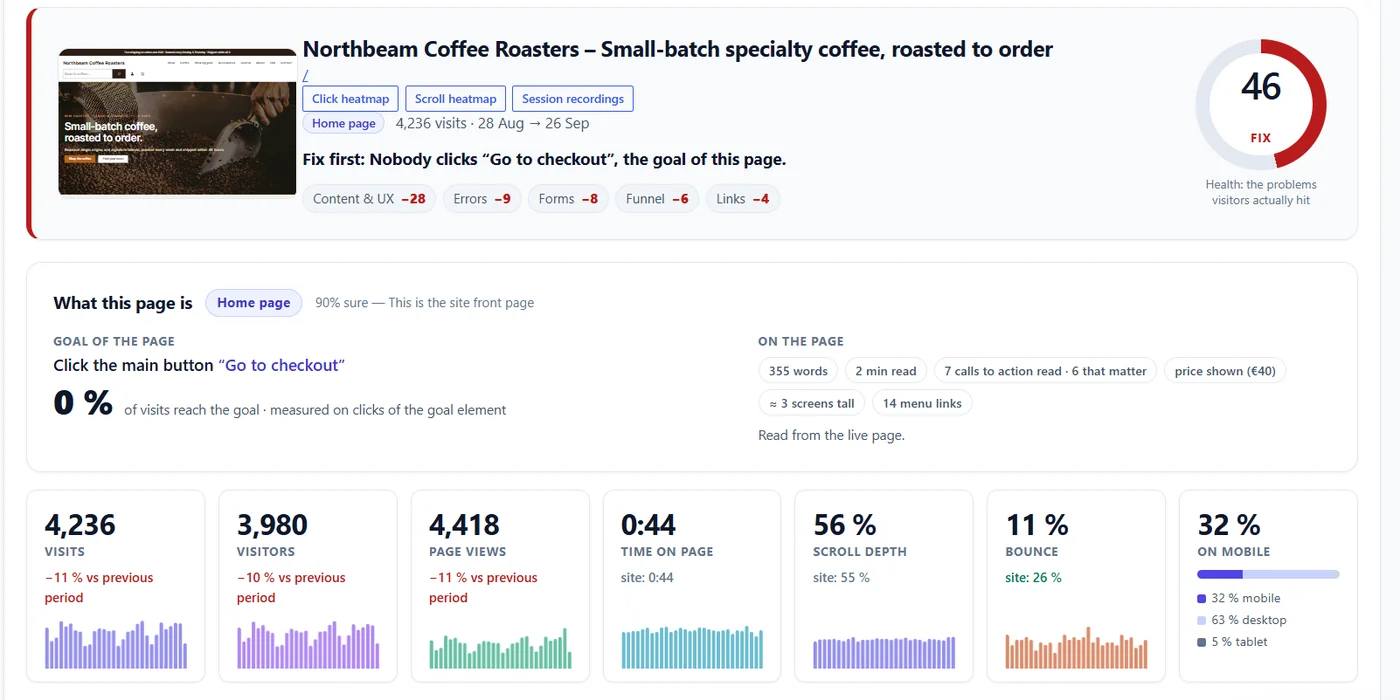
The top of the report shows a thumbnail of the page with links to its click heatmap, scroll heatmap and recordings, then the health score out of 100. The score starts at 100 and loses points for each problem visitors really hit; the chips below it show where the points went (for example Content & UX −28, Errors −9, Forms −8, Funnel −6, Links −4). One sentence tells you what to fix first.
What this page is reads the page the way a visitor does – title, headings, buttons, forms – and tells you its type (sales page, product, article, contact, download…), with how sure it is, the goal of the page (for example “click Go to checkout”) and the share of visitors who reach that goal. The key numbers of the page are compared with the average of your site.
3. What to fix, most costly first #
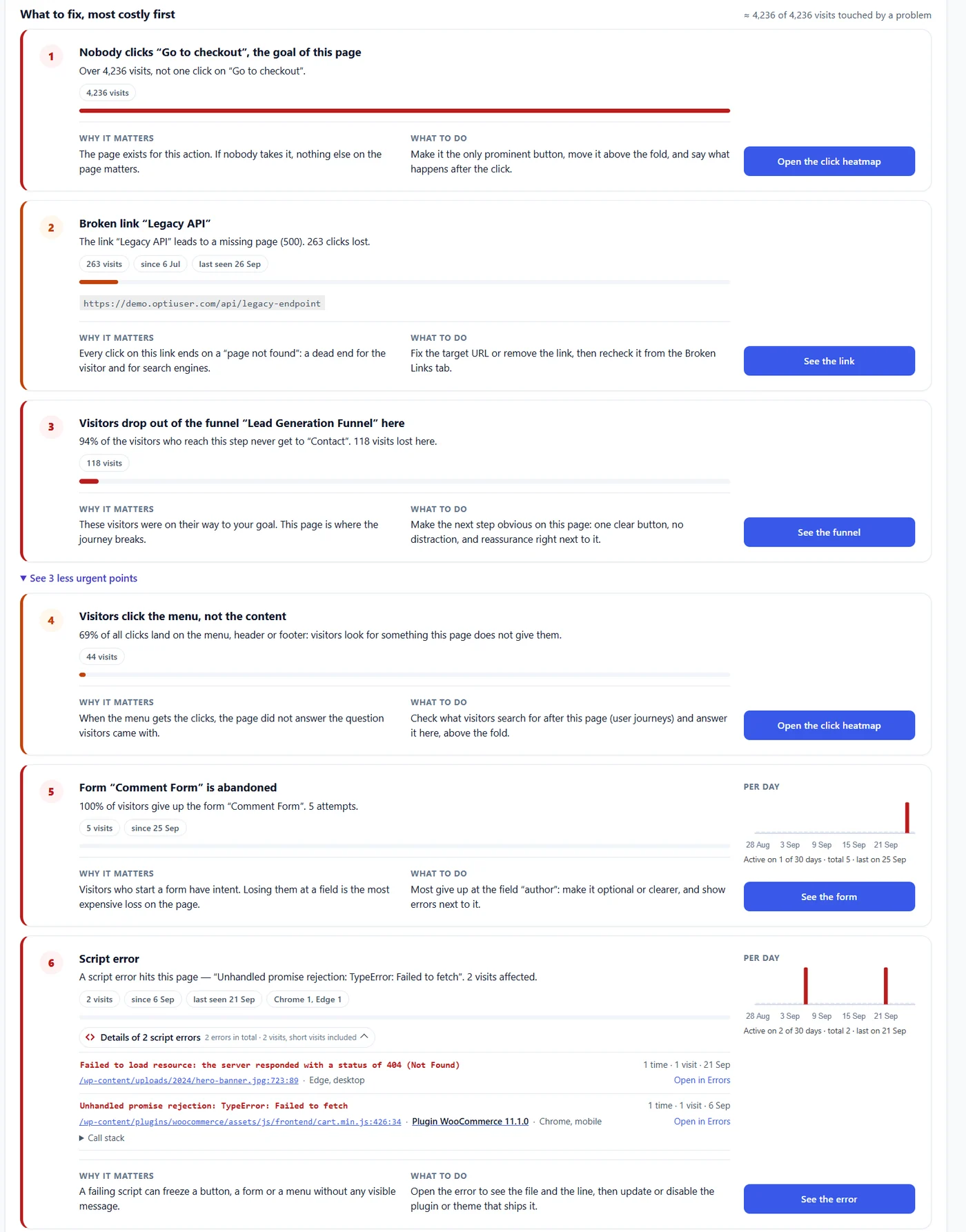
Problems are sorted by the number of visits they touch. Each card says, in plain words:
- What happens – for example “Over 4,236 visits, not one click on Go to checkout”.
- Why it matters and what to do – a concrete change, not a generic tip.
- A button to the proof – the click heatmap, the broken link, the funnel step, the form field or the script error with its file, line, plugin and browser.
- For errors and forms, a small chart shows on which days the problem happened.
Less urgent points are folded under See N less urgent points, so the list stays short.
4. What changed in WordPress #

Page X-Ray keeps a log of plugin, theme and WordPress core updates and of edits to the page. When a problem starts right after a change, it says so. Each change is drawn as a dark dashed line on the charts, so you can see whether a drop started the day you updated a plugin.
5. The page audit #
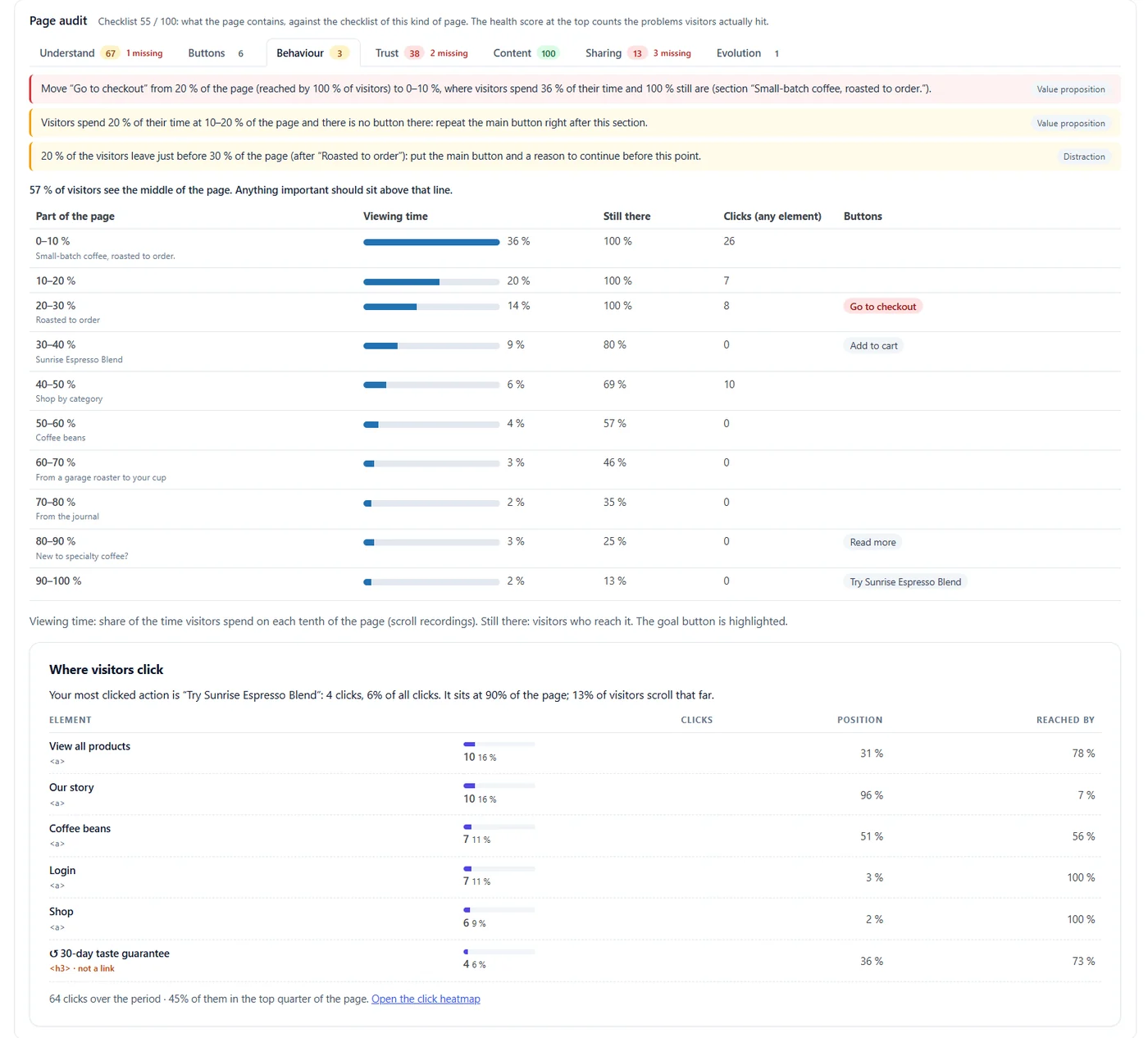
The page audit checks what the page contains against the checklist of its type. Its checklist score is different from the health score: the checklist says what is missing, the health score counts what visitors actually suffered.
| Tab | What it checks |
|---|---|
| Understand | Meta description, title length, a single main heading, one clear goal, offer visible without scrolling, mobile viewport. |
| Buttons | Every call to action: kind, position on the page, share of visitors who reach it, clicks and a verdict (for example Never clicked). Use Choose buttons on the page if the detected buttons are not the right ones. |
| Behaviour | For each tenth of the page: viewing time, visitors still there, clicks and buttons, with advice such as “repeat the main button right after this section”. |
| Trust | Customer reviews, testimonials, legal pages, a way to reach a human. |
| Content | Alt texts, what the main button says, enough words to decide, scannable text, author and date. |
| Sharing | The preview shown on social networks: share title, description, image and large card on X. |
| Evolution | Visits per day over 90 days and the last 14 days against the 14 days before. |
6. Did the change work? #
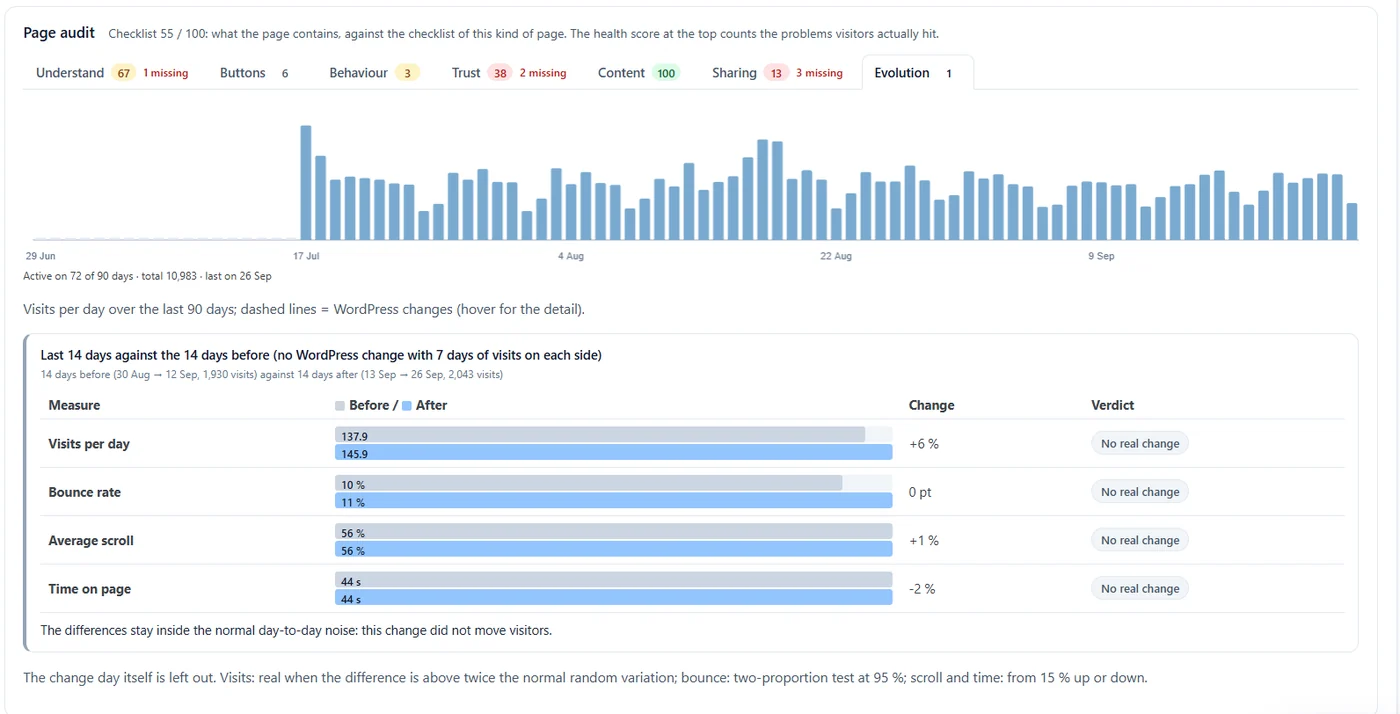
The Evolution tab compares the last 14 days with the 14 days before (or the two sides of a WordPress change). The day of the change is left out. A difference counts as real only when it is bigger than the normal variation: twice the usual random variation for visits, a two-proportion test at 95% for the bounce rate, and at least 15% up or down for scroll and time. Otherwise the verdict is No real change.
7. The action plan #
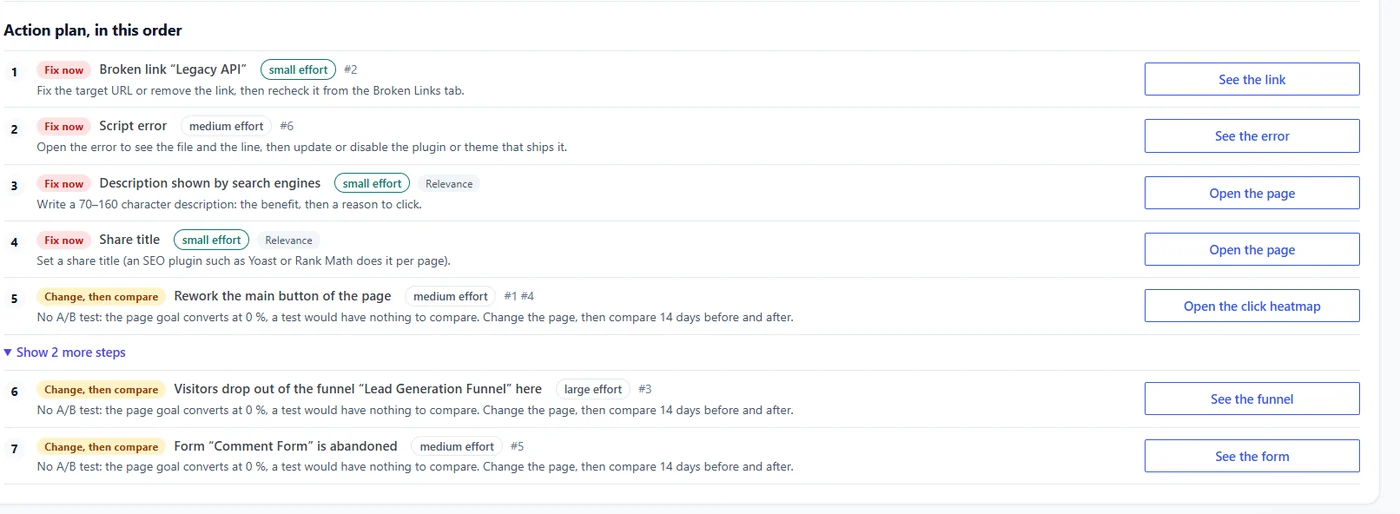
The report ends with a numbered plan. Each step has a tag and an effort (small, medium, large):
- Fix now – a bug or a missing element: broken link, script error, missing description.
- Change, then compare – a change to test. When the page has too little traffic for an A/B test, the plan says so and tells you to compare 14 days before and after instead.
- Measure first – something to set up before judging, for example a funnel whose steps match no real page.
Expected result #
After a few days of visits, the Page X-Ray tab lists your pages by health score. Opening one gives a single report with its goal, the costliest problems with their proof, the WordPress changes, the audit and a plan in order.
FAQ #
Why is a page missing from the list? #
Pages need visits in the selected period. Archive, search and paginated URLs are never listed. Try a longer period.
Does Page X-Ray send my pages anywhere? #
No. It reads your page from your own server, keeps the result for a few hours and computes everything in your WordPress. Nothing leaves your site.
The detected goal is wrong. Can I change it? #
Yes. In the Buttons tab, click Choose buttons on the page and pick the right button: the goal, the verdicts and the plan follow your choice.
Why does a problem appear on only a few visits? #
Page X-Ray needs a minimum of visits before it raises a problem, and sorts by the visits touched, so small problems stay at the bottom or folded.


