
Table of Contents
Pro feature. Drop-off replays need Opti-Behavior Pro. Start the 6-month free trial.
Numbers tell you where visitors leave a funnel. Recordings show why.
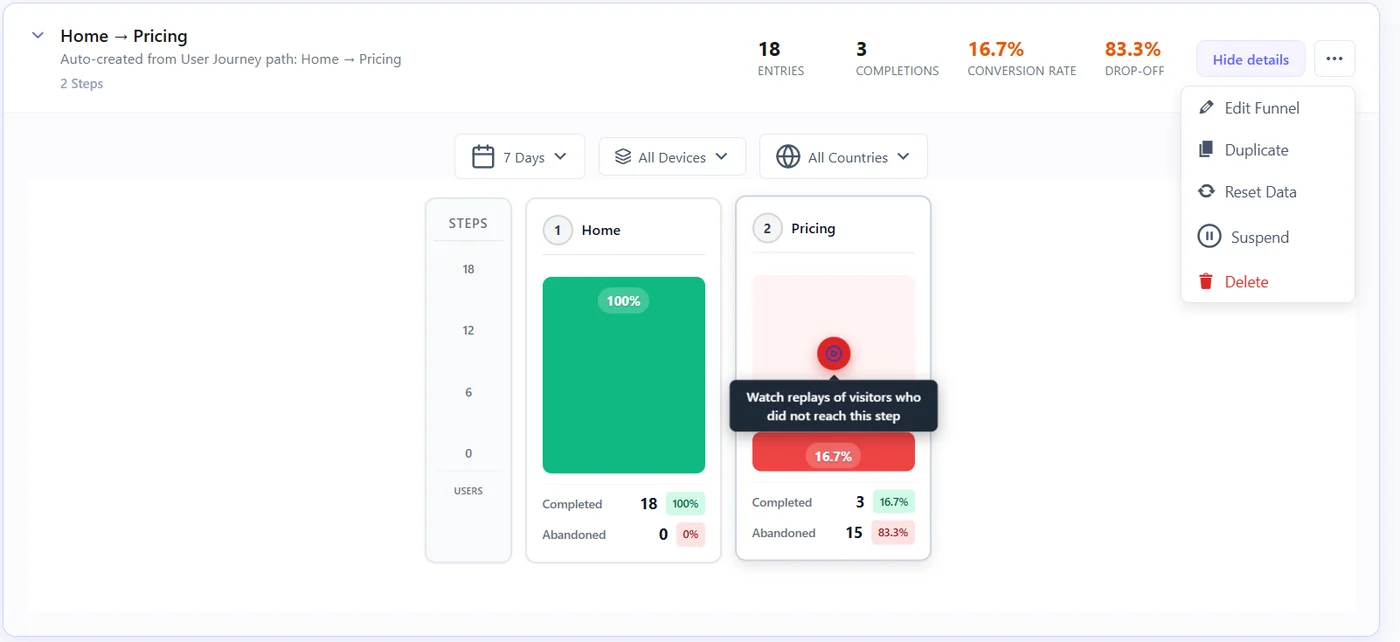
Steps #
- Open the funnel in Opti-Behavior → Funnels.
- Click the red play button on the step with the biggest drop.
- The Recordings page opens filtered on visitors who entered the funnel and did not reach that step.
- Watch 5 to 10 replays and note what repeats.
What to look for #
- Hesitation on the price or shipping line.
- Clicks on something that does not respond (rage or dead clicks).
- A form error or a script error.
- Leaving to compare (new tab), or a coupon field that sends them away.
Example #
A checkout step loses 60% of mobile visitors. Five replays show the same thing: the coupon field opens the keyboard and hides the Pay button. Moving the coupon field below the button is the test to run.
Expected result #
You can name the reason behind the drop and test a fix.
FAQ #
No replay is listed. #
Recordings must be enabled and consented; some drops happen before recording starts.
Smart Insights links here too? #
Yes: a Funnel Drop-off card opens the same filtered recordings.


