
Opti-Behavior shows you why visitors leave your WordPress site and what to fix first. It records what visitors do – clicks, scrolls, journeys, forms, errors – on your own server, turns it into a short list of problems ranked by the visits they cost, and lets you prove a fix with an A/B test.
Everything runs inside your WordPress. No data is sent to Opti-Behavior or to any third-party cloud.
How it works: collect, understand, fix, prove #
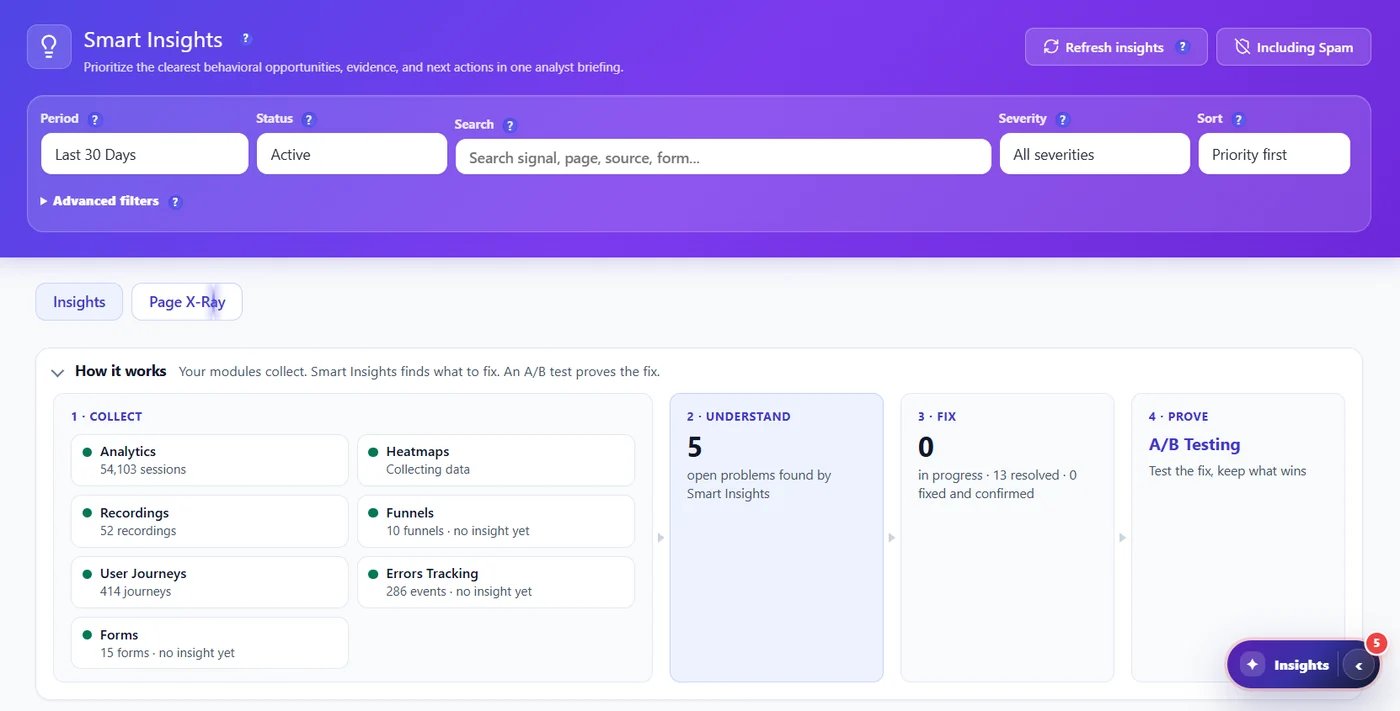
- Collect – seven collectors record behaviour: traffic, heatmaps, recordings, funnels, user journeys, errors and forms.
- Understand – Smart Insights reads all of it and ranks the problems by the visits they cost. Page X-Ray does the same for one page.
- Fix – each problem comes with what to do and a link to the proof (heatmap, recording, error, funnel step).
- Prove – an A/B test, or a before / after comparison, tells you whether the change really helped.
The modules #
| Module | What it answers | Free | Pro |
|---|---|---|---|
| Traffic (Analytics Dashboard) | Who visits, from where, on which device, and how many are bots or spam? | Full | Raw traffic CSV export |
| Heatmaps | Where do visitors click, move, look and stop scrolling? | Click heatmap, all pages | Move, Attention, Scroll, Top Clicked Elements |
| Session Recordings | What exactly did this visitor do? | – | Full |
| Funnels | At which step do visitors give up? | Funnels + suggested funnels | Extra recipes, discovered funnels, history backfill, drop-off recordings |
| User Journeys | Which paths do visitors take between pages? | – | Full |
| Errors & Performance | Which script errors, broken links, rage clicks and slow pages hurt visitors? | – | Full |
| Form Analytics | Which field makes visitors abandon a form? | – | Full |
| Smart Insights | What should I fix first? | Core signals | Pro signals, Weekly CRO Summary, full segment split, Page X-Ray |
| A/B Testing | Did my change really improve conversions? | Page split and element (visual editor) tests: 3 running tests, 3 variants, 3 goals | Unlimited tests, WooCommerce product tests, Bayesian engine, auto-winner, targeting, scheduling, decision engine |
Pro is free for 6 months. Start the 6-month free trial – no credit card needed.
Where to find everything #
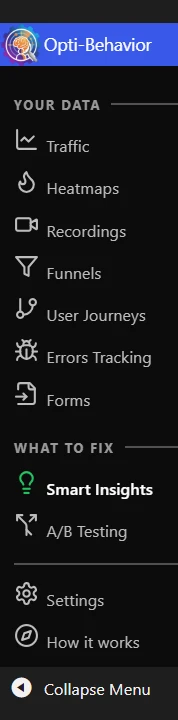
Everything lives under WP Admin → Opti-Behavior. The menu has two groups: Your data (the collectors) and What to fix (Smart Insights and A/B Testing), then Settings and How it works. See Understanding the admin menu.
Why self-hosted matters #
- Privacy – visitor data never leaves your server. Anonymous Mode sets no cookie.
- No sampling, no quota – every visit is recorded, whatever your traffic.
- No blind spot – ad blockers that block third-party analytics do not block a script served by your own site.
- Speed – the trackers are minified and loaded with
defer; they never block your page from rendering.
Expected result #
You know what each module does, which ones are Free or Pro, and where to start: install, verify tracking, then open How it works.
FAQ #
Is the free version limited in time? #
No. The free version is free forever, with no page or traffic limit.
Does it replace Google Analytics? #
It covers traffic analytics and goes further on behaviour (heatmaps, recordings, funnels, errors). Many sites keep both; some drop GA for privacy reasons.
Does it work with WooCommerce? #
Yes: WooCommerce funnels are suggested automatically, product pages get heatmaps and with Pro you can A/B test products. See WooCommerce compatibility.


