
Pro feature. Top Clicked Elements needs Opti-Behavior Pro. In the free version the panel shows a lock and an upgrade message. Start the 6-month free trial to unlock it.
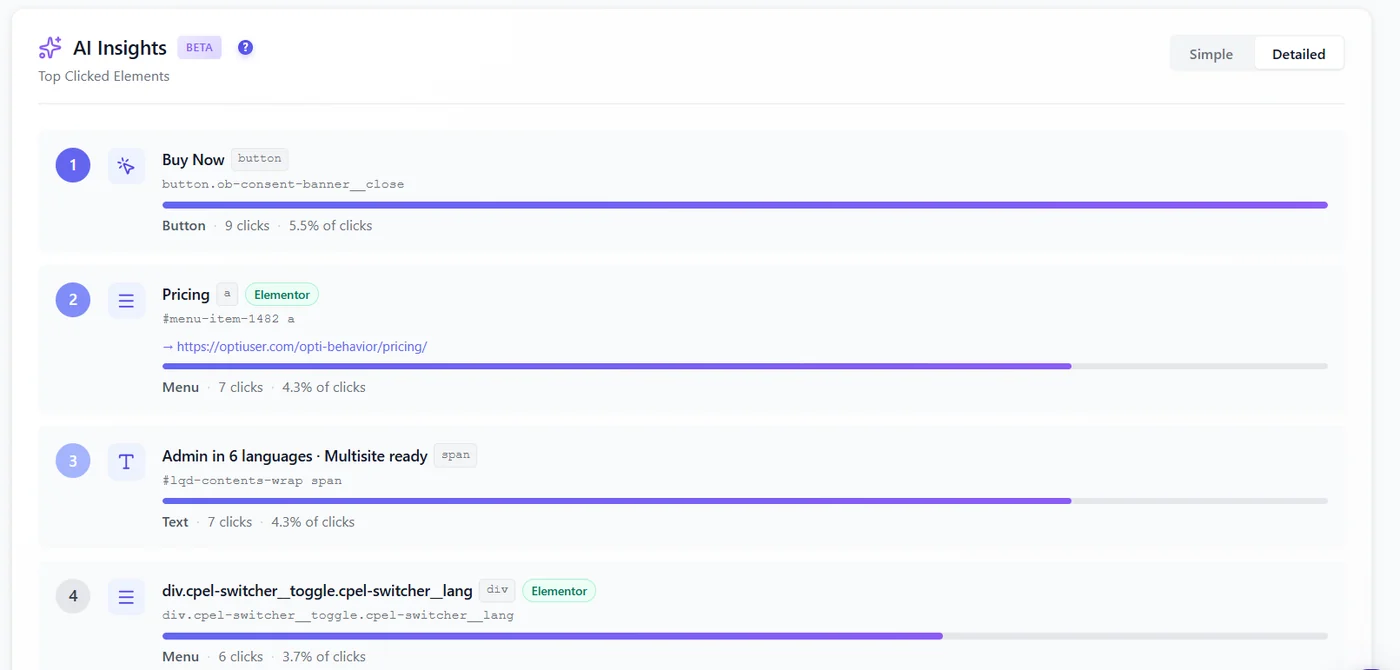
A heatmap shows where clicks land. Top Clicked Elements tells you what was clicked: the exact button, link, menu item, image or text block, ranked by number of clicks. It is the quickest way to check that your main call to action really is the most clicked element of the page.
Where to find it #
- Open Opti-Behavior → Heatmaps and open a page.
- Scroll below the heatmap to the AI Insights (Beta) – Top Clicked Elements panel.
- Switch between Simple (name, type, clicks, share) and Detailed (with the CSS selector).
The panel follows the device, period and filters of the heatmap, so you can compare mobile and desktop rankings.
How element detection works #
Each click is stored with the element it hit. Opti-Behavior groups clicks on the same element, recognises its type (button, link, menu item, text, image) and, when the page was built with a page builder such as Elementor, shows a badge with the builder. Clicks are then ranked, with their share of all clicks on the page.
How to use the ranking #
| What you see | What it means |
|---|---|
| Your main button is number 1 | Good. Now check its click rate against visits in Page X-Ray or a funnel. |
| A menu item beats your button | Visitors look for something the page does not give them. Answer it on the page. |
| Text or an image is in the top 5 | Visitors expect it to be clickable. Make it a link or change its style. |
| The same element has many repeated clicks | Possible rage clicks: check Errors & Performance → Friction events. |
Expected result #
A ranked list of the page’s elements with their clicks and share, for the device and period you selected.
FAQ #
Why is the panel empty? #
The page has no click in the selected period or device, or the licence is not active.
Why does one button appear twice? #
Two different elements share the same text (for example a “Buy” button in the header and one in the page). The Detailed view shows their selectors.
Does it work with any theme or builder? #
Yes. Detection works on the HTML of the page; builder badges are shown when the builder is recognised.


