
Good news: there is nothing to create. As soon as Opti-Behavior is active, every visit on a post, page, product, the home page or the shop page feeds that page’s heatmap. You only need visitors – and a few minutes to know where to look.
Before you start #
- Opti-Behavior is active and tracking works – see First 10 minutes: verify tracking is working.
- The page is published and receives real visitors (bots are filtered out).
- If you use a cache or optimisation plugin (LiteSpeed, WP Rocket, Autoptimize…), clear its cache once after installing, so cached pages include the tracker.
Step 1 – Let visitors come #
Each visit records clicks, mouse movements and scroll depth in small batches, sent about 3 seconds after the interaction. A simple landing page shows a first pattern after a few dozen visits; a long article or a shop page needs 100 or more visits per device for a reliable picture.
Your own visits. By default your admin visits are tracked too, which helps you test. After two days Opti-Behavior offers to exclude them so they do not distort your data. You can change it any time in Settings → Traffic & Behavior → Admin Tracking.
Step 2 – Open the Heatmaps list #
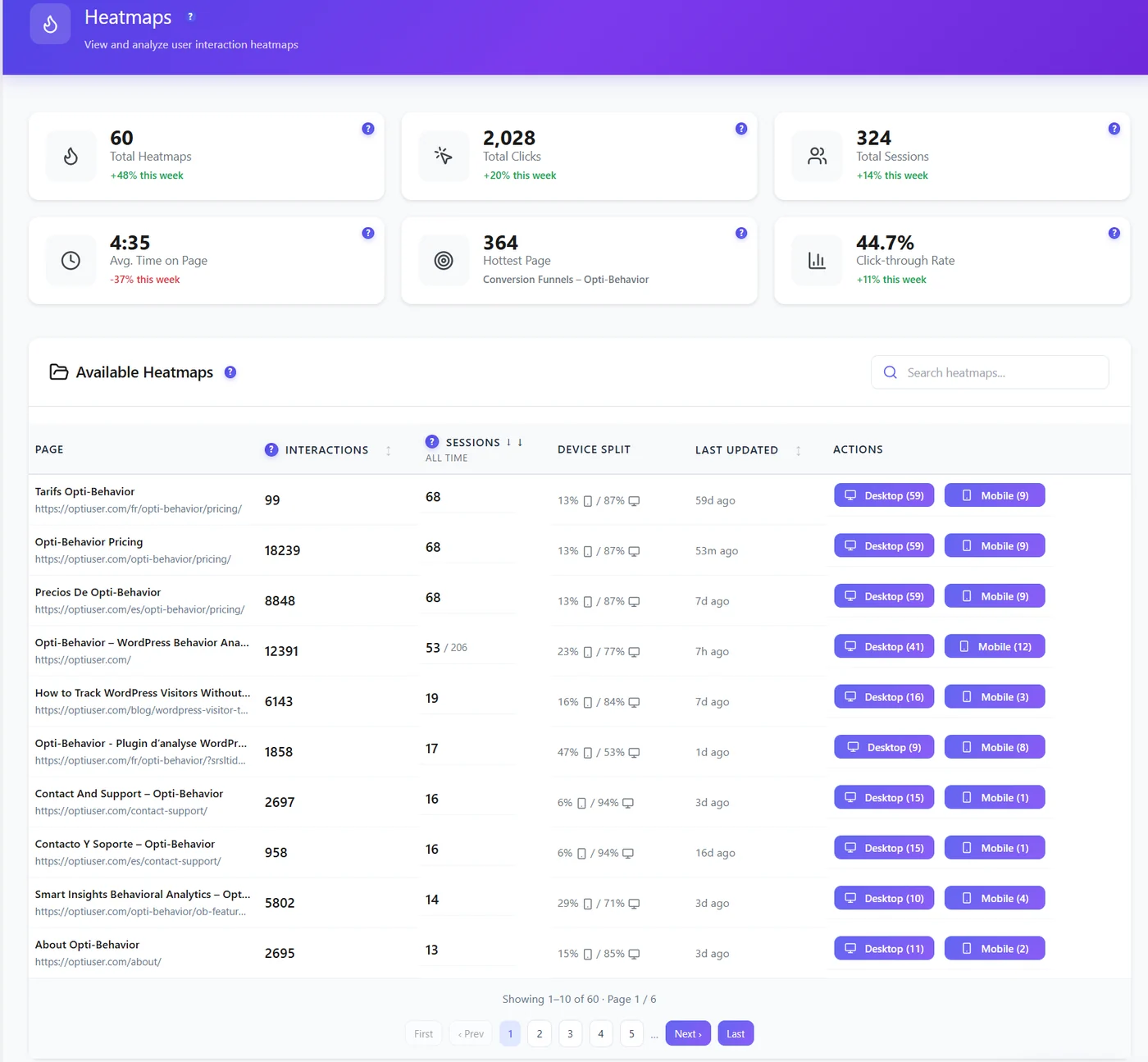
Go to WP Admin → Opti-Behavior → Heatmaps. Your page appears in Available Heatmaps after its first tracked visit, with its interactions, sessions and device split.
Step 3 – Open the heatmap #
Click Desktop (n) or Mobile (n) on the row. The heatmap page loads a live preview of your page with the Click heatmap on top.
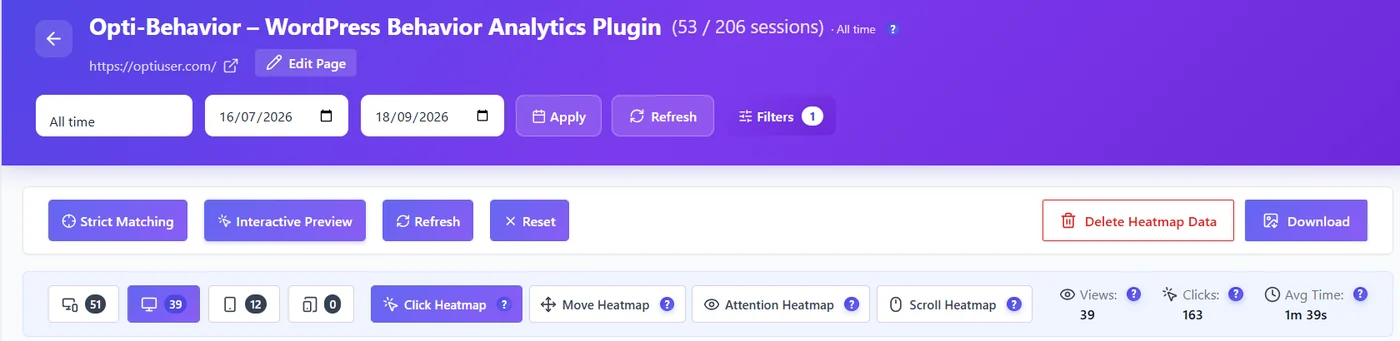
- Pick the period (All time, last 7 or 30 days, or custom dates) and click Apply.
- Pick the device: all, desktop, tablet or mobile. Each button shows its number of sessions.
- Pick the type: Click (Free), Move, Attention or Scroll (Pro).
- Scroll the preview to see the whole page.
Step 4 – Turn it into a decision #
Ask one question per heatmap: Is my main button clicked? Do visitors reach it? Do they click things that are not links? Then change one thing on the page and compare the same period after the change. See Reading a click heatmap for the patterns to look for.
Expected result #
The page is listed in Heatmaps and opening it shows coloured spots where visitors clicked, drawn on the real page at the width of the chosen device.
Troubleshooting #
- The page is not listed – it has no tracked visit yet, or it is an archive page (category, tag, search…), which is not recorded by default. See Heatmap settings reference.
- The preview is empty or grey – the page may block being shown in a frame; see Troubleshooting.
FAQ #
Do I need to add the page somewhere first? #
No. Every post, page, product, the home page and the shop page is recorded automatically.
Is there a limit on the number of heatmaps? #
No. The free plan records click heatmaps on all your pages.
Can I start fresh after a redesign? #
Yes. Open the page’s heatmap and click Delete Heatmap Data: the heatmap restarts from now, visits and recordings are kept.


