
Table of Contents
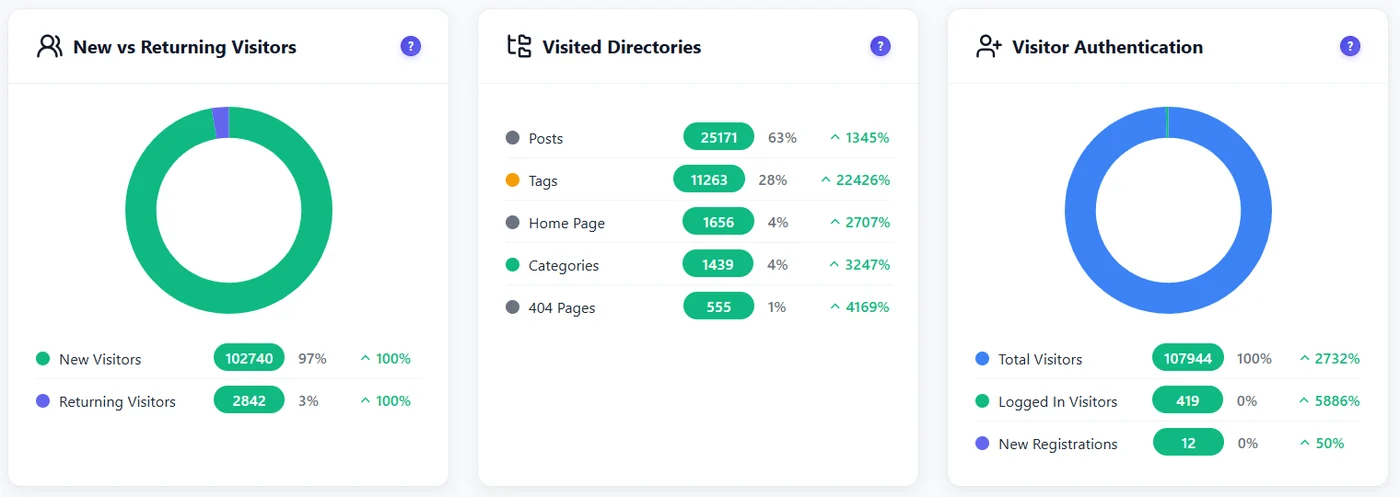
A returning visitor already knows you. Comparing new and returning visitors tells you whether your site attracts people and keeps them.
How it is counted #
| Mode | How a returning visitor is recognised | Consequence |
|---|---|---|
| Full Tracking (after consent) | Persistent visitor cookie | Returning visitors are recognised across days, until the cookie expires or is deleted. |
| Anonymous Mode | Non-personal daily hash | Recognised within the same day only: most visitors count as new. |
Each session is also tagged: new session (first session of that visitor) or returning session (the visitor had an earlier session). The post analytics box and the recordings list use these tags.
How to use it #
- Filters – set Visitor type to compare the heatmap of new and returning visitors: new ones often need more explanation above the fold.
- Content sites – a growing share of returning visitors means your content builds an audience.
- Shops – returning visitors convert more; check they find their account and reorder links.
Expected result #
You can read the share of returning visitors for a period and filter any report by visitor type.
FAQ #
Why are almost all my visitors “new”? #
You are in Anonymous Mode, or visitors refused cookies. That is expected.
Are logged-in users counted separately? #
The Visitor Authentication widget shows logged-in visitors and new registrations.


