
Table of Contents
| Feature | Free | Pro |
|---|---|---|
| Traffic, heatmaps on shop, product, cart and checkout | Yes | Yes |
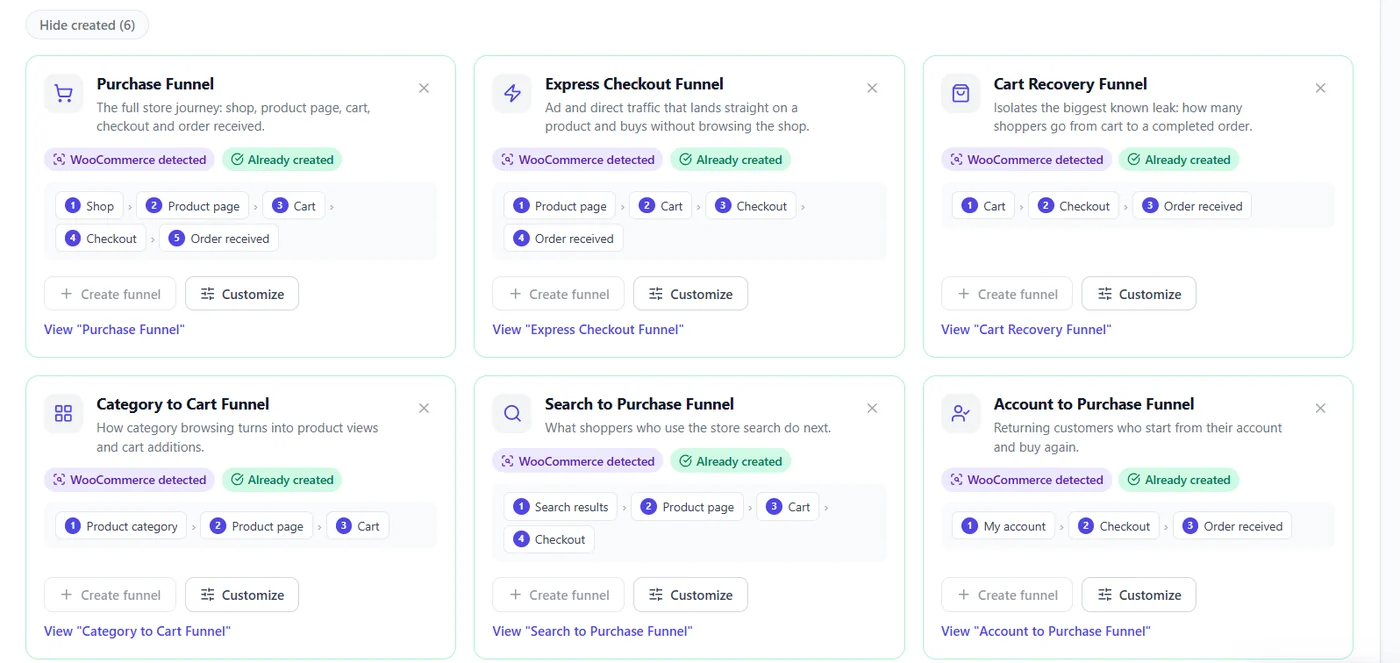
| Suggested WooCommerce funnels (purchase, express checkout, cart recovery…) | Yes | + more recipes, history backfill |
| Smart Insights on product pages | Core signals | + product, cart and checkout drop-off signals, revenue at risk |
| A/B tests of product content and price | – | Yes |
| Checkout errors and friction | – | Yes |
Tips #
- Order confirmation step: URL Contains
order-received. - Translated shop slugs are read from WooCommerce in suggested funnels.
- Revenue at risk appears only for funnels ending at checkout with at least 20 orders in the period.
Set up a store in 10 minutes #
- Install and verify tracking; clear the cache (cart and checkout pages are usually excluded from cache already).
- Funnels → accept the Purchase, Cart Recovery and Express Checkout suggestions.
- Heatmaps → open your best-selling product on mobile: is Add to cart reached and clicked?
- Smart Insights → set your conversion value (or let WooCommerce orders price the losses).
- Pro: Errors Tracking → filter the checkout page to catch payment script errors.
Troubleshooting #
- Checkout step never counts – one-page checkout plugins use another URL: use URL Contains with the real path.
- Cached prices in A/B tests – make sure your cache varies on the
opti_ab_vcookie. - No revenue in Smart Insights – needs a funnel ending at checkout with at least 20 orders in the period.
More questions #
Does it slow down my store? #
No. Trackers are deferred and batched.
Can I A/B test prices? #
Yes, with Pro’s WooCommerce test type.
Are logged-in customers tracked? #
Yes, as any visitor, following your privacy mode; the Visitor Authentication widget counts logged-in visits.
Expected result #
You see where shoppers drop from product to order, and why.


