
Table of Contents
The Weekly CRO Summary is the first block of Smart Insights. It answers one question: what should I work on this week? Since version 1.10.0 it is part of Opti-Behavior Pro; the free version shows a locked preview.
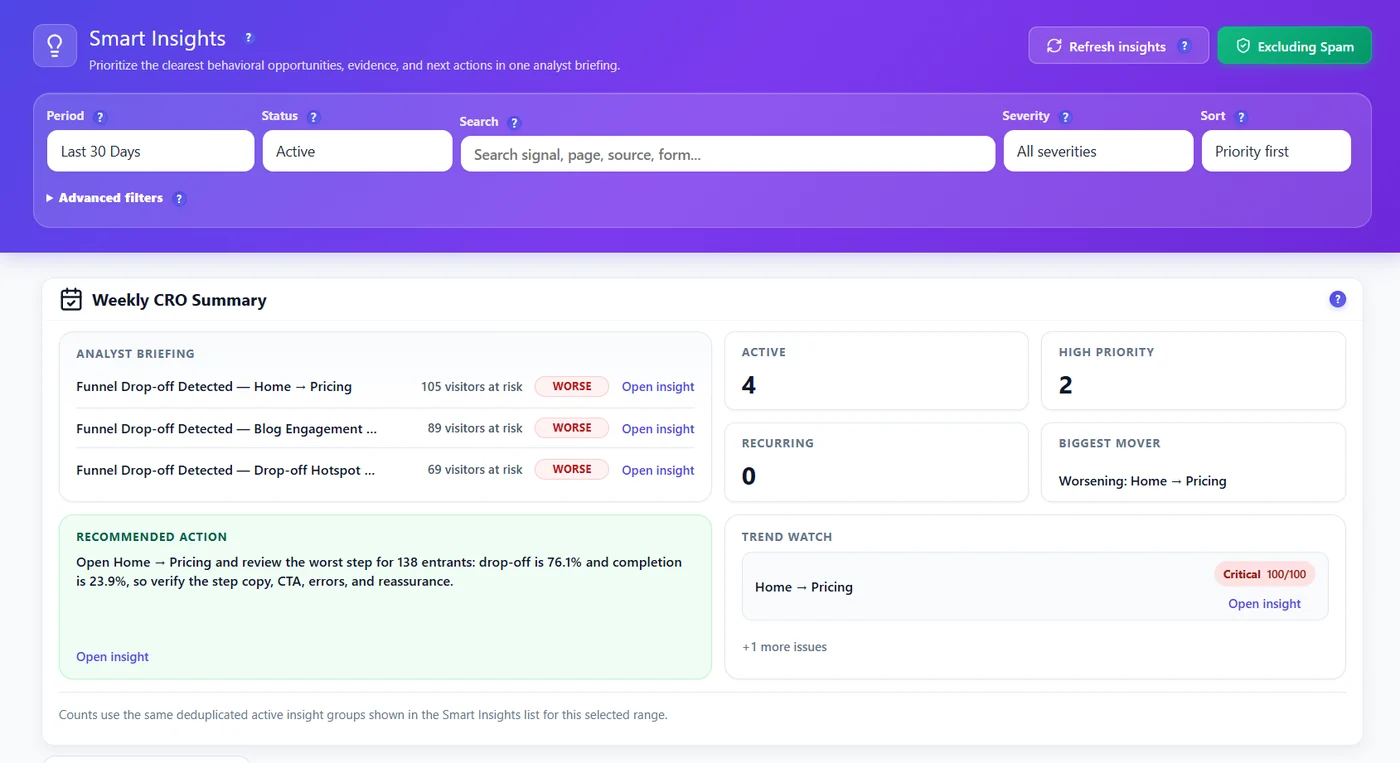
The blocks #
| Block | What it tells you |
|---|---|
| Analyst briefing | The three costliest problems, with the visitors at risk and a WORSE / BETTER tag when the change is real |
| Active | Open problems (new, reviewed, in progress) |
| High priority | Critical and High among them |
| Recurring | Problems already seen in the previous period |
| Biggest mover | The problem that changed the most |
| Recommended action | The next action of the top problem, in one sentence |
| Trend watch | Problems getting worse, with their priority |
| Wins this month | Fixes confirmed by the before/after measurement |
A weekly routine (20 minutes) #
- Read the recommended action and open its insight.
- Check the proof (heatmap, recording, funnel step) and decide.
- Set the card to In progress while you work on it, then Resolved when the change is live.
- Next week, look at Wins this month: the fix is confirmed or not by real numbers.
Expected result #
You leave Smart Insights with one task for the week and a way to check next week whether it worked.
FAQ #
Why is the briefing empty? #
No active problem in the period, or not enough visits yet. Try a longer period.
Does the briefing use a different period? #
No, it follows the period selected at the top of Smart Insights.
Can I receive it by email? #
The scheduled email report includes the Smart Insights of the period. See Scheduled email reports.


