
A heatmap paints visitor behaviour on top of your page: warm colours where many visitors click, move, stop or scroll, cool colours where almost nobody goes. Opti-Behavior offers four heatmap types. Each one answers a different question about the same page, and they work best together.
Everything is recorded by the tracking script on your own WordPress site and stored on your own server. No screenshot service and no third-party cloud is involved.
The four types at a glance #
| Type | Question it answers | Plan | Typical fix it leads to |
|---|---|---|---|
| Click | Where do visitors click, including on things that are not links? | Free | Turn a clicked photo or heading into a link, remove a fake-looking button |
| Move | Where does the mouse travel and hesitate before a click? | Pro | Put the answer (price, delivery time, guarantee) where the cursor hovers |
| Attention | Which parts of the page hold visitors the longest? | Pro | Shorten what they skip, strengthen what they read |
| Scroll | How far down do visitors get? | Pro | Move the main button above the line most visitors reach |
Pro feature. Move, Attention and Scroll heatmaps and Top Clicked Elements need Opti-Behavior Pro. The Click heatmap is free, with no limit on pages. Start the 6-month free trial to try them.
Where to find your heatmaps #
Open WP Admin → Opti-Behavior → Heatmaps (in the Your data group of the menu). The list page starts with six summary cards: total heatmaps, total clicks, total sessions, average time on page, your hottest page and the click-through rate, each with its trend for this week.
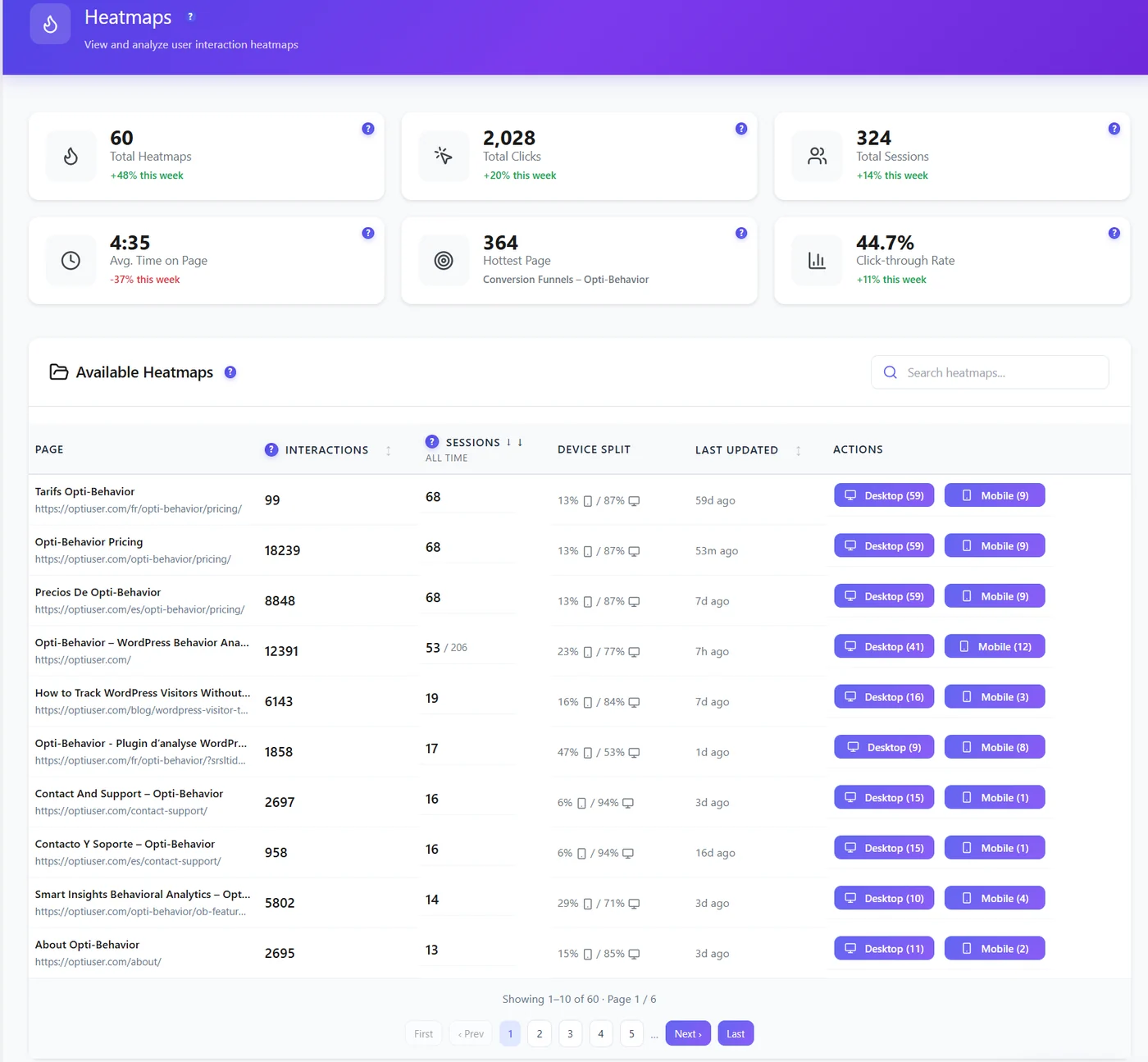
Below the cards, the Available Heatmaps table lists every page that received visits:
- Interactions – clicks, moves and scrolls recorded on the page.
- Sessions – visits to the page over all time.
- Device split – share of mobile versus desktop visits, so you know which view matters most.
- Last updated – when the page last received data.
- Desktop (n) / Mobile (n) – opens the heatmap for that device, with its number of sessions.
Use the search box to find a page by title or URL. The table shows 10 pages at a time.
Reading a heatmap page #
Click a device button to open the heatmap of that page. The top bar sets the period (preset or custom dates) and the Filters (visitor, session, pages and traffic, UTM – see Filtering heatmaps). The toolbar below offers:
| Button | What it does |
|---|---|
| Strict Matching | Shows only the clicks whose element still exists in the current page. Turn it off to also see clicks on elements you have since removed or changed. |
| Interactive Preview | Lets you click inside the preview to open accordions, menus, tabs and popups, so the clicks recorded on hidden elements appear in the right place. |
| Refresh / Reset | Reloads the latest data / clears your filters. |
| Delete Heatmap Data | Removes the heatmap data of this page (visit statistics are kept). See Deleting heatmap data. |
| Download | Saves the heatmap as an image to share with a designer or a client. |
The next row switches between all devices, desktop, tablet and mobile (each button shows its number of sessions; above 9,999 it reads “12 k”, hover for the exact number) and between the four heatmap types. Views, Clicks or Scrolls and Avg Time sit on the same row. The preview is drawn at the real width of the chosen device, so the mobile heatmap matches your mobile layout.
Click heatmap (Free) #
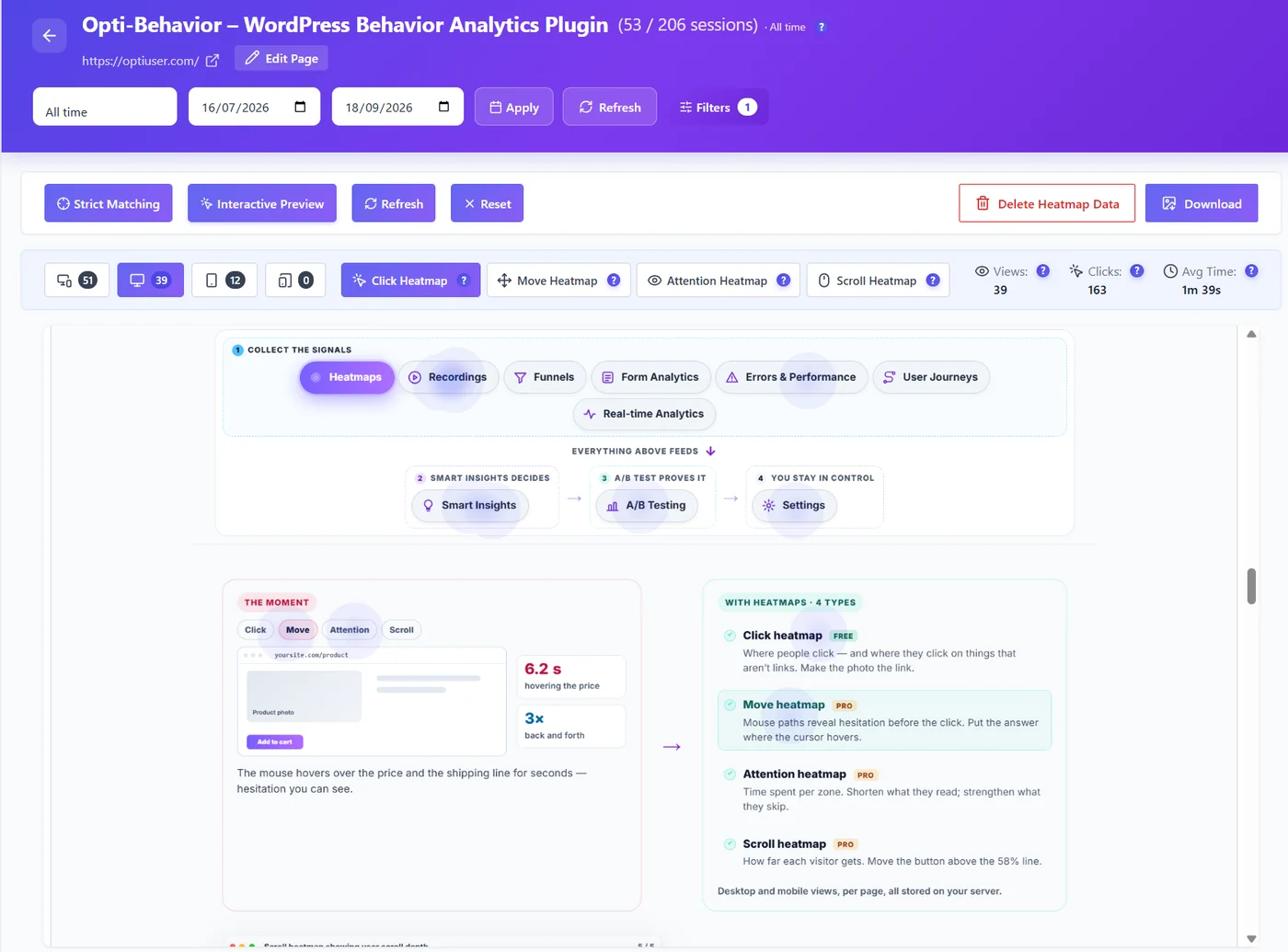
The click heatmap shows every click, including clicks on elements that do nothing. That is its most useful signal:
- Clicks on images, icons or headings that are not links: visitors want more. Make them links to the page they expect.
- Many clicks on the menu, few on the content: the page does not answer the question visitors came with.
- No click on your main button: the button is not seen, not understood or not convincing. Check the scroll heatmap next.
Move heatmap (Pro) #
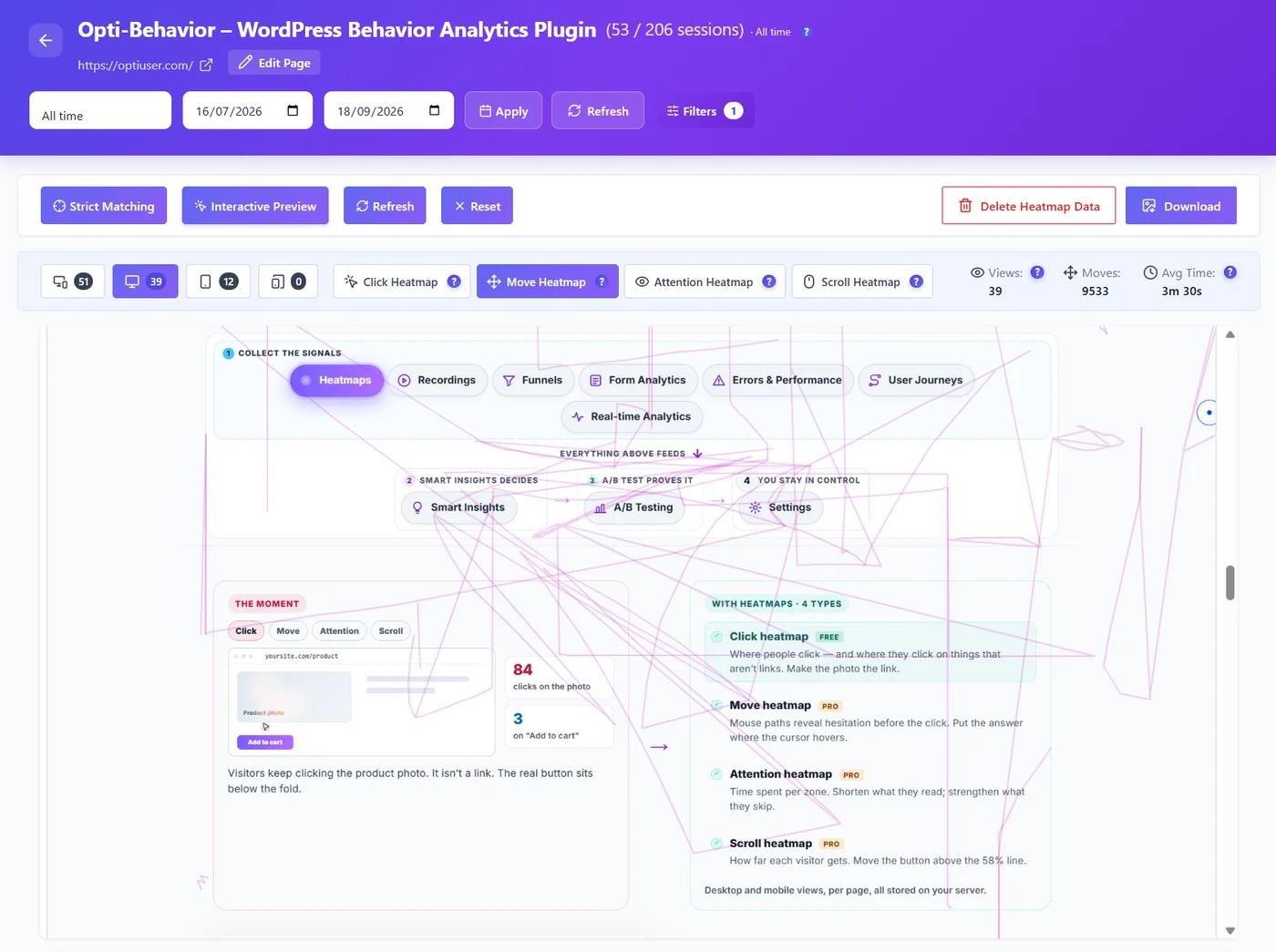
On desktop the cursor usually follows the eyes. The move heatmap shows what visitors read and where they hesitate before clicking – for example going back and forth between the price and the shipping line. Put the reassurance they look for (delivery time, returns, guarantee) right where the cursor hovers.
Attention heatmap (Pro) #
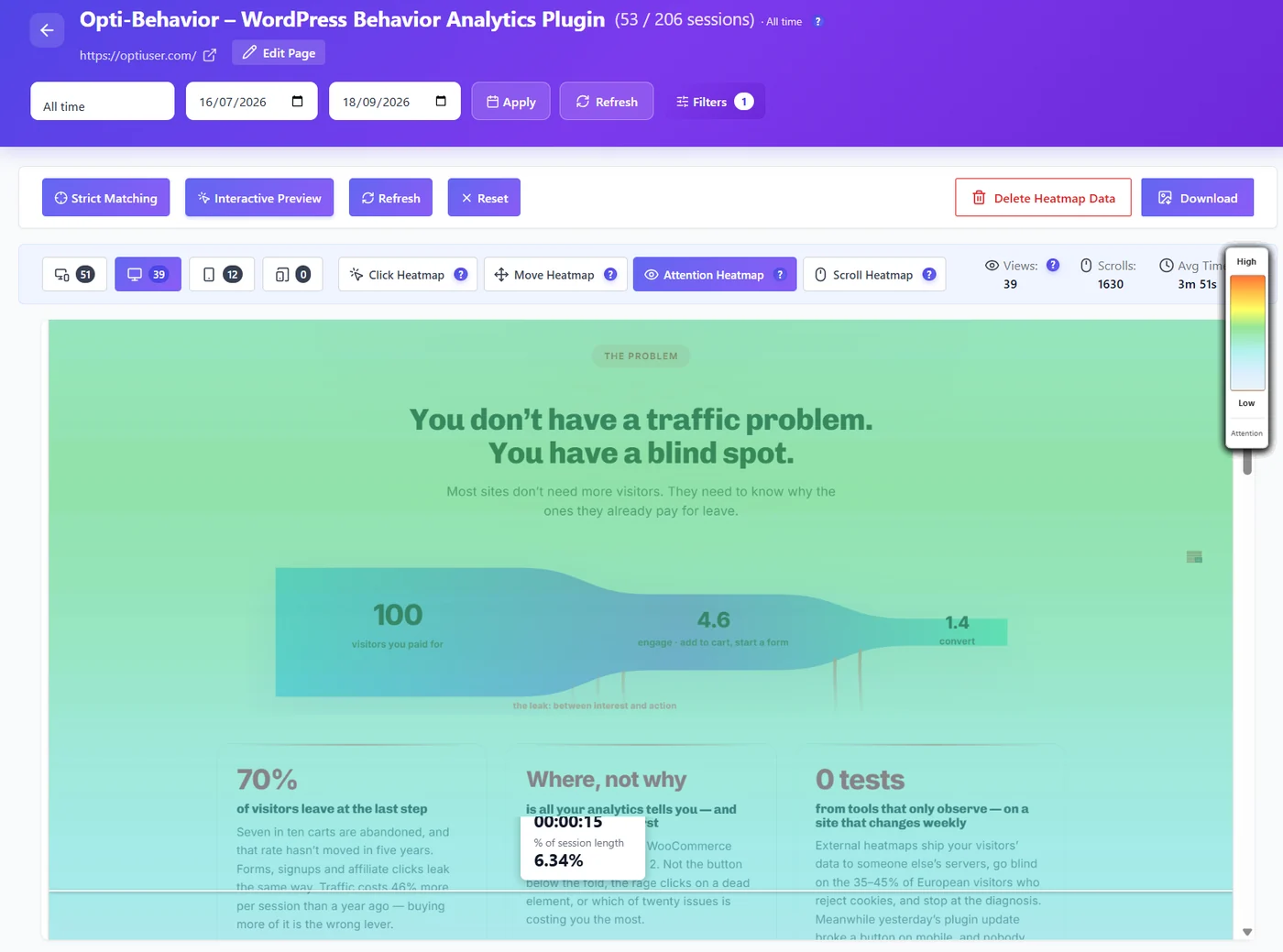
The attention heatmap colours each part of the page by the time visitors spend on it, from low to high. Hover any zone to see the average time and its share of the session length. Use it to find the sections visitors really read (keep and strengthen them) and the long sections they skip (shorten them or move them down).
Scroll heatmap (Pro) #
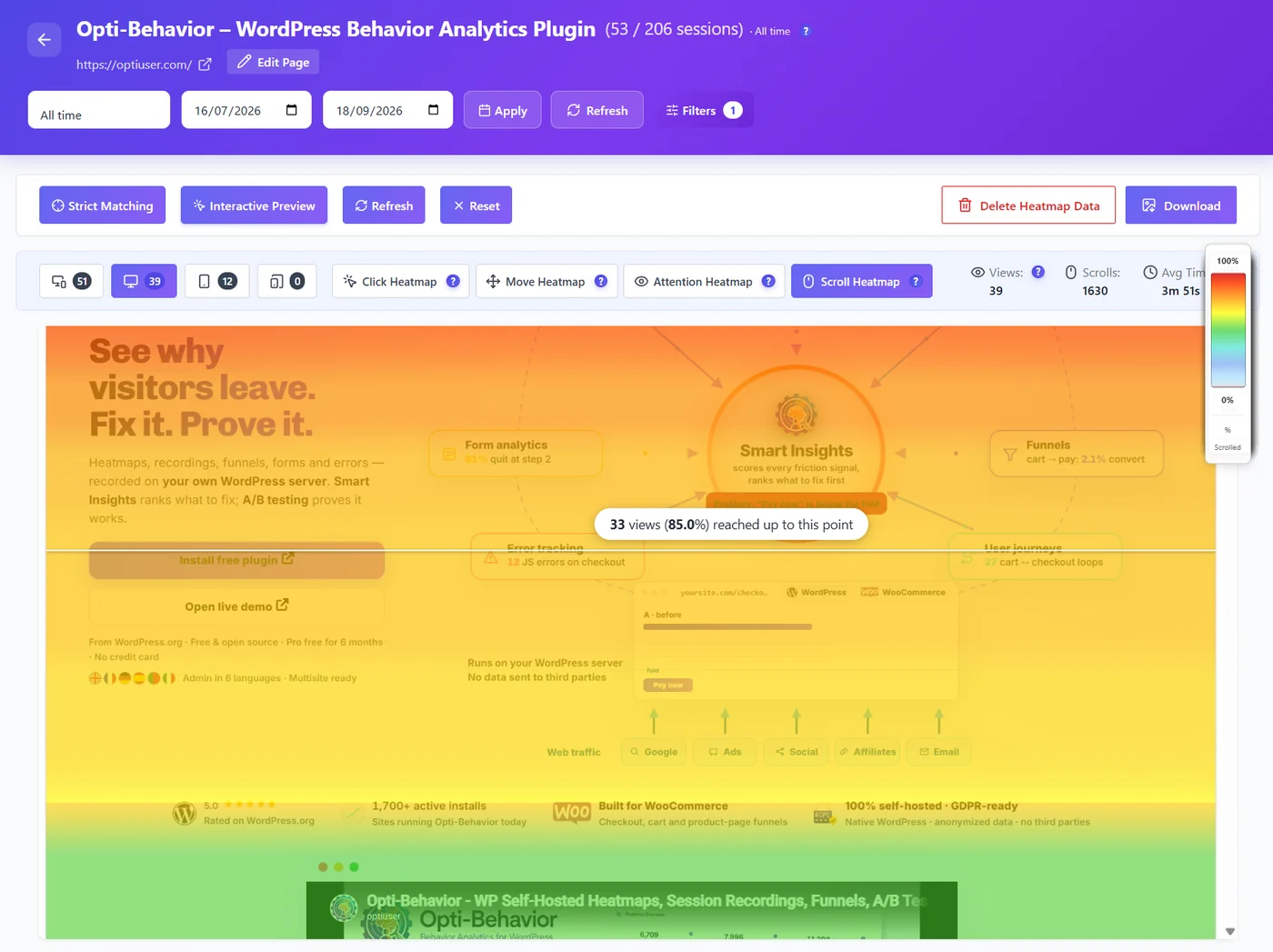
The scroll heatmap shows how far down visitors get. Move your mouse over the page: a line tells you how many views reached that point (for example “33 views (85.0%) reached up to this point”). Everything important – the offer, the main button, the proof – should sit above the line most visitors reach.
Top Clicked Elements (Pro) #
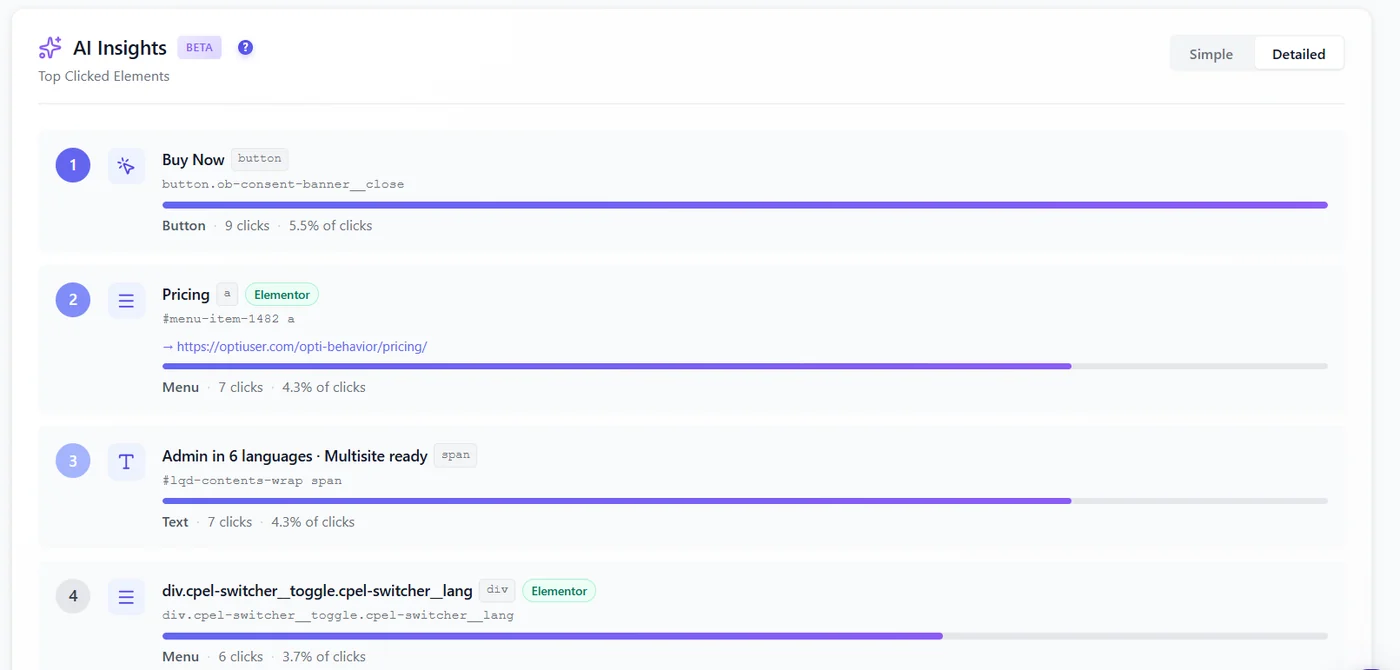
Below the heatmap, Top Clicked Elements ranks the elements of the page by clicks: button, menu item, text or image, the page builder that made it (for example Elementor) and its share of all clicks. It is the fastest way to check that your main button really is the most clicked element. See Top clicked elements.
Which pages get a heatmap #
Since version 1.9.1, heatmaps are recorded where they are useful: posts, pages, products, the home page and the shop page. Category, tag, author, date, search and paginated archive pages no longer create one heatmap per URL (a busy blog could create thousands). Visits on those pages are still counted everywhere else in Opti-Behavior.
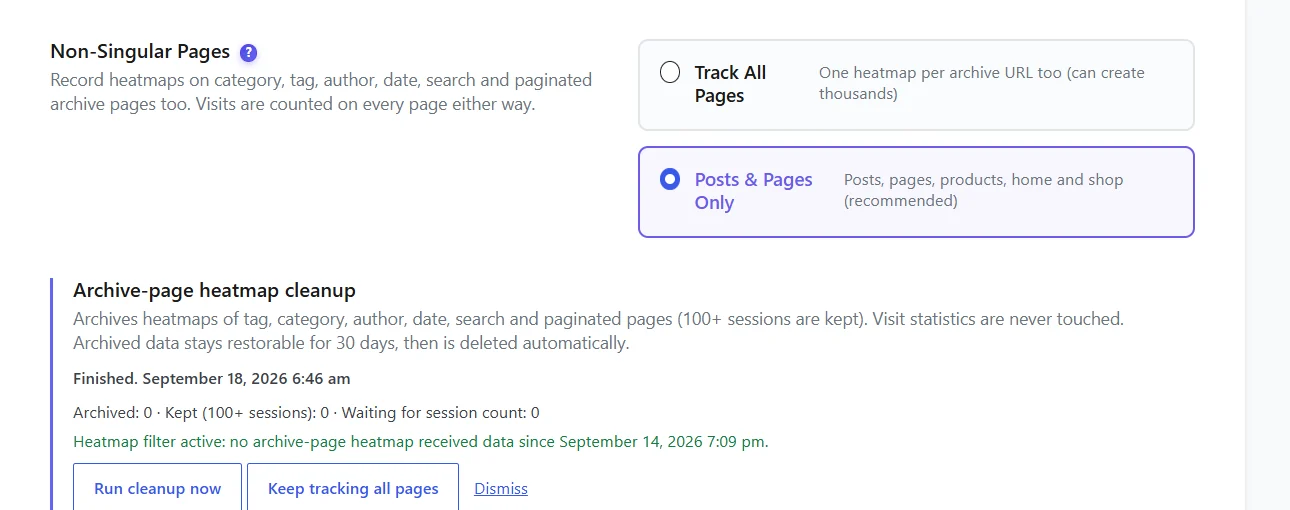
To record archive pages too, go to Settings → Heatmap Settings → Non-Singular Pages and choose Track All Pages. The Archive-page heatmap cleanup card below it archives existing archive-page heatmaps (pages with 100 or more sessions are kept). Archived data can be restored for 30 days, then it is deleted automatically.
How to use the four types together #
- Open the scroll heatmap: does most of the traffic reach your main button?
- Open the click heatmap: do visitors click it, or something else?
- Open the attention heatmap: which sections do they actually read?
- Open the move heatmap on desktop: where do they hesitate?
- Change one thing, wait for new visits and compare the same period before and after – or prove it with an A/B test.
Tip. Always compare desktop and mobile separately. A button above the fold on desktop can be three screens down on a phone. See Desktop vs mobile heatmaps.
Expected result #
The Heatmaps list shows your pages with their sessions and device split. Opening a page shows the chosen heatmap drawn on the real page, at the width of the chosen device, with its views, clicks or scrolls and average time.
FAQ #
Do heatmaps slow down my site? #
No. The tracker is minified, loaded with defer and sends data in small batches after a short delay (3 seconds by default), so it never blocks the page from rendering.
How many visits do I need? #
A few dozen visits already show a pattern on a simple page. For a reliable picture of a long page, wait for 100 or more sessions per device.
Why is my new page missing from the list? #
A page appears after its first tracked visit. Visit it in a private window (your own visits may be excluded), then refresh the list. Archive pages are not listed unless Track All Pages is on.
Is visitor data sent anywhere? #
No. Heatmap data is stored in your WordPress database and in files on your server. Nothing is sent to Opti-Behavior or any third party.
Why do I only see the Click tab? #
Move, Attention and Scroll need Opti-Behavior Pro with an active licence or trial.


