How A/B Testing Works on WordPress: Visitor Split, Cache and Statistics Explained

Sofia ran her first A/B test on her WordPress shop. Version B of her product page had a bigger "Add to cart" button. After two days, B was winning by 40%. She stopped the test, applied B, and waited for the money.
Nothing happened. Sales stayed exactly the same.
Sofia had not done anything silly. She had just skipped the part nobody explains well: how A/B testing works behind the buttons. How visitors are split. Why a cache plugin can quietly ruin a test. What "95% confidence" really means. And why two days is almost never enough.
This guide explains how A/B testing works in plain words, with the settings Opti-Behavior uses. You do not need to be a statistician. You just need to know what can go wrong.
The three rules of a fair A/B test: 1. Split visitors randomly. 2. Always show each visitor the same version. 3. Wait until you have enough visitors and enough days.
Contents
Rule 1: Split visitors randomly
An A/B test shows version A (the original, or "control") to some visitors and version B to others, at the same time. Because the split is random, both groups are alike: same mix of devices, sources, moods and weather. So if B does better, the difference comes from B, not from luck of the day.
In Opti-Behavior, you choose:
- Traffic percentage: the share of visitors who enter the test (100 by default).
- The split between versions: for example 50/50.
With few visitors, the split will not be exactly 50/50. That is normal. It evens out as more people arrive.
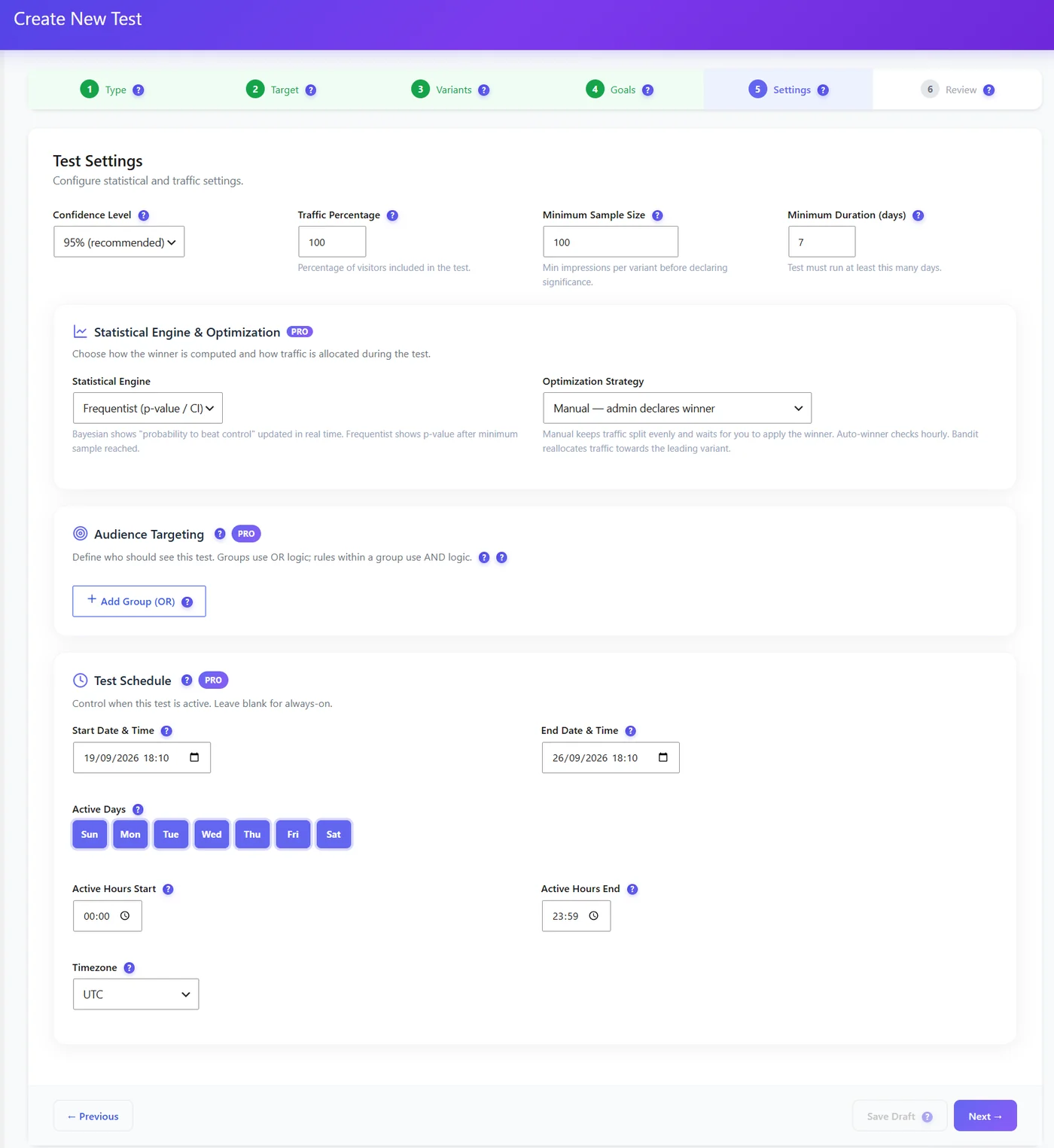
With Pro, you can also decide who enters the test at all. Audience targeting combines rules: for example (mobile AND from Google) OR (returning visitor). Visitors outside the audience simply see the original page and are not counted. You can also schedule a test to run only on some days or hours, in your audience’s time zone.
Rule 2: Always show the same version to the same visitor
This is called bucketing. Imagine a visitor sees the big button on Monday and the small one on Tuesday. Which version made them buy? Nobody knows. The test is ruined.
So a visitor must stay in their version. Here is how Opti-Behavior keeps it:
| Situation | How the version is kept |
|---|---|
| Full Tracking, consent given | A version cookie |
| Full Tracking, no answer or refused | Cookie-free assignment, like Anonymous Mode |
| Anonymous Mode | Cookie-free assignment from a non-personal code |
| Visitor accepts cookies later | Keeps the version already seen, now saved in the cookie |
Bucketing does not need cookies. Cookies only make the assignment last across days, and only after consent.
Do not change the split in the middle of a test. Visitors already assigned keep their version, and your results become biased.
The hidden enemy: page cache
Most WordPress sites use a page cache (LiteSpeed, WP Rocket, a CDN). A cache saves one copy of a page and shows it to everyone. That is great for speed, and terrible for A/B tests: if the cache saved version A, everyone sees version A.
The fix is to make the cache keep one copy per version. Opti-Behavior registers a companion cookie, opti_ab_v, with WP Rocket and LiteSpeed so each version gets its own cached copy. If you use a CDN like Cloudflare, make sure it forwards that cookie.
Signs that the cache is breaking your test:
| Problem | Likely cause | Fix |
|---|---|---|
| Everyone sees the same version | Cache not varying on the A/B cookie | Purge the cache, check the CDN forwards opti_ab_v |
| The version never shows for you | Test not running, targeting excludes you, or your cookie keeps you in control | Check the status, test in a private window |
| A short flicker of the original | The page shows before the version applies | Keep changes light, avoid heavy scripts at the top |
Test your test before trusting it: open the page in a private window and note the version. Open it in another browser: you may get the other one. Trigger the goal (click, or visit the thank-you page). After a few minutes, the results should show one visit and one conversion.
Rule 3: Wait for enough visitors and enough days
This is the part of how A/B testing works that surprises people most.
Back to Sofia. Why did her 40% win vanish?
Because with few visitors, random luck looks like a big difference. Flip a coin 10 times and you may get 7 heads. That does not mean the coin is unfair. Flip it 1,000 times and it will be close to 500.
That is what statistics in A/B testing are for: telling apart a real difference from luck.
What "95% confidence" means
Opti-Behavior uses these defaults:
| Setting | Default | Plain meaning |
|---|---|---|
| Confidence level | 95% | How sure the result must be before a winner is declared |
| Minimum sample | 100 | Visits per version before the result is judged |
| Minimum duration | 7 days | Covers weekday and weekend differences |
95% confidence means: if both versions were really the same, you would see a difference this big less than 5% of the time. That is the p-value below 0.05 you may have heard about. It does not mean "B is 95% better". It means "this difference is probably not luck".
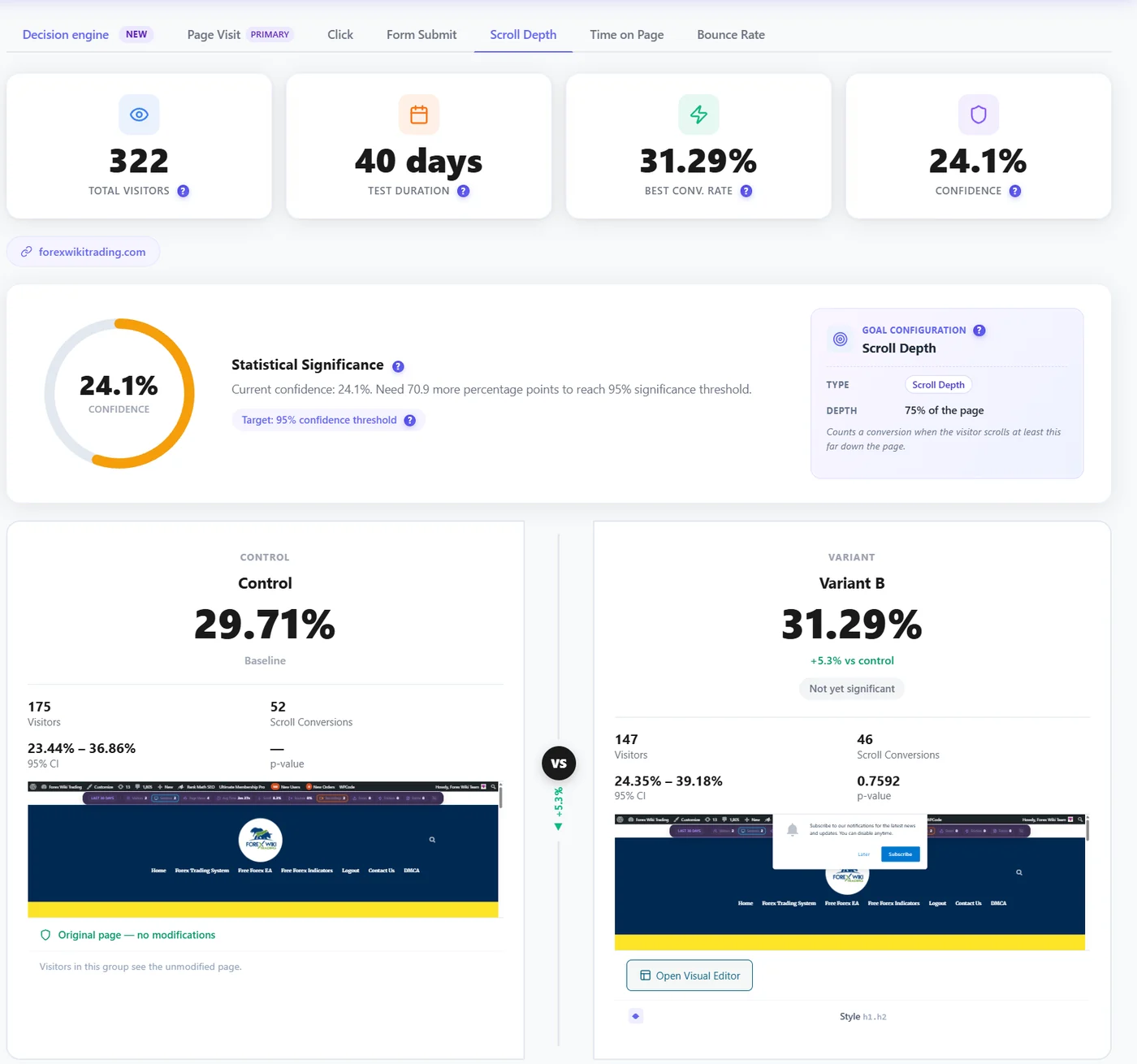
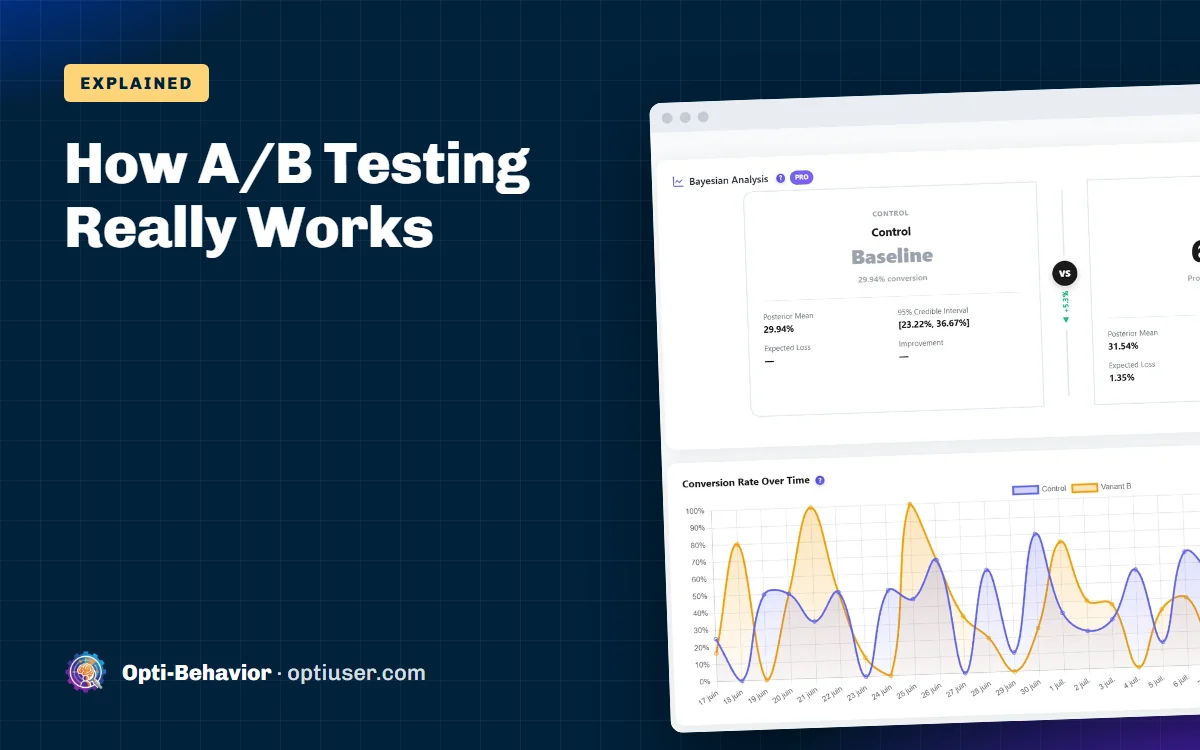
The results page also shows a 95% confidence interval: the range where the true conversion rate probably is. If the ranges of A and B overlap a lot, there is no clear winner yet.
Bayesian results (Pro)
Some people find "probability to beat control" easier to read than a p-value. Pro adds a Bayesian engine that shows exactly that, updated in real time, plus the expected loss: what you risk if you pick B and it is actually worse.
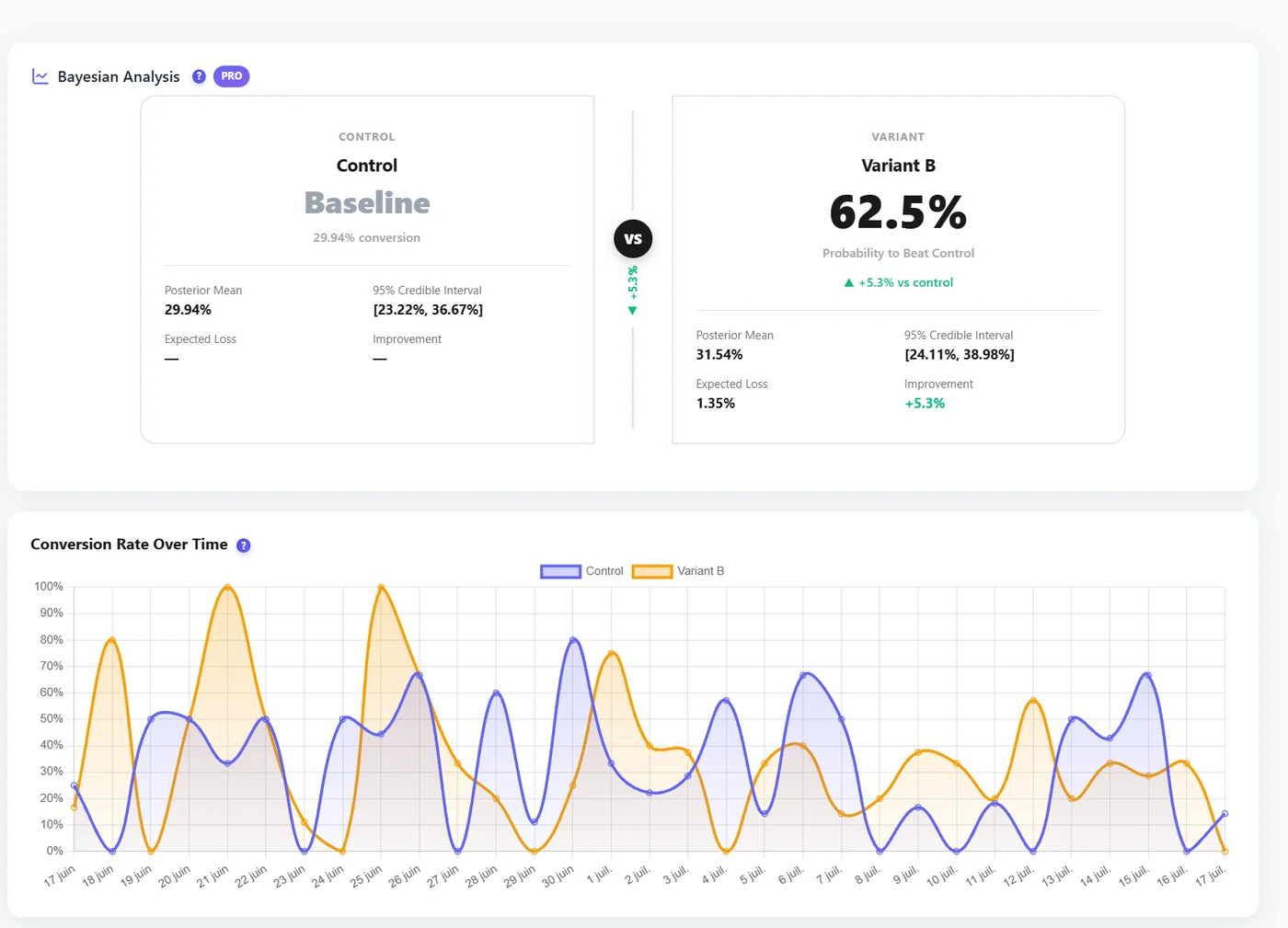
Pro also offers strategies: Manual (the split stays even and you pick the winner), Auto-winner (checks every hour and declares the winner when the rules are met), and Bandit (slowly sends more traffic to the version that is ahead). A bandit earns more during the test, but gives a less precise final answer.
How long will my test take?
It depends on your traffic and how big the change is. Rough orders of magnitude from our docs, for two versions at 95% confidence:
| Visitors per day on the page | Current conversion | Improvement you can detect in about 3 weeks |
|---|---|---|
| 100 | 5% | Only very big changes (50% or more) |
| 500 | 5% | About +20% |
| 2,000 | 5% | About +10% |
Low traffic? Do not lower the confidence. Test bolder changes instead: a new headline and layout, not a slightly different blue.
When goals disagree
Sometimes version B gets more form submissions, but people spend less time on the page. Which one wins? Pro’s decision engine lets you weight your goals (or pick a preset: Conversion focus, Balanced, Engagement focus, Pure CRO) and gives one recommendation with its strength. It also warns you when goals point to different winners.
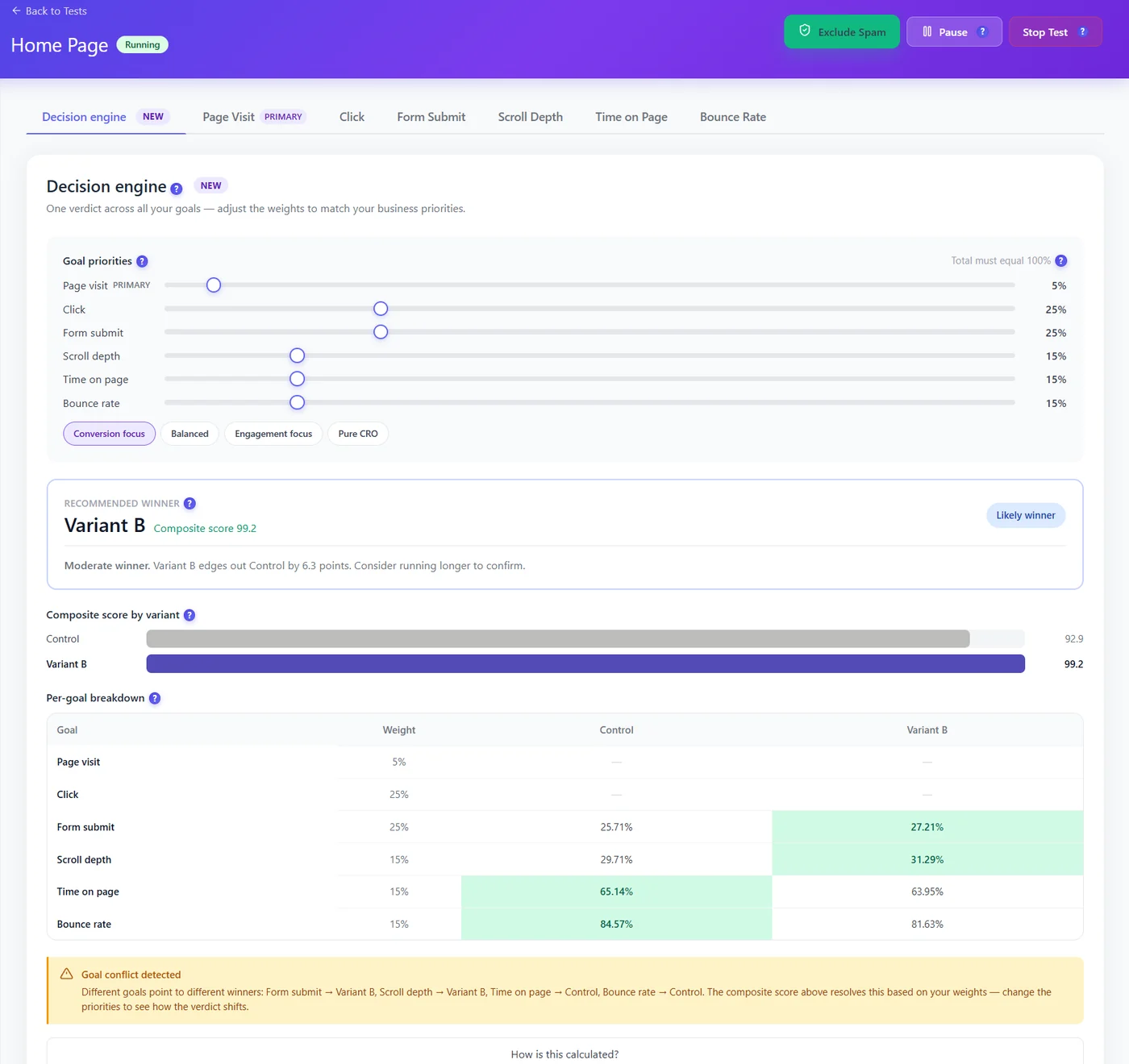
Choose the weights before you look at the results, so you are not tempted to pick the weights that give the answer you hoped for.
Sofia’s second test
Sofia ran the same test again, the right way. She checked in a private window that both versions showed. She let it run for 3 full weeks. At the end, B was ahead by 6%, with a confidence of 71%. Not a winner. The bigger button made almost no difference.
So she tested something bolder: a short list of three benefits right under the price. After 3 weeks, B won with 97% confidence and 14% more add-to-carts. That time, sales followed.
Not sure what to test first? Look at a heatmap of the page: our WordPress heatmap guide shows the 7 problems heatmaps reveal most often, and each one is a good test idea.
Run fair A/B tests on WordPress
Opti-Behavior includes A/B testing in the free plugin, with cache-safe bucketing, 95% confidence and minimum duration built in. Pro adds Bayesian results, targeting and the decision engine.
How A/B testing works FAQ
How does A/B testing work?
Visitors are split randomly between two versions of a page at the same time. Each visitor always sees the same version. After enough visitors and days, statistics tell you whether one version really performs better or the difference is just luck.
What does 95% confidence mean in an A/B test?
It means a difference this big would rarely happen by chance if both versions were really the same. It does not mean the winner is 95% better.
How long should an A/B test run?
At least one to two full weeks to cover weekdays and weekends, and until each version has enough visitors. Low-traffic pages may need several weeks.
Why does my A/B test show the same version to everyone?
Usually because a page cache or CDN serves one saved copy to everyone. The cache must keep a separate copy per version, for example by varying on the opti_ab_v cookie.
Should I stop a test as soon as one version is ahead?
No. Early leads often disappear. Wait for the minimum sample, the minimum duration and the confidence level you chose.