
Google Analytics 4 is free and powerful. It is also confusing. Many WordPress owners open it, see 40 menus, and close it again. On top of that, in Europe it needs a cookie banner, so a part of your visitors never shows up.
If that sounds familiar, you are in the right place. Here are 7 options for a Google Analytics alternative for WordPress, explained in plain words.
We make one of them (Opti-Behavior). We tell you where each tool is better than ours, too.
Quick pick: Want simple visit stats inside WordPress? Independent Analytics or Burst Statistics. Want a tiny cloud tool? Plausible. Want visits plus heatmaps, funnels and A/B tests, all on your own server? Opti-Behavior. Want a full GA-style platform you host yourself? Matomo.
Contents
Why people look for a GA4 alternative
- It is hard to use. Simple questions like "which page sold the most?" take many clicks.
- It needs consent in the EU. People who click "Reject" are not counted normally.
- Your data goes to Google. Some businesses do not want that.
- It only counts. GA4 tells you how many people came. It does not show where they clicked or why they left.
The 7 Google Analytics alternative options compared
| Tool | Runs where | Main job | Sets cookies? | Price |
|---|---|---|---|---|
| Opti-Behavior | WordPress plugin, your server | Visits + heatmaps, funnels, A/B tests | No, in Anonymous Mode | Free, Pro from €89/year |
| Independent Analytics | WordPress plugin | Simple visit stats | No (cookieless) | Free, paid plan |
| Burst Statistics | WordPress plugin | Simple visit stats | No (cookieless option) | Free, paid plan |
| WP Statistics | WordPress plugin | Visit stats and reports | Depends on settings | Free, add-ons |
| Plausible | Cloud or self-hosted | Light visit stats | No | Paid (cloud), free self-hosted |
| Matomo | Self-hosted or cloud | Full GA-style analytics | Depends on settings | Free self-hosted, add-ons paid |
| Microsoft Clarity | Microsoft cloud | Heatmaps and replays | Yes | Free |
Each option, in plain words
Opti-Behavior
Opti-Behavior is a WordPress plugin that stores everything on your server. It shows the numbers GA4 shows (visits, pages, sources, devices) and also why people act the way they do: click heatmaps, funnels and A/B tests in the free version. Pro adds session recordings, form analytics, journeys and error tracking.
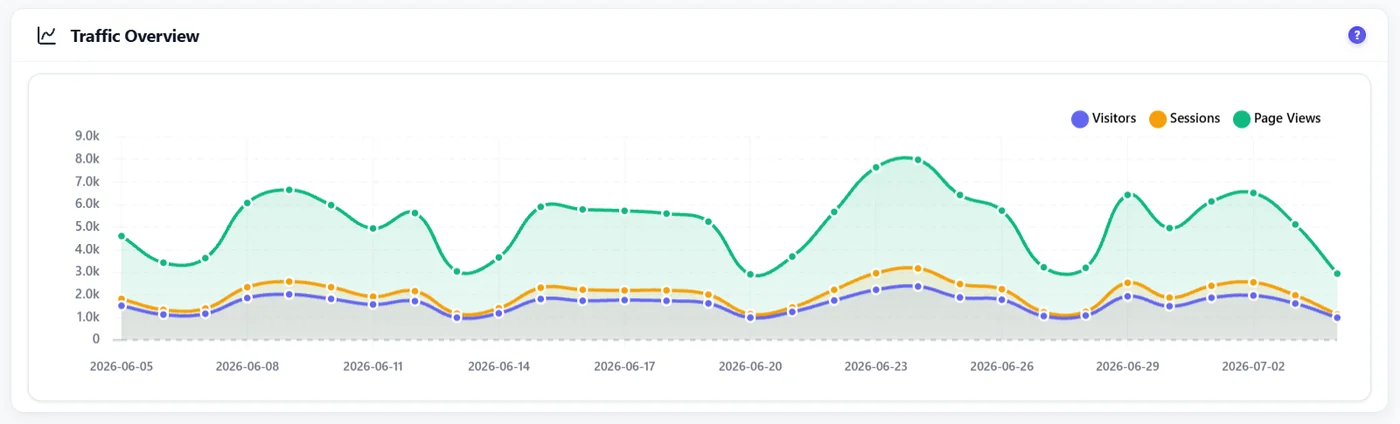
Best for: sites that want to understand and improve pages, not only count visits. Weaker at: very large sites with millions of visits a day, where a dedicated analytics server is better.
Independent Analytics
A clean, simple WordPress plugin. It shows visits, top pages and referrers in a friendly table, without cookies.
Best for: bloggers who want a simple, fast report. Weaker at: no heatmaps, recordings or A/B tests.
Burst Statistics
Another simple, privacy-friendly WordPress plugin with a clean dashboard and goals.
Best for: small sites that want basic stats in WordPress. Weaker at: no behavior tools like heatmaps.
WP Statistics
One of the oldest analytics plugins, with many reports and add-ons.
Best for: people who like lots of reports inside WordPress. Weaker at: can feel crowded, and behavior tools are limited.
Plausible
A very light cloud tool with a one-page dashboard. It is popular with developers and privacy fans. You can also host it yourself.
Best for: simple, fast stats on any website, not only WordPress. Weaker at: no heatmaps or recordings. The cloud version is paid.
Matomo
The closest thing to "Google Analytics you own". Very complete, can be self-hosted, with many paid add-ons.
Best for: teams that want GA-level detail and have technical help. Weaker at: setup and upkeep take time.
Microsoft Clarity
Not a full GA replacement, but a popular free add-on for heatmaps and replays. Data goes to Microsoft and it usually needs consent in the EU.
Best for: free behavior data if you already have a banner. Weaker at: it does not replace traffic reports.
What GA4 does that most alternatives do not
Be fair to Google. GA4 is still strong at:
- Linking with Google Ads and Search Console.
- Very large sites and complex setups.
- Cross-device tracking for logged-in users.
If you run big Google Ads campaigns, you may want to keep GA4 for ads and use a second tool for the rest.
How to switch from GA4 on WordPress
- Install your new tool and let it run next to GA4 for two to four weeks.
- Compare the main numbers. Expect some difference: cookieless tools often count more visits, because they also see people who reject cookies.
- When you trust the new numbers, remove the GA4 tag (often from a plugin like Site Kit or MonsterInsights, or from your theme header).
- Update your privacy policy.
Tip: Export your key GA4 reports before you remove it. Old data will not move to another tool.
Picking a Google Analytics alternative: the bottom line
A Google Analytics alternative should be easier to read than GA4 and fit your privacy needs. For simple counts, a light plugin is enough. To see where people click and why they leave, pick a tool with heatmaps and funnels, like the options in our WordPress heatmap plugin comparison. To track visits without cookies, read analytics without cookies.
Try a Google Analytics alternative made for WordPress
Opti-Behavior is free. See your traffic plus heatmaps, funnels and A/B tests, with your data on your own server.
Google Analytics alternative for WordPress FAQ
What is the best free Google Analytics alternative for WordPress?
For simple stats, Independent Analytics and Burst Statistics are good free plugins. For stats plus heatmaps, funnels and A/B tests on your own server, Opti-Behavior is free forever for those core features.
Can I use a Google Analytics alternative without cookies?
Yes. Some tools set no cookie, store no ID and keep no IP address. Opti-Behavior in Anonymous Mode works this way. Whether you still need a consent banner depends on your country and your other tools, so check with your adviser.
Will my numbers match Google Analytics?
Not exactly. Every tool counts a little differently. Cookieless tools often show more visits because GA4 misses people who reject cookies.
Can I run GA4 and an alternative at the same time?
Yes. Many sites keep GA4 for Google Ads and use a WordPress plugin for everyday analysis. Just keep GA4 behind your consent banner.