Self-Hosted Analytics vs Cloud Analytics: Why Your Data Should Stay on Your Server

Every time a visitor lands on your website, data is generated — page views, click paths, session duration, device type. The question is: where does that data go? With cloud analytics platforms, it leaves your server and travels to a third party’s infrastructure. With self-hosted analytics, it stays exactly where it belongs — on your server, under your control. This guide breaks down the self-hosted analytics vs cloud analytics debate so you can make an informed decision for your WordPress site. Short answer: self-hosted tools, for analytics or for log analysis, run on your own server, so you keep the data and handle the upkeep yourself. Cloud-based tools send the data to the vendor, who runs the infrastructure and sets the price, the limits and how long the data is kept.
What Is Cloud Analytics?
Cloud analytics refers to web analytics services that collect your site visitor data and store it on remote, third-party servers. When you install Google Analytics, Hotjar, Mixpanel, or Microsoft Clarity, every user action on your site is transmitted to servers owned and operated by those companies — servers you have no control over.
Cloud analytics tools are typically delivered as JavaScript snippets you embed on your site. As users browse your pages, those scripts silently send behavioral data back to the vendor’s cloud infrastructure. From there, you can log in to their dashboard and review aggregated reports.
How Cloud Analytics Works (Step by Step)
- You add a tracking script (e.g., Google Analytics tag) to your WordPress site
- A visitor loads your page — the script fires and begins tracking behavior
- Behavioral data (clicks, scrolls, page visits, device info) is sent to the vendor’s servers
- The vendor processes, aggregates, and stores that data in their database
- You log in to their web dashboard to view reports — you never touch the raw data
This model is convenient. Cloud platforms invest heavily in dashboards, machine learning, and scalable infrastructure. But the trade-offs are significant — and for many site owners, those trade-offs are no longer acceptable.
What Is Self-Hosted Analytics?
Self-hosted analytics (sometimes called on-premise analytics) means your analytics engine runs on your own server — or, in the case of WordPress plugins, inside your WordPress installation itself. Visitor data is collected, processed, and stored in your database. You own every byte.
Tools like Opti-Behavior and Matomo (self-hosted version) follow this model. Instead of transmitting data externally, the tracking script communicates with your own WordPress backend. All analytics — sessions, heatmaps, funnels, recordings — are stored in your WordPress database and displayed in your WordPress admin.
How Self-Hosted Analytics Works
- You install a self-hosted analytics plugin (e.g., Opti-Behavior) on WordPress
- A lightweight tracking script loads from your own domain (no external requests)
- Visitor data is sent directly to your WordPress REST API endpoint
- Data is stored in your MySQL database — same server, same host
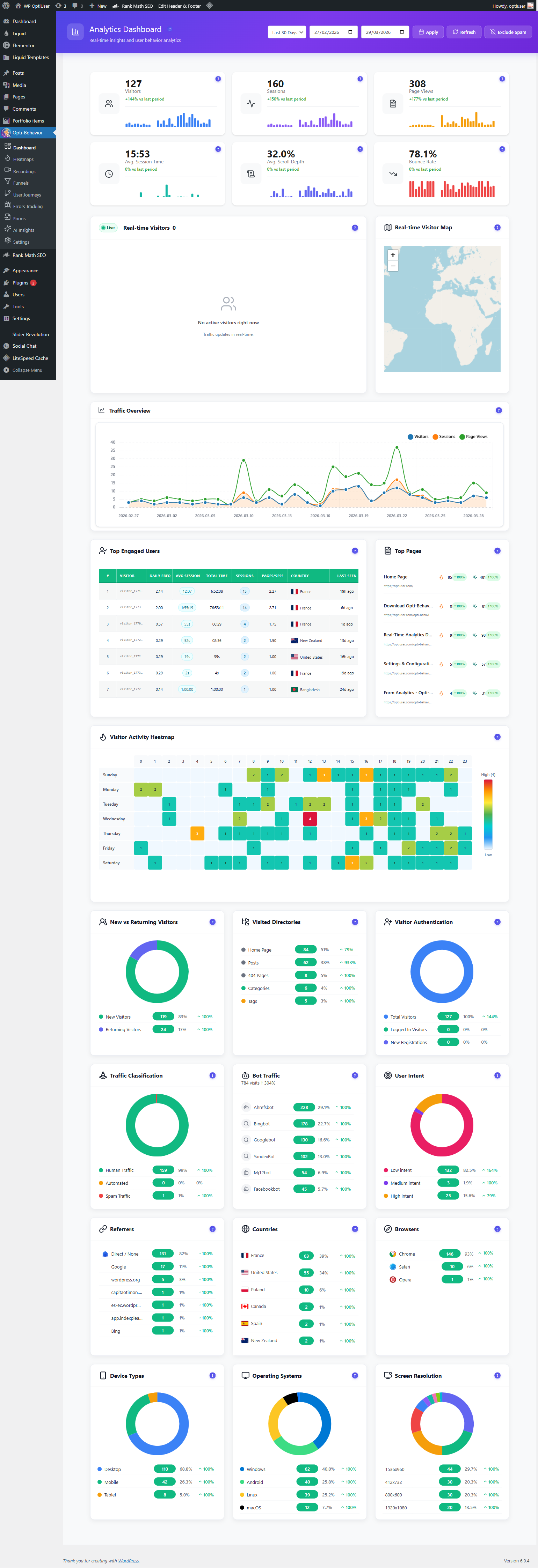
- You view dashboards, heatmaps, and reports inside your WordPress admin panel
The data never leaves your infrastructure. There are no third-party servers involved, no API calls to external services, and no external dependencies.
Privacy: The Most Critical Difference
The privacy implications of cloud analytics vs self-hosted analytics are profound — and increasingly, they are a legal matter, not just an ethical one.
Cloud Analytics Privacy Risks
- Data shared with third parties — When you use Google Analytics, your visitors’ behavioral data is shared with Google, who may use it to build advertising profiles. Microsoft Clarity explicitly states it may use session data to improve its own products.
- IP addresses transmitted externally — Cloud tools typically send raw IP addresses to foreign servers, which can violate GDPR Article 44 (international data transfers).
- Cookie dependency — Most cloud analytics tools rely on persistent cookies or fingerprinting to track users across sessions and sites.
- Data retention beyond your control — Vendors set their own data retention policies. You cannot always delete user data on demand, as GDPR’s right-to-erasure requires.
- Sub-processor chains — Cloud vendors often use sub-processors (cloud infrastructure providers, CDNs), expanding the chain of data handlers you’re responsible for disclosing.
Self-Hosted Analytics Privacy Advantages
- No third-party data transfers — Data never leaves your server, so it is not transferred to an outside analytics vendor.
- Full data ownership — You control retention periods, deletion schedules, and data access. Honor GDPR erasure requests in seconds.
- No cookies required — Opti-Behavior tracks visits without cookies. Whether your site still needs a consent banner depends on everything else it runs, so check with your legal adviser.
- No third-party scripts — Visitors are not exposed to tracking by entities they have no relationship with.
- Simpler Privacy Policy — You only process data yourself; no need to disclose Google, Microsoft, or Hotjar as data processors.
For any website serving EU visitors, self-hosted analytics means fewer outside vendors to list in your privacy policy. With a tool like Opti-Behavior on WordPress.org, visitor data stays on your own server and no cookies are required.
Cost Comparison: Free Is Never Really Free
Cloud analytics tools are often marketed as “free.” But when you factor in the actual cost — in privacy, performance, and compliance liability — the math looks very different.
| Tool | Model | Price | Data Ownership |
|---|---|---|---|
| Google Analytics 4 | Cloud | Free (but data shared with Google) | ❌ No |
| Hotjar | Cloud | $213+/month (paid tiers) | ❌ No |
| Microsoft Clarity | Cloud | Free (data used for AI training) | ❌ No |
| Mixpanel | Cloud | $20–$833+/month | ❌ No |
| Opti-Behavior (Free) | Self-Hosted | Free | ✅ Yes |
| Opti-Behavior Pro | Self-Hosted | Affordable (6-month free trial) | ✅ Yes |
The “free” tier of Google Analytics costs you your visitors’ privacy and creates ongoing GDPR liability. Hotjar charges $213/month for features that Opti-Behavior provides for free in its self-hosted model. The total cost of ownership strongly favors self-hosted analytics for most WordPress site owners.
Performance: The Hidden Impact of Cloud Tracking Scripts
Cloud analytics tools impose a measurable performance overhead on your pages. When a browser loads your site, it must also make DNS lookups, TCP connections, and HTTP requests to third-party servers — for every tracking script you’ve added.
How Cloud Analytics Slows Your Site
- External DNS lookups — Each third-party domain (google-analytics.com, static.hotjar.com, etc.) requires a DNS resolution before the browser can even start downloading the script.
- Blocking render paths — Poorly optimized analytics scripts can delay page rendering if they’re synchronously loaded.
- Third-party server latency — If Google’s or Hotjar’s servers are slow, your analytics script loads slowly — and your visitors feel it.
- Cumulative Layout Shift (CLS) — Some cloud analytics overlays and session recording tools can cause layout shifts that hurt your Core Web Vitals scores.
- Multiple trackers multiply the problem — Many sites run GA4 + Hotjar + Clarity simultaneously — three external scripts, three DNS lookups, three performance hits.
Self-Hosted Analytics Performance Advantage
Self-hosted analytics eliminates all third-party network overhead. When Opti-Behavior’s ~15KB async tracking script loads, it communicates exclusively with your own server — no external DNS, no third-party latency. The script is async and non-blocking, meaning it never delays your page render.
For sites that care about Core Web Vitals and Google Search ranking, removing cloud tracking scripts in favor of a self-hosted solution can meaningfully improve LCP and FID scores.
Data Ownership and Portability
Data ownership is one of the most underappreciated aspects of the analytics decision. With cloud analytics, you don’t own your data — you access reports about your data through a vendor’s interface. The raw data lives in their database.
Risks of Not Owning Your Data
- Vendor shutdown or acquisition — If the vendor shuts down or changes hands, you lose years of historical analytics data overnight.
- Pricing changes — Vendors can change pricing at will. When Hotjar raised prices, site owners using it had no leverage and limited alternatives.
- API restrictions — Cloud vendors limit what you can export. You often cannot get raw event-level data without expensive enterprise plans.
- Algorithm changes — Google has changed how it counts metrics (Universal Analytics → GA4) multiple times, breaking historical comparisons.
- Account suspension — Cloud accounts can be suspended for policy violations, locking you out of your own analytics history.
With self-hosted analytics, your data is in your WordPress database. You can export it as CSV at any time, query it directly, back it up on your own schedule, and migrate it to any future tool you choose. Opti-Behavior includes built-in CSV export for all analytics data.
GDPR Compliance: Cloud vs Self-Hosted
The EU’s General Data Protection Regulation (GDPR) has fundamentally changed the analytics landscape. EU regulators have repeatedly ruled that sending visitor data to US cloud servers — even via Google Analytics — violates GDPR. Austrian, French, and Italian Data Protection Authorities have all issued rulings that standard Google Analytics implementations are illegal under GDPR.
Cloud Analytics GDPR Challenges
- Data transfers to US servers trigger GDPR Article 44 requirements
- You must list the vendor as a data processor in your Privacy Policy
- Cookie consent banners become mandatory for most cloud tools
- Honoring right-to-erasure (GDPR Article 17) requires contacting the vendor
- You must sign Data Processing Agreements (DPAs) with each vendor
Self-Hosted Analytics GDPR Simplicity
- No international data transfers — data never leaves your EU server
- No DPA with external vendors required — you are the sole data processor
- No analytics cookies — a cookieless tool sets no analytics cookie; your consent banner still covers the rest of your site
- Right-to-erasure in your own database — delete records instantly via admin panel or SQL
- Simpler Privacy Policy — no need to disclose Google, Microsoft, or Hotjar
When Cloud Analytics Still Makes Sense
In fairness, there are scenarios where cloud analytics retains advantages:
- High traffic at scale — If your site receives hundreds of millions of pageviews per month, self-hosted analytics may strain your database. Cloud tools are designed to scale effortlessly.
- Cross-domain tracking at enterprise scale — Tracking users across dozens of domains and sub-properties is more mature in enterprise cloud tools.
- Existing Google Ads integration — If you run Google Ads campaigns, GA4’s native integration provides audience signals that self-hosted tools cannot replicate.
- Non-technical teams — Cloud tools like GA4 have larger communities, more tutorials, and more certified consultants available.
However, for the vast majority of WordPress sites — blogs, business sites, WooCommerce stores, membership sites — self-hosted analytics is the superior choice on every dimension that matters: privacy, cost and data ownership.
How to Switch from Cloud to Self-Hosted Analytics on WordPress
Migrating away from cloud analytics to a self-hosted solution on WordPress takes less than 10 minutes:
- Install Opti-Behavior — Search for “Opti-Behavior” in the WordPress plugin repository and install it in one click. The tracking script activates automatically.
- Remove cloud tracking scripts — Deactivate and delete Google Analytics plugins (Site Kit, MonsterInsights, etc.), Hotjar snippets, and Clarity scripts.
- Review your cookie consent banner — With Opti-Behavior’s cookieless tracking, remove the old analytics tools from your banner settings. Keep the banner for everything else it covers.
- Update your Privacy Policy — Remove references to Google Analytics, Hotjar, or other cloud tools. Note that analytics data is processed exclusively on your own server.
- Configure your dashboard — Navigate to your WordPress admin panel. Within 24 hours you’ll see real visitor data populating heatmaps, session data, funnel analytics, and more.
What You Get With Opti-Behavior: Self-Hosted Analytics Built for WordPress
Opti-Behavior is a complete self-hosted website analytics platform built natively for WordPress. Everything runs on your server — no external services, no data leakage, no third-party dependencies.
Free Features (Self-Hosted)
- Real-time analytics dashboard — visitors, sessions, pageviews, avg session time, scroll depth, bounce rate
- Visual click heatmaps — desktop and mobile, scroll tracking, configurable accuracy
- Conversion funnels — multi-step, device/country filtering, dropout visualization
- Session and visitor tracking — duration, pages, entry/exit, referrer, outbound clicks
- Bot detection and filtering — search engine crawlers excluded from stats
- Scheduled email reports — daily, weekly, or monthly summaries
- AI-powered insights — automated anomaly detection and recommendations
- CSV data export — full raw data export at any time
- Privacy-first by default — IP anonymization, no cookies, no third-party sharing
Pro Features (6-Month Free Trial, No Credit Card)
- Session recordings — unlimited, encrypted, with rage/dead click detection
- Error tracking — JS errors, network errors, Core Web Vitals (LCP, FID, CLS, INP, FCP)
- Friction detection — rage clicks, dead clicks, friction heatmap overlay
- User journey analytics — Sankey diagram visualization
- Form analytics — field-level time, errors, refills, and abandonment rates
- Advanced heatmap filtering — by country, browser, device, date range
- Priority support
Conclusion: Your Data Belongs on Your Server
The self-hosted analytics vs cloud analytics debate has a clear winner for most WordPress site owners in 2026. Cloud tools extract value from your visitors’ data in exchange for free or discounted services. Self-hosted analytics gives you everything you need — real-time dashboards, heatmaps, funnels, session data — with complete data ownership and no vendor lock-in.
The migration is simple. The privacy benefits are immediate. And with a tool like Opti-Behavior, you don’t give up a single feature to make the switch.
Self-hosted analytics vs server log analysis
Some people say: "I already have self-hosted analytics. My hosting shows server logs." Logs and analytics both live on your server, but they measure very different things.
| Server log analysis | Self-hosted behavior analytics | |
|---|---|---|
| What it records | Every request to the server: pages, images, scripts, files | Visits in real browsers |
| Bots and crawlers | Counted, often a big share of the numbers | Filtered out (bots, automated tools, spam) |
| Clicks, scroll, forms | Not visible | Visible: heatmaps, scroll depth, form fields |
| Cached pages | Often missed, because the cache answers before the server logs | Counted, because the tracker runs in the browser |
| Best for | Server load, bandwidth, security, crawler activity | Understanding visitors and improving conversions |
Logs are great for your hosting and security team. For marketing questions (which page converts, where people drop out, what they click), you need analytics that runs in the visitor’s browser and removes bots. Both can stay on your own server.