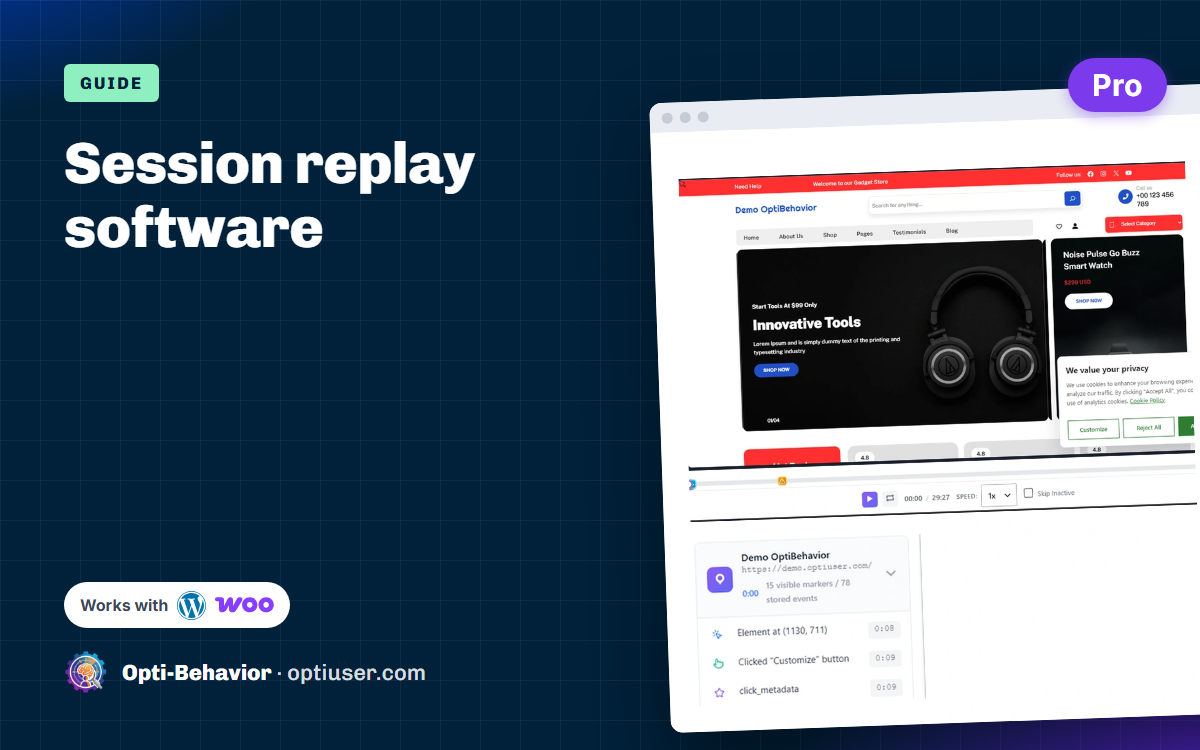

Session replay software rebuilds each visit to your site from recorded clicks, scrolls, mouse moves and page changes, so you can watch what one visitor did, step by step. Use it to see why people leave a page: a button that does nothing, a form field they give up on, a pop-up that hides the checkout on a phone.
It is one of the fastest ways to understand why a page does not work. Numbers tell you that many visitors leave the checkout page. A replay shows you the coupon field that hides the "Pay" button on small phones.
This guide explains how session replay works, what to watch out for (especially privacy), and compares 7 tools. We make one of them (Opti-Behavior), so we are biased, but we list everyone’s limits.
Contents
- What we found in our own replays
- How session replay software works (it is not a video)
- What you can learn from replays
- Privacy: the part you must get right
- 7 session replay software tools compared
- How to set up session replay on WordPress
- How to watch replays without wasting hours
- 5 replays worth watching first on a WordPress site
- Session replay software: the bottom line
- Session replay software FAQ
What we found in our own replays
Here is what this looks like on our own demo shop, which runs Opti-Behavior Pro. We did not look for a dramatic case: we opened one recording and read it.
What we saw. A desktop visit recorded on 7 April 2026 lasted 29 minutes 27 seconds. In the first 9 seconds, the visitor clicked the "Customize" button of the cookie banner twice. The next action came at 29:26: a choice in the product category menu. The timeline shows 15 visible markers out of 78 stored events.
What it can mean. Two clicks on the same button within a second often mean the first click did not seem to do anything. A gap of 29 minutes usually means the tab stayed open in the background. Neither shows up in a page view count.
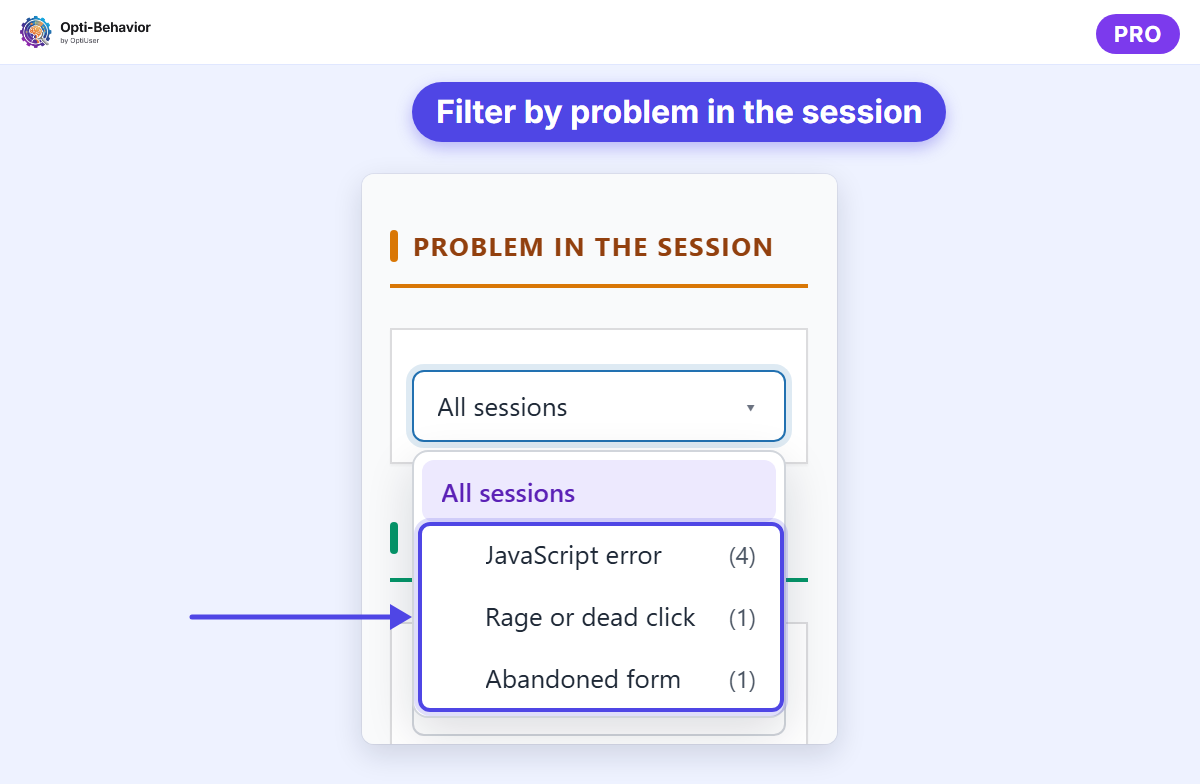
What we do next. Check on desktop that the "Customize" panel of the banner opens at the first click, if it does not, fix it, then filter the new recordings with "Problem in the session" set to "Rage or dead click" to check that the double clicks are gone.
How session replay software works (it is not a video)
Session replay does not film the screen. That would be heavy and slow. Instead, a small script records changes: the page structure, mouse moves, clicks, scrolls and typing events (without the actual text, in good tools). The player then rebuilds the page and replays those changes. It looks like a video, but it is a reconstruction.
This is also why replay tools can hide sensitive fields before anything leaves the browser. It explains two things you will notice in practice. First, a replay can look slightly different from the page the visitor saw: if a font, an image or a stylesheet has changed since the visit, or cannot be loaded by the player, the rebuilt page uses what is available now. Second, content drawn inside a canvas, video players and some embedded frames, such as the card form of a payment gateway, are often shown as empty boxes, because the script cannot read what is inside them. When a replay looks broken, check these cases before you conclude that the visitor saw a broken page.
What you can learn from replays
- Where people get stuck. They scroll up and down, looking for something.
- Broken things. A button that does nothing. An error message nobody sees.
- Confusing forms. People delete and re-type the same field.
- Mobile problems. A pop-up that covers the whole screen on a small phone.
- What people read. They stop on the reviews, skip the long intro. What replays do not give you is a rate or a trend: ten replays show how some visitors behaved, not how many of them. Pair what you see with a number, such as exits on the page, a funnel step or a form completion rate, so you know the problem is big enough to fix first.
Session replay on a WooCommerce store
On a shop, the replays that matter most are the ones that end before the order. In Opti-Behavior Pro, shop events (add to cart, checkout, paid order, payment failure) appear in the recording list and in the player, so you can jump to the moment a visitor added a product and see what happened next.
Three patterns are worth looking for:
- The visitor adds a product to the cart, opens the cart, then goes back to the product page several times. A question about delivery costs or sizes is often left unanswered on the page.
- The visitor reaches the checkout and stops on one field. Check form analytics to see whether the same field loses other visitors too.
- The payment fails, the visitor tries again, then leaves. On the Shop screen, payment errors are grouped by error type and payment method, and in Full mode you can open the recording of a failed payment.
Session-linked shop events are recorded only in Full mode, after the visitor’s consent. In Anonymous mode, the plugin keeps daily counters with no session.
Privacy: the part you must get right
Replays can capture a lot. A good tool protects visitors by default:
- Lets you mask form inputs, such as passwords, emails and card numbers.
- Lets you hide any element (like an account page) from recordings.
- Respects consent where needed.
- Tells you where the data is stored.
With cloud tools, every replay is stored on the vendor’s servers. With a self-hosted tool, replays are stored on your own server. For EU sites and sensitive industries, that difference matters a lot. We wrote more about it in session recording without US data transfer.
What Opti-Behavior Pro masks by default
Here is what the recorder in Opti-Behavior Pro does out of the box:
- "Mask all inputs" is on by default: what a visitor types in a text, email, phone or message field is masked in replays. Password fields are always masked.
- Elements with the class
opti-behavior-no-recordare not recorded. Add it to an account block or any area you do not want to see. Elements with the classespassword-fieldorcredit-card, and iframes, are blocked too. - Before a page address is stored, parameters that can hold personal data or secrets (email, token, password reset key) are removed, and so are WooCommerce order numbers.
Masking reduces what is recorded. It does not replace your privacy policy, or consent where consent is required.
7 session replay software tools compared
Opti-Behavior (WordPress, self-hosted)
Session recordings are part of Opti-Behavior Pro, with a 6-month free trial. Replays are stored on your own server (WordPress database and files).
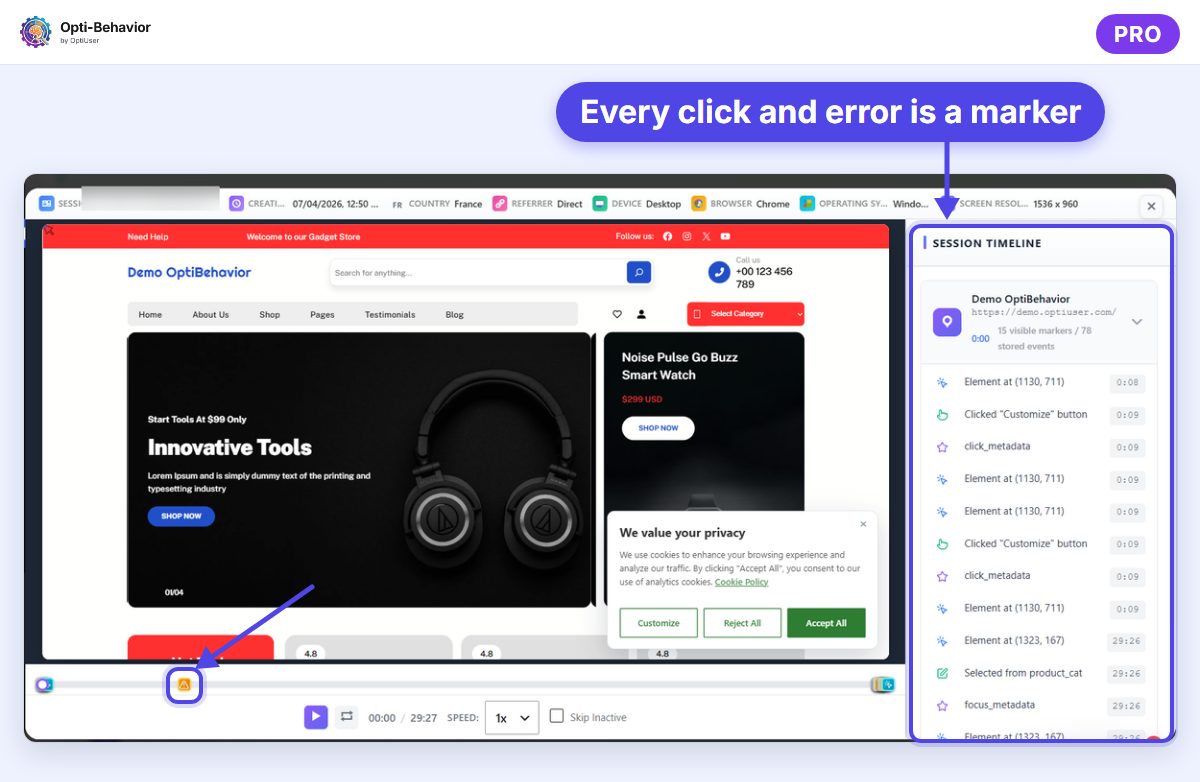
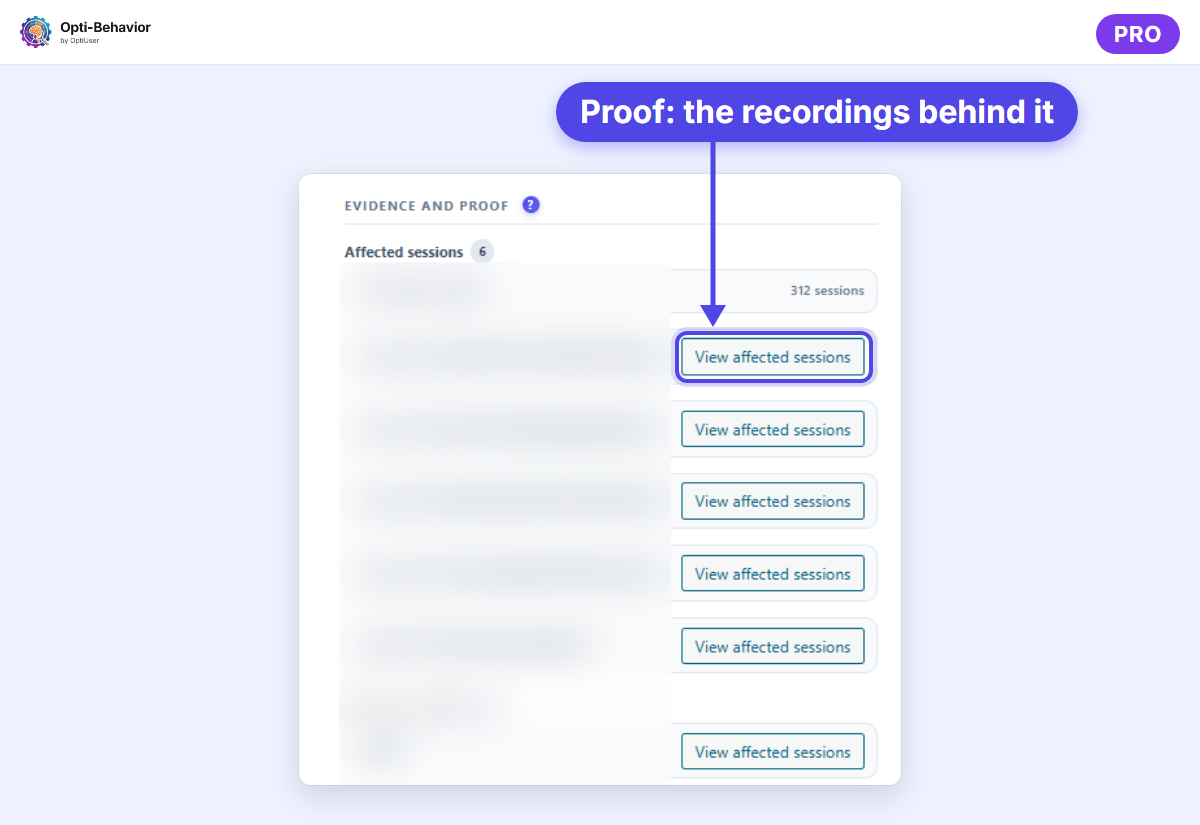
Replays connect to the rest of the plugin. In Pro, Smart Insights also flags JavaScript errors, rage clicks and abandoned forms, with the likely causes to check.
Weak spots: only for WordPress, and very busy sites need decent hosting for the stored replays. Because the replays sit in your own database, check its size after the first weeks of recording; we measured the database growth on one production site in our database size test. Read our WordPress session recording guide for setup details.
The others, briefly
- Microsoft Clarity: free, hosted in Microsoft’s cloud.
- Hotjar: replays with surveys, cloud-hosted.
- FullStory: cloud-hosted, aimed at large teams.
- PostHog: replays inside a product analytics suite, cloud or self-hosted.
- Mouseflow: replays plus form analytics, cloud-hosted.
- OpenReplay: open source, cloud or self-hosted.
How to set up session replay on WordPress
With Opti-Behavior, setup takes a few minutes and needs no external account:
- Install the free Opti-Behavior plugin from WordPress.org and activate it.
- Start the Pro trial and activate Pro on the site: session recordings are a Pro feature.
- Check the privacy settings first: keep "Mask all inputs" on, and add the class
opti-behavior-no-recordto any block you want to keep out of replays. - Clear your page cache. A cache plugin can keep serving old pages without the tracking script: our guide on tracking that shows no data because of a cache plugin explains what to check.
- Open your site in a private window (accept your consent banner if your site has one), click around for a minute, then open Session Recordings in the plugin. Your test visit should be in the list.
- Wait about a week before you judge anything. A handful of visits rarely shows a pattern.
Then come back to the recordings with a question, not to browse.
How to watch replays without wasting hours
Nobody can watch every recording. Use filters.
- Start from a problem. A page with high exits, a funnel step with a big drop, a form field people quit on.
- Filter by that page, that step, or by problem: in Opti-Behavior Pro, the "Problem in the session" filter keeps the recordings with a JavaScript error, a rage or dead click, or an abandoned form.
- Watch 5 to 10 replays. Patterns show up fast. If the first five show five different problems, your filter is too wide: narrow it to one page or one device and start again. If they all show the same thing, stop watching and fix it; more replays of the same problem add nothing.
- Write down what you saw in one sentence: "People on mobile cannot find the size guide."
- Fix it and test. An A/B test proves the fix worked.
5 replays worth watching first on a WordPress site
If you open the recordings list with no plan, you watch random visits. Start with these five. Each one matches a filter in Opti-Behavior Pro, but the method works in any session replay software that can filter by event.
1. A visit where the payment failed
A failed payment is a buyer who wanted to pay. Watch what happened after the click on “Place order”: an error message below the fold, a card form that reloaded, a second try with another method, or nothing at all.
Filter (Pro, WooCommerce): Shop action > Payment failed. This choice exists in Full Tracking mode with the visitor’s consent. In the other tracking modes the filter works from the pages viewed: use “Clicked Place order” or “Left checkout without confirmation” instead.
Then compare with the gateway log in WooCommerce > Status > Logs. Our WooCommerce checkout checklist lists the usual causes.
2. A form started and abandoned
Someone began your contact, quote or checkout form and left. Look at the last field they touched, whether an error message appeared, and whether they went back to an earlier field before leaving. One field that stops several visitors is the fix to make first.
Filter (Pro): Problem in the session > Abandoned form. More on the causes in our guide to form abandonment.
3. A rage or dead click
Fast repeated clicks on one spot, or a click on something that does nothing. Watch what the visitor clicked: often an image, a price, a bold word or an icon that looks like a link. Sometimes the button works but answers too slowly, so the visitor clicks again. The double click on our own cookie banner, above, is this case.
Filter (Pro): Problem in the session > Rage or dead click. See what a rage click is and its 7 causes.
4. A visit with a JavaScript error
Not every error breaks something. A replay tells you which ones do. Find the error marker in the timeline, watch the seconds before it, then check whether the page still worked after it: did the menu open, did the cart update, did the form send? If the page kept working, note the error for your developer and move on. If the visitor stopped or left right after it, that error goes to the top of your list.
Filter (Pro): Problem in the session > JavaScript error. Network errors and broken links are not counted under this choice. The player header shows the browser, device and screen size, so you can reproduce the error in the same conditions.
5. Mobile visits on your most important page
Most layout problems only show on a phone: a pop-up that covers the button, a sticky header that hides the form, a keyboard that hides the field being typed in, buttons too close to tap. Pick the page that brings you leads or sales and watch five mobile visits on it.
Filter (Pro): Device = Mobile plus the page visited. Add a “Problem in the session” choice to see only the mobile visits that went wrong.
Keep a one-line log
For each replay, write the page, what happened and the fix to try. After a week, the line that comes back most often is your first fix. A shared spreadsheet with four columns (date, page, what happened, fix to try) is enough. Add a fifth column with the date you shipped the fix, so the next review knows which replays come from before the change and which come from after it. Watch the same five filters again after the fix to check that the problem is gone.
Session replay software: the bottom line
Good session replay software saves you hours of guessing. Pick one that masks private fields, lets you filter by problem, and stores data where you are comfortable. Then watch a few replays every week, not hundreds once a year. Before you choose, run the same short test with each tool you consider. Install it on a staging copy or on one page, fill in your own contact form with fake details, then open your replay. Check that the text you typed is masked, that the pages you excluded (an account area, a checkout) are really missing, and that you can find your own visit again with a filter in under a minute. Then run PageSpeed Insights on that page with the tool on and off, and read where the vendor says the recordings are stored and for how long. A tool that fails one of these checks on your test visit will fail it on your real visitors too.
Watch real visits on your own WordPress site
Start free with heatmaps, funnels and A/B tests. Add session replay with Opti-Behavior Pro and its 6-month free trial.
Session replay software FAQ
What is session replay software?
It records how visitors use your site (clicks, scrolls, moves, page changes) and rebuilds each visit so you can watch it like a video.
Is session replay legal under GDPR?
It depends on how you set it up: what you record, what you mask, how you inform visitors and whether you collect consent where required. A self-hosted tool stores the data in your own database, and you stay responsible for consent and your privacy policy. Ask your data protection adviser.
Does session replay slow down my website?
Good tools record page changes, not video. Test with PageSpeed Insights before and after install, as we did in our test of an analytics plugin on WordPress speed.
What is the best free session replay software?
Microsoft Clarity is free and cloud-hosted. For self-hosting, OpenReplay has an open-source version, and Opti-Behavior Pro has a 6-month free trial on WordPress.
What is the difference between session replay and heatmaps?
A heatmap shows what many visitors did on one page, as colors. A replay shows everything one visitor did, step by step. Use heatmaps to find where, and replays to understand why.
How many session replays should I watch?
Start with 5 to 10 replays filtered on one problem, such as a page with high exits or a funnel step with a big drop. If the same behavior shows up in three or four of them, you have something to fix. If not, change the filter instead of watching more.
Can I keep an element out of session replays?
Yes. In Opti-Behavior Pro, add the class opti-behavior-no-record to the element and it is not recorded. Form fields are masked by default, and password fields always are.
Do I need session replay if I already have heatmaps?
Not always. A heatmap is enough to see that a button is ignored. Replays help when you need the order of events: what the visitor did just before leaving, or why a form was abandoned.
The Opti-Behavior Team
{“@context”:”https://schema.org”,”@type”:”FAQPage”,”mainEntity”:[{“@type”:”Question”,”name”:”What is session replay software?”,”acceptedAnswer”:{“@type”:”Answer”,”text”:”It records how visitors use your site (clicks, scrolls, moves, page changes) and rebuilds each visit so you can watch it like a video.”}},{“@type”:”Question”,”name”:”Is session replay legal under GDPR?”,”acceptedAnswer”:{“@type”:”Answer”,”text”:”It depends on how you set it up: what you record, what you mask, how you inform visitors and whether you collect consent where required. A self-hosted tool stores the data in your own database, and you stay responsible for consent and your privacy policy. Ask your data protection adviser.”}},{“@type”:”Question”,”name”:”Does session replay slow down my website?”,”acceptedAnswer”:{“@type”:”Answer”,”text”:”Good tools record page changes, not video. Test with PageSpeed Insights before and after install, as we did in our test of an analytics plugin on WordPress speed.”}},{“@type”:”Question”,”name”:”What is the best free session replay software?”,”acceptedAnswer”:{“@type”:”Answer”,”text”:”Microsoft Clarity is free and cloud-hosted. For self-hosting, OpenReplay has an open-source version, and Opti-Behavior Pro has a 6-month free trial on WordPress.”}},{“@type”:”Question”,”name”:”What is the difference between session replay and heatmaps?”,”acceptedAnswer”:{“@type”:”Answer”,”text”:”A heatmap shows what many visitors did on one page, as colors. A replay shows everything one visitor did, step by step. Use heatmaps to find where, and replays to understand why.”}}]}