Table of Contents
Requires Opti-Behavior Pro. Session Recordings are a Pro module. View pricing or start the 6-month free trial.
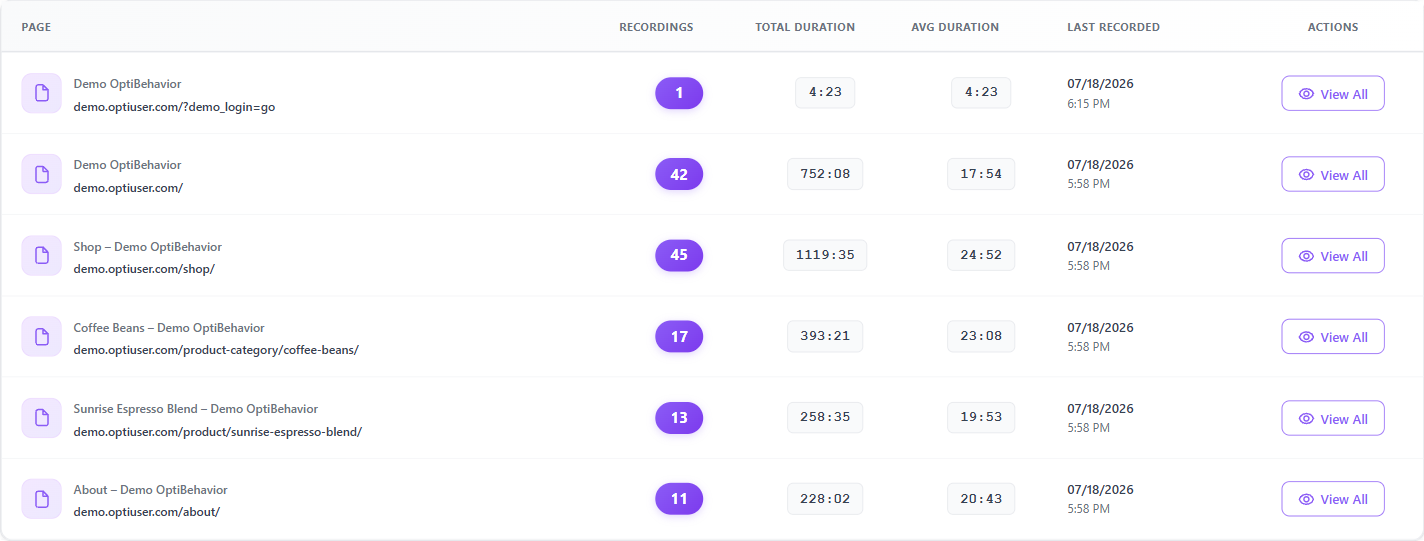
Instead of one long session list, you can group recordings by the page they touched. This is the fastest way to answer “which sessions visited this URL?”
Requirements #
- Plan: Opti-Behavior Pro
Steps #
- Go to Opti-Behavior → Recordings.
- Switch to the grouped by page view.
- Each row is a URL with these columns: Page, Recordings (count), Total Duration, Avg Duration, Last Recorded, and Actions.
- Expand a page to load its recordings, or use Play page to review sessions for that URL.
Expected result #
You can spot the pages with the most recorded activity and drill into them without scanning the full list.
FAQ #
Why does a page show more recordings than sessions? #
A single session can visit a page more than once; the grouped view counts recorded visits to that URL.