Requires Opti-Behavior Pro. The signals below are part of Opti-Behavior Pro Smart Insights. View pricing or start the 6-month free trial.
Opti-Behavior Pro adds 26 Smart Insights signals on top of the free set. Each signal watches your data and raises a prioritised recommendation when it detects a pattern. All analysis runs on your own server. This article catalogs them by group.
Requirements #
- Plan: Opti-Behavior Pro
See the free signals reference for the 6 signals included in the free plugin.
Funnel & checkout drop-offs #
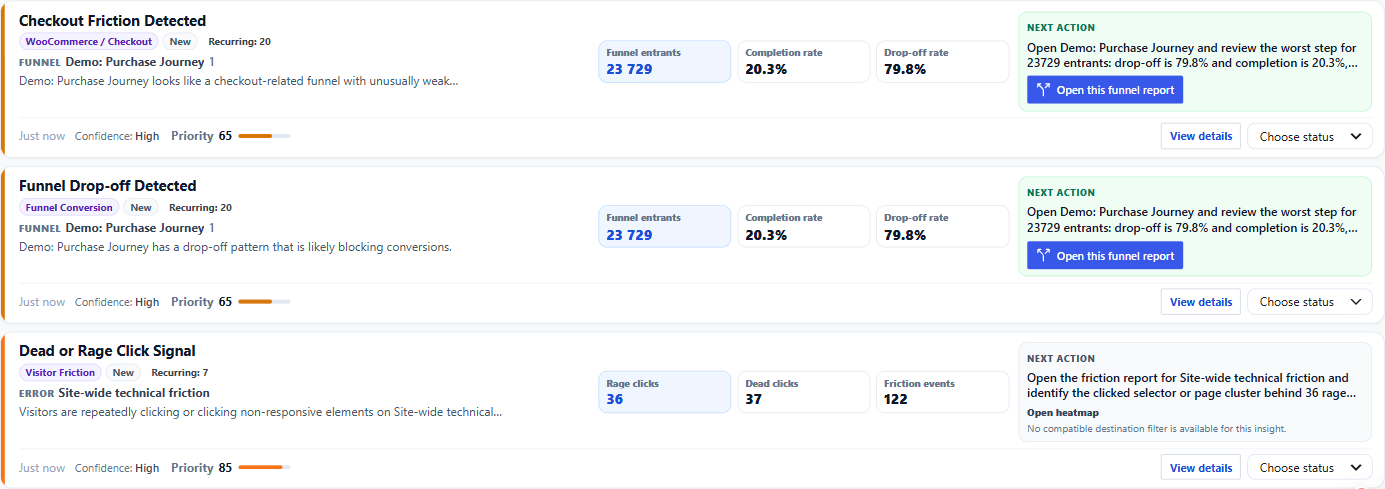
- Funnel drop-off — a funnel step is losing an unusual share of visitors.
- Cart-to-checkout drop-off — visitors add to cart but do not start checkout.
- Product-page-to-cart drop-off — product views are not converting to cart adds.
- Checkout-to-purchase drop-off — checkouts start but do not complete.
- Checkout friction — friction detected during checkout.
Form signals #
- Form abandonment — a form is started far more than it is submitted.
- Field-level friction — a specific field causes struggle or drop-off.
- Form error friction — validation errors are blocking submissions.
Friction & confusion #
- Dead or rage click — repeated or unresponsive clicks indicate frustration.
- Visitor confusion — erratic behaviour suggests a confusing page.
- Error impact — a JavaScript error is affecting many sessions or conversions.
Conversion & CTA #
- Conversion drop — conversions fell versus the recent baseline.
- Poor conversion rate — a page or flow converts below expectation.
- CTA low performance — a call-to-action is underperforming.
- Traffic spike without conversion — a jump in traffic did not lift conversions.
Mobile #
- Mobile friction — mobile visitors hit friction desktop visitors do not.
- Mobile CTA click rate lower than desktop — a CTA works on desktop but not mobile.
Engagement & exit #
- Engagement decay — engagement on a page is trending down.
- Quick exit — visitors leave a page almost immediately.
- Product page engagement issue — a product page is not holding attention.
Traffic & audience #
- Low-quality traffic source — a source sends poorly-engaged visitors.
- Campaign / page intent mismatch — a campaign’s landing page does not match visitor intent.
- Segment anomaly detection — a visitor segment behaves abnormally.
- Returning visitor opportunity — returning visitors show untapped potential.
Opportunities #
- A/B test opportunity — a page is a good candidate for an experiment.
- Session recording opportunity — watching recordings here would explain a pattern.
Expected result #
These signals appear in Opti-Behavior → Insights as prioritised recommendations, each with severity, confidence, and a link to the supporting report.
FAQ #
Do all 26 signals fire on every site? #
No. A signal only appears when your data matches its pattern; e-commerce signals need WooCommerce data, for example.
Does signal analysis send my data anywhere? #
No. All scoring happens on your server; no data leaves your site.