
Table of Contents
Pro feature. Form Analytics is part of Opti-Behavior Pro. Start the 6-month free trial to unlock it.
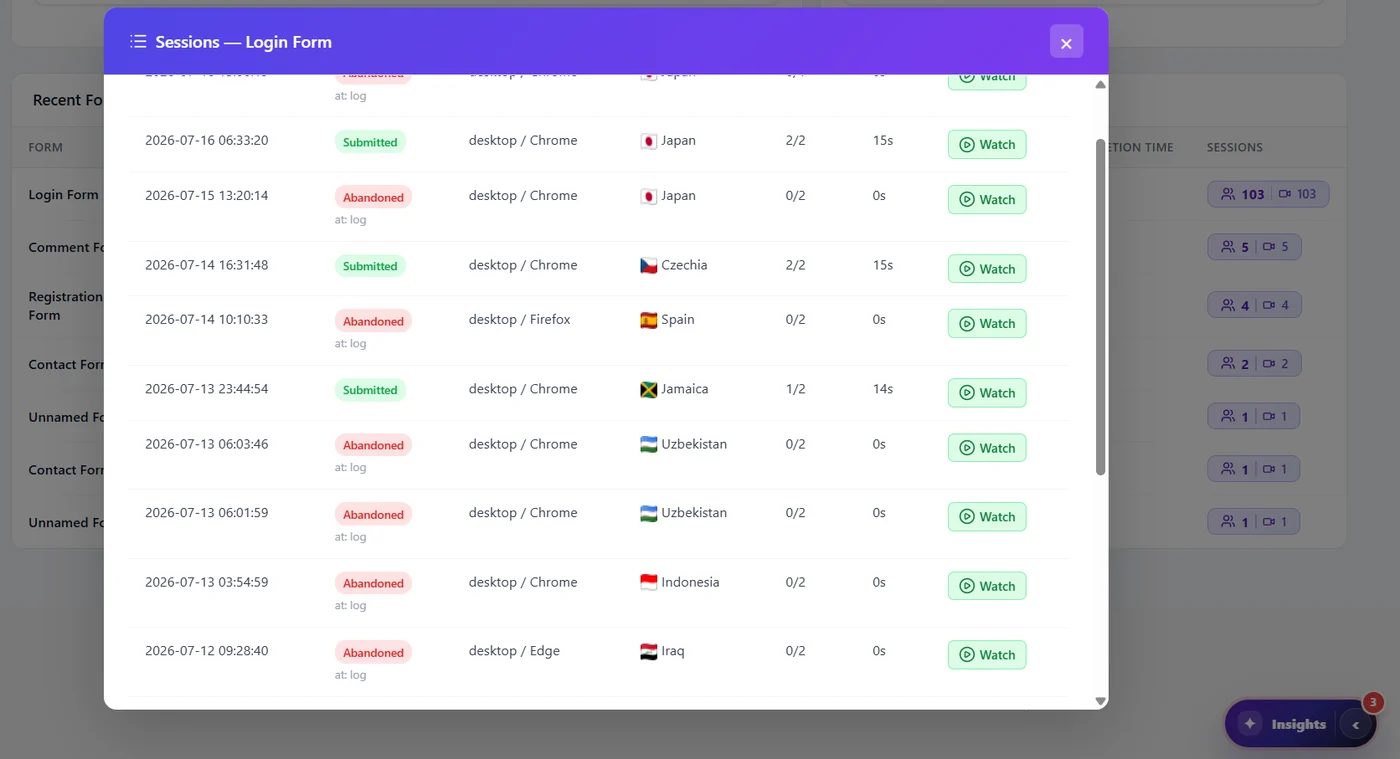
In the Forms list or dashboard, the badge with people and camera icons opens the sessions of the form: each attempt, its result (Submitted or Abandoned “at: field”), device, browser, country, fields filled and time, with a Watch button to open the recording.
Example: why do visitors abandon the login form? #
- Open the sessions of the Login Form and keep only Abandoned rows.
- Most show “at: log” (the login field) with 0/2 fields filled.
- Watch three of them: visitors land on the page from a link, see the form, and leave without typing – they were looking for something else.
- Decision: the login form is shown where visitors do not expect it; move it, or add links to what they came for.
Tips #
- Sort mentally by result: abandoned with 0 fields filled = wrong audience; abandoned after several fields = a field problem.
- Compare devices: many abandons on mobile only often mean a layout or keyboard issue.
- Recordings mask everything typed, so you see the behaviour without the values.
Expected result #
You can watch the attempts that stopped at a given field.


