
Table of Contents
The filter bar at the top of Smart Insights narrows the briefing and the cards.
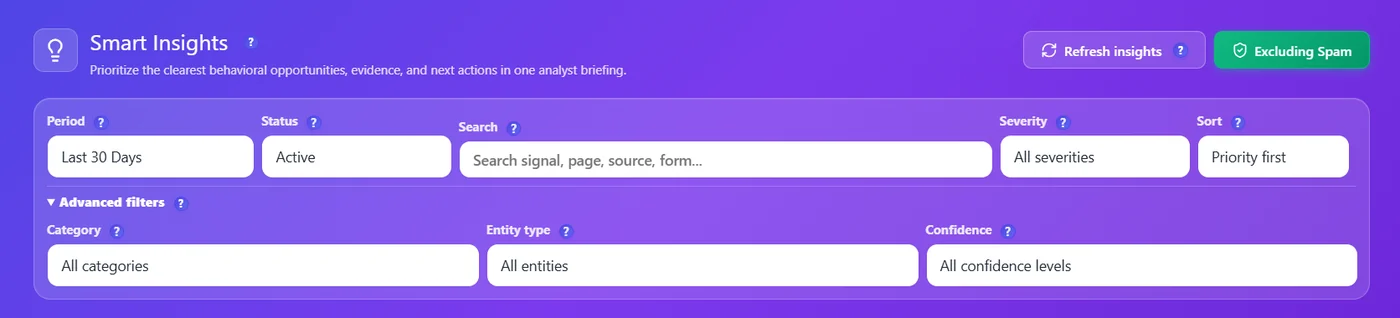
| Filter | Options | Tip |
|---|---|---|
| Period | Last 7, 14 or 30 Days, Last 3 Months (default), Custom Range | Longer periods give more confident cards. |
| Status | Active (new, reviewed, in progress), New, Reviewed, In progress, Resolved, Ignored, All statuses | Active is the default. |
| Search | A page, a signal, a source, a form… | Type part of a URL to see all cards of a page. |
| Severity | Critical, High, Medium, Low | |
| Sort | Priority first, newest… | |
| Category (advanced) | Funnel conversion, engagement, forms, errors… | |
| Entity type (advanced) | Page, funnel, form, segment, site | |
| Confidence (advanced) | High, Medium, Low | Set High to see only well-measured problems. |
- Refresh insights recomputes the cards for the selected period.
- Excluding Spam (default) keeps bots and spam out of the analysis.
More questions #
How do I see only one page’s insights? #
Type part of its URL in Search, or open its Page X-Ray report (Pro).
How do I share these results? #
Opti-Behavior → Reports → Site report: a PDF with the traffic and the costliest findings (short report Free, full report Pro).
Expected result #
The briefing counts and the cards follow the filters.
FAQ #
A custom range shows an error. #
The end date is before the start date; fix the dates.
Filters reset when I come back. #
The period is kept; other filters reset on purpose.


