
Table of Contents
Pro feature. Errors Tracking is part of Opti-Behavior Pro. Start the 6-month free trial to unlock it.
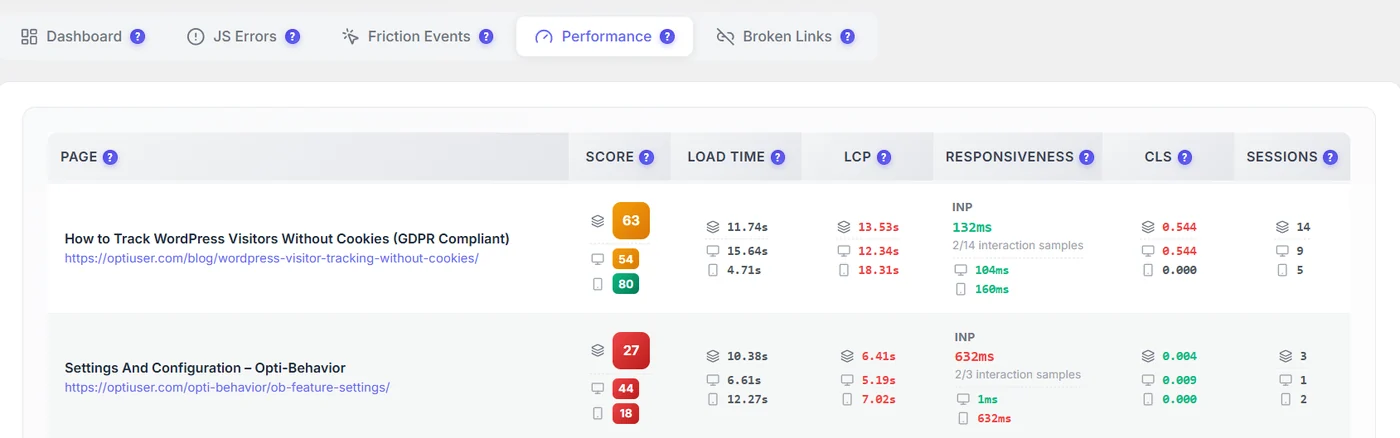
- Score 0–100 (higher is better), coloured red, orange or green, for all devices, desktop and mobile.
- Load time, LCP, responsiveness (INP and the number of interaction samples), CLS.
- Sessions measured – a score on one session is only an indication.
Prioritise #
- Sort pages by traffic, not by score: a slow page with many visits costs more.
- Look at mobile first: it is usually slower.
- Fix the worst vital of the page (see Core Web Vitals).
- Check the score again after a week of new visits.
Example #
A blog post with 14 sessions scores 63 overall, 54 on desktop and 80 on mobile, with an LCP above 12 seconds. The main image is 4 MB: compressing it and serving WebP brings LCP under 3 seconds and the score above 85 the next week.
Expected result #
You have a short list of important pages to speed up.
FAQ #
Why is a page at 0 with a huge load time? #
Often one visit on a very slow connection or a 404 page. Check the number of sessions.
Is this the same as PageSpeed Insights? #
Similar metrics, but measured on your real visitors instead of a lab test.


