
Table of Contents
Pro feature. Session recording is part of Opti-Behavior Pro. Start the 6-month free trial to unlock it.
| Column | Meaning |
|---|---|
| ID / date | Recording number and start time |
| Watched | Whether someone already watched it |
| Duration | Length of the visit |
| Activity | Number of events and clicks – high activity with no goal often means struggle |
| Visited pages | Number of pages; expand the row to see them |
| Visitor | New or returning |
| Referrer | Where the visitor came from |
| Icons | Country, browser, operating system, device |
Page timeline #
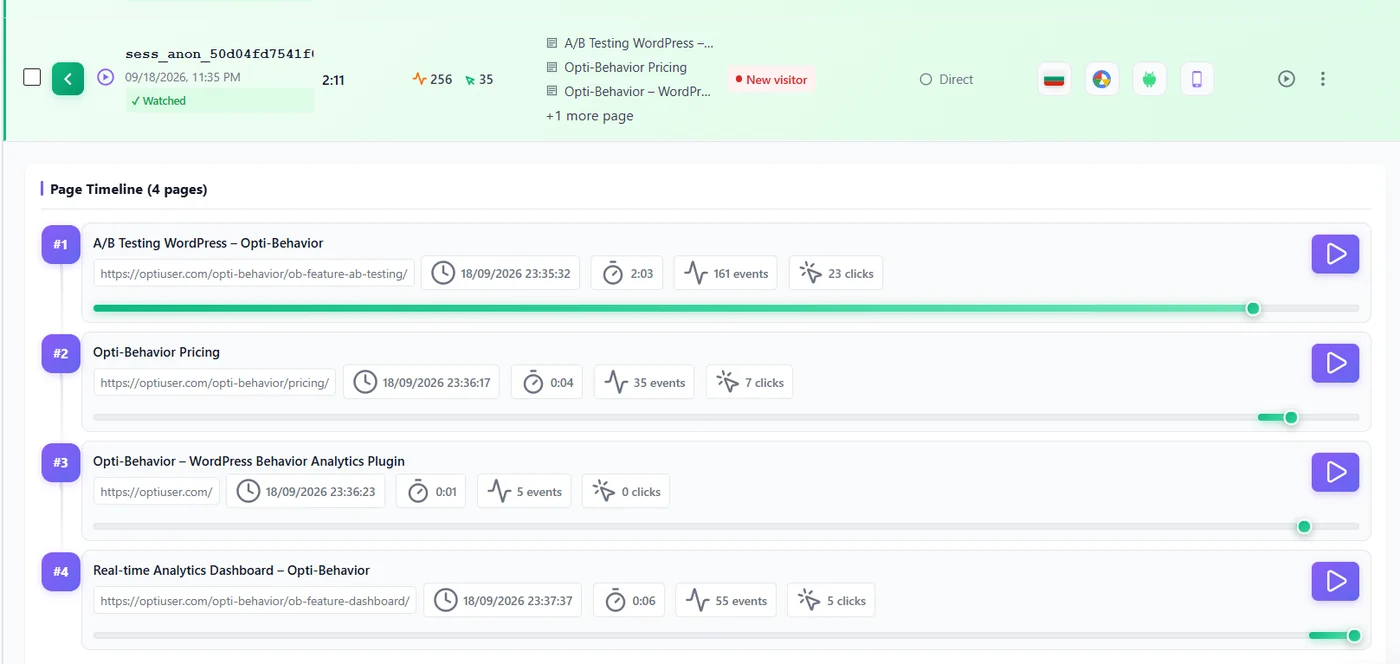
Expand a multi-page visit to see its page timeline: each page with its time, duration, events and clicks, and a play button to start the replay at that page.
Which recording to open first #
- High activity, short duration – many clicks in little time: frustration.
- Many pages, no goal – a visitor searching.
- New visitor from an ad – how your campaign lands.
- Returning visitor who leaves the cart – checkout friction.
Icons legend #
| Icon | Meaning |
|---|---|
| Flag | Country (Full Tracking) |
| Browser logo | Chrome, Safari, Firefox, Edge… |
| System logo | Windows, macOS, Android, iOS… |
| Screen / phone | Desktop, tablet or mobile |
| Eye | Watched |
Expected result #
You can pick the right recording without opening them all.
FAQ #
Why does the total show fewer recordings than sessions? #
Replay coverage is below 100% when consent, filters or retention removed replays.
Can I sort by duration? #
Use the filters (duration) and the search for a page.


