
Table of Contents
Free and Pro. Your shop figures are not only on the Shop screen: they also come in the scheduled e-mail report and in the site report. There is no separate Shop e-mail.
In the site report #
The site report has a “Shop” section: product views, adds to cart, orders, then “Adds to cart and orders per product page” and a “What to do” line for the product to check first. Figures are daily totals, not linked to one cart.
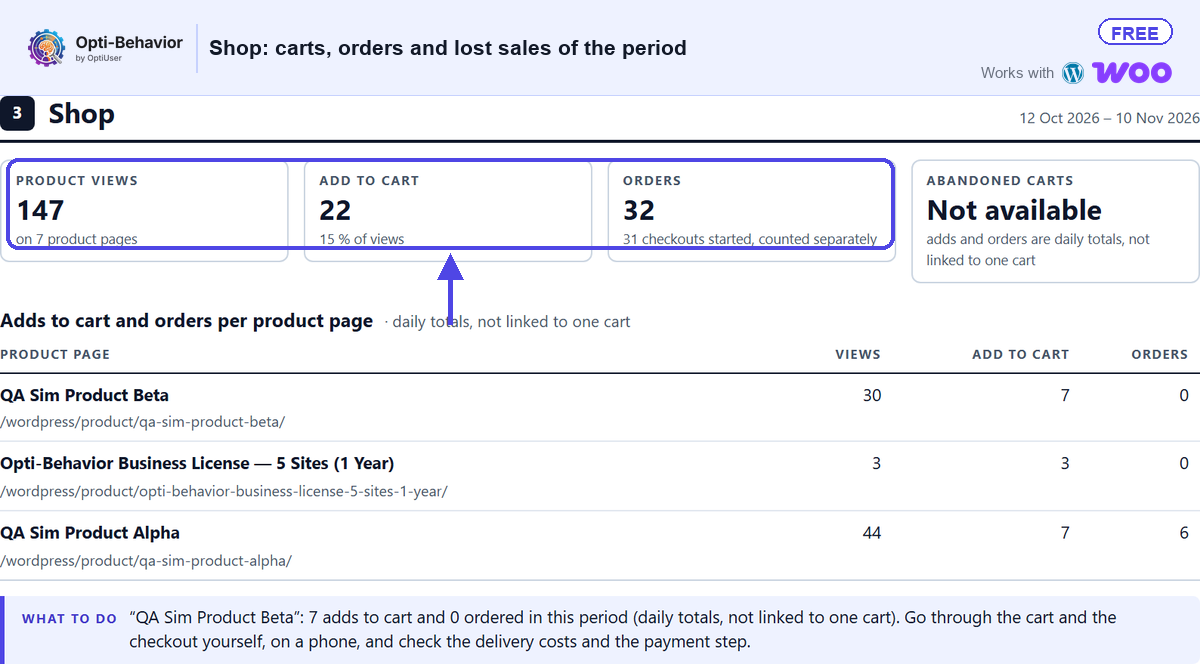
- Free: the short site report.
- Pro: the full site report.
- “Abandoned carts” shows “Not available”: adds and orders are daily totals, not linked to one cart.
In the scheduled e-mail report #
- A Shop block is part of the scheduled e-mail report when shop counting is on.
- “Money at stake” in that block is Pro.
Expected result #
Your scheduled e-mail and your site report show the shop figures of the period, with the product to check first.
FAQ #
There is no Shop section in my report. #
Check that WooCommerce is active and shop counting is on, and that the period has product views.


