
Table of Contents
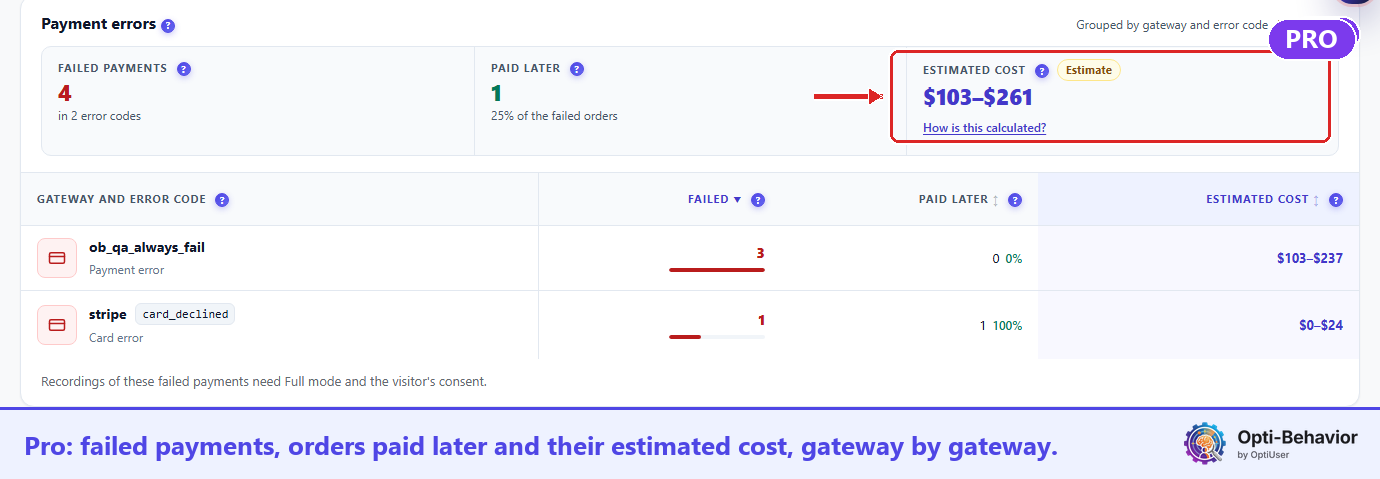
Pro. Under the product table of Opti-Behavior → Shop, Payment errors lists the payments that failed in the period, grouped by payment gateway and error code. Start with the row that has the highest Estimated cost.
The three figures #
- Failed payments: payment attempts refused or failed, and in how many error codes.
- Paid later: failed orders that were paid afterwards. These sales were not lost.
- Estimated cost: for each error code, the amount of its failed orders × the share not paid later. Each order counts once, even when its payment failed several times. A range with a 95 % margin, not a sum of real orders.
The table #
One row per gateway and error code (Card error, Authentication error, Gateway error or Payment error), with Failed, Paid later and Estimated cost. Click a column name to sort. Watch a recording opens a visit with that failure: recordings of failed payments need Full Tracking mode and the visitor’s consent. With no failure: “No failed payment in this period.”
What to do next #
Look up the code at the top in your payment gateway’s own log, then test the checkout on a phone.
In Free #
The block title shows with one line on what Pro adds.


